Categories
Framing Issues

Looking Back, Looking Now, Looking Ahead

To be quite honest I really dreaded doing an analysis of my e-folio. I do not enjoy posting to the e-folio, preferring the less formal and much safer space found in Vista, so I did not think I would find any apparent themes emerge. Much to my surprise the idea of “seeing” math in the “real world” appeared in many of my entries.

For our first e-folio entry we had to comment on what we thought was good use of technology in the classroom. I created a list and my first bullet was “to see something they couldn’t see before.” I went back to the forum and looked at my auto-eography and sure enough, it was all about an activity that I love doing with my students because it helps them to “see” math in everyday situations. This obsession that I have comes up again in my research on graphing calculators where I concluded that one of the values of graphing calculators was that its allows students a much more visual approach to mathematics. In our “sharing resources” activity I presented Google Sketch-up as a great tool because it allows students to use math tools that are used in the real world. As well, it also allows them to see things in 3-d. In reviewing knowledge networks, I was really drawn to the Globe project because students were involved in carrying out real data collection and tabulation. Once again it was real world math. The ideas reappear in the next three postings in various forms, but are all related to the idea of finding ways to help students relate what they are learning to the real world.

So where does obsession come from? Where am I at now and where do I go from here. Math is an elitist occupation. Many people are judged on how far up the intelligence scale they are by their ability to do math. In Alberta we offer three levels of math in our high schools. The “top” level math or pure math is deemed the “smart” math and is very challenging. Student who take Applied math, the stream I teach, consider themselves “dummies”. This academic course takes a very different approach to math, and utilizes a great deal of technology. Most of my students are there because they really struggle with math. These students do not have learning problems. Students with learning problems would be found in the third math stream, focusing on life skills math. I am searching for a way to make this math real and relevant to my applied students and to help them see themselves as math “learners” and not “dummies”. I use a great deal of technology in my class. Calculators, clickers, computers, the interactive white board, and cameras are used on a regular basis but I do not think I utilized these tools in the most effective ways.

Many of our students view math, even the better students, as something that you do with numbers and has very little link to what most people do in the real world. Students tend to view themselves as good math students if they can perform the algorithms they were taught, even if they don’t know how they fit in. Much damage is done to perfectly capable students who see themselves as “stupid” because they can’t learn many of these seemingly meaningless algorithms.

My friend’s daughter struggled all through high school math, and just failed a college level math course and yet this girl can solve contextually based complex math problems when she needs to. She sees herself as not very smart, yet has many skills and abilities. Her story is common among my math students.

I firmly believe that the traditional way of teaching mathematics has created a culture of math haters. Unlike many of the sciences, math has not fully embraced the use of technology to help make math more “real” in our students’ world. My interest in technology stems from an interest in finding tools that will create that link from math to the real world. I think I understood this interest in technology, but this course has helped me to formalize and articulate it.

My journey through ETEC 533 has not provided all the answers I was hoping for, but it has provided me some valuable learning experiences from which I can continue to find some of my own answers. Some of the tools we explored this term have led me to believe that math educators have a great deal to learn from science educators. They have embraced technology by creating amazing online activities including simulations, explorations, and games. These activities seek to bridge that gap between abstract science concepts and the real world. Students can now “see” how these concepts are relevant in their lives. I need to continue to seek out these types of tools that can be used in a math class.

Although the use of graphing calculators is standard practice in my classes, my research has given me a much greater appreciation of what can be achieved with them. Reformulating activities and questions will help my students “see” and connect more of the math they are learning. Our project involves the use of both graphing calculators and motion detectors. Motion detectors have great potential for helping students “see” math as they literally translate motion into mathematical data. I am really excited to introduce this concept to my students.

I found our last activity the most exciting, and provided me with the most food for thought. The whole notion of embodied learning or (Winn 2002) through what Reiner (Jones et al, 2002) called an “embodied experience” ,an experience that draws from tacit bodily knowledge, offers real possibilities for my students. I have focused on helping students “see” math, but embodied learning goes beyond to multi-sensory learning. I have often used storytelling, and role-playing in my math classes in the younger grades, but not as often in high school as the more demanding curriculum leaves very little time for “play”. I suspect that taking more time to “play”, to have students engage in more multisensory activities that activate the mental structures might be time well spent. This is a relatively new area of study, but one that I shall follow with great interest.

I will be returning to the classroom after taking this year off to complete my MET. It has been an incredible journey and my head is swimming with new ideas and even more questions. Having completed three courses this term, and three the last, it is difficult to attribute my new understandings to anyone course. There is so much transference between the three courses that it is often difficult to know where one stops and the next starts. What I will walk away knowing is that my quest to help my students “see” math is not futile and that the future of technology in the math classroom may soon provide us with embodied learning experiences that make math real and relevant.

Resources:

Jones, G.M., Minogue, J., Tretter, T.R., Neigishi, A., & Taylor, R. (2006). Haptic augmentation of science instruction: Does touch matter? Science Education, 90, (1), 111-123.

Winn, W., Windschitl, M., Fruland, R., & Lee, Y. (2002). When does immersion in a virtual environment help students construct understanding? Proceedings of the International Conference of the Learning Sciences, Mahwah, NJ: Erlbaum.

Categories
Framing Issues

Digital Storytelling

I was actually going to write about digital storytelling in my last post and never got there- so I’ll do another on it here.

I recently attended a three day workshop in Victoria on my latest passion, digital storytelling. Digital storytelling combines digital images, music and voice overs to tell a story. The focus of this very exciting workshop in Victoria was on telling your own personal story. People have been using storytelling since the beginning of time to pass down values, beliefs and knowledge so why not use it to help students understand important math concepts? Egan (1989) contends that “information with high emotional colouring within a story is much more easily remembered by humans then a random list”.

If students were to produce their own digital stories would it help them to remember the important concepts? I have had students produce videos about people like Pythagoras and Decarte, which have been successful, but now I wonder how I can use this idea to help them understand concepts. I always read childrens’ storybooks such as Sir Circumference and the Dragons of Pi by Cindy Neuschwander. , even to my grade 11 students, who love the stories and seem to remember them for a long time. I think that having students explore important math concepts in a narrative style might help them understand and retain them better. Getting students to communicate mathematical understandings is often difficult and this would be a great way for assessing student understandings. Creating digital stories in groups could also provide great collaborative opportunities. I am excited to give it a try next year.

I found a how-to create a digital story on geometry called Geometry Digital Storytelling. I also found several examples of digital stories that focus on math concepts. The following one is on finding a slope-

Egan, K. (1989). Teaching as storytelling: An alternative approach to teaching and the curriculum. London: Routledge

Categories
Framing Issues

Digital Images

I think that sometimes when we think about technology in a math class we often think about calculators, probes, and computer software. One area that I have always been interested in exploring is the use of digital images in the class. Math concepts can be rather invisible, unlike many concepts in the other content areas. Although math is all around us, students do not see it. Armed with still or video cameras, students can be given tasks that help them to see math through a different lens.

Doing some research on images I came across this little anecdote. “On the first day of introductory chemistry, one professor shows students photographs of everyday scenes, including an abandoned house and a bike rider. After asking them “Where is the chemistry?” in each picture, he asks them to list questions about chemical processes the images provoke. This exercise deepens students’ engagement with the subject, foregrounds lines of inquiry they will pursue later in the semester, and primes students to begin thinking like scientists” (NEA, ND). This is a really powerful way of getting chemistry students to start seeing chemistry in the world. The author of this article goes on to say that we can use images to engage thinking and feeling at they same time and because of this “they can illuminate the real, human significance of course material”. How powerful is that!

I have done several different projects using digital cameras. Once the students went out and photographed the tallest structures in our little town. We were studying trigonometry and their task was to see if they could figure out how high the structure was. My students started seeing angles- important angles all over. I don’t know if they remember the actual math, but they do know that it was real and relevant.

Another assignment I gave students was to create a video on transformations found in the real world. They had to demonstrate both single transformations and composite ones. Students had to film the transformation and provide an explanation. At first they found it easy, but some of the transformation became more difficult. Eventually they started seeing transformation all over the place and came up with some very creative examples.

I would really like to spend more time exploring digital images and math. There is not a great deal of research on this topic, but I did find one interesting site called the Future of Math http://futureofmath.misterteacher.com/digitalcameras.html#Analyze. The author of this website provides some interesting ideas on ways that cameras can be used in a math class to help students analyze and communicate different math ideas. Helping students to see that math is more than textbooks, work sheets, and calculators is important if we are going to help them value math.

National Education Association. (ND). Learning to Look. Retrieved from . https://www.achievementgaps.org/home/38024.htm

Categories
Framing Issues

Framing the Issue of Graphing Calculator

Graphing Calculators in the Classroom

“Look around you in the tree of Mathematics today, and you will see some new kids playing around in the branches. They’re exploring parts of the tree that have not seen this kind of action in centuries, and they didn’t even climb the trunk to get there. You know how they got there? They cheated: they used a ladder. They climbed directly into the branches using a prosthetic extension of their brains known in the Ed Biz as technology. They got up there with graphing calculators. You can argue all you want about whether they deserve to be there, and about whether or not they might fall, but that won’t change the fact that they are there, straddled alongside the best trunk-climbers in the tree — and most of them are glad to be there.” (Kennedy)

The above metaphor was provided by Dan Kennedy, a teacher from Chattanooga Tennessee. He goes on to say that the graphing calculator (GC) was the catalyst for changing his approach to teaching. He saw how it could be used as a focus for student discussion, collaboration, connection and investigations. Kennedy says the GC allows for a far more student centered approach and that “there is no turning back.”

Like Kennedy, I have always been interested in finding ways to engage my students, help them see things in a new way, share ideas and connect math to the real world. I believed that by developing pedagogy that includes technology I might be able to provide learning tools for my students that can do these things and more. I have used a SMART board, computers, digital cameras, clickers, and videos but was often left wondering if any of this technology really made much difference. Sure it was fun- but did it really improve student learning?

In “Framing Issues” our first module in ETEC 533, we completed several activities that helped us to explore different issues concerning technology in the math and science classrooms. Our first assignment was to examine our own personal assumptions about digital technologies by answering the question “ What counts as good use of technology in math and science learning environments?” I answered that any technology that allowed students to problem solve, create, connect, demonstrate, test, explore, and to see multiple representations were ways that technology could count in any class.

After looking over my list, I realized that graphing calculators were a technology that provided all of these affordances especially multiple representations and I had never really considered GC as a technology that I was integrating.

The next activities involved located and framing issues by examining videos of interviews of science and math teachers who were integrating technology in their classes and then conducting our own interviews. Of the six videos we could choose from, the one that drew the most analysis and comments was an interview of Teacher F who was using graphing calculators in his class. Comments from and about this video represented various perspectives of GCs including the following:

-“I have never used Graphing calculators with my students. First, it is too expensive for the students and secondly, learning to use that technology is difficult especially if the process is one of self taught” (Powell-Wilson, 2010).
-“ technology of graphing calculators … is perhaps not ideal to use until students have a solid grounding” (Cavenagh, 2010).
-“What I find hard is getting them to buy in [to GC] at first because they just want the steps and are used to activities that are scaffolded to help guide them. Once on board though, many were very eager to solve many other more challenging questions and were also eager to help others in the class that were struggling” (Tutkuluk, 2010).
-“I have been integrating graphing calculator in my lessons – to a point that I don’t find it interesting anymore…. If I am not interested in it, what about my students?”(Kwan, 2010).
With this wide range of thoughts and opinions it was obvious that GCs are not a neutral technology and certainly warrant further investigation.

In the second part of this activity I interviewed an experienced high school math teacher who was very comfortable using technology in his class. When I asked him to list the technologies he used, I noticed that he did not include graphing calculators. We both teach in Alberta where GCs have been mandated in grade 10-12 math classes by Alberta Education for many years. As I had not given GCs serious considerations either, I wondered if there was link between our shared attitude.

The last activity involved examining academic evidence to help frame issues that we had identified. The first article I read, The Role of the Graphic Calculator in Mediating Graphing Activity (Hennessy et al, 2001) outlines some of the affordances of graphic calculators when combined with activities developed for use with the GC. The researchers found that GCs provided visual representations of algebraic functions through dynamic graphing. It was noted that GCs can take over some of the basic functions like graphing so students can focus on the analysis and reflection of other mathematical activities. Hennessy et al (2001) also found that GCs allowed students to translate back and forth between numeric, graphical, and algebraic representations and receive immediate feedback from their actions. GCs offer the means for students to manipulate or generate multiple graphs so they can explore the properties of and relationships between graphs. Finally, they found that the portability of a GC made it far more flexible than desktop machines as it was not bound by time and place use. This article provides some compelling proof that GCs can be a valuable tool in our math classes.
After completing the first module in ETEC 533 I had many questions about GCs. Do GCs provide a ladder to help students reach the fruit they would not otherwise have access to, allowing them to collaborate, explore and become effective problem solvers? Or do they help students to cheat? Is access to teaching training a deterrent to their integration? Are they passé? Should students have a solid grounding of facts before they use the GCs? If graphing calculators provide the affordances found by Hennessy et al (2001), why are some teachers reluctant to introduce them to their classes? The purpose of this paper is answer these questions and to properly situate GCs as one of the many technological tools in today’s math classrooms.

Graphing calculators (GC), handheld calculators that are capable of plotting graphs, solving equations with variables, and numerous other functions have been available to students since 1985 (Burrill, 2002). Their use is common throughout Canada, the United States, and many parts of Europe while in countries like China and Malaysia, their implementation is just now being researched and considered (Tajudin, 2009, Ye, 2009). Research studies have provided us with valuable information on GC affordances, negative impacts, and conditions for ideal implementation.
Aside from the Hennessy et al (2001) article, I looked at looked at four other studies. Studies by Burrill et al (2001) and Kastberg and Leatham (2005) both provided an analysis of thorough peer-reviewed, published research studies that looked at specific areas in regards to GC including teacher’s beliefs, how students use technology, student achievement, student progress and influence on diverse populations. Research done by Rodd and Monaghan (2002) surveyed teachers in a Local Education Authority (LEA) in the United Kingdom provided information in regards to the extent and nature of their use of GC. Finally, a study completed by the Center for Technology in Learning (2007) provided valuable insights on how technology can support learning when it is paired with appropriate teaching techniques, curriculum and assessments.

In reviewing the literature on graphing calculators I found many common themes. The five studies that I looked at (Rodd, 2002, Kastberg, 2005, Hennessy, 2001, SRI, 2007, Burrill, 2002) provided evidence that graphic calculators can have a positive impact on learning in math classes.
GCs are tools that allows for dynamic multiple representations that allow students to make connections with the real world. The ability to use and make connections between multiple representations is an important aspect of understanding mathematical concepts (Kastberg, 2005, Bryan, 2009).
Several studies pointed out that GC could off-load cognitive functions allowing students more time to explore new concepts (Hennessy, 2001, SRI, 2007). Graphing calculators can reduce students’ cognitive load by completing tasks such as simple computations or graphing. Researcher found that if the cognitive load was reduced students could focus on “ more realistic or important problems, exploration and sensemaking with multiple representations, development of flexible strategies, and mathematical meanings and concepts” (SRI, 2007, p. 2).

It was noted by Burrill et al (2002), Hennessy et al (2001), and Rodd and Monaghan (2002) that GC allow for greater flexibility and approaches in problem solving as well as a greater variety of approaches to problem solving. They also provide a focus for collaborations (Hennessy, 2001, Kastberg, 2005).
The SRI (2007) and Hennessy et al (2001) stated that technology made ideas more tangible for students making it easier for teachers to build upon student’s prior knowledge and skills. Teachers could emphasize the connections between different mathematical concepts and connections to real world situations, introduce more advanced ideas and address common misunderstandings.

Burrill et al (2002) found some evidence that a GC equalizes differences between genders and lower achieving students. In many studies they found that lower achieving students showed significant gains if they had access to the technology.

Although these studies indicated that graphing calculators could be a powerful tool in the class, it was pointed out by Hennessy (2001), Rodd and Monaghan (2002), Burrill et al (2002) and Kastberg and Leatham (2005) that simple access to GC technology will not necessarily influence student success. The supporting conditions that are present will determine its effectiveness. With the proper supports, GCs allow for a deeper understanding of math concepts, a higher success rate, and better problem solving abilities.

All studies clearly stated that the teacher is the one most responsible for mediating access to this technology including how often students use it, and how they use it. Research showed that teacher’s beliefs about technology determines how they use it. If teachers believe that math is a closed set of rules and procedures they will teach it as a closed set of rules and procedures and they will use the GC in this way. If they believe that technology is a tool that aids in conceptual understanding their use of technology will reflect this. If teachers begin to see GCs not just as a procedural tool, but a conceptual tool, it will become an extension of the way they think about teaching and problem- solving (Rodd, 2002). Kastberg and Leatham (2005) also noted if teachers taught from a conceptual point of view they were more likely to encourage their students to use the GC.

Research shows that the amount of professional development and support teachers receive will affect their attitudes towards GCs and how effectively they can integrate them (Burrill, 2002, Kastberg, 2005, Rodd, 2002). If teachers feel they have very little efficacy using GC and no time to develop skills, they generally do not see the benefits of the calculators. Rodd and Monaghan (2002), Burrill et al (2002) and Kastberg and Leatham (2005) point out that time must be set aside to provide teachers with the training to use GCs, teach about GCs, to reflect on ways to use them especially for things that are not accessible any other way and to teach the students how to use GCs if they are to be used effectively in the classroom.

When looking at how students used GC, Burrill et al (2001) found that students tended to use GCs in the ways modeled by their teachers. Kastbert and Leatham (2005) found that student use was very closely aligned with the pedagogy of the teacher. “Students behave as they are taught” (p. 25). Research found that GCs were primarily used for graphing but also for computation, moving between different forms, and visualizing. Many students did not use the GC if graphing wasn’t required. Research also indicated that students would use GCs with little critical analysis unless it was taught (Burrill, 2002, Hennessy, 2001, Kastberg, 2005). Burrill et al (2002) and Hennessy (2001) stated that students needed to be confronted with technology limitations and challenged to make more effective use of them. “Learning to use technology in ways that can be useful can be complicated. In particular studies related to the use of calculators with computer algebra systems (CAS) or symbolic manipulators pointed out that learning to use the tool effectively is extremely complex, needs to be mediated by the teacher, and takes considerable time” (Burrill, 2002, p. v).

Burrill et al (2002), Rodd and Monaghan (2002), Kastberg and Leatham (2005), reported that long-term access is essential for achievement. Burrill et al (2002) found consistent evidence that students who had long term access to GCs spent more time exploring, using graphs, were more flexible in finding solutions, would move between multiple representations more often, made more conjectures, were more likely to develop their own calculation strategies and were more comfortable working with real data. They also found that how students spent their time with GCs would determine what they could do with it. If they spent time working on applied problems they would be able to use it for problem solving. If they only used it to complete procedure that is all they would be able to do with it. It is important for teachers to understand how their students are using GCs so they can best direct them.

Burrill et al (2002), Kastberg and Leatham (2005) and Hennessy (2001) all concluded that curricula must be designed with technology in mind. There was strong evidence to show “the intent of the curricular materials significantly influenced the way graphing calculators are used in the classroom” (Kastberg, 2005, p. 29). Kastberg and Leatham reported that the GC is most effective when it is an integral part of the curriculum. “Unlike students using problem solving investigations developed to be used with graphing calculators, students using calculators as an add-on were unable to integrate mathematical information drawn from different representation” (p. 30).

These studies have provided me with answers to many of my questions. I agree with Kennedy. Graphing calculators do not allow students to cheat. Instead they provide a scaffold for students to gain a deeper understanding of concepts they might not otherwise have access to. Research shows that Powell-Wilson’s (2010) concern about access to teaching training is legitimate. Lack of training and support is a big deterrent to GC integration. Departments responsible for teacher training and curriculum must consider graphing calculators when they develop math curricula, and provide the necessary training for teacher to effectively implement it in their classrooms. The use of GCs in the classroom is not a tool long past its prime. Although it doesn’t have some of the affordances that many dynamic computer programs have, its cost and portability make it an effective technological option. If teachers believe them to be effective tools and have the training to use graphing calculators they can be used in many ways that “count’.
I think my most important insight has to do with a question that I posed at the beginning of this paper. Why did my colleague and I not consider GCs an important technology in our classes? Jim Kaput (2007) talks about the evolution of technology. He says that the ultimate goal is to make it “infrastructural”. He offers that when technology is first introduced, people find it strange, and then familiar, and finally it is invisible. It is at this point that it has become infrastructural. I believe that the reason my interviewee and I did not acknowlege the roll of the GCs as important technology is because in Alberta GCs have become infrastructural.

As stated previously, the use of graphing calculators in high schools in Alberta is mandatory. The program of studies includes activities that require the use of GCs. All approved textbooks include directions for use of the GCs and integrated activities. As well, all students are required to have their own calculator. Provincial math conferences, and teachers’ conventions always offer professional development opportunities on GCs applications. As the studies indicated, the technology must be embedded into the curriculum in order for it to be used effectivley, and I believe that it is deeply embedded into our curriculum and being used effectivly. Teachers have training to use the technology, it is embedded into our curriculum, and it is clearly valued by both students and teachers thus making it invisible.

I think the lessons learned from my research lead me to wonder if this notion can be applied to all technology. Reasons that teachers in the Rodd and Monaghan study (2002) gave for not using calculators including lack of training, lack of support, being passe and the high costs are excuses that many of us use for not integrating other technologies into our classrooms. These excuses for not using graphing calculators would have very little currency in Alberta. Has Alberta Education managed to invalidate all those excuses by developing a curriuculum that includes the technology as part of its pedagogy? Without curricular support, is too much oness placed on individual, ill-prepared teachers to integrate technology? Would the process of integrating 21st techology tools into our schools be more expedient if those who are responsible developed curricula that integrated appropriate technologies and provided support for each subject? Further investigation into these questions might provide valuable insight into effective ways of integrating techology into our classrooms.

References
Bryan, J. & Fennell, B.D. (2009). Wave modelling: A lesson illustrating the integration of mathematics, science and technology through multiple representations. Physics Education, 44 (4).
Burrill, G., Allison, J., Breaux, G., Kastberg, S., Leatham, K., & Sanchez , W. (2002). Handheld graphing technology in secondary mathematics: research findings and implications for classroom practice. Michigan State Univeristy for Texas Instruments, Dallas.
Cavanaugh, K. (2010, Jan. 18). Personal communication.
Center for Technology in Learning, SRI International. (2007). Why should a teacher use technology in his or her mathematics classroom? Texas Instruments.
Chan, K. L. (2010, Jan. 18). Personal communication.
Hennessy, S., Fung, P., & Scanlon, E. (2001). The role of the graphiccalculator in mediating graphing activity. International Journal of Mathematical Education in Science and Technology, 32 (2), 267-290.
Kaput, J. (2007). Technology becoming infrastructural in mathematics education. Retrieved Feb. 18, 2010, from www.icme-organisers.dk/tsg15/ICME_Plenary_Kaput.pdf
Kastberg, S. & Leatham, K. (2005). Research on graphing calculators at the secondary level: Implications for mathematics teacher education. Contemporary Issues in Technology and Teacher Education, 5 (1), 25-37.
Kennedy, D. (n.d.). Climbing around the tree of mathematics. Retrieved Feb. 20, 2010, from Baylor School: http://mail.baylorschool.org/~dkennedy/treeofmath
Powell-Wilson, D. (2010, Jan. 19). Personal communication.
Rodd, M. & Monaghan, J. (2002). Graphic calculator use in leeds school: Fragments of practice. Technology, Pedagogy and Education , 11 (1), 93-108.
Tajudin, N. M. (2009). Graphing calculator strategy in teaching and learning of mathematics: effects on conceptual and procedural knowledge performance instructional proficiency. Retrieved Feb. 18, 2010, from http://atcm.mathandtech.org/EP2009/papers_full/2812009_17077.pdf
Tutkuluk, E. (2010, Jan. 24). Personal communication.
Ye, L. (2009). Integration of graphing calculator in mathematics teaching in china. Journal of Mathematics Education , 2 (2), 134-146.
Categories
Framing Issues

Reflecting on the Interviews

After reviewing my interviews and reading through those of my classmates, I have noted several similarities, and highlighted a topic I would really like to investigate in greater depth.

A common theme that appeared in many of the interviews was the lack of training for teachers to integrate technology. Several of the interviewees including mine commented that they were self-taught. Another common theme revolved around time. Many of the interviewees felt that preparing lessons with technology integration required a lot of extra time. One of the people I interviewed felt that technology had really given him more time. I think this is because he is an experienced math teacher with a lot of technology background. This gave him the confidence to try things with technology. Katie’s interviewee also mentioned that he now had enough experience that and felt comfortable experimenting with the technology.

Something that stands out for me in my interview, as well as in several other interviews was the attitude towards the use of graphing calculators. Although both teachers I interviewed are math teachers, neither one listed calculators as a technology they used in their classroom. Both of these teachers felt the most powerful technology they had was the SMART board. Katie’s interviewee also reported using the calculator in the class. When asked what impact technology had on this person’s student learning, the response was “ My senior classes use graphing calculators daily and take it all in stride- they are so accustomed to using them”. Joe’s interviewee listed calculators as a technology used in his math class, but the teacher felt that the best technology was the tablet because he could take notes and he could change colours. When Consuela interviewed Teacher C, they commented that they thought graphing calculators are great because students don’t get bogged down with calculations.

Two things strike me about these comments. First the teachers seem to be far more focused on the technologies that they use and not on what their students were using. Comments such as ”it is so much easier to present things”, and “so much easier to store notes” were considered beneficial affordances of technology. Secondly there seemed to be no acknowledgement of the powerful learning tools that graphing calculators can be. Teacher C saw them as a tool for simply calculating, and Katie’s interviewee noted that they were just there. I believe that none of these teachers have really taking into consideration the pedagogy behind using this technology. Instead they are considered much like a piece of paper and a pen, just an instrument for doing quicker calculations. I think this attitude is common amongst many teachers. As a result of this, I am really interested in exploring the pedagogical affordances of graphing calculators.

Categories
Framing Issues

Case Building- Interview

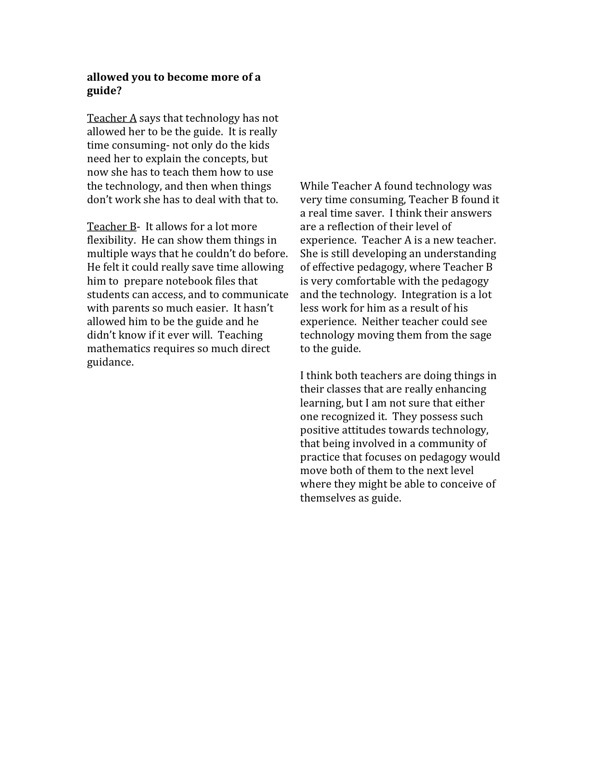
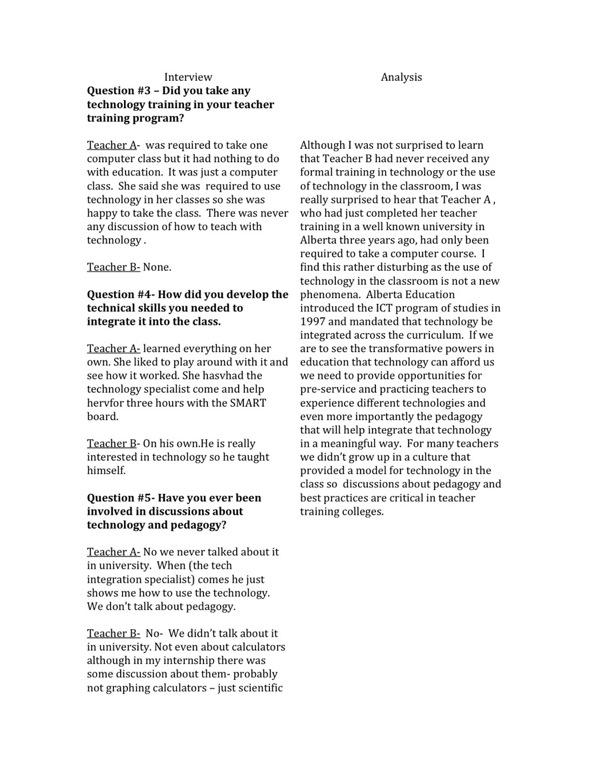
I interviewed two colleagues one ( teacher A) a third year junior high math and science teacher, and the second (teacher B) a math teacher as well as an administrator with 19 years experience. Both teachers would be considered exemplary tech users by their colleagues. My questions focused on four general areas:

    – their history in terms of training, technology training and teaching experience.

    -technology in the class including, how it is used, why it is used, how it affects student learning, and how it affect teaching

    – absense of technology and what a class would look like without technology.

    – concerns about technology in education.

The following is an excerpt of some of their answers and analysis of those answer:
Interview jpeg all 3 pages
Interview page 2 jpeg
Interview jpeg pg 3

Categories
Framing Issues

Case Building- Reviewing the Videos -Teacher E (Science, Elementary Preservice Teacher Education)

This was an interesting group of interviews with teachers- in-training who were developing slow motion units to go with the science units( elementary) they would be teaching on their practicums. The basic premise behind this type of activity was to demonstrate and perhaps reinforce basic science concepts through animations.

Very little of what I saw in these interviews convinced me that this would be a good use of technology or technology that would “count” in a science class. The slow motion activity is a very time laborious one. One of the student teachers pointed out that this activity was extremely time consuming taking upwards of 6 or more hours. She didn’t think she would spend the time with a class or even on her own.

The concepts that the students were working on could be presented in other much more effective ways with-out spending so much time. One of the students was going to have the students colour fish and then they would animate the coloured fish and tell a story. Colouring fish may help to develop sorting concepts in very small children, but there are probably much better hands-on activites that would accomplish this in a much shorter time period. This might be a more appropriate language arts activity. Another student felt putting together an animation of coloured pictures of animals moving was a worth-while activity as the students got to see the animals move. There is a wealth of videos out there that will show animals moving in their natural environment. Taking valuable time in class to create this might have some benefits but I don’t think they will lead to a deeper understanding of science.

I think that creating slow-motion animations can be a very creative and fun process for students. I have had students create slow-motion animations using Lego to animate a story they have written. They can incredibly creative and appropriate for a language arts. I am just not convinced that this is the best way to enhance learning in the science class.

Categories
Framing Issues

Case Building- Reviewing the Cases-Teacher S on Elementary Space Science.

This group of videos included an interview with a teacher who uses a great deal of technology in her multi-cultural grade 6/7 class, an interview with a group of students about their space science project, a new teacher and a retiring teacher. The classroom teacher reported that she had many students who’s first language was not English. She reported that the technology leveled the playing field for the students as no matter what their first language they were all tech savvy. She spoke about the different ways they used technology for math and science including research, doing a math rap (video?), and some type of math book. One issue that stands out for me here is assessment. Although she talks about the different things they are doing, she never addresses assessment of the learning or of the technology itself. I wonder :

Are they learning anything or just having fun?

Is technology the most appropriate way to learn the concepts?

Is the particular technology they are using the most appropriate technology?

Another issue that I wondered about is she reported many of the students had just come to Canada from countries such as India and Pakistan. Many of these students are coming from education systems that are still very traditional teacher centered institutions. I wonder how well they adjust to this child centered, project based classroom.

The interviews with the students were interesting but did little to convince that they were using the technology to its full capacity. Both interviews with the retiring and the new teacher highlighted the point that teachers need a lot of time and support to integrate technology into their classes

Categories
Framing Issues

Unpacking Assumptions

Good use of technology is technology that enhances learning. There are many concepts that can be taught in math and science with very low level technology- a pencil and paper- or no technology- having students simply observe. These can provide meaningful and memorable learning experiences. What is important is that the technology that counts is the one that makes learning more meaningful by helping the learner
– to see something they couldn’t see before
– to understand something in a new way
– to solve a problem
– to question something
– to create something
– to connect ideas
– to demonstrate understanding
– to test a hypothesis
– to explore.

This list is very incomplete-but I think if technology can help a learner do any of the above it “counts”.

Categories
Emerging Genres Framing Issues

Welcome to my ETEC 533 WEBLOG

Spam prevention powered by Akismet