Videos
Through ETEC 531, I developed a couple of YouTube videos using Camtasia. One of my first practice videos was “I am an Artist” available at: https://www.youtube.com/watch?v=Cw8ZVs9HN9M. For this video, the theme was whether or not one considered themselves an artist based on their experiences with art and technology. Thus, it was pretty autobiographical in nature as I utilized digital paintings, pencil sketches, photographs from my trips, and my favourite songs. On my subsequent try (and this time more formal assignment) I developed a media production using storyboarding techniques, and script (more of a narrative essay). I chose to cover a theme on digital memories that was highlighted in ETEC 531’s Culture and Technology course text by Andrew Murphie and John Potts. My media production for ETEC 531 entitled “Digital Memories: Theoretical Frameworks and Implications” can be accessed on YouTube at: https://www.youtube.com/watch?v=zL_AU83N2I8. Through both of these experiences producing media (and YouTube account) for the first time, I learned as my classmates did how much work was involved in the planning, production, editing and finalizing stages of creating a video. For my digital memories video, I had to thoroughly research the topic to cover aspects that linked back to our course material and also make interpretations of the content in order to engage the viewing audience (my classmates and professor). Interestingly enough, I’ve embedded this video into my group’s Moodle course site in keeping with our topic of the human digital memory.
DVDs
Having burned DVDs (as well as CDs, CD-RWs, etc) I reflected on my past experiences for this particular activity as I no longer have the need to burn DVDs (with the advent of YouTube, and a multitude of sites where videos can be watched on-demand). One of the key aspects to the ability of burning a DVD (or CD, CD-RW, etc) is to have a computer/laptop with the capability. For example, I know that most netbooks nowadays don’t have an optical drive which would pretty much eliminate the ability to do this activity. In any event, burning DVDs was straightforward as files needed to be dragged and dropped (or copied and pasted) into the project folder. The tips in the e-learning toolkit to test the DVD after it’s burned is a good one. At times, files are prone to becoming corrupted or malfunctioning and thus testing to ensure that it plays correctly in the initial stages can save time in the long run.
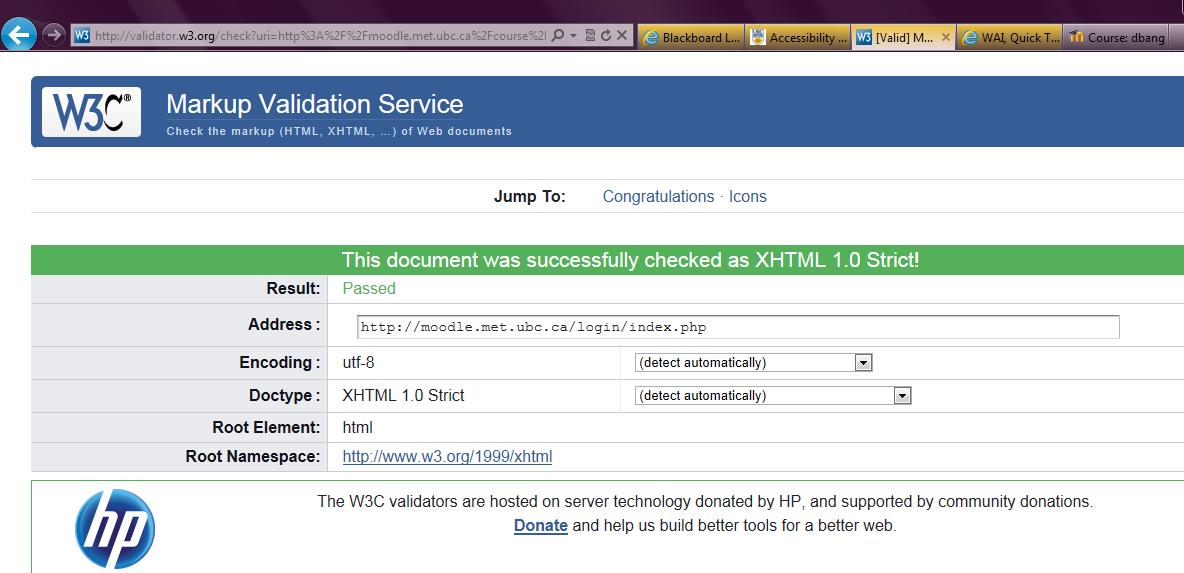
After carefully examining my Moodle LMS site and cross-referencing it with the Quick Tips guide on the Website Accessibility Initiative (WAI), I then checked my LMS site using the Markup Validation Service at: http://validator.w3.org/. I was pleased to see that the following message appeared: “This document was successfully checked as XHTML 1.0 Strict! Result: Passed.” I also noticed that I could put a “valid” icon on my LMS site to show users that I have developed an interoperable Web page. The next step for me now is to add the associated HTML for the “valid” icon on my LMS page. 🙂
Overall, I found this to be a useful exercise and consulting the top 10 list from the W3C site helped provide guidance about the key principles of accessible website design. I’ve included the list below as a reminder:
10 Quick Tips
1. Images & animations: Use the alt attribute to describe the function of each visual.
2. Image maps. Use the client-side map and text for hotspots.
3. Multimedia. Provide captioning and transcripts of audio, and descriptions of video.
4. Hypertext links. Use text that makes sense when read out of context. For example, avoid “click here.”
5. Page organization. Use headings, lists, and consistent structure. Use CSS for layout and style where possible.
6. Graphs & charts. Summarize or use the longdesc attribute.
7. Scripts, applets, & plug-ins. Provide alternative content in case active features are inaccessible or unsupported.
8. Frames. Use the noframes element and meaningful titles.
9. Tables. Make line-by-line reading sensible. Summarize.
10. Check your work.Validate. Use tools, checklist, and guidelines at http://www.w3.org/TR/WCAG
Editing images using Picasa:
After downloading Google’s Picasa and watching the provided YouTube tutorials from our e-learning toolkit at: https://www.youtube.com/watch?v=7r36K0j-2Zw and https://www.youtube.com/watch?v=HD23c2VFQPc, I followed the instructions to practice cropping and resizing copies of an original image from my computer. Overall, I found this exercise to be relatively straightforward. Previously, I’ve used Paint to edit images as well as the standard photo editing software that comes with digital cameras but discovered the robust capabilities of using Picasa to manage photos including removing red eye, adding text, creating collages and also developing movies using photos that can be directly rendered then uploaded to YouTube.
Recording audio using Audacity:
After downloading Audacity, I found the tips on how to prepare for a recording were helpful prior to creating a test recording. I used a headset microphone and had to test the mic’s position so that it didn’t pick up any background noise. Also, it was useful to close windows (to eliminate the sound of any traffic), turn of the A/C (momentarily), and ensure that there would be no sudden interruptions. In any case, after a couple of pilot test runs, I was able to create a recording that was pretty clear. This exercise reminded me of recordings I made for my group project in ETEC 510, in which I used Free Sound Recorder to record several sound files and CamStudio to develop a couple of video tutorials. In both instances, I went through multiple revisions as I learned through trial and error how to record sound files with minimal disruptions and background noise.
(Image mashup: Exploring the world of blogs and wikis)
My musings on blogging:
Upon reflection of setting up my UBC WordPress blog, I can definitely say that I’m beginning to master the brief learning curve and getting accustomed to the features that WordPress blogs has to offer. I think it also helped that I’ve used Google’s Blogger before and I definitely appreciate the use of this platform for my ongoing reflections on my learning journey throughout this course. One of the aspects I am still working on is sprucing up my html skills as at times I’ve had to revise and re-edit my posts as the html code hasn’t been visually perfect. In any case, I do find it useful to switch easily from html to visual views so that I can gauge how the html will affect the appearance of my post.
With the proliferation of blogs ranging from personal to professional in nature, it’s clear how functional and useful these can be as it can inform one’s learning and also obtain different opinions on a variety of topics. As the e-learning toolkit cited blogging, particularly educational blogging is indeed becoming increasingly popular. To keep up with them it does help to have them all on RSS feeds using products like Google Reader to organize and track all the information available. There are several professional blogs that I follow including David Rothman, Krafty Librarian, Jessamyn West’s librarian.net, Dean Giustini’s The Search Principle- among others as I find them particularly informative to help me stay current with the latest trends occurring in the field of librarianship.
As a notable mention, I recently stumbled upon a paper by my previous course instructor Dr. Diane Janes on blogging. It offered practical insight into how blogs can be incorporated in a constructivist classroom. Here’s a link to the paper for further reading: http://www.jdwwebdesign.com/edutech/pdfs/Blogs-Constructivist.pdf
Wikis:
Exploring the world of wikis was first examined in my LIS 766 Intro to Health Sciences Librarianship course at the University of Western Ontario. Out of curiosity, I re-visited my course wiki site at: http://healthresearchguides.wikispaces.com/ and surprisingly the Dentistry subject page I created was revised by a former classmate back in ’07. Further to this experience working on a wiki page, I recall that last term in ETEC 510 Design of Technology-Supported Learning Environments one of the pages I created was on Motivational Theories and Design at: http://sites.wiki.ubc.ca/etec510/Motivational_Theories_and_Design. As there was a bit of a hiatus since ’07 to ’11 that I had experienced working on wikis I remember consulting the various help pages from Wikipedia and gathering resources to create my wiki entry as citing verifiable sources was imperative to ensure its accuracy. It was quite an intensive research process and a definitely worthwhile experience to learn to use the “wiki language.” In the end, I don’t think I realized the full potential of working on a wiki as I didn’t chose to edit another person’s existing entry and instead I created my own. I recall that other students in the class also expressed the fact that perhaps MET students may be “too polite” to edit another students’ work. Unlike Wikipedia’s infamous edit wars, I felt that the process of working on a wiki entry using MediaWiki was pretty diplomatic and straightforward.
Looking now to my most recent experience with actually editing pages and engaging in the discussion “talk” portion of this week’s wiki activity I have to say it was a bit challenging to keep up-to-date with all the conversation that was occurring. I imagine that with more than 20+ students working on a wiki entry (say for example Wikipedia which is publicly accessible and can be edited by anyone) it can probably become even more challenging to keep content organized and maintain its accuracy. Yet, there are definitely benefits to using wikis as information is forever changing and certainly the features of a wiki enables this dynamic content to be created, edited and continually discussed. At the same time, it is dependent on its active contribution (to maintain its currency). Thus, some of the content from my health sciences course wiki may be outdated as I noticed from the history tab that it was last revised in ’07. Since that time, links may have changed, and more recent information about topics are probably available. In contrast, I imagine that the ETEC 510 Design Wiki will continue to be active as new rounds of MET students create new entries and revisions causing iterations of the course wiki to unfold.