OLT provides some easy to access resources for Faculty who are new to teaching in distance education. Here are a couple of resources that you can download or print and save for easy reference:
Category: Teaching Resources
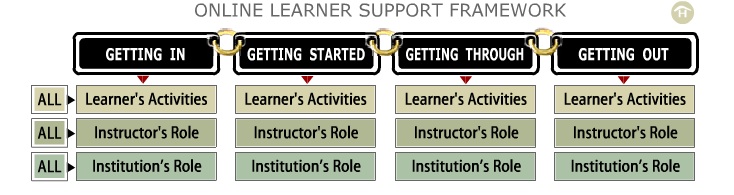
Learners, Instructors and teaching support staff are involved in different activities at each of the stages of a course or program. These stages may break down (simply) as:
- Getting In
- Getting Started
- Getting Through
- Getting Out
When planning a course or program, its helpful to consider the things that learners will be expected to do at each stage of the game and build from there to consider the role of the instructor and the institution in supporting that activity. The Learner Support Framework (developed at OLT) is a useful resource.
For instructors new to teaching online, it may also be helpful to keep track of the various teaching tasks that you’ll want to pay attention to in these areas:
- Pedagogical: Guiding student learning with a focus on concepts, principles, and skills.
- Social: Creating a welcoming online community in which learning is promoted.
- Managerial: Handling organizational, procedural, and administrative tasks.
- Technical: Assisting participants to become comfortable with the technologies used to deliver the course.
The CSU Center for Distributed Learning offers some tools and checklists that you may find helpful:
Assessing Online Facilitation Instrument
Both of these tools were developed to assist instructors in objectively reviewing their roles as online facilitators.

- Image by leighblackall via Flickr
Recently, Larry Ragan, Director of Faculty Development for Penn State’s World Campus, was asked “how would you rank the critical competencies for teaching online? Here are the 6 he identified:
1. Teaching and Learning
- State objectives, expectations, & policies
- Establish communication rules & group decision-making norms
- Give prompt, effective feedback
2. Technology Aptitude
- Know the LMS
- Seek technology assistance
- Be creative and flexible
3. Classroom Administration/ Management
- Check & manage roster
- Submit grades according to University policy
- Manage drop/adds
4. Faculty Workload Management
- Define time frames
- Develop schedule & responsibilities
- Communicate expectations
5. Building Community
- Foster dialog & interaction
- Provide for “space” for instructional & social interactions
6. Attitude/Philosophy
- Be open minded
- Take some risks
- Be willing to fail (with support net!)
Read the full article from the Distance Education Report, November 15, 2009
How Would You Rank the Critical Competencies for Teaching Online? (pdf)
![Reblog this post [with Zemanta]](http://img.zemanta.com/reblog_e.png?x-id=cad1575a-eead-465e-80ab-95b074aba1ce)

Each term, instructors struggle with the academic and policy implications around these questions:
- What do I do if I suspect that a student has plagiarized?
- How do I handle a student who is repeating my course?
- What are my responsibilities in providing guidance to students who are using social networking applications (ie. Facebook) and other free web tools for studying, collaboration on assignments, etc?
- OLT’s Instructor Resources: Plagiarism: offers links to a variety of resources and policy information for you and your students. You’ll find information about how to proceed when you suspect plagiarism, and about what resources are available to students who may need information and support.
Here are some resources that you may find helpful in preparing to address these questions in your own teaching practice:
Plagiarism:
Many students are simply unaware of the consequences of their actions when they “cut and paste” to prepare a paper or miss a citation for a direct quote, etc. Discussing the topic (or providing guidelines to students) at the start of the term may go a long way to preventing plagiarism by providing students with the information they need to make good decisions. Here is a collection of resources to help you develop a prevention plan or respond to plagiarism:
Course Repeats
Some students may choose to repeat a course to improve their overall standing or because mastery of the subject matter is important to their overall goals. Individual faculties have different guidelines around course repeats and students should be advised to discuss this with their faculty advisor before repeating a course. You will need to decide whether or not you will accept re-submission of the same course work or whether you expect the student to undertake different assignments in order to complete the course. Here are some guidelines and links to policy documents regarding academic advancement:
Online Identity
We are all learning everyday about the impact of our online identities on our offline lives. Consider the near suspension of a Ryerson student who reportedly ran on online study group on Facebook and was accused of cheating. And the potential forblurring of boundaries between student and prof on Facebook. Not to mention the daily stories of someone getting fired after posting something unpleasant about a boss, workplace or co-worker. A cross-campus team of students and professionals are addressing some of these issues in an interactive online tutorial:
As always, if you have an anecdote or resource to share with your colleagues about the topics included here, please leave a comment.

If you haven’t heard about the 7 Principles for Good Practice in Undergraduate Education you should know about them. They were originally published in 1987 by Arthur Chickering and Zelda Gamson. These are widely accepted principles and they have been applied in various contexts. For your review (or if you haven’t seen the original) the link to the original article (reprinted with permission by the Wingspread Journal: Johnson Foundation) is below for download:
Seven Principles for Good Practice by Chickering and Gamson PDF
Good teaching practice, according to the seven principles, emphasizes:
- student-faculty contact
- cooperation among students
- active learning
- prompt feedback
- time on task
- high expectations
- diverse talents and ways of learning
The communication tools that we currently have access to (chat, email, VOIP) as well as web based collaboration/social networking tools for students means that we have more opportunities than ever to be successful in implementing these principles in distance teaching. This has led to considerations about how technologies (including WebCT and Vista) can support the principles originally outlined by Chickering and Gamson:
- Implementing the Seven Principles: Technology as Lever by Chickering and Ehrmann
- Seven Principles of Effective Teaching: A Practical Lens for Evaluating
Online Courses - The Seven Principles and WebCT
- 7 Principles and VistaPDF
If you are not teaching an online course but are interested in how you might leverage technology to improve your teaching, the TLT Group (Teaching and Learning with Technology) has a public collection of “low threshold” or easy to integrate approaches.
Categories
Back to school

It’s close to that time again! If you are new to teaching in distance education, you’ll likely be looking for a few tips to get you started on the right track. Here’s a snippet:
- Connect with your learners at the start of term (Sept. 2nd for most of us). The Faculty Service Centre is the best way to do this if you are teaching a print based course or if you want to be in touch before your online course officially opens. You’ll need to know your course and section number. For distance education, the Sept. term is Term A.
- Print off your list of Key Contacts for DE. This will come in handy through the term.
- Bookmark the DE Instructors’ Guide. This is where you’ll find information and resources about distance teaching.
- Bookmark the e-Learning site. This is where you’ll find information about upcoming training sessions for WebCT Vista and other course technologies.
You may also want to reference the Teaching Tips for Online and Print. They’re both short reads and full of links and resources to get you off to a good start for Fall 2008!
Happy start of term, all!
EDUCAUSE is sponsoring an upcoming (March 3rd) ELI web seminar with Terry Anderson, Professor and Canada Research Chair, Distance Education at Athabasca University.
Many Students Loosely Joined: Social Software to Support Distance Education Learners will likely be of interest to any of you who are thinking about the potential for social/collaborative tools to improve both distance and blended learning environments.
I’ve attended several of these ELI online seminars and count them among the best online learning experiences I’ve had. Hope some of you will have a chance to check it out.
Cindy

I’ve just returned from the ELI Annual Meeting in San Antonio. The topic was Connecting and Reflecting: Preparing Learners for Web 2.0 ( a much maligned term referring to principles and practices of collaborative, participatory, democratic participation on the web). Technology plays a role, no doubt – but it’s all about the learning and the transformations that are beginning to emerge.
There are so many thoughts and resources I could share. Here are a few take-aways and some accompanying resources that I will be revisiting for some time. Hopefully, you’ll find some of these as thought provoking as I have:
- Encouraging learners to fully participate in designing their own learning leads to more “ownership”, more authentic learning outcomes and greater partnership between learner and teacher. Resource: podcasted conversation with conversation with Barbara Sawhill, Director of the Cooper International Learning Center at Oberlin College, and Jude Higdon, Instructional Technology Support Team Coordinator at the University of Minnesota (about half an hour in length).
- There is much fear associated with the use of collaborative tools and technologies associated with web 2.0 in academia- it’s important to keep the dialogue open and moving forward. Resource: A Digi-Drama about Fear 2.0. I wasn’t lucky enough to get in on this session but have since reviewed the videoclips and they are well worth the half hour spent!
- Access to excellent, good and mediocre quality learning resources on the web has exploded. We have a role in helping learners learn how to navigate this, learn how to make meaning and make learning processes more transparent. Resource: An assortment of the video archives of featured sessions hosted by the ELI. Average length: about an hour.
And , if you are interested in poking around at some of the resources that Educause has to offer, you may want to start here.
All for now.
Categories
E-Learning Institute News
At various times throughout the year, many members of the e-Learning community here at UBC contribute their efforts and talent to offer the UBC e-Learning Institutes. These institutes are typically spread out over a week, and include a variety of hands-on and seminar sessions dealing with an assortment of useful e-Learning topics. They are open to all faculty and staff and are a great way to fine-tune your existing skills or help build a strong foundation to start from.
This year, the Office of Learning Technology is producing a newsletter (every 2 months) that is printable for your convenience. It offers:
- a list of upcoming workshops and events related to teaching and learning with technology.
- profiles of faculty, staff or students who are using technology in innovative ways to enhance learning.
Download the PDF for Jan/Feb 08!
Categories
Diamonds in the rough

I thought I’d share something inspiring with all of you as we approach the end of the term. It’s about one teacher’s experience in appreciation of his students. Christopher Phelp’s Diamond in the Rough reminded me just how courageous, tenacious and adaptable we are. Appreciating those qualities in students is something we miss sometimes because we haven’t taken the time to get to know anything about them.
Getting to know students in a print-based distance course may be a bit of a challenge, but there are some ideas that you might consider:
- Send a welcome message via the Faculty Service Centre to all of your students at the start of term. Consider sharing something interesting about you and encourage them to send you a return message.
- Follow up regularly with students who miss assignments, don’t log into the course or haven’t contacted you in a while. A friendly check in goes a long way to creating a teaching presence that is so important in distance learning.
- Consider sending a brief survey out to students at the start of term. It’s a good way for you to find out something about their knowledge or interest in your subject matter and their approaches to learning.
What about you? What do you do to get to know your students? How do you stay connected during the course? Please leave a comment and share…
Happy Holidays all!