Categories
e-folio

Mobile Apps for Science

I am disappointed with the quality of the educational apps available for iOS (iPad, iPod and iPhone), because the vast majority on iTunes are rote learning tools.  There are also many informational apps (apps that allow information retrieval) but few truly interactive apps which students could become embedded and embodied with.

I downloaded and tested the free app Molecules for iOS (4.0 or higher) from Sunset Lakes Software , screen shot of Molecules which renders and allows users to view and manipulate three dimensional models of molecules. There are a number of included molecules, including a strand of DNA, Insulin and Caffeine, but there are thousands of molecules available for free download from PubChem and the Protein Data Bank. I viewed the DNA strand, Caffeine and downloaded and viewed Trichloroacetic Acid. Each rendering took only moments, and rotating and manipulating the molecule on the iPod screen was simple and seamless. These models are much better than a static image because by rotating the models on the screen, students can identify patterns and differences and can see the model from different perspectives to view troublesome or masked portions of the model. I was interested in this App from a biology perspective (because of the complex molecules involved in biological systems), but see where it would be useful in junior sciences as well as chemistry and biology

As a relatively specialized and limited use tool, Molecules surprisingly contains Winn’s (2002) notions of embeddedness, embodiment and adaptation. Student’s embodiment come about from the motions required to manipulate the 3-D model. Embeddedness comes about from the ability to interact with the molecular models, albeit in a minor fashion. Adaptation is similar to t-GEM’s (Khan, 2007) modifying, where student understanding is adapted to fit the sensory information they are subjected to. Molecules affords this by providing the vehicle for students to observe molecules from different perspectives.

Rochelle (2003) points out that handheld devices cause little change in the social practices of education, meaning that the teacher is still needed to scaffold the learning, and that learning still happens primarily through student-student and student-teacher interactions. Molecules does little to refute this claim. The teacher is still required to aid students in downloading and interpreting models and preventing misconceptions (like atoms of specific elements being specific colors). Student discussions are still important in forming understanding and co-construction of knowledge.
I would modify this app by adding a user construction component, where users could create their own molecules, and then share them with their classmates. This would add collaboration and user creation of content to the app, making it more well rounded and extensible, and make it appealing to junior science teachers who need tools to aid students’ learning in areas of chemical naming, formulas and bonding. The changes would facilitate mobile learning by making the app less specialized and of greater use to the student population as a whole.

References

Khan, S. (2007). Model-based inquiries in chemistry. Science Education, 91(6), 877-905.

Roschelle, J.  (2003).  Unlocking the learning value of wireless mobile devices.  Journal of Computer Assisted Learning, 19(3), pp. 260-272.

Winn, W. (2003). Learning in artificial environments: Embodiment, embeddedness, and dynamic adaptation. Technology, Instruction, Cognition and Learning, 1(1), 87-114

Categories
e-folio Interesting things

Exploratorium vs WISE

People normally visit museums as leisure activities where they engage in informal learning (Falk & Storksdieck, 2007). Falk & Storksdieck (2007) distinguish between compulsory learning and free-choice learning, noting the majority of people visiting a museum are engaged in the latter. However, museums are able to present information electronically, like time lapses and zooming in or zooming out, which is not possible otherwise (His, 2008). Hsi (2008) acknowledges most visitors to museums are free-choice learners, but students are often compulsory learners in museums.  Technology has great promise to enhance and expand on the traditional museum experience to enhance informal learning (Hsi, 2008).

The Exploratorium, a museum in San Francisco, has an electronic extension in an effort to maximize its educational coverage of science. The Exploratorium’s web site contains many content rich areas in which students can explore many topics. As well as content, the web site contains many demonstrations and instructions for hands-on activities, which would allow students to work together to develop knowledge.

I found The Exploratorium to be rather content heavy and rather non-interactive. There is much rich content, but it is presented in much the same manner as many museum exhibits: factual and information rich. There is a little interaction for students, but this mainly consists of choosing an area to read about, view a video or view images. Some images or pages display information dependent upon the location of the mouse. I saw little to aid student’s collaboration; if using this resource the teacher would have to provide another avenue for collaboration.

The Exploratorium, differing from WISE, does not have planned sequences of lessons forming units of study. Wise contains ways and means for educators to create or customize units, whereas I noticed no method for a teacher to create or even access a unit of study in The Exploratorium. Wise and The Exploratorium are similar in that neither has built the ability for students to collaborate over space and time. The affordance of the technology in The Exploratorium is in expanding on the traditional static museum display in order to meet a particular content presentation goal. The affordance of the technology in WISE is in creating a sequence of activities to meet a particular educational goal.

The Exploratorium has potential to become a great educational resource. Right now I feel it is just a good content area resource. In needs to be more interactive, it needs more on-line activities, it needs a collaborative aspect, and it needs a way for students to access content area experts. Milne (2007) wrote we are moving into the interaction age, where students interact with content and with each other. Students can create their own content easier than ever before, and resources such as The Exploratorium need to consider making available resources for students to make use of when creating their own content.

Right now, if I were to include The Exploratorium in my science classes, I would be more inclined to offer it as a possible content area for students to visit in pursuit of their learning goals.

Interestingly enough, as I write this I am returning from escorting students to Seattle, (which partially explains the drop in quality of this post) where one stop was at EMP, Seattle’s museum of Rock and Roll and Science Fiction. EMP is heavily technologically enhanced, with many interactive displays and many opportunities for visitors to be creative. One of the highlights for the students was to participate in a rock band experience complete with bright lights and roaring crowds. EMP definitely has made use of the affordances of technology for the in-person experience!


Falk, J. & Storksdieck, M. (2010). Science learning in a leisure setting. Journal of Research in Science Teaching, 47(2), 194-212.

His, S. (2008). Information technologies for informal learning in museums and out-of-school settings. In J. Voogt, G. Knezek (eds.) International Handbook of Information Technology in Primary and Secondary Education, 20(9), 891-899. Springer

Milne, A. (2007). Entering the interaction age today. Educause, 42(1), 12-31.

Categories
e-folio

Knowledge representation and Information Visualization

I think a common failing we make in teaching mathematics is to fail to remember mathematics is about representing knowledge in a special way. We forget there are ways other than numbers and symbols and charts to represent the knowledge. Technology has allowed us many ways to represent knowledge not possible in times past. Digital models are one particular way we can now represent our knowledge – using model aids in visualizing information.

A model is a representation of an object, event, process or a system (Gilber &Boulter, 1998, as quoted by Zhang, Liue & Krajcik, 2006). A mental model is a person’s internal cognitive representation built through environmental, community, technological and artifact interactions (Khan, 2007). The goal of teaching is then to cause learners to build and revise their mental models so they better represent the object, event, process, or system of interest. Computer modeling tools have been shown to cause learners to construct or revise their mental models (Schwarz, Meyer & Sharma, 2007). Learning mathematics should then be enhanced and aided if learners use computer modeling tools. Models are mostly visual tools. They have the affordance of slowing down, or speeding up, or magnifying, or reducing the object, event, process, or system so the learner can build a meaningful and useful mental model.

The visual representation of information contained in a model is fundamental in creating or modifying the learner’s mental model, because that too, being a model, is inherently an internal vision of what is modeled. Because of this, misconceptions are challenging for learners to recognize, because they may be confusing the actual object, event, process, or system with their mental model. This makes collaboration and communication with their peers and their teacher important so the learner can be exposed to various descriptions of not only the phenomena in question, but also to the mental models of others.

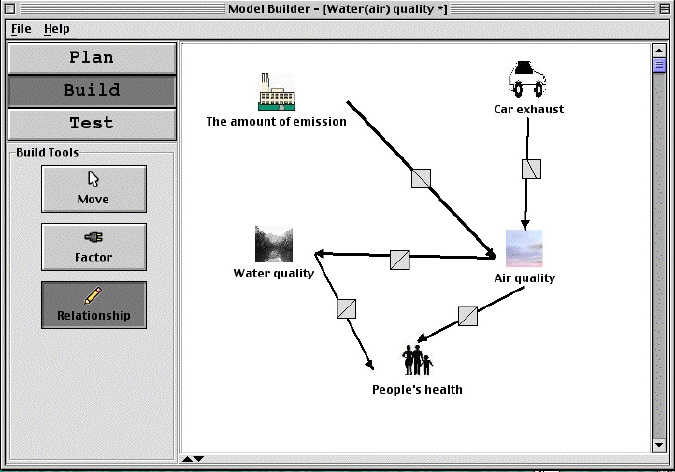
Model-It allows students to engage in cognitive strategies such as analyzing, relational reasoning, synthesizing, testing and debugging (Zhang, Liue & Krajcik, 2006). This software assists student’s visualization of challenging phenomena because it aids construction or revision of mental models by visually linking together relationships between components of the phenomena. This software could be included in many units in Mathematics and Science, but especially in areas where there are definite relationships intertwining the concepts. As with all digital technology that purports to improve student learning Model-It must be embedded with solid pedagogy that actively involves the learner and it should be used in authentic learning situations with the teacher guiding and scaffolding the learner.

One specific area where Model-It could be made use of is in climate change, an area of popular concern, and part of the BC Science 10 curriculum. Other area I see myself making use of Model-It is in Surface Area/Volume issues, Food-Webs, and ecosystems Biology. As my practice evolves and I see the need for more information visualization activities for learners, I see more the value of tools like Model-It, which may not be glitzy and glamorous, but gets the job done.

Khan, S. (2007). Model-based inquiries in chemistry. Science Education, 91(6), 877-905.

Schwarz, C., Meyer, J. & Sharma, A. (2007). Technology, pedagogy, and epistemology: Opportunities and challenges of using computer modeling and simulation tools in elementary science methods. Journal of Science Teacher Education, 18, 243-269.

Zhang,B., Liue,X., & Krajcik, J.S.  (2006). Expert models and modeling processes associated with a  computer-modeling tool.  Science Education, 90, 579-604.

Categories
e-folio

Jasper, WISE, MyWorld, Chemland and MyWay

A Technology Enhanced Learning Environments (TELE) is an educational environment that makes use of technology to enhance learning.

In Module B we looked at four TELES, each with unique features and affordances, but at the same time there were similarities. The Jasper environment used anchored instruction to create an inquiry learning environment, with roots in situated cognition and problem based learning, and used technology to deliver data and position the problem that was to be solved. WISE used technology to map learning to logical steps of inquiry in an effort to make learning visible. MyWorld, with its roots in Worldbuilder (Edelson, 2001), fosters inquiry learning through an extensible tool which encouraged inquiry and fostered learning for use as opposed to learning for assessment. Chemland and GEM (Kahn, 2010) worked together in a cycle of generating interest and hypotheses, evaluation of hypothesis and then modification of the hypotheses, all enabled through applets which allowed inquiry learning to take place. Although some of the theoretical underpinnings differ, each TELE promoted inquiry based learning, and each TELE could be made use of in a constructivist classroom, but in each and every case, the teacher is directly involved in guiding and fostering the learning. In TELEs the teacher’s role changes, they are no longer the sole source of knowledge, they are one source of knowledge amongst many, but the teacher is still needed to correct misconceptions, to foster interest, to scaffold, and ensure deep learning is happening.

Planning and designing a TELE is a non-trivial exercise. Nardi (1996) explains the activity engaged in affects learning, while Scardamalia (2004) explains knowledge building affordances are key aspects of learning environments that foster knowledge creation, which is the integral part of the act of learning. The four learning environments we looked at showed a variety of affordances, from non-linear access in Jasper and WISE, cyclic usage in Chemland and MyWorld, built in sharing and collaboration in WISE, modification and personalization in MyWorld to on-line access in WISE and Chemland. The technology provides affordances, but then affects student’s learning as the activity engaged in is mediated by those affordances. As such, classroom teachers are not in a position to create their own TELE from scratch, rather they must look to technology that already exists for components which will fit their classroom and teaching and learning philosophy. Neither do teachers have the time or expertise to create resources such as Chemland and Worldbuilder. As such, I see combining together what Jasper, WISE, Chemland and MyWorld have to offer creating a rich and dynamic TELE. WISE can be used to organize and share lessons and units. Jasper’s deep problem solving approach combined with applets similar to those in Chemland can provide both motivation and hypothesis building situations as well as situate the learning, while the sheer amount of data that can be worked with in a program like MyWorld can be made use of to test student’s hypothesis, creating a combined T-GEM – LfU environment. The only major piece missing is enabling collaboration and communication, which numerous discussion threads have mentioned as important for a TELE. Shall I call this this MyWay?

What impact does this have in my situation? The teaching and learning happening in my classroom is already mediated by Google sites, which is WISE like in some ways, but missing the repository of carefully constructed lessons to build upon. I use a problem solving approach, albeit one that Jasper puts to shame. I make use of pre-constructed electronic resources when I can, but still rely too much on paper based and electronic, but paper-like material. I need to examine my practices to ensure I am catching misconceptions and that I am fostering deep learning and providing proper scaffolding.

Implications to science and math teachers in general are more profound. The practices of talking in front of the class in the hopes that knowledge delivery will occur need to give way to posing deep and complex problems, to talking to small groups or individuals, and to working with students to help them build their knowledge, all of which MyWay would enable!

I realize I did not include having students involved in real world activities of scientists (and mathematicians), and I think valuable learning comes from those situations as well. I need to examine how to integrate this into “MyWay”

Edelson, D.C. (2001). Learning-for-use: A framework for the design of technology-supported inquiry activities. Journal of Research in Science Teaching. 38(3), 355-385

Khan, S. (2010). New pedagogies for teaching with computer simulations. Journal of Science Education and Technology, 20(3), 215-232.

Nardi, B. (1996). Studying context: A comparison of activity theory, situated action models, and distributed cognition. In Nardi, B. (ed) Context and Consciousness. Cambridge, Ma:MIT Press

Scardamalia, M. (2004) CSILE/Knowledge Forum. In Education and technology: An encyclopedia (pp 183-192). Santa Barbara: ABC-CLIO

Spam prevention powered by Akismet