Favorite Tools: Radiology Anatomy Atlas Viewer

Precision in radiology is incredibly important.  We’re often the ‘final diagnosis’ for patients, so the more specific we can be, the better it is for patient care.

And the body is a big place.  Every structure in the body has a name and rather than just saying ‘the back muscles’, it’s better for everyone if we can say ‘Iliocostalis lumborum’.  But some rare parts of human anatomy we might use once a year, and it’s best if we check our answers.

And there are a lot of cross-sectional anatomy web sites out there.  Some are free and some are commercial, but one free tool I have found super-helpful is the Radiology Anatomy Atlas Viewer.  It’s free software for Macintosh and Windows computers that you can download and install on your computer.  It shows cross-sectional anatomy of various body parts, all labeled so that you can find the name of that structure before you commit to it in your report.  A screenshot from the software is below:

Screenshot from the Radiology Anatomy Atlas Viewer software showing anatomic labels from a cross section of the human orbit.

Radiology Anatomy Atlas Viewer

At least a couple of times a week I find myself using it to look up anatomical structures that I can’t figure out the name (or just can’t remember), in hopes that my reports will be better and more specific and somehow this will help the surgeon or clinician and ultimately, the patient.

The software is free and can be freely distributed for non-commercial purposes.  I hope you find it as helpful as I do!

Favorite Articles: Appearances of Hepatobiliary Contrast Agents in the Liver

Hepatobiliary Contrast Agents are an incredibly important tool in liver imaging due to their ability to allow us to differentiate the different types of lesions that can occur in the liver.

But due to the huge number of types of lesions that can occur in the liver, and even the varied appearances of lesions in a single category, it’s not always straightforward in figuring out what is what, even with a good clinical history and lab data when it’s available.

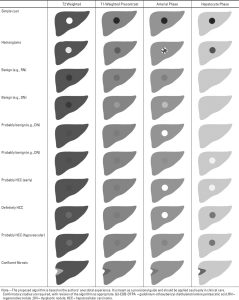
That’s where this article comes in; it contains a great explanation of expected appearances, and even a handy chart of what these lesions look like during the different phases of imaging (e.g. arterial vs portal venous vs delayed).  It has a super-helpful ‘quick reference diagram’ that shows the expected appearance of the different lesion types under the different imaging phases, as shown below (reference for the image is here):

Expected appearance of different lesion types under different imaging phases using hepatobiliary contrast agents.

Expected appearance of different lesion types under different imaging phases using hepatobiliary contrast agents.

The article also contains numerous MRI images of different lesion types under different imaging phases, and is well worth a read.  The reference for the article is:

Cruite, I., Schroeder, M., Merkle, E. M., & Sirlin, C. B. (2010). Gadoxetate Disodium–Enhanced MRI of the Liver: Part 2, Protocol Optimization and Lesion Appearance in the Cirrhotic Liver. In American Journal of Roentgenology (Vol. 195, Issue 1, pp. 29–41). American Roentgen Ray Society. https://doi.org/10.2214/ajr.10.4538

Favorite Articles: Brachial Plexus Anatomy / Thoracic Outlet Syndrome

While I think we all remember ‘roots, trunks, divisions, cords, and branches’ from medical school anatomy class, actually reading brachial plexus MRI – due to the complex anatomy and the complexity of the imaging sequences/appearances layered on top of it – is very difficult.

One of my ‘go-to’ articles for reading these cases is from RadioGraphics:

Demondion, X., Herbinet, P., Van Sint Jan, S., Boutry, N., Chantelot, C., & Cotten, A. (2006). Imaging assessment of thoracic outlet Syndrome. Radiographics, 26(6), 1735–1750. https://doi.org/10.1148/rg.266055079

It has wonderful anatomic dissection images as well as labeled CT and MRI images that help explain the complex anatomy of the brachial plexus and thoracic outlet. Definitely an aid when reading these often difficult cases. Below is one of the images from the article.

Figure 3c.  Assessment of the interscalene triangle with different imaging modalities. Sagittal gross anatomic section (a), computed tomographic (CT) image (b), T1-weighted magnetic resonance (MR) image (c), and sonogram (d) show the anterior scalene muscle (AS), clavicle (C), fifth cervical nerve root (C5), sixth cervical nerve root (C6), seventh cervical nerve root (C7), eighth cervical nerve root (C8), first rib (FR), middle and posterior scalene muscles (MS), subclavian artery (SA), subclavian vein (SV), and first thoracic nerve root (T1).

Figure 3c.  Assessment of the interscalene triangle with different imaging modalities. Sagittal gross anatomic section (a), computed tomographic (CT) image (b), T1-weighted magnetic resonance (MR) image (c), and sonogram (d) show the anterior scalene muscle (AS), clavicle (C), fifth cervical nerve root (C5), sixth cervical nerve root (C6), seventh cervical nerve root (C7), eighth cervical nerve root (C8), first rib (FR), middle and posterior scalene muscles (MS), subclavian artery (SA), subclavian vein (SV), and first thoracic nerve root (T1).

Favorite DICOM tools: dcmtk

Background

I just wanted to do a quick post about one of my favourite open-source DICOM toolkits, dcmtk.

From the dcmtk website: “It includes software…

  • for examining, constructing and converting DICOM image files
  • handling storage media
  • sending and receiving images over a network connection
  • as well as demonstrative image storage and worklist servers”

So, basically it does a lot of the things you need to do to deal with DICOM network traffic as well as DICOM files themselves. I’ve incorporated it into pretty much every Radiology software project that I’ve written, as its tools can easily be called inside of common scripting languages to do almost whatever you need to do in terms of interfacing with PACS systems and handling/manipulating DICOM files.

Some of my favorite dcmtk utilities:

    • dcmdump – used to dump out the header elements of DICOM files
    • findscu – utility to perform C-FIND operations on PACS; I use this to create worklists in web-based apps or allow users to query PACS interactively
    • movescu – retrieve DICOM object(s)/files from PACS; useful for moving around files
    • dsrdump and dsr2html – dump out the data from DICOM SR objects (dsr2html dumps it to HTML format); super-helpful in understanding how the various vendors’ SR formats & content work

I’ve used it before in Mac OS, Windows, and Linux environments, and it works flawlessly in all of them.  This project is a real asset to the imaging community.

Example – movescu & dsrdump

Here’s an example of some PHP code how you’d use movescu to retrieve a DICOM object from  PACS:

$command = "movescu -aet $myaetitle -aec $pacsaetitle -aem $myaetitle -S -k 0008,0052=\"IMAGE\" -k 0020,000d=\"$studyuid\" -k 0020,000e=\"$seriesuid\" -k 0008,0018=\"$objectuid\" $pacsipaddress $pacstcpport 2>&1";
$movescu = shell_exec($command);

The variables used above are:

  • $myaetitle – the DICOM AE Title of the web server/workstation doing the retrieval
  • $pacsaetitle – the DICOM AE Title of the PACS server
  • $studyuid – the Study UID of the study that the SR object belongs to
  • $seriesuid – the Series UID of the series that the SR object belongs to
  • $objectuid – the Object UID of the SR object
  • $pacsipaddress – the IP address of the PACS server
  • $pacstcpport – the TCP Port that the PACS Server’s DICOM interface is listening on

And let’s say we just retrieved a DICOM SR object; next we can use dsr2html to dump out the SR object into a variable:

$dump_command = "dsr2html -Ee -Er -Ec +Rd +Sr report.css " . $infile;
$sr_html = shell_exec($dump_command);

The options I’m using here for dsr2html are:

  • -Ee – ‘ignore item errors’ – useful as SR objects can sometimes have errors in them
  • -Er – ‘accept unknown/missing relationship type’ – again, to not fail if the object has errors
  • +Rd – ‘render full data of content items’ – to render the entire content of the SR
  • +Sr – ‘add reference to specified CSS to document’ – to have the HTML output reference the CSS file that you’re including to style the output
  • report.css – the CSS file to use to style the HTML output

We could then just render the HTML output with print $sr_html;

That’s it – hope you find it as helpful as I have over the years.

Radiology Post-processing Videos

A while ago, I made 14 videos about post-processing software for radiology applications.

What is post-processing software, you ask?  Here’s a bit of background:

  • Those pretty 3-D images from medical imaging studies aren’t usually automatically made when a patient gets imaged; they have to be created, and one way to do it is by using post-processing software on a dedicated workstation by the radiologist.
  • Various vendors (Siemens, Philips, GE, etc) all have post-processing software platforms
  • Post-processing is about more than just creating 3-D images; they can be used for many tasks, from performing quantitative image analysis, body part segmentation, specialized measurements, and even for creating .STL files for 3-D printing.
  • These platforms definitely fall into what I think of as ‘expert software’; they’re not particularly easy to use because they have so many features and the tasks they perform are so complex, thus the videos to show a bit of the ‘art of the possible’.

My goal of creating these videos is to provide a preview of a small number of the post-processing software platforms available, and some of the things that you can do with them.  Like all things software-related, these videos are just a ‘snapshot in time’ of the software available to me at the time I made the videos.  I am sure that many if not all of these software packages are being continually improved by their manufacturers.  The goal here is not so much to show the software per se but rather to show a sampling of what can be done with them.

Here is the link to the UBC Vimeo site where the videos are hosted: https://vimeo.com/showcase/6277385

Favorite Articles: Pulsatile Tinnitus

Pulsatile Tinnitus is a complex condition with symptoms that can range from annoying to highly disruptive.

It has various causes and can be quite difficult to diagnose both clinically and on imaging; a common radiology test ordered for its diagnosis is a CT angiogram of the head & neck.

I found this article in the EJR a while ago and it’s great; it discusses not only an optimal CT protocol for assessing this condition, but also a pictorial guide of the causes and things to check when reading these studies.

Fig. 2 Dominant sigmoid sinus and internal jugular vein A 30 year old female patient presented with right sided PT. CT A-V axial (A,C) and coronal (B, D) images demonstrate a dominant right sigmoid sinus (A, long arrow) draining into a dominant right internal jugular vein (IJV) (C, short arrow). The contralateral non-dominant left sigmoid sinus (B, long dashed arrow) and left IJV (D, short dashed arrow) are smaller in calibre.

Figure 2 from the article showing a dominant sigmoid sinus.

The Citation for the article is:

Detecting causes of pulsatile tinnitus on CT arteriography-venography: A pictorial review
Kumar, Raekha et al.
European Journal of Radiology, Volume 139, 109722