Categories
Team OERs of Emerging Markets

Connected Learning

 
From blogs.ubc.ca/etec522/Sept13
Week 12: Connected Learning
 
 
Comment by davidp 10:41 am on November 22, 2013
 
RE. “Thrun clearly sees himself as a first rate educator in the context of academia, but appears to have become impatient with students outside of his experience or understanding.”

There were some pretty salty tweets about this very point last week.

Two alternative MOOC-like approaches emerging that may be better tuned to open development than the current brand of xMOOCs:

University of the People –> http://www.uopeople.org

How University of the People supports students in the developing world

OER University –> http://oeruniversity.org
 
Comment by jiorns 8:28 am on November 24, 2013
 
I checked out OER University and University of the People.

OER University seems rather like most MOOCs offering higher-ed courses where tuition is free but certification has a cost. The partners to OER University are universities and polytechnics from a number of English-speaking countries, so it has strong support. Very nice interface too.

University of the People claims to be a not-for profit and tuition free university. Its backers are UNESCO and other UN organisations together with some universities like NYU and corporates like HP and Microsoft. But there is a business model to keep it running and therefore fees are attached to processing of applications and processing of exams. A donor system potentially support students who can’t meet the fees.

What is interesting to me is that U of the P has commercial partners and missing from the list are the mobile phone providers/telecom carriers.
 
Comment by davidp 8:41 am on November 24, 2013
 
All good points. There has to be a business model, for sure.

OERu is built on the notion of free courses (built on OER) leading to recognized credentials, with students having to pay for either challenge exams or prior learning assessments. It’s MOOC-like in its delivery format, but perhaps unique in offering recognized credentials as a differentiator.

Another differentiator for OERu is that it does all its planning in the “open,” completely transparently. Not many organizations could make that claim.

Take a look at http://wikieducator.org/OER_university/Home

The point about alliances with mobile/telecom providers might be a business model that some startups in this space will pursue. Actually a bit surprising nobody has done it with any of the tablet vendors.


Categories
Team OERs of Emerging Markets

Learning Analytics

 
From blogs.ubc.ca/etec522
Week 10: Learning Analytics
 
psweeze says: 5:31 pm on November 4, 2013

Learning analytics: The next big thing is already here

Hello fellow ETEC 522 students. This weeks focus is on learning analytics and is presented by Rocky Lam, Milena Brunetta, Adeel Farooq, Dana Mehregani, and Phil Sweezey. The advent of numerous different offerings in the LMS, digital textbooks and educational apps fields, has been met with a certain amount of hesitancy by the current education […]
 
Comment by jiorns 8:35 pm on November 5, 2013
 
Just a question. I notice that you have a copyright statement on the blog you created.
Is it not an OER ??
 
 
DIY Analytics

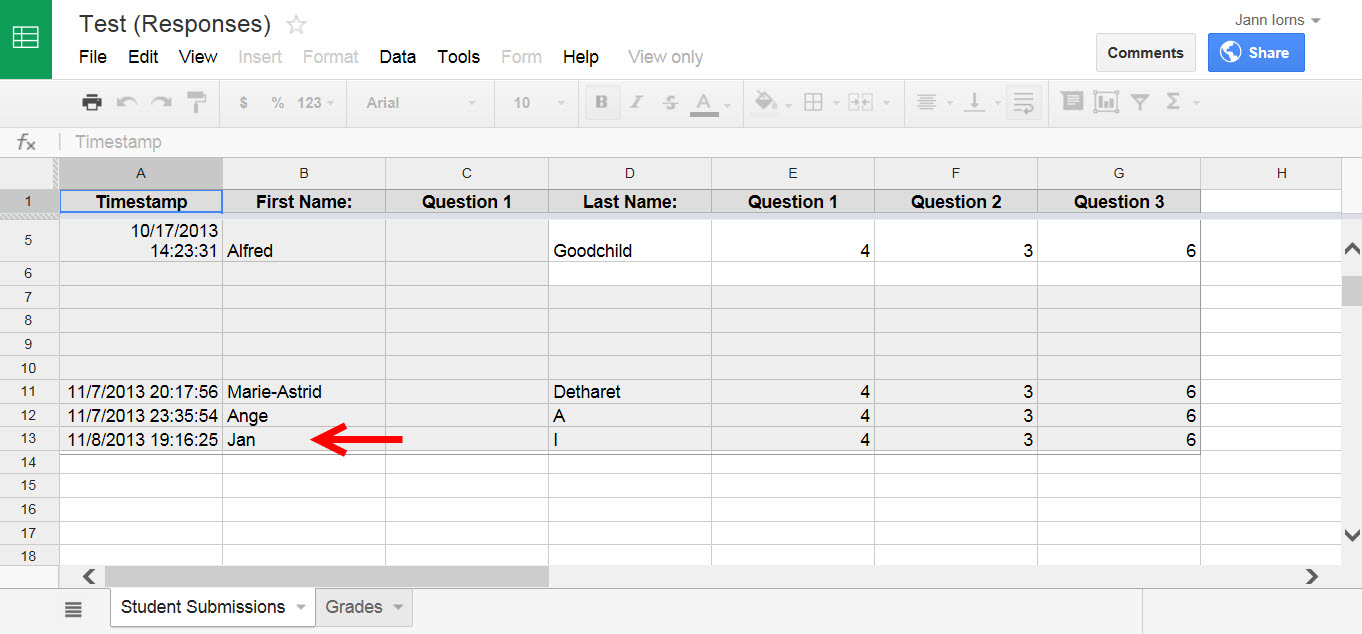
In this section we will be taking you on a journey to explore how one can run a simple analysis on ones own classrooms grades. We will be using Google Forms/Spreadsheets to help us gather data and a combination of a script called Flubaroo and excel to do our analysis.
 
jiorns quiz input 8 November 2013


jiorns says: November 8, 2013 at 6:22pm
 
I’m not sure if the Quiz is generating grades. I was able to see that Flubaroo had accepted my quiz responses, but the grade tab did not show any data.


Categories
Team OERs of Emerging Markets

Maker Spaces

From blogs.ubc.ca/etec522/sept2013
Week 9: Makerspaces
 
 
Discussion: Which type of makerspace would appeal the most to you and be the most successful in your community? Is there a successful makerspace in your area?
 
jiorns says: October 29, 2013 at 3:13 am
 
This is a really novel market and one I had never heard of until today. Thanks for the introduction to Makerspaces. I’ve explored what is happening in Australia and was curious to see that there are some geeks and artists following this trend.
 
For example, a “Robots and Dinosaurs Hackerspace” is in Sydney, very much repurposing old electronics equipment.
 
A fab lab tried to get off the ground in another part of the country. It was a community initiative of artists and craftspeople in a rural location that had an old, disused hospital which would have converted nicely to a makerspace.
The intention was to call it ‘egMakerspace’ (short for East Gippsland Makerspace) but it couldn’t raise the funding needed. Details are on the Pozible crowdfunding website.
 
There are a few other aspiring individuals with electronics/3D printing orientations trying to get like minds together via the MeetUp website.
 
What I think is great about Makerspaces is the opportunity to re-use electronic componentry (there’s so much of it going to …. somewhere??)
 
 
Marketing a Maker Space – Target Market and Location
 
Some aspects to consider include:
1.Community – people interested in makerspaces tend to be explorers, tech – savvy, and creative.
2.Demographics – most people interested in creating fit into a younger demographic-between 20-40 years old. Many have at least some college or university experience. The majority of people involved in makerspaces (65-85%) tend to be male.
3.Potential Competition – libraries, schools and non-profits are expanding services to include makerspaces.
4.Location – Access via public transport, especially in urban centers is key. Also important is access to hardware stores (to purchase equipment for repairs, restock etc.) and food services (many users of makerspaces often put in long hours and need access to quick pick -me-ups)
 
What other factors should be considered when assessing a community location for a makerspace venture?

 
jiorns says: October 29, 2013 at 3:36 am
 
I wonder about the statement in the Demographic sub-section that “many have at least university/college background”.
 
When I watched the video in the introduction to this Makerspaces topic, I saw a lot of industrial equipment like lathes, cutting tools, etc. The type of equipment used in metalworking, woodworking and other technical trades. To my mind, people with the technical skills to use that type of equipment have come from backgrounds of no formal education, VET or apprenticeship-based learning.
 
It would contrast with the more ‘geeky’ kind of Hackerspace whose participants might be computer technicians and IT graduates from university or college backgrounds. Just my thoughts.
 
 
Discussion: If you were opening up a makerspace in your local community and your marketing budget was limited, what cost-effective marketing strategy would you employ, and why?
 
Janette says: November 4, 2013 at 2:45 am
 
Some other marketing tactics are:
 
1) ‘Refer a friend and redeem your prize’
 
This is a stronger marketing tactic than a passive ‘tell someone you know about us’. The refer-a-friend tactic will require design and printing of vouchers that promote a prize to be redeemed by a member or their guest when the guest uses or joins the Maker Space. The prize is likely some kind of discount – e.g. reduced membership fee, reduced class fee or one free class, x% discount on hire space booked between particular dates, and so on.
 
A digital version of the voucher can run alongside printed vouchers and be run through social media (FB, MeetUp, other sites).
 
2) ‘Vouchers on retail receipts’
 
Contact the marketing managers of the petrol station brands or supermarket brands in the area and try to negotiate the printing of a voucher (or small advertising message) on their local store customer receipts. Petrol stations will have the largest consumer base in the local community, so using them as a marketing channel makes sense. Likewise, supermarkets have a wide reach. This tactic is one way to get a message about the Maker Space to a lot of people. Ideally, it doesn’t cost much and you would negotiate the message to run for 2 to 3 months.
 
3) ‘PR magnet’
 
Think of a novel event to hold related to the Maker Space and do the pre and post publicity for the event.
 
Make sure to hold the event on a weekend to attract community members (ideally a competition intending to make something intriguing using maker space tech skills). It might be only members of the Maker Space participating or it could be community members at large (depending on equipment and tools required). The essential thing is to think of an event that has a competition theme and that will involve doing something intriguing (e.g. “Make the biggest 3D banana competition”). Anything novel attracts a crowd.
 
However, the crowd will need to know beforehand that the event is happening. So, try to get some publicity in local media (radio/press) and also in social media. If you are holding a novel event, and it’s a competition of some kind, the radio/press organisations will probably be interested to run a short publicity message. You would need to contact the media organisations and send them a ‘media release’ (1/2 to 1 page media statement ensuring it includes Maker Space contact details and name of event organiser) a few days leading up to the event. Make a courtesy call to each media organisation after you send the information to make sure they got it.
 
While the competition is happening, take photos. Then upload those to social media with a catchy paragraph or two. Send the same photos and a summary to local media for them to run a short after-event message (they may not do it if they gave pre-event publicity but it’s worth a shot). Make sure the message clearly states the location and contact details for the Maker Space.
 
 
Discussion: In your professional setting have you participated in a war room? If so, can you describe the task that the team was addressing and how the approach worked.
 
jiorns says: October 29, 2013 at 4:18 am
 
Professionals blocking out calendars and hunkering down in a ‘war room’ for a period of time sounds great .. so long as everyone is free of competing priorities for that time. I relate to a ‘project team’ such as that demonstrated in the video and how it might work for course development in an educational institution where IT, instructional design, SMEs, content developers and perhaps marketing need to work together. However, practically, in a commercial organisation, this type of ‘co-habitation’ would only occur for sessions of an hour or few hours at a time (e.g. courseware validation sessions). There is just too much pace to business and too much multi-tasking for people to ‘shut off in a room’.
 
I do like the term ‘war room’ though, and think it conjures up notions of rigorous debate, which is a good thing.
 
I think there’s a bit of a stretch from makerspace to war room in a corporate workplace. Project teams are the norm in corporations and even then, they don’t work together and may not even sit anywhere near each other, and come together just for the occasions when there needs to be consensus on something or a strategy clarified.
 

tsteffen says: October 30, 2013 at 5:36 pm
 
Thanks for joining this discussion thread. I can appreciate that proposing war rooms as an example of a makerspace will be debatable for some. However, depending on the nature of the activities taking place in the war room and the reason for bringing the team together, I believe that a good argument can be made for the war room as a type of makerspace.
 
If “creative making” of a key deliverable is required, especially with a compressed project schedule, in my experience the need to isolate the key project team members from competing priorities is exactly why a war room is often set up.

 
jiorns says: November 4, 2013 at 3:28 am
 
Sure. For something ‘urgent’, like getting a tender proposal finished for a deadline which requires collaboration of a few people, a war room could be set up to take the relevant people ‘off line’ for a time to focus on the urgent project. To me, it’s just a different type of Makerspace to others mentioned in this topic because no organization is founded in order for the space/equipment to be used; it already exists. Interesting that these types of spaces have the word ‘war room’.


Categories
Team OERs of Emerging Markets

Digital Textbooks

Developed an OER on Digital Textbooks for Week 8 of ETEC522.


I worked independently on this project. My OER was announced on the etec522 sept13 weblog and published at http://digitaltextbooks.wordpress.com.


digital textbooks
OER – Digital Textbooks – by Janette Iorns


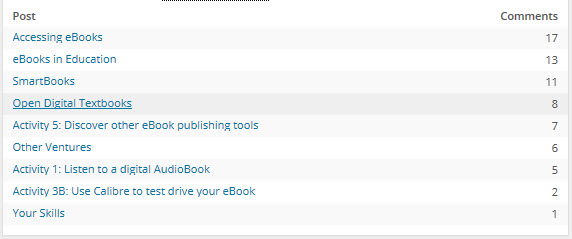
The ETEC522 cohort were encouraged to participate in learning activities and online communication. A total of 70 comments/contributions were published to the Digital Textbooks OER and there were over 840 page views.

 
digital textbooks blog statistics
 

digital textbooks comments analysis
Analysis of interactions on different OER pages

 
I also commented on the alternative Digital Textbooks project developed for Week 8: Digital Textbooks (Shaimaa Otify, Alex Lemon and Amber Doumouchel) at digitaltextbooks.weebly.com

Comment by John Lee
 
I realize that there is a commercial component which I’m probably missing the point of. Perhaps digital textbooks are more easily marketed. But purely from a pedagogical standpoint, it almost feels like we’re highlighting the merits of Betamax. In ten years, will people still use DT’s instead of websites?
 
Response by Janette 10/26/2013 10:58pm
 
I think the direction for the future will be far more use of mobile devices as learning platforms, and that content will become smaller and smaller in file size to be consumed ‘on the go’ or for ‘short bursts of attention’. In that context of learning, I imagine that apps will be the mode of delivery and interaction for learning content. An entire course may be on an app, or a student may flick between resources on many apps. The design of the app would determine if content needs to be packaged as a ‘book’. Books could possibly bind up learning objects, rather than leaving them flexible.

Categories
Team OERs of Emerging Markets

Game-based Learning

From blogs.ubc.ca
Week 7: Game-based Learning
 
 
Introduction to Game-based Learning
 
jiorns says: October 26, 2013 at 11:40 pm
 
I refuse to believe that the size of the consumer market using Farmville (mentioned in one of the Infographs) is an indicator of opportunity for the educational gaming market. What really is the opportunity for this emerging market if most institutions cannot afford the costs associated with the design of complex game environments?
 
 
Challenges in Game-based Learning
 
jiorns says: October 27, 2013 at 12:25 am
 
Perhaps games that are on apps can be an optional learning resource – perhaps suggested to learners as homework or pre-work.
After all, they can be played alone and don’t need a tutor present.
That would enable each parent to endorse what app/game they would like their child to play and to also meet the cost of the app.
 
 
Analysis of Game-based Learning
 
jiorns says: October 27, 2013 at 12:48 am
 
I liked Vocabulary, although it might not be perceived as ‘fun’ to young learners because it doesn’t have graphics or multimedia. Older learners and adults should find the game interesting and challenging.
The game definitely has educational value, because of the design of feedback to learner responses and that feedback including examples of how a word is used. Vocabulary is actually a grammar and vocabulary learning tool combined, because its feedback demonstrates the type of word as well as the meaning of the word.
The inbuilt adaptive content makes Vocabulary replayable.
I’m not sure on market potential but the cost would need to be low. If distributed as an app, maybe $6-10 per consumer.


Categories
Team OERs of Emerging Markets

Apps

From blogs.ubc.ca
Week 6: Apps
 
 
Comment on Cloud-based-apps
 
jiorns October 8, 2013 at 6:07 am
 
I really appreciated the quiz on digital security and the infographic. Thanks for those. It seems that the risk of loss of individual and organizational data through cloud computing is a hot topic.

Personally, I’m not using the cloud for any storage or backup and have only ever worked for one educational institution that did. In that instance, it was google docs. From memory, it wasn’t always a reliable service; there were server connectivity issues. But then again, the institution used google docs as its LMS, so the complications may have been that, rather than storage/backup.

I do believe there are some cloud tools are good for discrete educational and professional development activities. MET has introduced me to IHMC concept mapping and WordPress, for instance, which are tools I try to apply to other contexts.

Perhaps the user efficacy, all round experience and satisfaction with a particular cloud app will have bearing on the tendency to embrace other cloud technologies.
 
 
Comment on Google Docs
 
jiorns October 10, 2013 at 3:16 am
 
Thanks for this fun-loving presentation. I didn’t know about the Flash Cards feature so thanks for sharing that. Have you used it by the way?
I really like GoogleDocs for collaborative projects and find the comment feature helpful for questions and discussions. The shared creation and editing space is very user friendly, although have you noticed that sometimes the spacing goes a bit weird when you’re inputting?
Asynchronous and synchronous collaboration is good on GoogleDocs.
 
 
Comment on Adding an Evernote clipper to a browser
 
jiorns October 10, 2013 at 4:30 am
 
I think your team’s consideration of what is involved in browser extension downloads is very thoughtful.
I was adding Evernote Clipper to Internet Explorer until the extension asked me to disable a security setting in the browser. There was no similar issue with adding the extension to a Chrome browser, so that is the extension I used to create my first shared Evernote.
A narrative and picture.
First Evernote”
 
 
Comment on ESL Activity
 
jiorns October 10, 2013 at 5:10 am
 
English 360 is impressive, given it has a vast amount of digital Cambridge University Press content (an elite curriculum provider for teachers of ESL/EFL).
I delved a little further to find out more about the service to teachers and to institutions. It’s not really a free OER.
Teachers working independent of any institution (e.g. freelancer or self-employed) will incur a charge when learners start using the platform. Schools can receive the English360 platform with added benefits of school branding, a unique URL, and administration-teacher accounts, but there is a minimum payment of €90 per month for a year.
Once onboard, there is opportunity to share and source resources from others in the ESL community – at no cost.
 
 
Comment on App Development Tools
 
jiorns October 13, 2013 at 2:01 am
 
Cute video promo for App Inventor! Short on info, but definitely engaging.
The Infinite Monkeys video was worthy of watching – then app developer looks really powerful. Certainly must do a llot for the hospitality trade.
I appreciate all the research you have done in app building tools.
 
 
App development tools – Post feedback on your experience using the
Infinite Monkeys, iBuildApp or App Inventor app development tools in the comment box below.
 
Ran out of time for this!! Was trying to get the Week 7 Digital Textbooks OER underway.

Categories
Team OERs of Emerging Markets

Cloud-based Apps

From blogs.ubc.ca/etec522Sept2013
Week 6 – Cloud-based Apps
 

jiorns says: October 8, 2013 at 6:07 am

I really appreciated the quiz on digital security and the infographic. Thanks for those. It seems that the risk of loss of individual and organizational data through cloud computing is a hot topic.

Personally, I’m not using the cloud for any storage or backup and have only ever worked for one educational institution that did. In that instance, it was GoogleDocs. From memory, it wasn’t always a reliable service; there were server connectivity issues. But then again, the institution used GoogleDocs as its LMS, so the complications may have been that, rather than storage/backup.

I do believe some cloud tools are good for discrete educational and professional development activities. MET has introduced me to IHMC concept mapping and WordPress, for instance, which are tools I try to apply to other contexts.

Perhaps the user experience and satisfaction with a particular cloud app will have bearing on the tendency to embrace other cloud technologies.
 
Comment on GoogleDocs
 
jiorns says: October 10, 2013 at 3:16 am

Thanks for this fun-loving presentation on GoogleDocs. I didn’t know about the Flash Cards feature so thanks for sharing that. Have you used it by the way?
I really like GoogleDocs for collaborative projects and find the comment feature helpful for questions and discussions. The shared creation and editing space is very user friendly, although have you noticed that sometimes the spacing goes a bit weird when you’re inputting?
Asynchronous and synchronous collaboration is good on GoogleDocs.
 
Comment on Evernote Web Clipper
 
jiorns says: October 10, 2013 at 4:30 am

I think your team’s consideration of what is involved in browser extension downloads is very thoughtful. I was adding Evernote Clipper to Internet Explorer until the extension asked me to disable a security setting in the browser. There was no similar issue with adding the extension to a Chrome browser, so that is the extension I used to create my first shared Evernote. A narrative and picture.
My Evernote production.
 
Response to the question about how much cloud storage I use
 
jiorns says: October 10, 2013 at 4:37 am

Sorry, I’m not storing in the cloud as yet. Probably am a slow starter because I’m mostly a PC user. I just keep saving to the hard drive!
 
aadair says: October 10, 2013 at 3:18 pm

I have been sending my documents to myself with my Yahoo account for years, and there is no limit to the storage space I can use in 25 MB increments or less. It’s like winning the million dollar lottery where they dole out 50 bucks a week for life. Dropbox is great for larger files, like videos I take with my smartphone.

I was curious about the cloud storage, so I looked it up and quickly found this HowStuffWorks article written with refreshingly proper English grammar. It answered my questions about the physicality of cloud storage, the dystopian controversy of data ownership, and some other useful information for entrepreneurs interested in the market.
http://computer.howstuffworks.com/cloud-computing/cloud-storage.htm
 
jiorns says: October 11, 2013 at 6:56 am

I do that too – send docs to myself on Yahoo. Hadn’t thought of it as my cloud repository but now that you’ve mentioned it, of course it is!
Hard to say how much storage I have consumed on Yahoo after 5 years, but it’s massive.
And since I’ve opened a Dropbox account this week, Yahoo gives me the added option to save to the Dropbox cloud whenever I open an email attachment.
 
Comment on English360.com
 
jiorns says: October 10, 2013 at 5:10 am

English 360 is impressive, given it has a vast amount of digital Cambridge University Press content (an elite curriculum provider for teachers of ESL/EFL). I delved a little further to find out more about the service to teachers and to institutions. It’s not really a free OER.
Teachers working independent of any institution (e.g. freelancer or self-employed) will incur a charge when learners start using the platform. Schools can receive the English360 platform with added benefits of school branding, a unique URL, and administration-teacher accounts, but there is a minimum payment of €90 per month for a year.
Once onboard, there is opportunity to share and source resources from others in the ESL community – at no cost.
FAQs

Categories
Team OERs of Emerging Markets

Social Media in the Classroom

From blogs.ubc.ca
Week 5: Social Media in the Classroom
 
Introduction page
 
jiorns says: October 3, 2013 at 2:28pm

Great work, Team 1. Loved your intros, and also that you highlighted social media for teaching & learning *and* for professional development. Ryan, your environment-by-pictures said lots for the value you get from social media. Looking forward to exploring more of your team’s project.
 
Conclusion – Analysis of Market for Professional Development
 
jiorns says: October 7, 2013 at 1:11 am

When reading this week’s content and comments on social media sites, and the comparisons of the usefulness of these sites for professional development, I was surprised that LinkedIn didn’t get more coverage.

LinkedIn.com has 225 million members and is “the world’s largest professional network” (http://www.linkedin.com).

Its services are connecting, learning and sharing, and growing careers. Any profession.

LinkedIn is the space to “talk business”. Not commerce necessarily, just your kind of business/work.

The groups (communities) feature on LinkedIn is the absolute best resource for connecting, and learning and sharing with others in the same professional field. I am in quite a few groups that are relevant to my work in instructional design and eLearning. Once I join up, there is a feed and I can choose how often to get the feed.

The content that is published within the community is diverse. Members create the kind of dialogue they seek within LinkedIn’s theme structure. Content can be anything from asking questions, sharing hot information, running surveys, promoting employment opportunities, promoting professional development events, seeking input for research, discussing changes in government policy or other relevant issues to the profession, and so on.

Each group/community is as international or as local as the group host, group name, and participants determine. I am in groups that are hosted from North America and in other groups that are hosted in Australia or New Zealand.

There are varying levels of participation that anyone can have when a member of LinkedIn, from free participation to premium (paid) services. There is a jobs board which I believe is a significant value add to a professional network. This service filters to your profession and location of interest and is also adaptive in format, retrieving opportunities from a database and letting you know what is available.

I understand that it has many other benefits from a marketing perspective, which I am yet to explore.

When we consider the task of market analysis of social media sites, there is an article that might be of interest. Forbes published an article on 5th October that compared Facebook, LinkedIn and Twitter (public companies). The writer contests that the value of a social media site is not “how many users?”, but “what is the worth of each user to the company?”, and “is that worth growing or declining?”. The article provides statistics on the ‘average valuation per user’, with LinkedIn at $135 per user, Facebook $108 per user. LinkedIn’s AVPU has grown since the company went public, while Facebook’s AVPU has declined since public launch.

See more at http://www.forbes.com/sites/tristanlouis/2013/10/05/is-twitter-the-new-linkedin-or-the-new-facebook/.
 
Comment about Twitter group for ETEC522SM
 
jiorns says: October 8, 2013 at 4:32 am

Your join up doesn’t seem to be working, at least not directly from this page. I posted a tweet and used your group hash tag, but not sure if it will be accepted into your log.

Here’s my tweet:

Janette Iorns ‏@wait_up
Plenty of topics and people to follow. I just found @spbt_tweets check them out #ETEC522SM

 
Comment about Twitter for Professional Development
 
jiorns says: October 8, 2013 at 4:38 am

Personally, I don’t like twitter and don’t actively use it for tweeting or following. However, it is linked to my WordPress site and posts that I make on WordPress do simultaneously get to the twitter sphere.
I prefer blogs by far and am more interested in the conversation format available within LinkedIn groups to nurture professional development than trying to make sense of erratic short bytes on twitter.
I can imagine that the ability to locate other people in a particular field and follow their tweets and other digital text is attractive to some people and would be a mode of engaging in professional development. Personally, I like to locate a group rather than an individual to get a wider range of opinions.
 
Comment about Pinterest
 
jiorns says: October 8, 2013 at 5:14 am

Prior to ETEC522, I thought of Pinterest as purely promotional media. Another channel to promote oneself, one’s creativity or one’s product. I had this thought without ever using it.
After the suggestion to sign up for an account, I have taken that step and viewed the Education category on Pinterest. I had the same thought as others have stated – the posts are very random, the site needs sub-categories, unless one has the time to do random browsing.
I still think that Pinterest works as promotional media.
A pin for Socrates 2.0 was very professionally developed as a narrated simulation video. Likely that vid was distributed across a lot of different social media.
In sum, I cannot think of anything Pinterest does that warrants me not sticking with LinkedIn or using Google.


Spam prevention powered by Akismet