Categories
Uncategorized

Web Page Design and Hosting

A screen shot of my Webpage

I spent the morning looking at web design and HTML authoring using the E-Learning Tool Kit. The activity is pretty long, but quite interesting; Luckily I had a little background knowledge of HTML, which made things a bit quicker as I worked through the tutorial on web page design.

I had never heard of CSS (cascading Style Sheets) before, but it is really great. It makes it much easier to follow the code as you develop a web page, as you can separate much of the formating from the content. It also helps to make the format of the page consistent. I really enjoyed doing the How to Build Websites Tutorial.

I managed to make a simple webpage, but I really didn’t have enough time to build something I would consider uploading. Next I downloaded Amaya (all 20 Mb of it on my limited satellite link!) It isn’t easy to use or intuitive and I couldn’t work out how to have more than one page for my site.

I was getting desperate so I went to Bravenet to have a look at how I would be able to upload something. After registering and giving my personal details, it kept sending me in circles and I couldn’t get a free hosting ๐Ÿ™ย  I think the site is a bit of a dud. I did some research and opted for Webs.com instead. There is a small advertising banner across the top, but it isn’t too bad. It was easy to set up a web page and I had the option of uploading my simple creation in HTML. However, after having looked atย Web Pages That Suck, I lost confidence and decided to build a site online. It is really easy, though obviously you have less flexibility than doing something from scratch. In fact there is a great similarity between creating a web page and a blog. They are almost the same, really. Each option offers certain style and functionality advantages, so it all depends on what you want to do.

The process of building a web page from scratch is very labor intensive and time consuming. If you are using a WYSIWYG editor, it isn’t much better (especially if you don’t really know how to use the software). I recently wanted a webpage for my school at the university. Honestly I don’t have time to build a webpage, and I don’t know enough about graphic design.ย  I paid a professional, and it wasn’t expensive. I would recommend this for any business. For small time users, I would recommend building online.

Here is my web site: http://englishdiddlyverma.webs.com/. It’s not much yet, but it’s mine ๐Ÿ™‚

Categories
Uncategorized

Hotpotatoes and Moodle

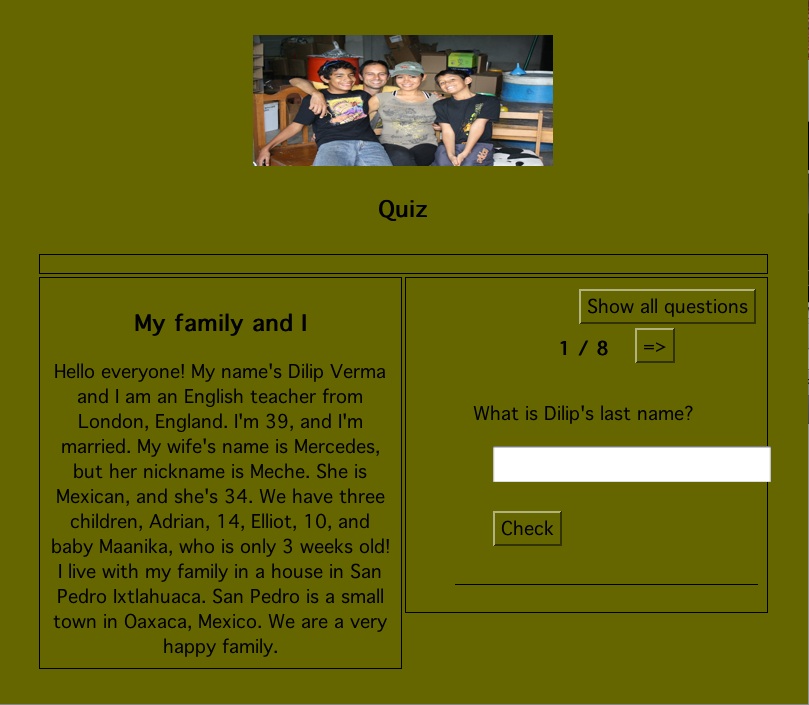
A hotpotato reading comprehension exercise

Hello again.

This past week I have been working away on my Moodle course, but it has been slow, as I have had a few problems. First, the text editors in Moodle are not WYSIWYG in the Safari browser. I wasted a couple of days trying to learn how to program using HTML commands so that I could get the text and images the way I wanted. It wasn’t until I went to an Internet cafe and used a PC that I saw that things are much easier when the text editor appears. This was a little frustrating, but I guess this is one occasion when the Mac doesn’t work as well as PCs. The Moodle platform is pretty intuitive, but I still haven’t figured how all of the activities work. I am working by trial and error, but it is taking me longer than I had expected to develop my course.

I downloaded Hotpotatoes and have developed activities for the Moodle platform in each of the options, quizzes, matching exercises, crosswords etc. It took quite a while to do, but what took longer was figuring how to get the activities onto the Moodle platform. I have worked out that you can do it by creating SCORM zip files and uploading them. The only problem is that again the Mac Version of Hotpotatoes doesn’t work properly. The SCORM files either don’t save or are not recognized by the Moodle platform and so can’t be opened. AAARGH!!! I also found that even on a PC I couldn’t get the Crossword built inHotpotatoes to work properly in Moodle as a SCORM file, which meant that I had to upload it as a web page. That isn’t a problem in itself, but obviously the platform doesn’t record the results of the exercise. I guess this is a bug in Hotpotatoes. I can’t get the “Masher” in Hotpotatoes to work either. Whenever I create a mashed exercise the index is always blank. Oh well….

My next mission is to upload a listening activity, with questions to answer. So far the only way I can see how to do it is to insert the WAV file into the Hotpotato quiz using HTML code (it doesn’t seem to work with MP3 files) and then upload the exercise as a SCORM file. I have tried all the options in Moodle itself like “lessons” and “quizzes”, but nothing has worked yet.

Well that is enough complaining for one post! I am sure I will figure it all out soon.

Spam prevention powered by Akismet