Categories
Uncategorized

LMS and CMS and security features….

This week we have discussing the choice of different LMS (Learning Management Systems) in different educational scenarios.

I spent time looking up what to look for in a LMS in general and learned in great details about the amount of time it would actually take to make a LMS choice for any organization. The rubrics we worked on together, summarized what priorities different educational organizational may have when choosing a LMS, the cost of a LMS and most importantly – all the LMS options.

Last night, my husband wanted me to look over the brochure that he had prepared for his presentation today for work. It was brilliant – of course- full of graphs, images, statistics and a strong rationale why his company should win “the” contract.

Of course, he had done it in word and when I asked him about a possible “presentation” her mentioned that he would “blow up the word document” on the Interactive whiteboard. I showed him prezi and he is now sold on the “advances in Education”.

Earlier in the evening he was telling me about the advances of his Company’s Operating/Management System – of which he did not know the name.” It is the best – because it is the “most secure”” He did not the name, he knows it is not user friendly, that you have to bring home specific hardware in order to work from home, that it is very expensive, that it has a lot of lists (good for data entry) and is reliable (he can usually trust it and find things) – but it is secure.

However, when he saved his most valuable presentation that could be seen as “gold” from his competitors, he saved his presentation in word file and he started – but never finished – an amazing presentation in prezi. He texted his buddies to make sure that they were “ready” for the big day and did use his LMS to send e-mails. But other than e-mails, some of the most important “artifacts” to the company’s success – were “open” and available to the public.  All communication is “open” and all presentations are “open” but all data is secure.

I would think that the company would look for other LMS/CMS options that offer more choices if they want all of their content secure.

It makes me really think about google and gmail and google.docs and how it could be considered a LMS because of all its functions and tools – and is it safe? It is very reliable, and much more user friendly – but is it safe? Is anything really “safe”? I don’t know if I would prioritize a LMS for security, if it doesn’t offer all the tools and functions I need. Especially, if I am using so many alternative methods to work in a “collaborative system”.

It seems to me that LMS and CMS offer platforms from which the members of the organization work from. But we all need to be aware of the “real world” and take basic security measures in order to protect our identity and our intellectual property.

Verena:)


Categories
Uncategorized

My son knows how to use a SMARTboard

I am so excited I had to write about my son’s teacher and lesson at school yesterday.

I have two children in school – my daughter is in grade 2 and my son in in kindergarten. When we lived in BC, my daughter did not have access to a SAMRTboard, and there was one SMARTboard in the library.

While I started my MET program while living in BC, I struggled with the lack of technology integration in the schools. I approached my daughter’s kindergarten teacher and together we learned how to make a classroom blog with the intention of helping parents practice French with their children at home . The blog continues today:

http://viaud.edublogs.org/

I learned that the integration of technology takes a lot of work.

We moved to Calgary – the land of SMARTboards. My son has a SMARTboard in his classroom and my daughter has access to one.

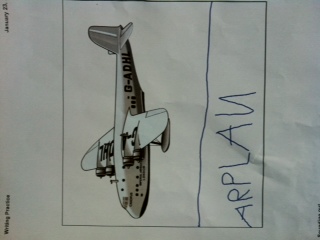
Yesterday, my son came home with a printout from the SMARTboard. The teacher has asked each student to come up to the board and practice writing by “sounding out”. He was so proud of himself – and could spell a pile of new words based on what he “saw” and “heard” through his peers.

My son’s SMARTboard print out:Airplane image


Although SMARTboards are designed for f2f learning environments, they can also be used with online classes using the Notebook software and SMARTboard bridgit software.

The creation of blogs and a SMARTboard activity demonstrate that the blended approach to learning is the way to go! Integrating technology is time consuming…..but worth it! Thinking ahead about WHY each technology activity is chosen is imperative to meeting the needs of all learners – online or f2f.

Verena:)

Categories
Uncategorized

Great Funny Teacher videos…

Middle Ages Technology:

New comedy series on teachers:

Verena:)

Categories
Uncategorized

SOPA and the Educator

So, “How could SOPA affect my efforts as an Educator?”

Yesterday, January 18, 2012, 700 websites worldwide blacked out for the day in protest over possible SOPA (Stop Online Piracy Act) legislation in the United States.

SOPA is being debated in the United States as possible legislation to restrict the use of intellectual property on the Internet. Restricing my access as a Canadian citizen to web tools that I need and use in my classroom. I feel that it would sabotage the way I teach -and limit my professional growth as a teacher if passed.

I was writing about SOPA in teh ETEC565A class discussion, but thought I would  add it to this week’s blog as well.

This is a video about why people everywhere could be affected by SOPA legislation:

SOPA concerns me – as a Canadian, because I use the Internet, of my because of my limited educational budget and because of a possible stagnation in educational progress. I need to use “free” web 2.0 tools from the Internet as resources in my online classes. We have discussed how long it would take for a teacher  to create a moodle course in our weekly discussion. If teacher was expected to pay for resources, their course would lose that “interactive and engaging edge”. Their course would not progress if he was restricted in the tools they could use.

The time that a teacher would have to take to create his course would also be affected as well. Lawyers would have to be used to consult on intellectual property questions to ensure that a teacher was not including anything illegal in their online content. It is time consuming enough to create a new course – imagine having to create a course, then check everything with a lawyer before offering your class.

SOPA would also affect the students. If a teacher created project based activities….then many of the links and resources that the students use as examples and turn to for content would also have to be screened by a lawyer

. Yesterday the tech community spoke to try and suggest that alternatives forms of “legislation” to be created for intellectual property. As a teacher, I am not looking for legislation that could possible push educational change backwards. Instead, intellectual property piracy needs to be addressed in a different matter – How? I don’t know….

.. Verena:)

Categories
Uncategorized

Deleting Blog

Hello!

Well – I have learned….when playing with your blog settings try not to delete  your account….

It takes a long time to get things up and running again…and you lose some refelctive posts!

Verena:)

Spam prevention powered by Akismet