Categories
Author: verenanz
Categories
Finishing Up….
As I spend the week finishing up my Moodle Course called “Teaching ESL Online” I just wanted to add a quick post about a new blog that I created. Last week I made it to my first Parent Advisory Committe meeting at my son’s school. He goes to a Spanish-English Bilingual school and they were debating the scholastic book fair. The “problem” is that in Canada, we don’t have access to a lot of Spanish books and Scholastic has some kind of stipulation about what Spanish books we are allowed to buy and how many book fairs we are allowed to operate for fundraising.
I asked about e-books – and the possibility of using them in the classroom and at home instead.
In a recent chat with Alan November, he suggested that in encouraging teachers to use technology in their classes, you have to prove to them that there is a need and that it saves time.
So, I suggested a bilingual reading program (full of eBooks) that I am working on with my son using his iPad called: http://www.footsteps2brilliance.org/ as well as considering focusing on buying e-books for the classroom. Of course that would mean buying some kind of tablet (iPad or android), but then the students would have unlimited access in the classroom to Spanish books and could possibly have access at home.
For the first time in a long time- people listened…I think because they were ready to listen and because rather than “proposing a “Verena’s new idea”, I was proposing a solution to a problem.
After the meeting a few parents came up to ask me about e-books or how to find Spanish resources online. I gave them a few ideas, then I asked them if it woudl be easier if they would like me to e-mail them some links…
Instead of e-mailing links….I created a secondlangauge parent blog, that I hope will be used as a resource and collboration tool for the parents.
We’ll see where this goes….but it nice to be “asked” to do something technological….and now I ahve the “blogging” skills to meet those needs….
Check out: http://secondlanguageparent.wordpress.com/
Verena:)
Categories
Blogging Reflections
After spending the last week chatting about blogging, I still support blogging. I think that blogging should be offered over a continuum like the one presented by Kim Cofino in google.docs:
I had a alot of fun investigating the privacy and security features of Live Journal this week. While I am quite comfortable with blogging in general, I did not feel comfortable offering LJ as a blogging option to my students. While their security features are solid once you are “inside” LJ, their website home page is not ok for K-12 viewers> the topics were controversial and there is no way that as a teacher I could monitor them all.
The best thing about this week was learning that I am really ok with blogging in the classroom, I just believe that it is a skill that needs to be developed across the whole school career (and beyond).
I think that we missed out on discussing this week were the other blogs that could be used, that offer security and “acceptable” home pages to k-12 students. Some of these include:
blogger
Edublogs
wordpress
weebly
bloglines
edmodo
ning
And those that we don’t alwasy think of as blogs:
google.docs
wikispaces
Anyway..on that note, I will leave the link to my first blog ever, an ode to Alan November
Verena:)
References:
http://techitupwebtools.pbworks.com/w/page/20240031/FrontPage
Categories
How to Be a 21st Century Teacher
I wrote this as a proposal for a chapter in an online book being created for the Classroom 2.0 – 5 Year Anniversary. It talks about where I have come as a teacher, where I see myself today, and the direction I would like to follow.
Teaching without Walls – How to Become a 21st Century Teacher
By: Verena Roberts
I stared at the laptop in a cubicle in front of me and looked into the eyes of my new Vice-Principal who said, “This is your classroom”. I did not know how to admit that I didn’t even know how to turn the computer on or what he was talking about. This wasn’t what I was “used to”. This is the story about how anyone can become a 21st century teacher.
My technology career began as the k-3 part-time online teacher for @KOOL – Kamloops Open and Online Learning based out of Kamloops, BC Canada. I had applied for any part -time positions in the hopes of creating a balance of work and family. I had recently completed an online based Masters Degree in Leadership and Training, and I had the qualifications for the job. The first step is accepting that you are on a difficult journey. Learning something new is never easy and in Educational technology, you learn something new everyday. Like in any journey, you need perseverance to overcome challenges. It is really difficult and frustrating at times, and you need to know that there will be ups and downs, but you have to keep going.
Step 2 to learning and teaching in the 21st century is to ask questions and search for an answer yourself. I asked my Vice-principal to help me “set-up” and I began my lists of questions about what it would mean work online. Leave your ego at the door. Technology is a humbling experience and you are not going to learn if you do not accept that you don’t know everything already.
In that first year, I learned how to “relearn”. Step 3 is accepting that they way “we” learned as kids, is not the way we will teach our students. I tried to scan my resources that I had used as a bricks and mortar teacher to create documents online for my students. I asked them to print off the copies and then come in and visit me weekly with the written work. I quickly learned that “f2f” content is not the way to engage students online. In fact they could find better and more interesting worksheets on the Internet already. As a 21st century teacher, I had to figure out how to engage, encourage and motivate students using technology as a tool. I had to become a facilitator to guide the students in their personalized learning, not push worksheets. I also had to learn how to “meet” virtually, using skype and consistently facilitate their learning by offering my time and developing a learning relationship.
I took a course through RRU on “Teaching” Online learners to learn about different ways that I could teach/facilitate online. This was my first introduction to wikis and some basic Web 2.0 tools. As a Teacher On Call with @KOOL, I was able to see how different teachers offered their courses, the importance of building a learning community and giving timely feedback. Step 4 is ensuring you develop learning relationships with your students. This includes building trust by creating Digital Forum Cafes, defining Digital Citizenship, setting clear expectations and guidelines and demonstrating respectful behaviour to your students. Offer synchronous and asynchronous times to meet and opportunities to ask for clarification. Use your LMS (Learning Management System) to create a positive learning environment for your students where they feel safe and ready to learn.
After taking an online course, Technology Conferences offered me the opportunities to learn more about what people are really thinking. Step 5 is use problem solving skills to get what you need. I went to every conference sponsored by my school district. Then I looked for grants and volunteered to ensure that the “Digital Divide” did not influence my learning. I also turned to the Internet to learn. My first step was completing a “Web 2.0 Tools for Teachers” Checklist. This encouraged me to try out new ideas in my own time and my own space. I started searching the Internet for interesting blogs and research. I began thinking about who I wanted to connect with and why. Step 6 is to try and surround yourself with like minded-people. When you are learning how to teach differently you need to be around positive people with great ideas. Conferences offer you the face to face stimulation and the Internet offers unlimited ways to connect with like-minded people.
Since I was not offered a contract with my school district, I volunteered as a technology parent at my children’s school. Step 7 is look for opportunities where there is need. With classroom teachers, I created classroom blogs (some still in use today), assembly presentations and SMARTboard units. I also presented at a local university teacher training program on how to integrate technology into a classroom. What I learned was that teachers have two attitudes about technology: the “why technology should not be used” in a classroom teachers or those teachers that see a bigger picture and try to get there in their own way . After supporting too many “why technology should not be used” teachers, who had a variety of different rationale, I knew that I wanted more educational opportunity for my children. After dealing with technological frustration firsthand, I decided to complete a second Masters, this time in Educational Technology, online, through UBC. I thought that by going back to school, I would be able to more effectively meet the needs of my students when I was able to get a job in the classroom again.
I had moved from Kamloops and left saying, “If you ever have a job for me where I can work from home – give me a shout!” Just over a year ago, I received a phone call from my former principal to come and help him create a new way to “do” online learning. Dean Coder and Dr. Terry Sullivan from SD73 Kamloops/Thompson had been granted permission by the Ministry of Education in British Columbia to develop a business company that could offer accredited online courses to international students. I joined the team to help with administration. I am now the CEO- Chief Education Officer of www.GlobalEd.ca and I am a 21st Century Teacher. Step 8 is to be fearless and follow the path that is less travelled. In the last year, Dean and I have created a “new” vision in online learning. Based on an teaching model, created by Corrie Macdonald, we have brought together a wide variety of online learning resources to create a cutting edge program that meets and exceeds anything that I have ever taught in any classroom. We follow the principles that there are no walls to learning and that we learn with integrity.
Step 9 is to share what you are learned. Collaborative learning leads to bigger and better ideas.
How to Become a 21st Century Teacher
Step 1: Accepting that you are on a Difficult Journey – It’s not going to be easy!
Step 2: Ask questions and search for an answer yourself. Leave your ego at the door.
Step 3: We need to relearn “how to learn”.
Step 4: Develop learning relationships with your students
Step 5: Use problem solving skills to get what you need.
Step 6: Surround yourself with like minded-people
Step 7: Look for opportunities where there is a need.
Step 8: Follow the path less traveled
Step 9: Share what you have learned
Based on all the steps to learning using technology we have created our own – Blended model which I would like to share. These are the primary differences between a “Traditional Online Learning” Environment (TOL) and what we call “Technology Assisted Learning” Environment (TAL) which can be used in an “online” or bricks and classrooms as a Blended Learning Environment.
| TOL
Traditional Online Learning |
TAL
Technology Assisted Blended Learning: |
|
○ Flipped Classroom
○ Creation of Online Community
○ Project and Inquiry Based Learning
○ Constructivist Learning
○ Extensive Teacher Communication
○ Synchronous |
Any www.GlobalEd.ca “course” could be facilitated in the following way:
- We train our BC Certified teachers in a “GlobalEd” teacher training course facilitated by Dr.Betty Boult PhD which was created in collaboration with our teachers. We also encourage our teachers to learn about technology by participating and “experiencing” the learning themselves. For example, teachers moderated and participated in the the Classroom 2.0 Conference to learn about how to use Elluminate videoconferencing tools. We train our teachers like we want the students to learn.
- The students are registered in groups of synchronized cohorts with clear beginning and end dates.
- We train and meet with the “Home School- Teaching Assistants” to ensure that the program is clarified. One of the most important parts of the model is ensuring that the TA clearly understands how the technology works, where to find the assignments and announcements and how to connect with the teacher. The TA’s are silent heroes who tirelessly work to help meet the needs of their students in their home schools. The TA’s are part of the learning community and we build learning relationships.
- The course is created in Moodle using Open Source software to ensure that the teacher can edit according to student and course needs. Using open source LMS also gives the teacher an opportunity to share teaching ideas and strategies online in a global environment. The Moodle collective offers technological support and is another key factor in the learning community.
- The Course focuses on the development of a positive online environment where we all learn from each other (This would include forums and “Digital Cafes” for students, open communication between TA’s and teachers and opportunities to find solutions to technology problems within the Moodle community. The administrators also mentor all the teachers and provide support through a staff Learning Community wiki )
- Teachers and students are encouraged to communicate using Moodle communication tools and/or www.Edmodo.com. Students, parents, teachers and administrators are all members of the Moodle and/or Edmodo online communication system to ensure that all assignments, announcements and activities are clearly outlined.
- The course is designed using Problem Based Activities building on constructivist theories. The activities are designed to use Web 2.0 tools to complete the activity (usually one web 2.0 tool a week) in order to ensure that the students receive a blend of course topics and technology skills. The BC curriculum expectations are met and exceeded.
- The teachers create weekly videos to provide direction and content that are embedded into the course or on www.Edmodo.com . We attempt to follow the recent “Flipped Classroom” phenomenon by offering the content of the course at the beginning of each week. The common examples are videos – made with http://www.techsmith.com/jing.html “jing” software and using audacity http://audacity.sourceforge.net/ for podcasts and www.audioboo.com
- The teachers “meet” with the students in small groups using Elluminate videoconferencing tools to engage in face to face interactive activities with the teacher.
- The teachers respond to e-mails, or encourage “FAQ” forums to ensure that all questions are answered in a timely manner.
- The teacher ensures two day feedback to ensure student motivation and satisfaction.
- Students are encouraged to “reflect” upon their learning in e-portfolios and blogs embedded into their courses. The e-portfolios can be taken with them at the end of the course.
After spending the last year forging ahead on the “new” version of blended learning – I would say the final step to learning how to become a 21st teacher, is to collaborate, build relationships, to be open and forthcoming about your ideas and teach with integrity. I have been honoured to speak with people around the world about Educational Technology and this model would never have been created without the time and energy of a huge Global Village. Learning and Teaching today is not about “closing the door” to your classroom, it is about opening the doors and teaching without walls. I look forward to learning from you.
People who contributed to this development of this model and I would like to thank, include:
Jay, Mackenzie, Carson and Paxton Roberts
Dean Coder
Lorin Toews
Terry Sullivan
Gloria Viaud
Corrie Macdonald
Betty Boult
Tracy Poelzer
Sunddip Panesar
Shannon Poulsen
Jamie Wright
Alan November
C. Ryan Hoskins
Bev Hoskins
Chris Hoskins
Major influences:
www.GlobalEd.ca Teachers
MET – UBC
Nik Peachy
Classroom 2.0
Alan November
Categories
Online Learning – Reflections
For the last few weeks we have been focusing on online learning and how to develop and design courses for online learners. I am extremely lucky to work with www.GlobalEd.ca because we are trying to meet some of the “learning” needs that I have read about by Anderson, Gibbs and others.
Really – what makes our online program different from anything I have ever experienced before – is that we we think outside the box. We are not contained as teachers or administrators…we are encouraged to push boundaries and create new opportunities.
The reality of the situation is….it means a lot of work for the teachers and administrators. I often wonder why there has not been a huge shift in education towards adopting technological options. I think the answer lies in the fear of change (why change something that works?) and the work involved. If something is easy…it is often not truly “worth it”.
Trying to “do things differently” is one of the hardest professional challenges I have ever faced. When youa re used to being contained, have limited expectations, are restricted by budgets, culture, administration or whatever…it is easy to dream about the grass that is always greener…
When you are the one who is asked to “do” , “create”, “build” while being accountable to your learners- and curriculum guidelines, it is harder than I ever thought. “No limits” is one of the biggest challenges an educator could ever face.
I am lucky to work in a job that makes me think and challenges me so much….but the cost is family time, work/life balance and money. I still have to pay the bills – and stop dreaming about all the ways I can engage and create meaningful learning environments.
I am not scared of change – I love to change everything around me…I never like teaching the same way…so that has helped push me into the “work” I do now….But the journey of fostering a new way of “thinking” in Education…is not easy. I often compare it to being an explorer – I hear myself telling people that, “there is something out there! New and exciting! We just have to figure out how to get there!!!”
So as a result…other than creating my Moodle course which is a specific outcome based assesment…my learning in my course over the last 3 weeks has been quite reflective of my “online” journey…and what I am “doing” to try and promote educational epiphanies for all….
Verena:)
Categories
Classroom Redefinition
In the usual “Real case scenario” style – I experienced educational tech integration issues this week as well. I have been asked to help an English 11 student create a “project” online to finish up the course. He is a hockey player and moved from SK to AB. So I asked him to do a novel study- The Kite Runner – and instead of following usual “novel study format”, I asked him to create a blog (weekly posts instead of a reflective journal, 3 main mini projects (on pages).
I also encouraged him to look at my blog for support – so you know who you are…and I am VERY impressed with your perseverance if you are reading this! Keep up the good work! Remember that we are all learners, so I am learning from you too!
Last night he e-mailed me because his attempts at classroom blogging were “overwhelming”. His e-mail said, “I’m so sorry – but I can’t do what you want me to do”. (What a conscientious student) I asked if we could skype – I and went through his webpage dashboard using screen share on skype – and we learned how to make a post. He had already logged in….but he found it confusing and did not know where to start. He said, “I’m sorry, I must be the only one who feels this way, but I was just overwhelmed- it is actually very easy when you explain it in chunks”.
So- from Anderson’s POV, the interactions were extremely important and varied between teacher student, student/student (he asked his fellow hockey teammates and no one knew how to help him) and student- content. Sometimes he just needed the content, sometimes he just needed a teacher. Once I explained that the only expectation was to write a post after each chapter…then in a week we can see how he has progressed, he visibly calmed down. While I explained what the little icons at the top of the page could add images, font etc…you could see him tense up again….I imagine that after the first or second post he will start to “expand” his horizons….but that’s the way it works with new technology.
I found this article and that’s what inspired me to write another post this week. In this case, the teacher refers to using technology in the classroom as Classroom Redefinition. You can’t “force” technology, you have to try, reflect, then try again….and give it time…oh- and chunk it. Anyway…I digress…here’s the link:
Verena:)
Categories
Possible Moodle Communication Tools
I have been experimenting with different communication tools to try and figure out the best way to create a “podcast” like component to my Moodle course. My course is on “Teaching ESL online” and part of the learning is about communicating with the students.
Right now, we offer a licensed ESL Moodle course that we have no ability or permission to edit. As such, we have huge problems communicating with students. On a basic level of communication, we are using www.edmodo.com as a “social networking and posting of information tool” every week for each course.We also meet with the students every week “f2f” by videoconferencing. I am pretty familiar with Blackboard, Elluminate, skype and now adobe connect. These platforms let the teacher really engage with the students and get to know them better.
Tonight I tried out Dimdim (no longer available) , Nanogong and Wimba. Nanogong (MoodleGong) is extremely slow, but great if it will work. I may try and install it into my course for fun. When I tried to click on different people’s responses the screen froze, a lot, which limited my experiences. It was not very user friendly. Wimba was terrific – clear and very easy to use. I really liked it, but I believe that it costs money – and my company doesn’t have enough to spend on audio services. If I could prove how wonderful it was, maybe they would reconsider?
My other option are podcasts using Web 2.0 tools. I personally love audioboo because it is so easy to use. I have not used it in a course yet, so the students would have to send me their links. I guess I am looking for an option that keeps everything in one place.
Lots more to investigate….but that is what I have discovered so far!
Verena:)
Categories
LMS and CMS and security features….
This week we have discussing the choice of different LMS (Learning Management Systems) in different educational scenarios.
I spent time looking up what to look for in a LMS in general and learned in great details about the amount of time it would actually take to make a LMS choice for any organization. The rubrics we worked on together, summarized what priorities different educational organizational may have when choosing a LMS, the cost of a LMS and most importantly – all the LMS options.
Last night, my husband wanted me to look over the brochure that he had prepared for his presentation today for work. It was brilliant – of course- full of graphs, images, statistics and a strong rationale why his company should win “the” contract.
Of course, he had done it in word and when I asked him about a possible “presentation” her mentioned that he would “blow up the word document” on the Interactive whiteboard. I showed him prezi and he is now sold on the “advances in Education”.
Earlier in the evening he was telling me about the advances of his Company’s Operating/Management System – of which he did not know the name.” It is the best – because it is the “most secure”” He did not the name, he knows it is not user friendly, that you have to bring home specific hardware in order to work from home, that it is very expensive, that it has a lot of lists (good for data entry) and is reliable (he can usually trust it and find things) – but it is secure.
However, when he saved his most valuable presentation that could be seen as “gold” from his competitors, he saved his presentation in word file and he started – but never finished – an amazing presentation in prezi. He texted his buddies to make sure that they were “ready” for the big day and did use his LMS to send e-mails. But other than e-mails, some of the most important “artifacts” to the company’s success – were “open” and available to the public. All communication is “open” and all presentations are “open” but all data is secure.
I would think that the company would look for other LMS/CMS options that offer more choices if they want all of their content secure.
It makes me really think about google and gmail and google.docs and how it could be considered a LMS because of all its functions and tools – and is it safe? It is very reliable, and much more user friendly – but is it safe? Is anything really “safe”? I don’t know if I would prioritize a LMS for security, if it doesn’t offer all the tools and functions I need. Especially, if I am using so many alternative methods to work in a “collaborative system”.
It seems to me that LMS and CMS offer platforms from which the members of the organization work from. But we all need to be aware of the “real world” and take basic security measures in order to protect our identity and our intellectual property.
Verena:)
I am so excited I had to write about my son’s teacher and lesson at school yesterday.
I have two children in school – my daughter is in grade 2 and my son in in kindergarten. When we lived in BC, my daughter did not have access to a SAMRTboard, and there was one SMARTboard in the library.
While I started my MET program while living in BC, I struggled with the lack of technology integration in the schools. I approached my daughter’s kindergarten teacher and together we learned how to make a classroom blog with the intention of helping parents practice French with their children at home . The blog continues today:
I learned that the integration of technology takes a lot of work.
We moved to Calgary – the land of SMARTboards. My son has a SMARTboard in his classroom and my daughter has access to one.
Yesterday, my son came home with a printout from the SMARTboard. The teacher has asked each student to come up to the board and practice writing by “sounding out”. He was so proud of himself – and could spell a pile of new words based on what he “saw” and “heard” through his peers.
My son’s SMARTboard print out: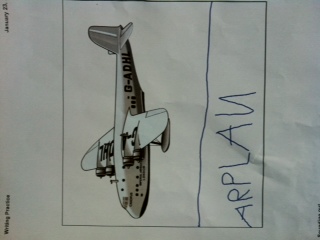
Although SMARTboards are designed for f2f learning environments, they can also be used with online classes using the Notebook software and SMARTboard bridgit software.
The creation of blogs and a SMARTboard activity demonstrate that the blended approach to learning is the way to go! Integrating technology is time consuming…..but worth it! Thinking ahead about WHY each technology activity is chosen is imperative to meeting the needs of all learners – online or f2f.
Verena:)
Categories
Great Funny Teacher videos…
Middle Ages Technology:
New comedy series on teachers:
Verena:)