Categories
Assignment Reflection

Moodling

This is not the first time I’ve created a course in an LMS. As part of my job, I do all this nitty-gritty for our new online courses in WebCT. Whilst taking this course, I completed one on the “Greek and Latin Roots of English” and am starting on a course on “Women as Visual Artists”. Thankfully, the content is the responsibility of experts in the respective fields. Several MET courses ago, I also collaborated on the creation of a course module in WebCT Vista.

So, while this wasn’t as much of a “how-to” learning experience for me, it gave me the opportunity to compare the platforms. In most ways, Moodle is more advanced and user friendly than WebCT (Vista and earlier). However, I found the lack of control over organizational pages, the hierarchical “breadcrumb” trail (why, oh why does it not track where you’ve been? back-clicking from a forum to a list of all fora is counter intuitive and less than useful), discussion forum layout, and vague explanations of tools and terminology to be frustrating.

My personal preference would be not to choose Moodle as an LMS platform if the resources were available for another, more polished and logical LMS. Nonetheless, I do know now that I’m just as capable of creating a course in Moodle as in any other LMS. I’d like to spend some decent sandbox time in D2L, Blackboard 9 and others now.

Incidentally, today I came across (via Twitter) a course delivered entirely using Wetpaint. Have a look at Alec Couros’ EDST 499K web site at http://edst499k.wetpaint.com/. I’m impressed.

David

Categories
Assignment Reflection

Multi/Media Inventory

In Module 5 of ETEC 565 (Spring 2009), the terms media and multimedia are used almost interchangeably, adding an element of ambiguity to what we choose to include in our “Multimedia Inventory”. Richard Mayer (2001) defines multimedia as “the presentation of material using both words and pictures” (p. 1). Pictures may be still or moving, and words may be print or audio. Kingsley & Boone (2008) define multimedia as “any system that combines two or multimedia-media-inventorymore media into a single product or presentation, such as a software program or a Web page.” Clearly, multimedia artefacts are those that combine multiple media objects into a single entity. As can be seen in my inventory (attached in Word 2007 and PDF formats), some multimedia entities can even combine other multimedia entities. I have chosen to separate those items that are simply media from those that are truly multimedia.

With a couple of days left to polish the mock Moodle course I’m creating for Lay Readers, I may still add some more media and multimedia files. The inventory is up-to-date as of today. I have to admit that I was surprised at just how many files I have included in the course, despite having completed only a small portion of the overall course.

At first blush, I have found that the main benefit of this inventory exercise has been to force myself to be meticulous about recording my (multi)media object sources. I have already begun to apply this exercise to my professional practice.

Multi/Media Inventory (PDF)

Multi/Media Inventory (Word 2007)

References

Kingsley, K., & Boone, R. (2008, December 1). Effects of Multimedia Software on Achievement of Middle School Students in an American History Class. Journal of Research on Technology in Education, 41(2), 203-221. (ERIC Document Reproduction Service No. EJ826093) Retrieved July 26, 2009, from ERIC database.

Mayer, R (2001) Multimedia Learning, 9th ed. Cambridge, UK: Cambridge University Press.

Categories
Reflection

Assignment upload in Moodle – Rationale

In this unit on assessment tools, we were asked to create a “complete quiz or exam” in the LMS we have chosen for our project. Having finished this, I’m really not convinced that it is a tool I would use extensively in an online course for Anglican Lay Readers. Such an online course would be better served through the creation of artefacts such as written, audio- and video-recorded sermons (much the way ETEC 565 has been designed).

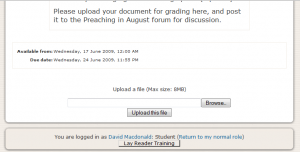
The assessment activity I’ve chosen to highlight here is an assignment upload activity in which students are asked to apply the knowledge they have learned from the preceding portion of their content module and the related discussion forum, compile this application of knowledge into a report and upload it for assessment.

Assignment Upload Area in Moodle

Students are also expected to post their assignment in the following discussion forum for sharing and discussion as members of a community of practice (Lave & Wenger, 1991). This assignment will be the first of a series of assignments on preaching, each one building on the previous: first, students describe how they would go about researching and preparing for a sermon. In the next assignment, they’ll be asked to review readings for a specific Sunday and prepare a short (5 minute) written sermon. After revision based on instructor and peer feedback, students will be asked to make an audio recording of themselves presenting the sermon, followed by a video recording of the sermon being presented in church, preferably to a real congregation.

Such an ongoing series of assignments meets all of the conditions set out by Gibbs and Simpson (2004). By distributing assessed assignments, study time does not become concentrated in the period right before a test, exam or major assignment (Conditions 1, 2). These assignments prepare students for their duties through authentic activities (Condition 3). Lay Readers’ duties are carried out in a community of peers, so frequent written and conversational feedback from both the instructor and classmates is extremely relevant to the activity (Conditions 4, 5, 6, 7, 8). By situating feedback in a discussion forum, students can’t help but receive it and act on it in preparation of the following assignment (Conditions 9, 10).

Is it the assignment tool in Moodle that meets the conditions outlined by Gibbs and Simpson (2004)? No. The tool is simply that – a tool. It is the assignment/assessment design that meets these condition. To be quite frank, an LMS isn’t even truly necessary to accomplish effective assessment. A flexible blog platform or wiki could facilitate this just as easily. What the LMS does provide is a way of recording, tracking and reporting student grades. But what represents learning? A grade or the series of artefacts? In my opinion, it is the series of artefacts showing growth in understanding and ability that is evidence of learning. A grade is no more than a temporally-dependent judgement of a student’s performance level that says nothing about his or her learning.

References

Gibbs, G. & Simpson, C. (2004) Conditions Under Which Assessment Supports Students’ Learning. Learning and Teaching in Higher Education, 1, 3-31.

Lave, J. & Wenger, E. (1991) Situated Learning: Legitimate peripheral participation. Cambridge: University of Cambridge Press.

Categories
Reflection

Setting up a Moodle Quiz…ugh

My colleague, John Koetsier, recently described setting up a quiz in Moodle as “trained monkey work”…very apt, except that the trained monkeys would probably want to pawn it off to a bunch of macaques.

Setting up my quiz in Moodle has been the most tedious task I’ve undertaken for ETEC 565 thus far, and one I don’t relish doing again (although I’ve got one to set up in WebCT CE 4.1 at work next week). It was probably a mistake on my part to start off with the embedded question (Cloze) style assessment. My first thought was that a fill-in-the blanks kind of question would be useful, but the fact that such questions require special coding in Moodle and that the related Moodle Help documentation is rather skimpy made this question very frustrating to set up.

One of our requirements was to embed an image in at least one question. My inclination was to do this in a matching-type question – provide an image and match terminology or a description. This would add variety to the quiz and take into account different learning styles, although accessibility to visually-impaired students becomes an issue. Well, first of all, I couldn’t embed the images into the question fields – I had to put them into the question description area. Alignment wasn’t working, so I set up a table and labelled things to coordinate with the question fields. Then, in preview mode, the table showed up, but without the images. As it turned out, I had to fiddle with the html created by Moodle, linking in the resources stored by Moodle. I shouldn’t have to do this. Many instructors won’t know how to fix the html and will end up complaining to the trained monkeys about outsourcing to the macaques.

Probably the biggest part of the learning curve for me was having to detail everything, anticipating how I would respond to student answers, how students might answer correctly and how they might answer incorrectly. When I’m grading a paper-based test, I’ve got all those correct/incorrect algorithms stored in my subconscious, ready to interpret and assess a student’s answer. On occasion, I’ll get a correct answer that I hadn’t anticipated – an online, automated quiz isn’t necessarily prepared for this. Fortunately, there is the opportunity in Moodle (not in WebCT CE 4.1) to review and override automated grades. In my view, though, reviewing and overriding marks is probably more work than manual grading (on paper OR online).

David

Categories
Reflection

Communication|noitacinummoC

I’m not entirely certain what to say here – I’ve used a variety of communication tools in personal, educational and professional contexts for a number of years now, both in and external to LMSs. Setting up a discussion forum in Moodle really wasn’t very hard, once I’d figured out a purpose for it. I suppose I could have set up a Moodle chat, using the built-in tool, but I decided that my course content really demanded voice and video capabilities. I’ve used Skype, MSN Messenger, Adobe Connect, Wimba Classroom, Elluminate Live!, and probably others I really don’t remember any more…

Skype is a tool that I use regularly to teach cello to an adult student who lives more than a few hours from me. Except for one recent lesson that was interrupted by a power outage in my student’s community, Skype has worked fairly well. It’s drawbacks are the slight delay that makes it impossible to play duets online, and that only two users can broadcast video simultaneously. As soon as you have more than two participants, Skype goes to voice and text only.

For multiple participants, I’ve found Elluminate Live! to be a very robust and reliable meeting platform, with good management features. However, since I’m cheap and didn’t want to shell out for more than a free service, I briefly considered using Elluminate’s V-Room service, which is fairly limited in its capabilities and number of uses. It’s really more of a teaser to get you to subscribe to a paid service. Instead, I decided to try out Dimdim, which had been recommended on a couple of different occasions by various Ed Tech colleagues. Dimdim is an Indo-European opensource project, with a scaled-down free service with unlimited usage. Yes, it’s also a teaser, but more functional than V-Room. Despite the paid-subscription plans, the software is free to download and host on your own.

I did test Dimdim out with several family members. Setting up the meeting, logging in and managing participants was a breeze. I did have some technical difficulties, but they were specifically related to the setup of my computer and not to Dimdim itself. This is definitely a service I’d use again…

David

Categories
Assignment

Project Platform Proposal

Diocese of Algoma Lay Reader On-Line Training Supplement

DISCLAIMER:
This mock proposal is an educational exercise in partial fulfillment of the requirements for the course ETEC 565 at the University of British Columbia, and in no way reflects the opinions or decisions made at the Diocese of Algoma or Thorneloe University as a whole.

Institution/Context:
Diocese of Algoma, Anglican Church of Canada

Key decision makers:
The Rev. Dr. Stephen Andrews, Bishop-Elect; The Rev. Harry Huskins, Executive Archdeacon; Dr. David Gould, Warden of Lay Readers; The Rev. Heather Manuel, Program and Youth Consultant

Project description, rationale:
The Anglican Diocese of Algoma encompasses nearly 60 parishes in northern Ontario, stretching from west of Thunder Bay to Temiskaming and south to the Muskoka Highlands (Algoma, 2009): nearly 20 hours from end to end by road. Most parishes have at least one lay reader, even in smaller communities. Because the diocesan territory is so large, it is nearly impossible for new lay readers to pursue their suggested studies in anything but a vacuum. Participation in regular church liturgy is an essential component of the training process, but lay readers often find themselves acting in relative isolation, learning only how to work within a specific parish (therefore highly individualized and dependent upon the parish priest’s liturgical practice), and without the broader support of a community of lay readers. The addition of an online component, using Moodle hosted by Remote-Learning Canada, to lay reader training can help to establish a diocesan standard (and eventually a national standard) of core lay reader competencies and build community . This would allow lay readers who move from one community to another within their own diocese to be able to function in a new parish without retraining. Similarly, clergy who are welcoming and licensing trained lay readers into their parishes will have the confidence that they have been trained to a diocesan standard.

Method of evaluating different options:
In terms of pedagogy and features, it really doesn’t make a significant difference which Learning Management System (LMS) one chooses to deliver one’s educational content (Feldstein, 2009). The core differences between the features of different platforms are relatively minimal. Thus, in order to determine which LMS best ‘fits the bill’, we need to consider such aspects as: who the Students are; Ease of use; Cost; Teaching and learning; Interaction and interactivity; Organizational issues; Novelty; and Speed (Bates and Poole, 2003). Bates (2005) argues, though, that “[f]or distance and especially open learning, … access remains the most important decision-making variable…”

The students who will be using this curriculum are adult learners from a wide variety of socio-economic backgrounds across northern Ontario. Many have access to the internet either from home or from a public access point such as a library, municipal hall, school or church. Some students will have only dial-up access and a very small number will have no internet access (print materials need to be provided for these students). All students are members of an Anglican parish and are Lay Readers-in-Training with the recommendation and support of their clergy and parish communities. Most students, if not all, have at least some secondary education, yet only a few will have had any experience with distance or online learning. It is anticipated that some training will be necessary to bridge gaps in experience with on-line learning. There are many resources available through the moodle community to assist in this bridging.

Moodle is an ideal choice for these “digital immigrants” (Tapscott, 1999), as the platform design “[p]romotes a social constructionist pedagogy (collaboration, activities, critical reflection, etc)” (moodle.org, 2009). Moodle has been used in various dial-up situations and anecdotal reports are that it works fairly smoothly, even for “heavily interactive” courses (Hanson, 2008). Through the use of discussion fora, wikis to collaborate on homiletics or to share newly found resources, and online delivery of a training curriculum including photos, videos and self-testing options, Moodle is well-positioned to foster the strengthening of a wider community of lay readers in addition to facilitating the development of lay readers’ core competencies (still to be determined).

Moodle addresses ease-of-use issues by providing WYSIWYG editors for all text entry windows, operating similarly to standard word processing software. The use of icons and text makes navigation in Moodle relatively straightforward. The web-based nature of this platform also makes it easy to update in order to adapt to changing (albeit slowly in the Anglican church) needs of lay readers.

[Additionally, Moodle is the LMS of choice as it is the one platform, of two from which to choose in ETEC 565, with which I have had no prior experience. Otherwise, I might have considered a number of other open source solutions, including Drupal, Joomla, OLAT and Claroline, or a dynamic blog platform such as WordPress.]

Resources needed to deliver project
Licensing/Hosting Fees:

Cost is a significant factor in considering which LMS to choose. In a recent report published by Brandon Hall Research (2009), Richard Nantel notes that a one-year license for a locally installed, behind-the firewall commercial LMS implemented for 500 learners ranges from a low of $US 499 to $111,630. When considering a three-year license for a hosted LMS, the cost ranges from $9000 to $387,000. In contrast, Remote-Learner Canada, an official Moodle Partner, offers a shared hosting Moodle service for approximately 100 users for a one-year licensing fee of $970 (2009). Also notable is the 24/7 support Remote-Learner Canada offers for students and instructors with all hosting levels.

Human Resources:
This project will require a Diocesan oversight committee, consisting of the Bishop, the Warden of Lay Readers, the Executive Archdeacon, and the Program and Youth Consultant. The implementation of the project will require a Lay Reader Training Development Team, including two or more curriculum authors, one technical/instructional designer and course reviewers. The course reviewers shall be selected on an
ad hoc basis from the Diocese of Algoma’s clergy and Lay Readers. The author and designer fees will likely total $15,000-$20,000 for part-time work over a three-year development period (counting on the charitable attitudes of church members). Training materials developed by the Dioceses of Edmonton, Fredericton and Montreal could be available for adaptation to the online format.

Additionally, experienced Parochial Lay Readers, Diocesan Lay Readers and some clergy will act as online moderators, helping to guide new Lay Readers through the course materials, activities and discussions. Remuneration through honoraria may need to be established for the work of moderators.

Cost Summary:

Year 1 Year 2 Year 3 Years 4+
Hosting $1000 $1000 $1000 $1000
Development $5000-7000 $5000-7000 $5000-7000
Content Maintenance $500
Course Moderation $300 $300 $300
Total $6000-8000 $6300-$8300 $6300- $8300 $1800

Hardware:
As this project is planned for delivery via hosted Moodle, the Diocese of Algoma will not need to purchase any significant new hardware. There may be a need to purchase sundry hardware items such as digital video cameras, audio recording equipment and document scanners. However, it can be expected that such equipment may be available to borrow from parishioners across the diocese, and from Thorneloe University in Sudbury.

Software:
Moodle is available at no cost to download from moodle.org. However, with the contracting of a hosted Moodle solution, there is no need to download or install Moodle or any plug-ins. This can all be managed through Remote-Learner Canada. Anyone accessing the Moodle courses will require a standard browser such as Firefox, Safari or Internet Explorer. All content can be authored within Moodle using standard WYSIWYG editing tools.

Resources

Bates, A.W. (2005). Technology, E-Learning and Distance Education, 2nd ed. New York: Routledge.

Bates, A.W. and Poole, G. (2003). Effective Teaching with Technology in Higher Education. San Francisco: Jossey Bass.

Diocese of Algoma (2009, March 13). Parishes in the Diocese of Algoma. Retrieved 29 May 2009, from http://dioceseofalgoma.com/dioparishes/parishes.htm

Feldstein, M. (2009, March 5). Why All LMSs Are ‘Pretty Good/Bad’. Message posted to http://mfeldstein.com

Hanson, G. (2008, October 7). Re: UVic Moodle (BC Canada) to students in Etheopia – problems/issues? Message posted to http://moodle.org/mod/forum/discuss.php?d=107501 (requires “Guest” login).

moodle.org (2009, February 10). Features – Moodle Docs. Retrieved 5 June 2009, from http://docs.moodle.org/en/Features

Nantel, R.(2009, June 1). Price Ranges for Learning Management Systems in 2009. Message posted to http://brandon-hall.com/richardnantel/

Remote-Learner Canada. (2009). Moodle FAQ Canadian Prices 200209. Retrieved 2 June 2009, from http://www.oktech.ca/RL_Moodle_FAQ_Canadian%20Prices%200209.pdf

Tapscott, D. (1999) Growing up Digital: the rise of the net generation. New York: McGraw-Hill.
Categories
Reflection

fiddling in moodle

Well, I’ve just finished following the introductory moodle activity as outlined in the moodle toolkit wiki page. I’m accustomed to setting up pages and discussion forums in WebCT CE, which is fairly quick and simple. Setting up the discussion forum in moodle did take more work than I’m used to, but I think that’s partly because of what I’m used to and also because of the number of setting options available in moodle. (Flipping back and forth between the moodle course and the wiki to ensure I followed the instructions to the letter was also time consuming and likely more labour intensive than it would be to create a forum on my own.)

The one feature that was new to me, so far, was the grading option in the forum. This option does open up some possibilities for assessment, but I would want to really think about how and why I would grade individual posts, and whether all, some or even any posts ought to be graded in this way. Why isn’t there a checkbox option for students and faculty to indicate that they have read a posting? This could be a useful measuring tool too.

I also have some trepidation about the layout of the discussion forum, but I won’t really be able to judge its effectiveness until there are more postings to read. Things seem to be okay for two postings, but will moodle afford a good organization of several thousand messages?

I find it interesting too, that moodle automatically set up my course shell for a 10-week organization. Such defaults might restrict less adventurous (digitally) faculty who are trying to create online courses.

Cheers,
David

Spam prevention powered by Akismet