In Task 5, I used Twine to create a course simulation for an introductory accounting course geared towards business managers. These business managers, who can range in specializations from marketing to human resources, can benefit from having basic accounting knowledge to help analyze the financial performance of their divisions and make decisions surrounding staffing and resourcing.
Twine: Accounting Fundamentals for Business Managers (Zip file – Right-click to download)
Reflection:
This was my first time using Twine.
Inspired by the Temple of No, I wanted to create a multimodal simulation that would put learners in the role of a Chief Financial Officer at a fictional Vancouver start-up. The simulation would give learners a chance to make business decisions, integrating the knowledge they’ve obtained throughout an introductory accounting course and providing them with instant feedback on the effectiveness of their decisions.
I was inspired to create something that I could use outside of the context of this course and I wanted the simulation to be an effective way for learners to review key concepts from my course. A “Choose Your Own Adventure” simulation (created using Twine) was chosen as it provides instant feedback to students. Anderson (2008) highlights that “timely and detailed feedback provided … as near in time to the performance of an assessed behaviour, is the most effective in providing motivation, shaping behaviour, and developing mental constructs” (p. 352).
Strategy and Process
I began work on my Twine by brainstorming on a Microsoft Word document. In a bulleted list, I wrote out key business decisions that I wanted learners to make in my Twine and key concepts I wanted to review with learners. Every 4 to 5 points, I paused and attempted to separate my bulleted list into Twine “passages”.
I found this process to be much easier than building an outline by hand. I recalled in a previous task, that writing a 500-word story by hand brought about challenges when revising and replicating content. Using a word processor allowed me to easily copy and paste my comments to Twine and prevented numerous hand cramps. In addition, the word processor allowed me to remove, replace, and rearrange words, sentences, and paragraphs, even placing them into other documents (Bolter, 2001).
Once the planning stage was complete, I copied and pasted sections of my plan directly into Twine passages. I rearranged and moved passages and sentences where necessary. I reviewed the Twine cookbook, a help manual, to understand the various features available in Twine and learned how to integrate them into my passages. I challenged myself to integrate some of these features to provide a multimodal simulation, maximize the effectiveness of the simulation, and prevent boredom on the part of the learner. After some trial and error, I was able to integrate images, audio, and checkboxes in my Twine. Achieving multimodality, particularly through the integration of images near text, was important to me as it allows “students to make clearer connections between the text and graphics” (Devers et al., 2018, p. 11).
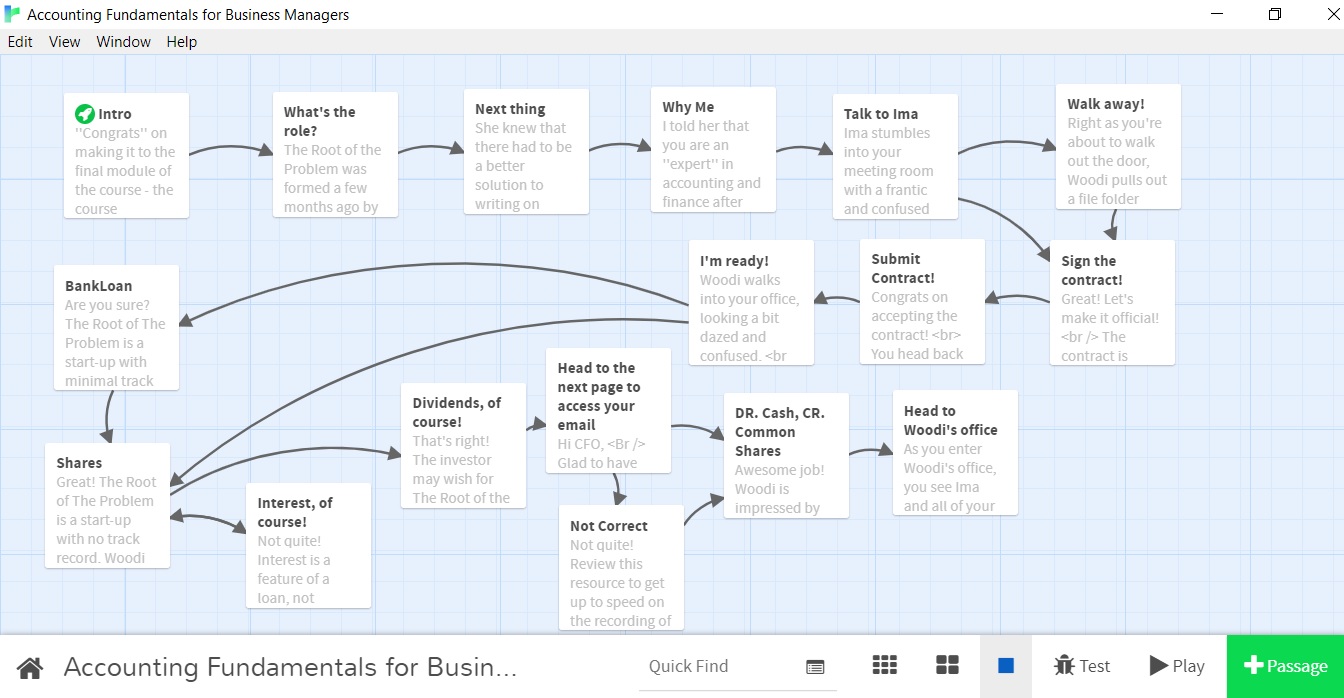
After every 4-5 passages, I paused and ran the Twine in its entirety to ensure that it was working the way I had intended. In the end, I had 17 passages and 20 links.
Other Observations
In building my Twine, a few other observations came to mind:
- I found that, in general, my tone of writing was more conversational and casual, rather than formal or academic. This was likely due to the fact that I was trying to simulate conversations between a worker, their co-worker, and their boss.
- While my Twine gave learners a “choice” at certain points, this was arguably an “illusion” as poor choices, made by learners, redirected them to repeat a task or pushed them towards choices I wanted them to take. An example of this is when I ask learners if they are willing to take on the role of Chief Financial Officer. One option allows them to continue with signing a contract while the other option directs them to a situation where they are forced to take on the role regardless. Choice was very much an illusion in this case.
- If this simulation was done in print, the learner would likely have to view the text in a specific order. However, in this electronic medium, learners had the ability to veer off course and alter the order with which they progressed through the content without revising any of the text on any of the pages (Bolter, 2001).
- It was important to consider how to connect different pages or greet users as they navigate between pages. As Bolter (2001) highlights, “If the reader chooses to follow the link, she expects that the second page will comment on, elaborate, or explain the first” (p. 37). It was, therefore, important to consider what users would see as they travelled from one page to the next.
- I found it challenging to figure out how to upload and integrate images and audio files in Twine. A basic understanding of HTML was required, for which I relied on tutorials I found on Google. In addition, the HTML required me to link images and audio files to an Internet source. As such, I decided to upload and store my images and audio files on the Media page of UBC Blogs, so that the images and audio would be centrally accessible to learners.
References
Anderson, T. (2008). Teaching in an online learning context. In T. Anderson & F. Elloumi (Eds.), Theory and practice of online learning (pp. 343-365). Athabasca University. http://www.aupress.ca/books/120146/ebook/14_Anderson_2008-Theory_and_Practice_of_Online_Learning.pdf
Bolter, J. D. (2001). Writing space: Computers, hypertext, and the remediation of print (2nd ed.). Lawrence Erlbaum Associates.
Devers, C. J., Devers, E. E., & Oke, L. D. (2018). Encouraging metacognition in digital learning environments. (pp. 9-22). Springer International Publishing. https://doi.org/10.1007/978-3-319-46215-8_2
Fantastic! Richard, you’re the first person I have come across who actually created a Twine story. I myself took an alternative path while several Twine stories of our classmates cannot be opened. And your casual tone of writing is warm and welcoming! I also have to say that from my experience, for some students “no choice” is the best option possible. So, you didn’t create an illusion, you truly helped someone there. And I won’t even start on your successful integration of images and audio files into Twine – it is still a rocket science for me. Again, very well done and explained!
Thank you very much, Richard!