Categories
Activity 7

Synthesis Reflection

Summary of My Flight Plan

Seems as though it was just yesterday when I posted my flight plan to my ePortfolio. Truth be told, nearly three months have zoomed by and now it is time to reflect on my ETEC 565 experience. It might make sense to first re-introduce myself. My name is Erik Van Dusen. I’ve been teaching for nine years in Regina, Saskatchewan, Flightpath picCanada. My teaching assignments have included both Kindergarten and grade eight. Two years ago, I became interested in educational technology and set out to find a graduate program that would help me to better understand how to integrate technology into my teaching practice. I was lucky enough to stumble upon the MET program at UBC and, after two years of studies, was excited to see ETEC 565 added to the course list because it seemed most applicable to my learning goals and career development.

At the beginning of the course, I set three major goals as part of my flight path. They are as follows:

1. Develop skills in evaluating and selecting technology tools and multimedia and assessing their potential benefits for teaching and learning so I don’t fall into the trap of simply using technology for its cool factor.
2. Learn to develop units or courses using a Learning Management System (LMS) to allow me to take advantage of their affordances and to shell my units so they can be used from year to year, perhaps even by colleagues.
3. Learn how to incorporate video-conferencing into my units of study so I can go beyond the walls of my classroom in order to invite experts to connect with my learners.

The ETEC 565 readings, toolkit and module learning activities, resources, along with the course community, allowed me to achieve my goals. I now feel more prepared to select and evaluate technology tools to be used or not used in my teaching practice. I think being introduced to several critical frameworks for helping to select and evaluate technology was most helpful in this case. My favorite is still the SECTIONS framework (Bates & Poole, 2003), something that I’ll likely use for a long time and pass on to my colleagues. By using Moodle for several assignments in ETEC 565, I have gained a great deal of LMS skills. I feel fairly confident that I could use Moodle to develop some courses to use with my students. While I completed only two modules of my Moodle course in additional to a quiz and a splash page, I want to try to find some time this summer to finish the unit and test-drive it in September. Regarding my third goal about video-conferencing, I think I’m ready to take the plunge! I played around quite a bit with Skype during and after a toolkit activity and I really appreciated seeing Adobe Connect in action during a Moodle demonstration because my school division’s technology consultant mentioned it as a nice video-conferencing option. In the end, I couldn’t be happier about the strides I’ve taken to address my learning needs in ETEC 565!

My E-Learning Toolkit Experience

I loved the E-learning toolkit activities. What an excellent opportunity to bridge the technical skills and theory required to integrate emerging E-learning tools. This is, in my humble opinion a feature missing from most university courses. The E-learning toolkit component provides a certain level of authenticity and an opportunity for hands-on learning. Kudos to the ETEC 565 course designer(s)! Each toolkit page hosted theory, examples, resources, and a chance to explore the tool first hand.

I completed every toolkit activity available to me, though I did not always post a reflection on my experiences. I learned a great deal, even in areas in which I believed I was quite knowledgeable. A great example of this was when I explored the toolkit activities for web design and HTML authoring. While I’ll be the first to admit that I need help in the area of HTML coding, I have a great deal of experience developing websites using WYSIWYG toolkiteditors. I was amazed to learn that my website designs have many flaws and shortcomings. Some of my websites could even be describe as “websites that sucks”. Now that I have some training, I can address my website woes in the future and pass some of new knowledge onto my students and colleagues.

Speaking of other people, I am ashamed to admit that I have not once taken into consideration making my websites usable by people of all abilities and disabilities. The toolkit page on accessibility was another valuable learning experience for me. My websites and learning designs do not meet the guidelines published Web Content Accessibility Guidelines. Again, a real eye-opener and now it is up to me to apply my new knowledge within my teaching practice.

What I think is interesting is the fact that the E-Learning toolkit activities did so much to help me achieve my aforementioned course goals. All three of my goals would likely not have been achieved without the opportunity to explore, create, and build. Now that ETEC 565 is coming to an end, I am hoping that I can still access the E-learning toolkit resources. Furthermore, I’d love to be able to share this resource with my colleagues!

Self-Assessment Using SECTIONS Model

Students

Generally speaking MET students are technology savvy and willing to make their work public, at least to fellow students and instructors. I am no different and therefore I have found WordPress to be an appropriate technology selection given that it allows me to easily post my work, view the work of others, and lets me engage in the type of reflective practice that seems so important in the learning process. Although it would be rare for a MET student to have a lack of technology skills, it is possible and in my opinion, WordPress provides a fairly gentle learning curve. On the other hand, there is plenty of opportunity for the more experienced web designer to put their skills to use and create flashy dimensions to their blog pages.

Ease of Use and Reliability

Like I’ve already mentioned, WordPress is not a difficult tool to use. The interface is user-friendly and mistakes can be edited very quickly. The auto-save function saves plenty of headaches and adding media such as images, sound, and video is easy. With the embed codes provided by many multimedia sites, adding media is almost seamless. As a visitor to my ETEC 565 blog, you will be treated to easy navigation and an appealing presentation layout. Interaction is also simple and clear as leaving a comment to a post can be done with one click of a button and some keyboard strokes. The set up of the blog was easy as well, although UBC Blogs had already done some of the work for me. Outside of ETEC 565, I’ve used WordPress with the same amount of success and reliability. I’ve never experienced and technical difficulties or glitches.

Costs

You can’t beat free! Hosting content is free with WordPress. Likewise, visitors can also access your content for free if you’ve given them permission. This is certainly an attractive drawing card for institutes looking for an affordable blog hosting option. I should mention, however, that there might be costs associated if institutions want to host their own WordPress platform on their own servers.

Teaching and Learning

In my opinion the ETEC 565 blogs work best with constructivist teaching approaches. When you look at my ePortfolio, you loads of self-reflection and it is apparent that the assignments were very open-ended and learner-centred. If you spend a few minutes viewing several of the ETEC 565 blogs, you will discover that each student came up with unique products and there is a wide variety of ways used to present their work. Each site looks slightly different and yet none of them are right or wrong.

Interactivity

I am thinking to earlier in the course when we learned about Anderson’s (2008) assertions that effective course design should include opportunities for interactions to take place between teachers, students, and content. Certainly, these types of interactions are supported and encouraged through the use my ETEC 565 blog. I’ve been visiting the blogs hosted my ETEC 565 classmates to view their work and to leave the occasional comment or question. I’d like to think others are viewing my blog once in a while and I’ve been fortunate enough to read some of their comments regarding my work.

Organization

If I were to use an ePortfolio approach in my classroom, I’d first have to clear my plans with the school administrator, parents, and likely my division’s educational technology consultant. Their approval and consent are required to do almost anything involving online interactions. Access to computers during the school day would have to be increased and this would mean purchasing more machines or restructuring the computer cart schedule. A positive change, or benefit, that would result from using Portfolios would be the amount of paper saved by hosting materials online.

Novelty

WordPress has been around since 2003 and is now the largest self-hosted blogging service in the entire world. Although online tools come and go relatively quickly, it would appear as though WordPress is here to stay for a while. During the past semester or two, I’ve noticed many other MET students and instructors making use of WordPress to host ePortfolios like the ones created for ETEC 565.

Speed

Assuming that one has ready created and designed the content for their course or blog, mounting the materials could be done in as little as a few days. Remember that editing a WordPress pages is possible by cutting and pasting from another source. In ETEC 565, the tasks that took time were the assignments themselves, as opposed to the quick mounting of the finished products to my ETEC 565 blog. Once posted, material is very to edit and modify.

Next Steps in Terms of My Practice in Educational Technology

As I have already mentioned, my first step is to apply what I learned in ETEC 565 into my regular classroom duties. I’d love to have my Moodle course ready to go by September and I can’t wait to start using Skype to bring in some live presenters from abroad. I also feel that it is incumbent upon me to share my new skills and knowledge with other educators who are interested in ways to integrate technology across the curriculum. I can do this casually by offering to help out around my school, but I can also take a more formal approach and offer a professional development session or two during the year at the division/provincial level. To really show off my news skills, maybe I can look into designing a workshop that I can deliver using Adobe Connect. To my knowledge, online professional development workshops have never been offered within my school division; I would be the first!

During the next school year, I’ll still be very busy finishing up my MET program. While I have only three more courses to complete, I am somewhat nervous about being out of the MET loop because I want to keep my knowledge of E-learning technologies current and I want to stay aware of cutting-edge teaching practices. To this end, I think it is crucial that I stay connected to the MET program, instructors, and students through Twitter, Facebook, and the MET Ning group. Additionally, through ETEC 565, I have put together a nice set of tools and skills that I must keep up to date and sharpened. It wouldn’t make much sense to become complacent and let my tools rust over a time of inactivity. Best to take care of new tools and skills, use them often, upgrade them when necessary, and remember to always put them in a safe place. A safe place just might be within my ETEC 565 ePortfolio or by using a social-bookmarking site.

Looking down the road a little, I have aspirations of one day working outside of the classroom in a leadership position. My dream would be to be in a role where I could influence and help others to integrate technology into teaching and learning and show them the importance of doing so. While I don’t believe that technology is the sole cure for all of education’s woes, I strongly believe it make learning more meaningful, relevant, and engaging for our students.

References

Anderson, T. (2008). Towards a Theory of Online Learning. In: Anderson, T. & Elloumi, F. Theory and Practice of Online Learning. Athabasca University. Accessed online 8 July 2009 http://www.aupress.ca/books/120146/ebook/02_Anderson_2008_Anderson-Online_Learning.pdf

Bates, A.W. & Poole, G. (2003). Chapter 4: a Framework for Selecting and Using Technology. In Effective Teaching with Technology in Higher Education: Foundations for Success. (pp. 77-105). San Francisco: Jossey Bass Publishers.
Moodle Final Reflections

I think I’ve finally finished my course requirements as they apply to the LMS, although I’m not sure a LMS is really ever finished. When I first learned that ETEC 565 students would be required to create a LMS I was both excited and nervous. Excited because I think the use of LMS in education is on the rise and it would makes sense that as a person interested in advancing my career in the area of education technology, I’d do well to develop my Moodle skills. Nervous because learning a new technology is seldom easy and requires a great time commitment. In the end though, I found that using Moodle is quite and easy it has many affordances that could lead to improving the learning experience of my students.

I think it made a huge difference to not tackle the task of learning to use Moodle alone. I had more than enough support from fellow classmates and online resources. I also really benefited from the Adobe Connect session last week and I appreciate the opportunity to learn from experts outside of the course.
In terms of the actual assignment, I THINK, I’ve completed the objectives. Just to make sure, and as a reflective exercise, I’ve broken things down as follows:
A Learning Management System (LMS) online course site, either in Moodle or WebCT/Vista (25), including complete set-up for the following:
Proposal for LMS selected (10)

Splash page using an object orientation (5)
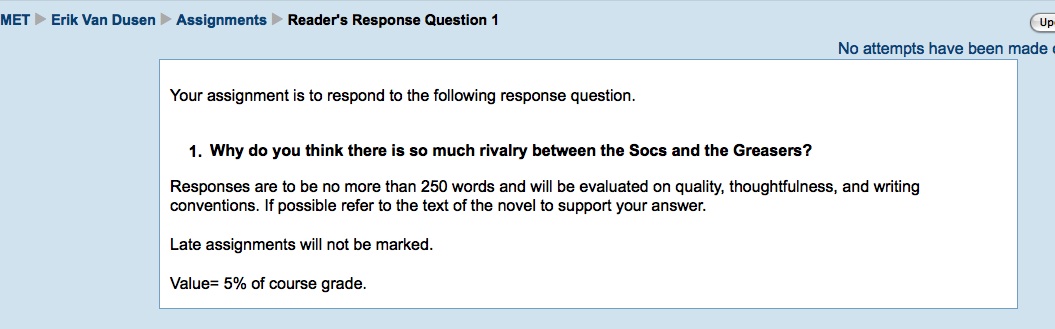
I found a great picture on Flickr Creative Commons to use as my object orientation. The image appears to be of the original cover of The Outsiders; very unique. I linked the image back to the Flickr page in order to credit its owner. After peeking at some other ETEC 565 LMS, I realized that I need to create some links on my splash page to offer quick access to key sections of the course. This makes sense as every MET class I’ve taken thus far has also had this feature.
Two (or more) complete content modules (5)
I put a great deal of thought and effort toward completing my content modules. To be honest, I though it would be easier to throw something together because I have taught The Outsiders novel study so many times. When it came down to making decisions on content and activities however there were always many choices to be made. What I am most proud of is the way I incorporated online resources to enhance what I normally would have done in a face to face setting. My first module allows students to set the context of the novel before starting to read the book. I know my students will just love viewing the Youtube videos I found showing some great commercials from the 1960’s. I’d really love to finish the other modules and export my course to my division’s Moodle server. We’ll see how much time I have this summer.
(At least) one module programmed for selective release (1)
As I discovered at the Adobe Connect session, selective release is different for Moodle and Vista being that you are somewhat limited in Moodle. Nevertheless, I programmed my module containing the unit exam to be released at the end of the course.
Two general discussion fora topics (2)
I have several discussion fora topics included in my course, but my favorites are the two included within my content modules.
One group discussion forum for (at least) 2 groups (2)
On my splash page, I created a discussion forum for group discussion (2 groups). The idea here is that students will use the forum to discuss their group tasks that are scattered among the learning activities. In MET, I’ve learned to value and appreciate a group discussion forum to help with group tasks. I don’t know where I’d be without one.

In conclusion, I am really happy about the opportunity to learn about Moodle. I feel that I’ve developed a great deal of technical know-how along with some pedagogical theory through this assignments. This is of course important to me as learning to use Moodle was one of my goals I set in my flight path.

Multimedia Reflection

Think about an example of how multimedia have been used effectively to enhance your learning.

In ETEC 531, MET students are charged with the task of creating two multimedia productions that respond to any post-unit question. The productions are to make use of images, video, and sound and must between 3-5 minutes.

I’ll be the first to admit that the content and reading material for ETEC 531 has been difficult for me to understand. Because it is heavy on theory, I find some parts to be somewhat boring to read. However, by experiencing the content in a multimedia format, it is easier to understand, far more engaging, and stimulates more of my senses. It is almost as though education is converging with entertainment. I say this because in this digital world, I have become accustomed to being entertained by multimedia where ever I go; you can’t escape it. What does this say about many educational resources that are still heavily print-based? No wonder it is so difficult to engage my students in book reading!

Nearly every multimedia project I have viewed from ETEC 531 has been fantastic and left me worried that I didn’t have the skills required to complete such a task. Nevertheless, I managed to create two productions that I am comfortable submitting for assessment. If you’re interested, you can view my second multimedia production here.

Wiki Activity

As part of module four, the class was asked to collaborate in a wiki environment. Turns out that there was a problem with my user name and I could not log in to edit the wiki or participate in the discussion, however I still contributed by having a classmate post for me. Working in a wiki environment is not completely new to me, so I can reflect on this activity along with my prior experiences. Here are some wiki thoughts:

  • What I value most about wikis is the idea that many people are contributing to a single document; a valuable way to promote social-constructivism, and most importantly knowledge building. Section B of ETEC 565 had the opportunity to share their wisdom and insight to produce a response to several prompts. There is, I THINK, far more value in this type of exercise than to simply have students provide individual responses sent to the instructor. Learning is a social activity and the more social the better!
  • The discussion feature of the wiki allowed a forum to share and discuss ideas and the document portion seemed to be the canvas on which those ideas were painted. This seemed to be an efficient system. I also like the ability to revert to previous drafts of the wikis, a neat feature for safety and recovery.
  • I think it is time that people rethink their attitudes toward wikis. I’m referring to the notion that a wiki can’t be considered  reliable source of information. Wikipedia has always been slammed for this, but I think Wikipedia has many safeguards preventing false info. After all, when false info is published in an encyclopedia, it remains forever; when the same happens on Wikipedia the page is flagged and investigated.
  • The fact that my username did not work reminded me that technology, despite best intentions, does not always; there are issues inherent with trying new tools in the classroom. All too often, I have planned great plans that use technology only to have technical issues that hampered the learning experience. Still, we must persist and move on.

Assessment Activity

Description

In addition to creating an exam for my LMS course site (see assessment page), I also chose to add a student survey to Module #4. The Constructivist On-line Learning Environment Survey (COLLES) in Moodle is a set of statements that allows learners to identify their preferred learning environment or their actual learning environment (Cole & Foster, 2008). I have elected to use a combination survey that covers both. In total, the students will respond to 50 survey items during class time.

Rationale

Timely and effective feedback is a vital component of any learning design (Gibbs & Simpson, 2004). In my experience, feedback is mostly given by instructors to students and  opportunities for students to provide feedback to instructors are often ignored. The COLLES survey provides an excellent chance for students to reflect on their learning needs and to share that information with their instructor. Feedback then, in the same way in which it can support student learning, may also promote instructor learning. Because my LMS course site is my first, I value the opportunity to illicit student feedback about the effectiveness of my course design. I want to know what is and is not working well and I want to know this early enough in the course so that I may make changes to improve the learning experience for my students. The COLLES survey, in my opinion, is also about getting to know my learners and assessing their learning styles and tastes. In my rather extensive experience as a student, I  have come across only a handful or two of teachers who were interesting and willing to give their learners a chance to give formal feedback to them for the purpose of improving a course. I’d love to give my learners this chance, which is why I’ve chosen to position the survey at the half-way point of my course. I foresee students willingly using the survey during class time and appreciating the opportunity to share their opinions. Moodle made it easy to add the survey tool and I’ll be able to view and download the responses.

This is, of course, not the only assessment activity I have designed in my LMS course. I have already included assessment tools for several other modules. I just wanted to take a chance and try something new here.

References

Cole, J. and Foster, H. (2008). Using moodle: Teaching with the popular course management system. Sebastopol: CA. O’Reilly Media Inc.

Gibbs, G. and Simpson, C. (2005).  “Conditions under which assessment supports students’ learning.” Learning and Teaching in Higher Education Accessed online 24 June 2009 http://www.open.ac.uk/fast/pdfs/Gibbs%20and%20Simpson%202004-05.pdf


Categories
Activity 3

Communication Tools

The course readings and module content regarding synchronous and asynchronous communication tools helped influenced my decisions about which tools I would include in my Moodle course and how these tools will be used. I will include on this page a brief description of the activity and the tools I set up within the course shell and also a rationale of the decisions I made. The course instructions were to design two activities, but I got carried away, couldn’t help myself, and added a couple more. Hope this is okay. To set the context here, please recall that my Moodle course shells a novel study on The Outsiders (1967).

ACTIVITY # 1 forum

A Discussion forum where students have been instructed to post their personal reflections to the chapter readings. I will repeat this discussion forum for each of the course modules. I configured this forum to allow each person to post one discussion, but I require everyone to respond to at least two of their classmates’ posts. I have been clear about what content is to be included in the discussion posts, but students will have a great deal of personal choice because they are free to take up a wide range of topic. This is the nature of personal reading responses. To support my learners with this, I have included an assessment rubric in the course materials in response to Anderson’s (2008) assertions regarding effective online course design.

Why I chose it

Teaching students to write personal responses to literature is an accepted teaching strategy in language arts instruction. Traditionally, in face to face settings, students publish reading responses in notebooks or journals and these are submitted to instructors for assessment. What is lost here is the possibility for the students to learn through valuable social interactions that Anderson (2008) asserts should take place between teachers, students, and content. I was looking for a tool that would allow students to exchange and share their reading responses throughout the duration of the novel study. As the instructor of this course, I need to also be able to interact with my learners as they make connections with literature.

What this tools brings to the educational experience

My personal experience as a student has allowed me to recognize that there is much value in using forum discussions even in face to face settings. Posting reading responses to a forum for the learning community to see will encourage interactions between the instructor and his/her students. In a face to face discussion immediate responses to ideas are required;however, the asynchronous forum allows students time to think and reflect on content before posting a response. In my opinion, this increases the quality of the exchanges and alleviates some of the anxiety that learners sometime feel by being put on the spot when face to face. Of course, forums also support two-way communication making students active participants in the learning process.

The tool’s limitations

The danger of using discussion forums is a lack of participation by learners. If students are not participating in the discussions the potential benefits of the forum may never be realized. The forum in Moodle requires learners to read and write responses and offers little alternative for those who struggle with literacy. Students who have difficulty writing for example may not be willing, or capable, to publish posts.

Does it work?

Yes, I tested my forum and they all work.

ACTIVITY # 2wiki

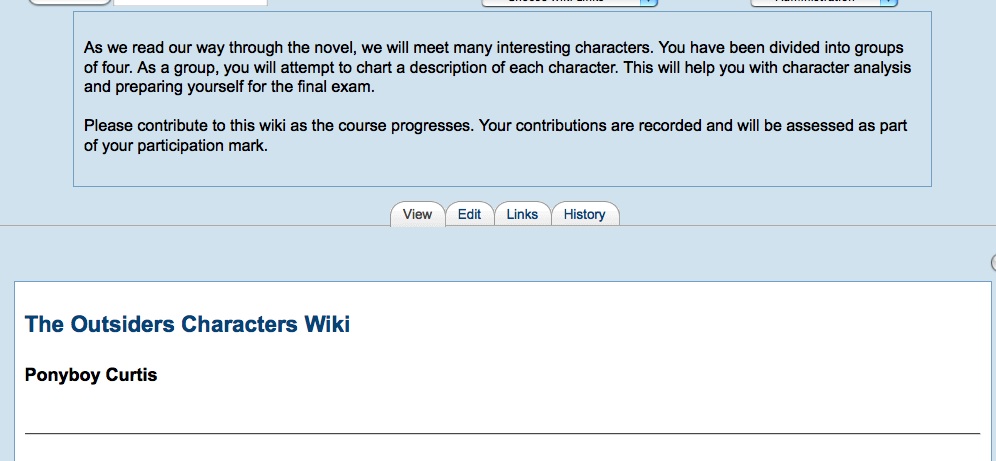
A Wiki activity on characterization. Working in groups of four, students will design a wiki about the characters in the novel study. The idea is that this activity is on-going and edited as we progress through the course. The wiki will become a resource for my learners and a study guide for the final exam. I have already structured the wiki so that it includes the main characters of the book. I have also provided a resource to introduce students to wikis. The wiki will be assessed as part of each students’ participation mark.

Why I chose it

Characterization is an important element in literary works and is commonly taught in novel studies. The Outsiders (1967) introduces its readers to many characters in great detail. Keeping track of all the characters and what role they play in the plot is a difficult task, so I wanted students to create and maintain a document that could record their notes as we make our way through the novel. I don’t feel, however, that students should tackle this lengthy and difficult assignment individually, so I chose a wiki to enable student collaboration. This will help to divide the workload among learners. Again, with a few clicks of mouse, I added a wiki activity to my Moodle course. The ease of adding the tool factored into my decision regarding its selection.

What this tool brings to the educational experience

When I think wiki, I think fast, efficient collaboration. Providing students with a mechanism for working together towards a common goal will hopefully engage them in the task and make them active participants within a learning community. A wiki allows for asynchronous participation, so, like the discussion forum, provides a tool for interactions to take place over time. As the instructor, I will be able to track and evaluate individual contributions to the wiki to ensure the workload is being shared. The students will be able to develop their work under peer review, which is important.

The tool’s limitations

Compared to other wiki authoring sites, the Moodle wiki interface is not as user-friendly. Wikispaces, for example, makes it much easier to navigate and edit wikis. This is important because it is quite possible that a lack of technical skills of a student might impede their ability to participate in the activity. Also, I do not like how the Moodle wiki does not have a space for groups to discuss the collaborative document. Most wiki services have a discussion tab to facilitate this.

Does it work?

Yes, tested and the wiki works.

ADDITIONAL ACTIVITIES

  • Chat forums have been established to enable synchronous communication. I created private chat rooms for groups in order to facilitate group discourse. Here, students can collaborate and discuss group projects. Another chat room has been created to allow all students come together in order to discuss the course or simply to hang out and form community bonds.
  • Lastly, as a bonus, since I already downloaded SKYPE during the e-learning toolkit activity, I am planning on using this communication tool to “bring in” an outside expert to present to my learner. The expert who has agreed to visit us using SKYPE will present on the topic of “street gangs”, very relevant to the novel study of course.

Rationale:

The selection of these tools was made after careful consideration. In my opinion, and consistent with several of the course readings, proper selection of instructional tools is the key to effective course design (see Anderson, 2008; Chickering & Ehrmann, 1996). Forums, chats, and wikis all encourage interactions on several levels: learner-learner;learner-knowledge;learner-teacher. These tools also help to establish the learning community.

Moodle made it very easy to add these activities to my course design and I’ll be able to track student progress with no problems. I’ve elected to assess the discussion forum activity by activating the grade option and using the “separate and connected ways of knowing” scale. I have also chosen to read the tracking highlights of unread posts. Regarding the chat rooms, I can view past chat activity at any time. Because I won’t be assessing chat, I need only be concerned with the appropriateness of content, although there might some value in reading the chat archives to follow progress and check for understanding. Moodle will allow me to monitor the wiki activity as well. I can also browse the wiki history to see who is contributing to the group effort.

Limitations

The problem with chat is that it requires all participants to participate at the same time. My students all live in the same time zone, so the physical distance that can be problematic in some settings does not apply here. Still, with conflicting personal schedules, it may be difficult to find a meeting time that works for everyone. Text chatting, is also very slow. It may be difficult to get my learners to buy into Moodle chat when so many other attractive options are around, such as cell phones.

In my experience, forums can be problematic for some learners who have difficulty expressing themselves in writing. This might discourage them to post written responses that are viewable to the entire class. Again, with the other online options available to teens, I’m not sure that they will be big on hanging out in Moodle as opposed to popular social-networking sites.

Concerns

I think my students will enjoy working with the communication tools that I designed into the course and they certainly have the skill set to do so. If I’m worried about anything, it’s the level of participation that will be seen. How will I encourage my students to take part at a level that will enhance the learning experience? I think I have already began to address this by providing clear participation expectations.

References

Anderson, T. (2008). Teaching in an Online Learning Context. In: Anderson, T. & Elloumi, F. Theory and Practice of Online Learning. Athabasca University.

Chickering, A.W. & Ehrmann, S.C. (1996). Implementing the Seven Principles: Technology as Lever. American Association for Higher Education Bulletin, 49(2), 3-6.

Hinton, S.E. (1967). The Outsiders. New York, NY: Viking Books.

Weblogs

This week, I check out weblogs for the E-learning Toolkit activity. Although I do have some experience with weblogs, both as readers and as a publisher, I welcome the opportunity to learn more about them. I was most surprised and impressed to visit the link to the ETEC 522 course site, which appears to host and manage most or all of the course content. Makes sense, I suppose because weblogs are much more than personal journals, but I had never really stopped to think about how many people or agencies are using blogs to manage their content.

I’ve never used Blogger as a weblog application, so I created an account to check things out a little. This was pretty much the standard sign-up procedure for web services, no surprises here. The Blogger interface is very similar to that of WordPress, which I use quite often. Blogger makes publishing very easy and I was also able to change my template with no trouble at all.

While I understand that Blogger and WordPress are very popular in educational settings, I still prefer using Class Blogmeister with my students. I feel comfortable and in complete control over postings because I am able to preview and approve entries and comments before they are published. This is an important feature if you’re a grade eight teacher.

I did however try out Google Blog Search to locate some great NHL blogs that I added to my Google Reader. I want to teach my students how and why to do this during units of study. I’m also trying to locate a nice student blog evaluation rubric that I can use next school year. I suppose I could make one myself, but I’d prefer not to re-invent.

Synchronous Communication Tools

I’m really liking the E-learning toolkit activities. This week, I’ve spent several hours tinkering with various synchronous communication tools including Skype and Wimba. It is quite easy to recognize the value of these tools, especially in light of this week’s Anderson (2008) reading where the key attributes of online learning were discussed. As a learner in the MET program, I can attest that a good online learning design needs to incorporate synchronous communication tools in order to foster appropriate interactions between teacher-learner, learner-learner, learner-knowledge, and learner-community. Selfishly, I am most interested in using these tools to increase interactions between learners and the community outside of my school. One of my professional goals is to go outside the confines of the school walls in order to tap into the vast network of outside expertise and knowledge. I had planned on using synchronous tools to enable me to do so. I just think it’s silly to try to be a teacher know it all these days when there are others who are more capable and who don’t mind helping out. For example, recently my class and I started to study about the Holocaust. I know very little about the Holocaust, but managed to put a decent unit together. This is fine, but I can’t help but think that I could have been joined by an expert in the field. Bringing an expert in by Skype or Wimba might just be what the doctor ordered.

And so I tried out Skype…..

The download was quick and it installed on my Mac with no trouble at all. After that the sign-up process took minutes and I was all set to test things out. With no contacts, or no knowledge of Skype etiquette, I was hesitant to make a call. I used the search function to locate a number of a pizza delivery service in Brazil that guaranteed delivery in 45 minutes or less. I clicked on the green phone icon, and heard the call going through. The following transcribes my call:

Pizza Guy : something in Portugese

Me: Hi, can I make a delievery order?

Pizza Guy: What?

Me: I want to order a pizza and I wonder if your 45 minute guarantee applies to me?

Pizza Guy: You have to be kidding me

Pizza Guy: hangs up

The point is that the call worked and it was free, opening up a huge world of possibilities for my teaching practices. What I do worry about, however, is how to support my guest experts who may not be familiar with Skype. Perhaps they aren’t skilled with technology at all. I wonder if someone has designed a tutorial for this purpose. I’m going to check!

Erik

First Impressions of Moodle

I enjoyed my first toolkit activity on LMS. I chose to explore Moodle over WebCT/Vista because my division runs its own Moodle server, so the opportunity is there for me to perhaps develop a few courses and use them with my students. Always excited to engage in practical assignments that can easily be transfered to my professional life.

I spent roughly 60 minutes on the toolkit exercises, opening a new course, adding a ice breaker message, and then setting up a graded discussion forum. None of this was very difficult at all. In fact, I was surprised at how easy it was to edit my new course. As usual though, I became interested in Moodle and spent several hours on the Moodle page, playing with features and pondering what I might add to my course. Lots of potential here, indeed. Because I teach face to face, I will have to consider whether a blended course would really benfit my students before I invest a great deal of time designing a course. Nonetheless, I think distance learning has a HUGE future, so any chance to develop the associated skills will likely be of value.

Stay tunes as I try to decide on a unit to build for ETEC 565. After all, if I have to design a course to pass the class, I might as well make something I can use in the future!

Spam prevention powered by Akismet