Categories
Active Learning EDUCATION Flexible Learning Flipped Classroom teaching

Screencasts: Asynchronous Video Tutorials for Economics

Recent technology and internet presence have become an essential part of education. Screencast Tutorials is one such medium – it’s an effective and powerful way to teach, present and communicate with students.

A screencast generally consists of a recording of the computer screen, along with the instructor’s commentary. Although easy to produce, it’s an excellent way to narrate presentations, explain concepts, answer students’ questions. It’s also an effective way to guide students through software and website.

Many students were eager to share their experiences and said that screencasts made economics appealing and learning fun. So, to gather further feedback I administered an online survey for my blended course; a class of 80 students taking a first-year undergraduate course in Economics were asked to provide feedback in an anonymous survey at the end of the academic semester. The survey was voluntary and administered after the final course grades were submitted for all students.

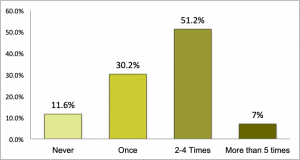
The survey responses highlighted that the ability to play and replay and at your own time were important benefits of video tutorials. The student survey asked how often the respondent replayed the screencast videos, and roughly half of them re-played the videos 2 to 4 times.

Figure 1. The number of times students replayed the video.
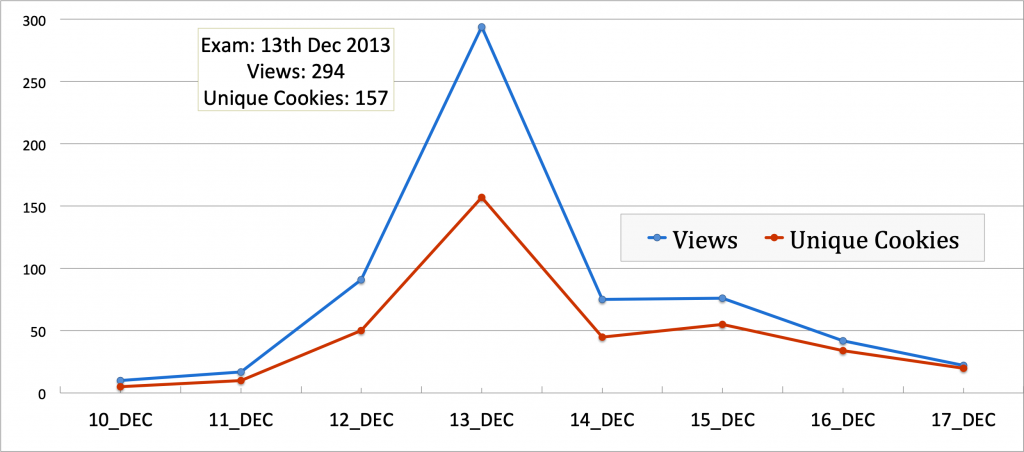
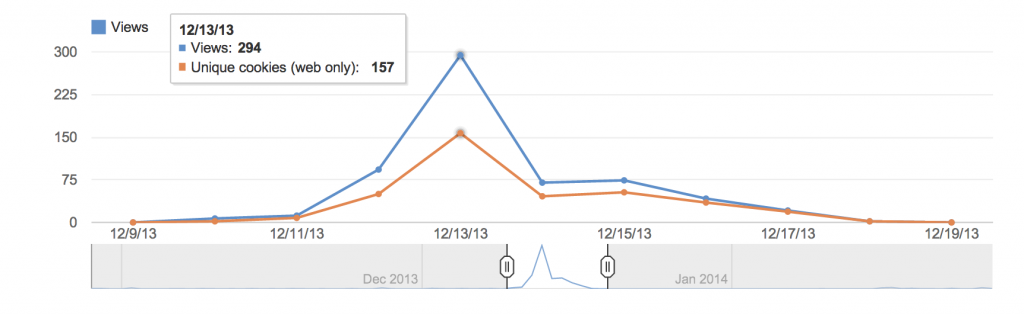
The above results are also supported by analytics from my YouTube channel where these videos are hosted. Looking at the 2013 viewership data for the YouTube channel, the biggest peak in viewership was the day before their final exam, where 157 students (as per IP addresses or cookies) watched the tutorial 294 times.

Figure 2. YouTube Analytics on Viewership
 Students rely on these videos for multiple reasons. In table 1  we have student’s responses to “For what purpose did you use the video tutorials?” Reviewing for exams was the main reason most students viewed these videos, followed by further clarification of the content.

Table 1: Student survey – Reasons students engage with the screencast video

Screencasting comes with some shortcomings too which includes that it demands time, and planning to ensure students engage with the content. One way to ensure that the student is paying attention to the video is by requiring guided notes on key points and allowing/using annotations.

A simple screencast tutorial is easy to create and takes no more than 15 minutes to learn and understand. There are many types of downloadable screen capture software like Camtasia, screencast-o-matic, screencapture- a simple google search will provide you with many software that will do the job. The annotations can be added at the time of recording or during editing. If you plan to upload it on youtube, then you can use the editing and annotation tools within youtube – that’s what I do for final touches.

So, with some pre-planning and crafty editing you can easily create a well-crafted screencast and here are a few things that I have learnt during the process:

  • Annotate- Similar to traditional lectures, organization and ‘Hooks’ are essential – organize the videos within the course and integrate new information in the video to existing knowledge by using annotated text.
  • Edit – Keep the screencast tutorials concise and short (5-7 minutes). You do not need to introduce yourself to each video unless they are stand-alone pieces.
  • Enhance with Visuals: Most recording applications offer tools to enhance videos, use these to highlight content and show connections. 
  • The tone of the video tutorial should depend on the purpose of the video and the course content that it replaces – 
    • Replaces in-class or face to face teaching – a conversational tone would work better. 
    • Replaces textbook content –  a formal tone is more suited.
  • The majority use smartphones or tablets with smaller screens to watch – so the text should be visible and easy on the eyes: use larger fonts with web-friendly colours. 

Here is  an example of a screencast tutorial – Econ101 tutorial on Income Effect and Substitution Effect using Indifference Curves

Categories
Flexible Learning Flipped Classroom teaching

The Video Tutorials – To Teach, Review and Finally Flip the Classroom.

I have been experimenting with a few variations to this approach since 2009

1. Flipping with Peer-Based Learning. Econ 101 (2013) 

Class Size – 160 students Last semester I had three lectures that were flipped. Here is a summary for one of these. I had undergraduate student volunteers from the 3rd and 4th year (Economic Students Association) to help with the class exercise. (The class only had one assigned TA) Students were asked to watch the following video tutorial. The material was discussed briefly in the previous class and students were asked to view the video before the next class. Price Control: Price Ceiling and Price Floor YouTube Preview Image This was the class exercise handed to the students – they were asked to work in groups of 2-4 (their neighbours). Rent Control – Exercise The Problem: 30 students (Internet Protocol-IP address or cookies) watched it 68 times before the flipped class. The Biggest peak in viewership was the day before the exam where 157 students (IP address or cookies) watched the tutorial 294 times.

2. To teach/review a statistical software (STATA). Course: Econ 490 (2009)

I started using video tutorials in my courses in 2009. I created videos (screen-capture)  tutorials for the seminar Econ 490 course (Gender, Population, and Health) and posted them on YouTube. These video tutorial were created to help students with their research. They review lectures on statistical software and discuss other research tools like accessing data sources from the UBC library.

https://www.youtube.com/user/KHELKHELMAINrg

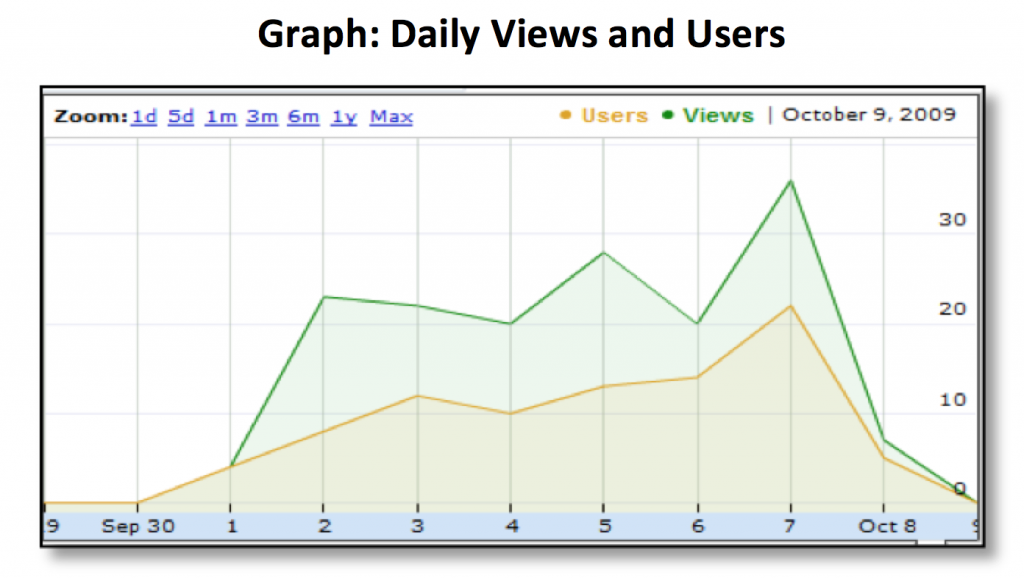
Introduction to Stata Video tutorials is especially useful for courses where students need to practice and review software commands provided in a class, closer to the time when the data is accessed, or the software is used. The following user statistics are for the video “Stata for Assignment 2 part 1” – it reviews the STATA commands discussed in class, and that is needed to complete Assignment 2 for this course. From the user statistics for these video tutorials, note that: 1.  Students viewed this video multiple times; a class of only 44 students viewed this video more than 100 times. (Imagine doing this in class time) 2. Students viewed this video just before the final paper due date.

3. Review of first-year undergraduate course material required for higher level courses. Econ 355 (2009)

I also host video tutorials on basic microeconomic concepts. These concepts are taught in a first-year undergraduate course, which is required for upper-level courses. For many students, much time has elapsed between the lower and upper-level courses, and they struggle in the beginning trying to catch up with the long-forgotten material. These video tutorials review microeconomic concepts required in my Econ 355 and are viewed multiple times by students in my course. Students can replay a video until they follow, in their own time and at their own speed.

A few suggestions from my experience and from current literature

  • Annotate- Similar to traditional lectures, organization and ‘Hooks’ are essential – organize the videos within the course and integrate new information in the video to existing knowledge by using annotated text.
  • Edit – Keep the screencast tutorials concise and short (5-7 minutes). You do not need to introduce yourself to each video unless they are stand-alone pieces.
  • Enhance with Visuals: Most recording applications offer tools to enhance videos, use these to highlight content and show connections. 
  • The tone of the video tutorial should depend on the purpose of the video and the course content that it replaces – 
    • Replaces in-class or face to face teaching – a conversational tone would work better. 
    • Replaces textbook content –  a formal tone is more suited.
  • The majority use smartphones or tablets with smaller screens to watch – so the text should be visible and easy on the eyes: use larger fonts with web-friendly colours. 
Categories
Active Learning EDUCATION Flexible Learning Flipped Classroom teaching

Flipped Classroom

When learning happens before class. Class time can then be used to solve related problems.

Why?

Because, a) learning is not complete unless the learnt material is applied or used in an exercise; b) Class time is a limited resource, and having students learn basic concepts before class allows me to engage students in problem-solving; c) I believe guiding my students in solving a problem is more conducive to learning than a lecture that gives the answer.

Some issues that have been raised in earlier meetings (flipped classroom)

–  We have tutorials/Labs for problem-solving – that’s what TAs do in a tutorial. So, are the instructors taking up TA’s task?

  • Not all courses have tutorial sessions.
  • Why should the instructor be deprived of witnessing her student’s ‘Aha moments’ that, in general, are more frequent during problem-solving?
  • The instructor would lead the class in problem-solving, discussing the nuances and the concepts that need to be applied – while the TAs assist.

–  Would there be a need for professors- if the lecture can be replaced by a video and TAs can hold tutorials?

  • I would be surprised if a whole course can be flipped. I think there would always be material that can be better explained in a classroom.
  • One benefit of videos that I have not heard at these meetings is the ability to watch and replay and then to replay some more till the student gets the concept (see evidence of student engagement below).

Evidence of student engagement

Teaching statistical software—STATA—in my course Econ 490 (2009)

I started using video tutorials in my courses in 2009. I created videos (screen-capture)  tutorials for the seminar Econ 490 course (Gender, Population and Health) and posted them on YouTube.

These video tutorials were created to help students with their research. They review lectures on statistical software and discuss other research tools, like accessing data sources from the UBC library.

https://www.youtube.com/user/KHELKHELMAINrg

Introduction to Stata

Video tutorials are especially useful for courses where students need to practice and review software commands provided in a class, closer to the time when the data is accessed, or the software is used.

The following user statistics are for the video “Stata for Assignment 2 part 1” – it reviews the STATA commands discussed in class, and that is needed to complete Assignment 2 for this course. From the user statistics for these video tutorials, note that:

1.  Students viewed this video multiple times; a class of only 44 students viewed this video more than 100 times. (Imagine doing this in-class time)

2. Students viewed this video just before the final paper due date.

Categories
Flexible Learning Flipped Classroom teaching

Social media helps collaboration and participation among students – in and out of classroom.

This 4th year undergraduate course, in the Economics Department, is required for all graduating students majoring in Economics. Most students come into the course excited about applying their skills learned from four years of undergraduate work to a real issue, through forming a research question and answering it by analyzing data. From the beginning, interactions between the professor and other classmates are encouraged.  Peer discussions, which often generate positive externalities, can lead to a greater understanding of the costs and benefits of various policies and behaviors (Van Den Berg, Admiraal, & Pilot, 2006).

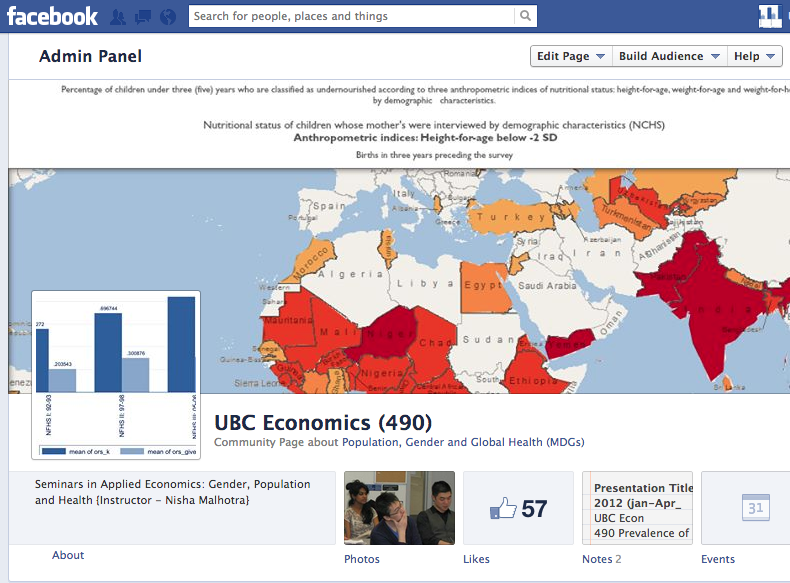
Having a place to post comments and participate without the public eye encourage involvement from the shy student and this has also been documented earlier (Larson, B.E. & Keiper, T.A., 2002). The idea of a Facebook page came from my students in the first year undergraduate class – who after having created a Facebook group for the class invited me to join the group to help them with some practice questions.

This module helped achieve what face-to-face, three-hours a week interaction could not. I have decided to make this media a permanent feature in my course.

References:

Van Den Berg, I., Admiraal, W., & Pilot, A. (2006). Peer assessment in university teaching: evaluating seven course designs. Assessment & Evaluation in Higher Education, 31(1), 19–36. doi:10.1080/02602930500262346

Larson, B.E. & Keiper, T.A. (2002). Classroom Discussion and Threaded Electronic Discussion: Learning In Two Arenas. Contemporary Issues in Technology and Teacher Education, 2(1), 45-62. Norfolk, VA: AACE Retrieved from http://www.editlib.org/p/14452.

For the complete article and an insightful discussion please follow this link

http://tinyw.in/OVPC

Experimenting with Facebook in the College Classroom

By:  in Teaching with Technology

Spam prevention powered by Akismet