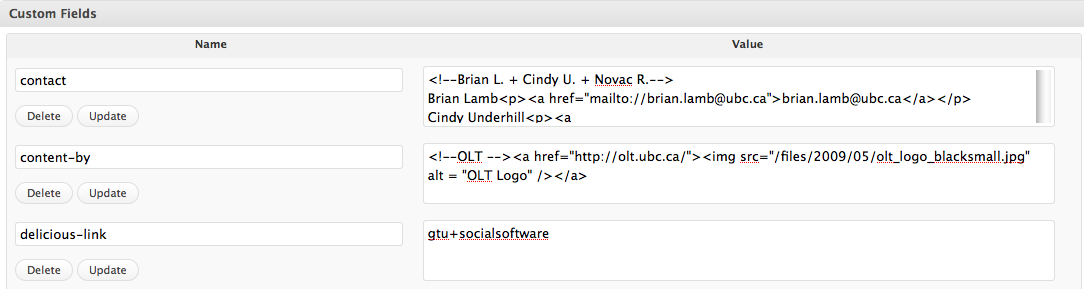
All these custom fields are used by the same widget: Learning Commons Custom Fields, to store information on the author, license and administrator of a page.
These custom fields store information for each page: what is the page author, the page license and the page administrator that can be contacted if something is wrong with the content, etc. This information should be entered in HTML format. This means that you can enter links and images in any of the custom fields, and this information will be directly displayed on the page(s) containing the custom fields.
The widget – role correspondence is as follows:
1) The Content By widget displays the author of a page (stored in the author’s custom field on each page)
2) The License widget displays the license information of a page
3) The Contact widget displays the information of the page administrator, which can be contacted with regard to the page contact.
When authoring a page, please make sure you include the relevant information for each of these custom fields.
Add Custom Fields: Content-By and Contact
1) Scroll down your page to Custom Fields.
2) Click on the drop down menu beside “select” and choose “contact”.
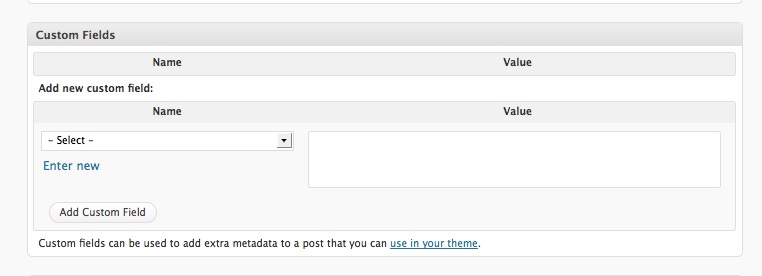
3) Add the information from the matching page on the current Learning Commons site into the “Value” box and use HTML format. Here is an example of the HTML code for a single Contact (just repeat for two contacts):
<!–Julie M.–>
Julie Mitchell<p><a href=mailto://julie.mitchell@ubc.ca”>julie.mitchell@ubc.ca</a></p>
5) Now go through the same steps to select Content-By. If you don’t have the image you need for the logo, download it to your desktop and follow the process for adding media. Example:
<!–CLC–><a href=”http://www.library.ubc.ca/clc/”><img src=”http://leap.sites.olt.ubc.ca/files/2009/05/clclogo1.jpg” alt = “CLC Logo” /></a>