Tag Archives: technology

Introduction to digital technologies commonly found in elementary schools

The elementary school experience today is vastly different from what it used to be like not too long ago. Thanks to the rapid development of various technologies, how they are used in classrooms has vastly evolved. Eight years ago in elementary school, I remember walking down to the computer lab with my classmates. We would impatiently wait for the teacher to unlock the door, then we would enter and choose our favourite computer. Typically, a portion of the time was spent typing away on All the Right Type or creating artwork on KidPix (does this ring a bell?). Other times, we would spend time in the computer labs working on research projects. After everything was done, we would be allowed free time on the computers.

Nowadays, students don’t even have to leave the classroom to access technology anymore. Often times, they are already installed in the classrooms. One of the most recognizable technologies are SmartBoards, which is one type of Interactive Whiteboards (IWB). IWBs strive to increase student engagement by providing a focal point for instruction, interactivity, gaming, and animations. Gone are the days of overhead projectors!
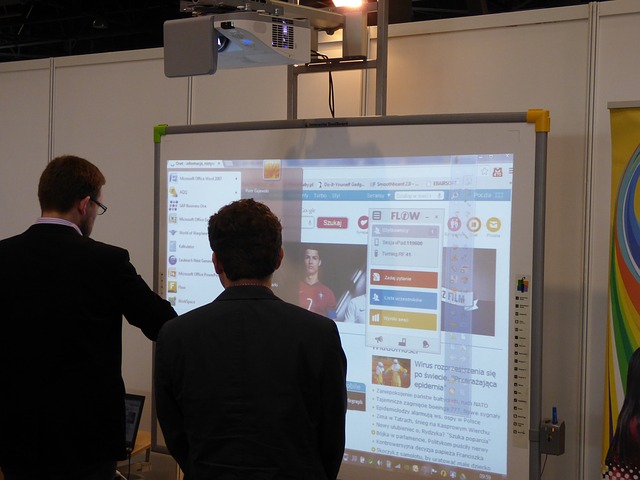
interactive-whiteboard-332239_640

Other common technologies include iPads and laptops. Often, classrooms or school libraries will have carts of iPads and laptops available for loan during school hours. When using any device, encourage small group work so that students get the advantages of learning to use the technology while fostering social interactions.

Regardless of whatever technology you decide to utilize, remember:

“The mere introduction of the technology does not guarantee an enhanced learning environment. The role of the teacher, his or her knowledge of the technology and how to use it, will be the most important factors in determining if successful progress can be identified and supported” (Hockly, 2013). The view that any technology by itself will lead to “better” learning is misleading (Hocky, 2013).

Articles worth checking out:

References:

Hockly, N. (2013). Interactive whiteboards. ELT Journal, 67(3), 354-358. doi: 10.1093/elt/cct021
Leave a Comment

by | December 3, 2014 · 1:29 pm

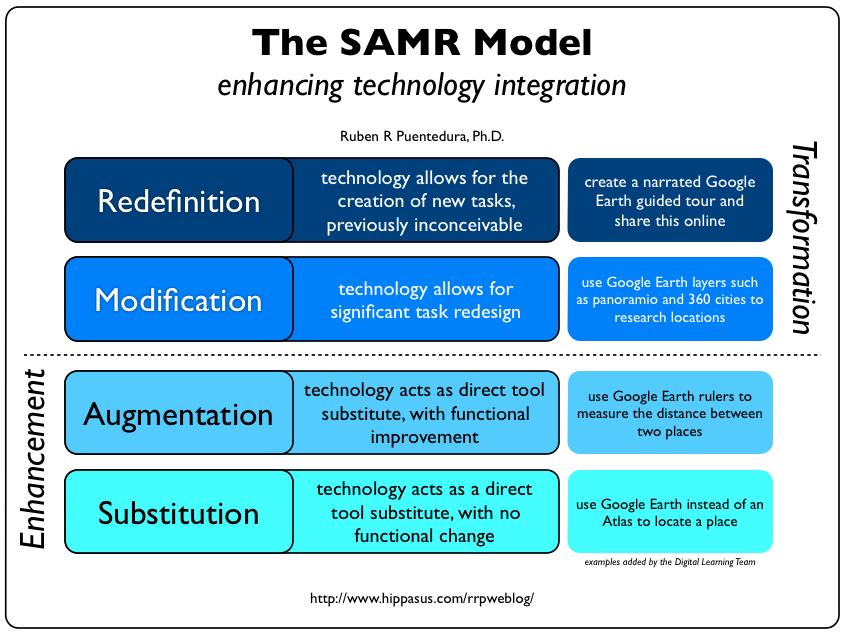
Introduction to the SAMR Model

The SAMR Model was developed by Dr. Ruben Puentedura as a way for teachers to evaluate how they are incorporating technology into their practice. This video on Common Sense Media gives a good overview of the model. SAMR stands for substation, augmentation, modification, and redefinition.  If you attended the workshop but did not receive a handout, click here for a PDF of the wheel poster that incorporates the SAMR Model.
null

Resources:

In our session today, we looked at (and explored) several digital technologies through the SAMR lens. As you select digital technologies for use in your own classroom, remember to apply SAMR.

Apps we explored today:

  • Student Response Systems – we tried Kahoot and looked at polleverywhere (which allows text message response as well as online) and Socrative (allowing individual student accounts). Remember the ‘issues’ around anonymity – you can harness the value but need to be aware of the risks… The other system that incorporates student code cards that I mentioned is called Quiz Socket – I’ll be making a set of cards and testing this one out over the next couple of weeks (so please check back!)
  • Padlet.com a cloud based, cross-compatible space for brainstorming… you can even moderate student responses (using the settings wheel) and adjust the privacy of your wall. Valuable for group brainstorms where you’re asking students to consider the responses of others. Helps in co-constructing kn0wledge.
  • 32 Interesting Ways to use Padlet in the Classroom
  • Concept mapping is a valuable way for students to connect learning – co-construct visual CMaps using Popplet.

Here is a link to the promised google doc with ‘subject specific’ online applications, simulations, games etc to support learning – again, as you select, evaluate using SAMR! NB: I will be adding to this list in consideration of our discussion and the subject areas ‘identified’ in our workshop over the next few days!

As always, please feel free to leave a comment below if you have any questions, comments or requests!

Leave a Comment

by | November 18, 2014 · 11:49 am

Debunking the Myths About Digital Natives and Immigrants

In an article by Marc Prensky, he coins the terms “digital natives” and “digital immigrants”. A few excerpts:

It is now clear that as a result of this ubiquitous environment and the sheer volume of their interaction with it, today’s students think and process information fundamentally differently from their predecessors…

What should we call these “new” students of today? Some refer to them as the N-[for Net]-gen or D-[for digital]-gen. But the most useful designation I have found for them is Digital Natives. Our students today are all “native speakers” of the digital language of computers, video games and the Internet.

Those of us who were not born into the digital world but have, at some later point in our lives, become fascinated by and adopted many or most aspects of the new technology are, and always will be compared to them, Digital Immigrants.

I do find the dichotomy that Prensky propose slightly problematic, as I feel like this distinction doesn’t serve anyone much good. He does have some good points, though.

Since I started my position with the Faculty, one of the things I hear on a regular basis is the concern over a self-perceived lack of technological skill. Many perceive those that have grown up in the era of technology are super tech savvy. Likewise, others that have recently returned to school feel that their skill sets don’t measure up to some of their peers.

There’s also the assumption that students all “digital natives” possess a wealth of knowledge and experiences related to technology. That is definitely not the case at all: some will have had the opportunity to learn bits and pieces, others not so much. If the assumption holds true, then there wouldn’t be students close to my age who come to ask for help. On the job, I learn about different programs, apps, and software on a rolling basis. There’s a lot I don’t know about, and I’m pretty young, too. Anecdotal evidence, but it gets the point across.

When you do integrate technology into the classroom, do highlight to the students that this is a learning process for everyone. Students appreciate it when teachers experiment with new technologies, and are also quite forgiving if something happens that doesn’t go as planned. Often times, you will find students that are eager to help teachers when faced with a tech issue. And this, my friends, is where the learning happens!

So, what does Iron Man have to do with any of this? I like to use this clip to make an analogy. You might feel like a bit like Heather, the first flight attendant that Iron Man saves. Remember that there are others just like you, ones that experience the same fears and concerns. And when you’re out teaching or in your classes, remember that there are many tools and resources available at your fingertips.

Recommended readings

Fear of Classroom Technology Just Doesn’t Compute

Jumping off the Cliff of Comfortability – Classroom Tech Integration

Overcoming Technology Barriers: How to Innovate Without Extra Money or Support

11 Reasons Teachers Aren’t Using Technology

5 Tips and Tools for the Tech Terrified Teacher


Leave a Comment

by | October 23, 2014 · 10:52 am

iPad possibilities

This week in the Scarfe Sandbox we explored some iPad apps that can support formative assessment (among other things). I frequently offer students the opportunity to share their learning using one of the ‘whiteboard’ style applications such as ‘Explain Everything’ or ‘Showme’.

These apps allow students to create content on the iPad (rather than just ‘consuming’). Students are able to draw, text, upload images and narrate. This can provide the perfect platform for teachers to have the opportunity to recognize understandings and to catch misunderstandings.

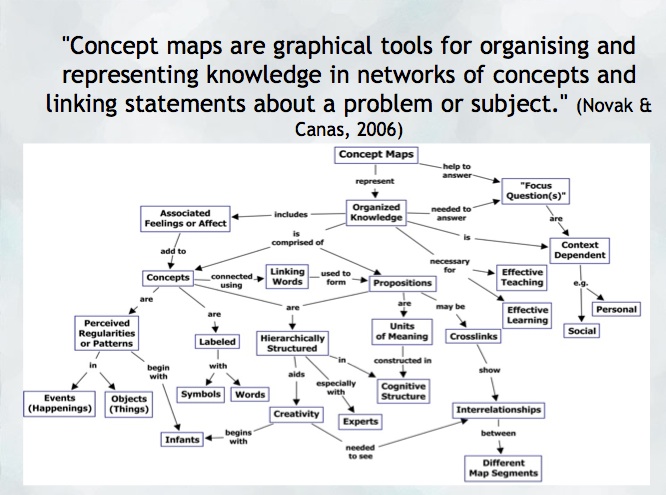
Another opportunity to help a student construct and share their understanding might be a concept map. Mind mapping, or concept mapping, can be a powerful tool where students are encouraged to illustrate the connections between their ideas, concepts or content in meaningful ways.

“A concept map is a type of graphic organizer used to help students organize and represent knowledge of a subject. Concept maps begin with a main idea (or concept) and then branch out to show how that main idea can be broken down into specific topics”.  There are some excellent tutorials on this site and information for teachers about the ‘concept’ of ‘concept mapping’

mindmap
Try: Inspiration or Kidspiration  as iPad apps

*Many schools also have licensing for this application on their computers or laptops.

Digital Storytelling is another excellent use of the iPad for content creation… try Puppet pals, Showme or imovie (among others!)

Leave a Comment

by | September 24, 2014 · 8:43 pm