Category Archives: Resources

Performance Assessment: connecting teaching, learning, and assessment to support student

Performance Assessment is a way to integrate not only students’ knowledge and competencies but also the teaching and assessment process. By engaging in a more ‘real-world’ and authentic approach, students will learn in a more contextualized and deep way!

What is a performance assessment?

This type of assessment evaluates students’ knowledge in a more complex way because students need to show what they know and are able to do through a practical and contextualized activity (Darling-Hammond & Adamson, 2010). In this sense, students produce something, such as an experiment, a performance, a report, research, etc that materialize what they have learned.

Moreover, performance assessment gives teachers the space to think about assessment beyond a way of measuring student learning. This type of assessment is also an opportunity for student learning since they may understand better a concept or develop a new skill during a performance assessment (Darling-Hammond & Adamson, 2014).

Differences between performance task and performance assessment

The biggest difference between performance tasks and performance assessments is that the latter is designed for students to demonstrate a group of skills and knowledge acquired during a couple of performance tasks.

Teachers might design a series of three or four performance tasks (for example, one for each week of class). Each one of these performance tasks has the purpose of developing different skills and knowledge. Consequently, the final performance assessment of this course should give the opportunity to students to demonstrate all skills and knowledge developed during the four performance tasks.

One common way in which performance tasks  might be designed is through project-based learning where students are invited to develop a topic connecting classroom knowledge with some real world, community or contemporary topic (Lenz, Wells & Kingston, 2015).

Performance assessment has the purpose of helping teachers (and students) understand what students have (or have not) learned over a period by getting them to apply and practice in a contextualized situations.

How to design a performance assessment?

The National Science Teacher Association (NSTA) has an interesting article with steps to help you design a performance assessment. Below, we summarize these five steps:

Step 1: Unpack the performance expectation: Teachers should understand their expectations or in other words what they expect students to achieve at the end of the lesson/ classroom. Thus, teachers need to evaluate if the performance assessment is really accessing what they want. In this step, teachers can use curriculum standards to better align their expectations with the performance assessment.

Step 2: Identify a rich and authentic phenomenon: the richness of performance assessment is exactly its characteristic of being contextualized. Therefore, teachers should pay attention to choosing a phenomenon that allows students to apply their knowledge and skills in an authentic way.

Step 3: Develop prompts: teachers should develop prompts and questions that guide students throughout the process without taking them the opportunity to discover and test their hypotheses and assumption because these experiences are essential to produce deep learning.

Step 4: Create scoring guides: teachers should create rubrics or order types of scoring guides for students during the process. These guides help students to understand the different kinds of activities and levels of expectations teachers expect them to complete.

Step 5: Pilot, score, and revise: before putting performance assessments in practice, it would be important to test them to analyze if they attend what you want and identify possible problems.

Performance Assessment Tools and Resources

The Performance Assessment Bank, an open educational repository, includes resources for interdisciplinary studies and in several discrete subject areas including history/social studies, english language arts, science and math. In BC, a set of performance standards was developed to support teachers in designing assessments. Below are some additional resources:

References

Darling-Hammond, L., & Adamson, F. (2014). Beyond the bubble test: How performance assessments support 21st-century learning. John Wiley & Sons.

Darling-Hammond, L. & Adamson, F. (2010). Beyond basic skills: The role of performance assessment in achieving
21st century standards of learning. Stanford, CA: Stanford University.

Lenz, B., Wells, J., & Kingston, S. (2015). Transforming schools using project-based learning, performance assessment, and common core standards. John Wiley & Sons.


Guest post by Peer Tutor Ariane Faria dos Santos (Ph.D. EDCP), Dec. 2021

Leave a Comment

Filed under Active Learning, Assessment, Blog Posts, Curriculum, Language & Lit Learning, Lesson & Unit Planning, Math, Open Educational Resources, Planning, Resources, Science, Social Studies, STEAM

Developing, interpreting, and accessing student thinking

According to Teaching Works Team (2022, May 9), eliciting students’ thinking involves classroom practices that develop, interpret, and access student thinking, such as questioning, discussions, and assessments with the purpose of identifying students’ prior knowledge, understanding, and misconceptions. It is a pedagogical approach where…

“Teachers pose questions that create space for students to share their thinking about specific academic content. They seek to understand student thinking, including novel points of view, new ideas, ways of thinking, or alternative conceptions. Teachers draw out student thinking through carefully chosen questions and tasks and attend closely to what students do and say. They consider and check alternative interpretations of student ideas and methods. Teachers are attentive to how students might hear their questions and to how students communicate their own thinking. Teachers use what they learn about students to guide instructional decisions and to surface ideas that will benefit other students. By eliciting and interpreting student thinking, the teacher positions students as sense-makers and centers their thinking as valuable” (Teaching Works Team, 2022, May 9).

Why is eliciting student thinking essential?

There are many reasons to teachers invest classroom time to elicit students’ thinking:

  • Value students’ ideas, competencies, and ways of seeing the world, changing the focus from the teacher to the students;
  • Understand students’ connections to previous knowledge, making learning meaningful;
  • support students’ deepen understanding of essential concepts in each subject matter, generating the development of high-level skills;

How can teachers elicit student thinking?

The Teaching Works Team (2022, May 9) suggests some steps teachers can take to develop, interpret, elicit, or assess students’ thinking:

  1. “Formulating and posing questions designed to elicit and probe student thinking, with sensitivity to how students might hear or respond to the questions
  2. Listening to and interpreting student responses
  3. Developing additional questions, prompts, and tasks to probe and unpack what students say”

To help you understand the specific features in each one of the steps of this cycle, you can check in the Teaching Works Team document.

Circular Model with Children at the Center where Teachers formulate questions design to elicit and probe student thinking, pose the questions, listen and interpret responses, develop additional questions and make sense of what students know and can do.

Source: Visual representation of eliciting and interpreting student thinking (Teaching Works Team, 2022, May 9).

Designing effective questions

Making questions to students is one of the most common and powerful pedagogical strategies used by teachers during the process of teaching and learning. Read the blog post “Asking Questions that promote deep learning” to learn more about asking effective questions.

Probing as a formative assessment

Another way that teachers can interpret students’ understanding is through formative assessment probes. Tobey and Arline’s books (2014) give many examples of how teachers can build formative assessment probes to identify misconceptions or prior knowledge that conducted students to develop their current way of thinking about specific contents or concepts in a subject area.

The difference between using assessment probes to evaluate learning and to understand students’ thoughts, is that the latter wants to reveal parts of the learning process and not its final results.  In this sense, the goal is to uncover the connections students have made during their learning. Another feature is that these types of formative assessment probes are designed to show students’ understanding of specific (and in general essential) knowledge of a subject. For example, Tobey and Arline (2014c, p. 5-7) claim that teachers should design assessments that allow uncovering students’ misconceptions about “area” and “volume”.

As a consequence of better understanding students’ thinking, teachers may be able to design new learning experiences to deepen or correct students’ conception at this point. Therefore, teachers may be able to improve the process of teaching and learning and deepen students’ understanding.

What does eliciting students’ thinking look like in different content areas?

The Teaching Works Team (2022, May 9) from the teacher education program of the University of Michigan shares some specific tips and classroom resources for different subjects:

More resources:

The course, Eliciting and interpreting, offered by the University of Michigan as part of their Teaching Works Collection of free and openly accessible resources, shares many classroom videos as examples of how to elicit students’ thinking. The videos discuss classroom situations and show how teachers can use these moments to better understand students’ thinking:

References:

Keeley, P., Eberle, F., & Farrin, L. (2005). Formative Assessment Probes: Uncovering Students’ Ideas in Science. Science Scope, 28(4), 18-21. http://pal.lternet.edu/docs/outreach/educators/education_pedagogy_research/assessment_probes_uncovering_student_ideas.pdf

NSTA (2022, May 9).Using Formative Assessment Probes With Real or Virtual Field Trips. https://www.nsta.org/science-and-children/science-and-children-septemberoctober-2020/using-formative-assessment-probes.

Ok Math Teachers (2022, May 9). Formative Assessment Probes. http://okmathteachers.com/formative-assessment-probes/

Teaching Works (2022, May 9). Eliciting and interpreting. The University of Michigan. https://library.teachingworks.org/curriculum-resources/teaching-practices/eliciting-and-interpreting/

Tobey, C., & Arline, C. (2014a). Uncovering student thinking about mathematics in the common core, grades k-2. SAGE Publications, Inc.

Tobey, C., & Arline, C. (2014b). Uncovering student thinking about mathematics in the common core, grades 3-8. SAGE Publications, Inc.

Tobey, C., & Arline, C. (2014c). Uncovering student thinking about mathematics in the common core, grades 6-8. SAGE Publications, Inc.

Tobey, C., & Arline, C. (2014d). Uncovering student thinking about mathematics in the common core, high school. SAGE Publications, Ltd.


Guest post by Peer Tutor Ariane Faria dos Santos (Ph.D. EDCP), Aug. 2022.

Leave a Comment

Filed under Active Learning, Blog Posts, Inquiry, Not Subject Specific, Open Educational Resources, Planning, Resources, Teaching Strategies

Games for Language Learning

In a language learning classroom, a game “could be any activity that formalizes a technique into units that can be scored in some way” (Brown, 2001, p. 183). Additionally, a language learning game is an activity “which is entertaining and engaging”, which should be challenging in some way, and which often includes interaction and collaboration (Wright et al., 2006, p. 1). Games may or may not include competition – some students are motivated by competition and others are not. Overall, games should inspire students to participate, try their best, and practice the target language.

For more information about group work in general, visit this blog post!

Why incorporate Games?

Games can be a great way to get students communicating and increase engagement! Providing a variety of activities can help to engage diverse students (different learners enjoy different activities and learning styles). Furthermore, repetition is a key element of language learning and games can provide opportunities for repetition while keeping the material fresh. Wright et al. (2006, p.2) describe a few of the benefits of including games in language learning:

  • Games help and encourage many learners to sustain their interest and work
  • Games provide one way of helping the learners to experience language rather than merely study it
  • Many games… provide repeated occurrence and use of a particular language form
  • Games involve the emotions, and the meaning of language is thus more vividly experienced
  • Games provide the key features of a ‘drill’ with the added opportunity to sense the working of language as living communication

The Teacher’s Role

Games require that teachers become facilitators (or sometimes participants). Try not to correct grammar or mistakes unless it’s absolutely necessary – games can encourage participation and we want to make that participation positive and rewarding. Don’t forget, “errors are a ‘necessary’ manifestation of interlanguage development, and we do well not to become obsessed with their constant correction” (Brown, 2001, p. 181). Teachers can be engaged in formative assessment during games and note what may need to be reviewed or targeted later with students.

Wright et al. (2006, p. 4) suggest the following steps to introduce a new game:

  1. Explanation by the teacher to the class
  2. Demonstration of parts of the game by the teacher and one or two learners
  3. Trial by a group in front of the class
  4. Any key language and/or instructions written upon the board
  5. First ‘try out’ of the game, by groups
  6. Key language, etc., removed from the board
  7. The game continues

Icebreakers

Learning a new language can be intimidating for many students: it requires that they are open to communicate with others and take risks. Developing a sense of classroom community and shared experience can help to make students feel more comfortable and willing participate despite the potential mistakes, which could result in feelings of embarrassment and vulnerability. Teachers need to consider how they are building and developing relationships in the classroom and can check in with students by taking a class temperature.

Icebreaker games are a great way to get students “to feel comfortable with each other, confident in themselves and focused on the language lesson” (Wright et al., 2006, p. 11). Games can also help students get warmed up and ready to learn by activating prior knowledge (an activating strategy).

Here are some examples of Icebreaker games:

  • People Bingo – the teacher makes a bingo grid with questions to help students get to know each other. Students circulate asking questions to their classmates, trying to fill in their bingo cards.
  • What Makes You Unique – each student’s uniqueness benefits the class. Students (and the teacher) all come up with something they think makes them unique. As each person says their point, anyone who can say ‘me too’ raises their hand and says it. Then that person needs to think of a new unique point until every person has been able to share something where no one else can say ‘me too’ (if a student is struggling to think of something, you can return to them at the end to give them more time – I like to use a class list or seating plan and check off names as I go).
  • Two Truths & A Lie – each person secretly writes two truths about themselves and makes up one lie. Students need to circulate and see if they can guess the lie (this can be done as a class too). Note that some guidelines and trust may be needed for this game so that the truths and lies are school-appropriate.
  • Would You Rather? – teacher says or shows an image of two things and asks students which they would rather (ie. Would you rather ketchup or mustard?). Students can move to one side of the class or the other to show their picks or raise their hands. You can extend this activity be asking a few students ‘why?’ each round.
  • Temperature line or Four Corners – Similar to would you rather, the teacher (or a designated student) can pose a question and students respond by moving to one of four corners or by organizing themselves along a line based on the ‘degree’ of their response)

Examples of Games

Here are a few game ideas to get you started. Check out Wright et al.’s (2006) book, Games for Language Learning, for many more examples and suggestions.

Board Games Adapted for the Classroom

  • Scattegories – Divide the class into teams. The teacher prepares a list of 8-10 topics (ex. a verb, an animal, a food, a colour, a movie character, etc.), then randomly picks a letter of the alphabet. The teacher will set a timer and each group will work on generating word for each topic that starts with the selected letter. When the timer goes off, one at a time, groups will share what they wrote for each topic – they get a point if they wrote a word, starting with the correct letter, that no other group wrote (if another group wrote the same word, neither team gets the point). Subsequent rounds can be played with a new random letter.
  • Pictionary – In groups of four (two against two), students can use a vocabulary list and take turns selecting and drawing a word for their partner to guess. This can also be fun as a whole class game (with two teams), having students draw on a white board, projector, or document camera.
  • Concentration – teachers or students can build this game. Teachers should create a grid (so that all pieces are equal size and shape). Teachers or students create matching pieces (one piece with a word in the target language and one image/drawing). When all the pieces are complete, students flip over the pieces and mix them up. Then, students take turns selecting two pieces to turn over, if they have a match, they get to keep those two pieces. The students with the most pairs at the end wins. Card Sorts can be done digitally as well. See the ‘Whose Names are These’ blog post in the Scarfe Sandbox for an example.
  • Headbands – this game has students asking questions to guess which object or character they’ve been given. The teacher writes names or objects on small pieces of paper and while students are working at their desks on another task, the teacher can circulate and tape the papers to the backs of their students (make sure to tell students not to discuss them!) – in the boardgame version, players wear headbands for display. Students will stand up and circulate to ask yes/no questions to their classmates in order to guess who they are. For an added level of complexity, the people/objects can be designed as pairs that students then need to figure out and stand beside before the game is complete.
  • Bingo – teachers can create a blank bingo sheet (5×5 grid). Students can write or draw vocabulary words (creating the bingo sheet themselves also serves as a form of review!). The teacher calls out the words in the target language and students can use small pieces of paper as markers until a student gets 5 in a row (vertically, horizontally, or diagonally) and calls out “Bingo!”. I like to continue for a few rounds allowing more people to get a bingo before starting again. Students can easily keep these bingo sheets as a quick review later before a test or anytime throughout the year.
  • Jenga Builder – students create a design without showing their partner using Lego or coloured pieces of paper in different shapes/sizes (students should have two matching sets of whatever material they are using). Students will hide their design and verbally communicate to their partner(s) how to build the same design. This is an example of an unplugged coding activity where students practice procedural and directional language to develop their computational thinking skills (an important aspect of the Applied Design Skills and Technologies BC ADST Curriculum). Visit the Unplugged Coding blog post in the Scarfe Sandbox for more examples and resources.
  • Battleship – give students a simple grid and have them prop a binder between them so they can’t see each other’s sheets. Students hide their ships by colouring in boxes on the grid. Students communicate how they will identify the rows and columns on the gride and then take turns guessing boxes until all ships have been discovered. (This is another unplugged coding example)

Movement Games

  • Statues – one student is asked to leave the room. The students who remain in the room are all given a verb to act out (silently). The teacher yells ‘Freeze’ and the students all stop mid-motion as statues. The teacher calls back the student from the hall to guess what action the statues are frozen in.
  • Charades – students are given a prompt and must act (silently) while their teammates guess.
  • Simon Says – one person takes on the role of ‘Simon’ (or they can use their own name!). Anytime the leaders say, ‘Simon says…’ and then an action, all the students must do the action. If students do the incorrect action they sit down. If the leader doesn’t say, ‘Simon says…” before the action and students act, they sit down. Continue until you have one or two winners left standing.

Whole-Class Cooperative Games

  • Go, Go, Stop – Index cards work well for this activity. The teacher will create a set of cards (make sure that you have en

    Go Go Stop cards

    ough cards for all the students, if you have extras, some students can take two). Each card will contain an answer (to a question on another card) and a question (whose answer is on another card). The first card will have START at the top and the first question at the bottom, and the last card will have the last answer at the top and STOP at the bottom. Shuffle the deck and hand them all out randomly to students. Creating a master list for the teacher to use will make this game much easier to facilitate! The teacher starts the timer when the student with the start card begins and the goal is to get all the students to read their cards in the correct order (this requires that students listen carefully and consider what they should be listening for). The teacher stops the timer when the last student says stop. I like to discuss with the group how to improve, then reshuffle the deck, hand them all out again and try to get students to beat their time (for secondary teachers with more than one class, they can have classes compete against each other for best time). 

  • Teacher Vs. Student – you’ll need a projector or document camera for this activity. The teacher displays some images on the screen (10-12 works well), then points at an image and says the word in the target language. If the image matches the word, then the whole class must repeat the word after them. If the teacher points at an image and says the wrong word, everyone in the class must stay silent – if they do stay silent, the class gets a point, and if anyone makes a sound, the teacher gets a point. The teacher can go faster or slower depending on the level of the class. First to 10 points wins!

Competitive Games

  • Flyswatter – the class is divided into two teams. The teacher displays a screen of words and/or images (the teacher could also write words on a white board). Two students come to the front (one from each team) and using fly swatters (or yard sticks) point to the image/translated word after the teacher says a word in the target language. The first student to point at the image/word gets a point for their team.
  • The Amazing Race – the teacher divides the class in teams of 4-5 and creates a list of tasks (translating, conjugating, and drawing work well). Teams send up a representative from each team to get the first task (depending on the difficulty of the task, these could be shown to students or given as a slip of paper – make sure they can’t see the following tasks!), then take it back to their team to complete. Teams show the teacher their completed (and correct) task before getting the next task – this continues for the rest of the game. The first team through the entire list wins.
  • Design Challenges These can be a great way to promote collaboration and communication (in the target language!).

Digital Games

  • Boukili (French) is a free website offering French books to read for a variety of reading levels. As students read, they unlock levels to travel virtually to new countries where they can change the avatar’s outfits and play games.
  • Jeopardy – Factile allows users to create a digital jeopardy game which can be projected onto a screen. One of the highlights is that the program keeps track of scores!
  • Blooket – This program allows teachers to create review games for students in a variety of game formats.
  • Word Games, like Boggle, Wordle, word searches and more, can be played online.

Board Game Ideas

If your school or department is looking to spend some money on board games for language learning, here are a few that would make excellent classroom resources:

  • Spot it – learn the vocabulary and race to spot matching pairs of images
  • Lion In My Way (AKA Obstacles) – creative problem solving and story-telling game using images
  • Dix It  – players use their imaginations to interpret images
  • Taboo – players try to communicate a word to their team without using any of the listed ‘taboo’ words
  • Scrabble – the classic word game can easily be used in classrooms
  • Bananagrams – similar to scrabble, but without the board
  • Guess Who – players take turns asking questions to try to figure out their partner’s mystery person

References

Brown, H. D. (2001). Teaching by principles: An interactive approach to language pedagogy (2nd Ed.). Addison Wesley Longman.

Wright, A., Betteridge, D., & Buckby, M. (2006). Games for language learning (3rd Ed.). Cambridge University Press.


Guest post by Peer Mentor Lindsay Cunningham (Ph.D. student, EDCP), July 2024.

Leave a Comment

Filed under Activating Strategies, Active Learning, Blog Posts, Curriculum, Digital Tools and Apps, Inclusive Practices, Language & Lit Learning, Not Subject Specific, Planning, Resources

Art Canada Institute: Teacher Resources

The Art Canada Institute (ACI), is a not-for-profit charity and educational organization based at Massey College at the University of Toronto. In collaboration with Canadian teachers and cultural advisors, they have developed over 40 Teacher Resources Guides, available for free in both English and French, to enable K-12  educators to teach cross-curricular subjects through art.

Developed in accordance with national education recommendations, these guides include step-by-step lesson plans, classroom activities, and ready-to-download Power Point slide decks that cover topics including Indigenous history; Truth and Reconciliation; Black, Asian and Women’s history; Climate Change, Human Rights in Canada and many more.

Research has shown that learning through the arts has a positive impact on student learning and can benefit engagement. Pre-service and in-service teachers will benefit from access to free, high-quality Canadian-made, open-source resources in both French and English.

Getting Started:

  1. Visit the Teacher Resource Guides on the ACI website
  2. Search by keyword, Sort and filter by grade level(s) and subject area(s)
    • filter features the ability to plan for multi-age and interdisciplinary learning!
  3. You can also access ‘Independent student learning activities’
  4. While on their website, you may wish to explore further. Visit the ACI Home Page and check out the ‘Explore Canadian Art’ menu!

Leave a Comment

Filed under Blog Posts, Curriculum, Open Educational Resources, Resources, STEAM, The Arts

Living and Teaching the First Peoples Principles 

Whether you are new to the profession or a seasoned professional, teachers in BC are called to consider how they might incorporate the First Peoples Principles of Learning (FPPL) into their classrooms and schools.  

The Truth and Reconciliation Commission Calls to Action and the BC curriculum requires teachers to consider and incorporate Indigenous voice, issues, resources and perspectives in our teaching. Jo Chrona provides a background of FPPL and Current Contexts on her blog:

In 2006/2007, The BC Ministry of Education partnered with the First Nations Education Steering Committee (FNESC) to create the English 12 First Peoples course. The development of this curriculum included significant input from Indigenous knowledge-keepers and educators from BC….to ensure that the course was able to authentically embody aspects of First Peoples’ values around teaching and learning.  

These voices were previously left out and systemically excluded from the current educational experience. Included in this process of course creation was the development of the FPPL so that First Peoples’ experiences, values, beliefs, and lived realities could be more authentically reflected in the course.  

Since then, the BC Ministry of Education has made an increased commitment to including Indigenous perspectives in education. According to Chrona, the initial integration of First Peoples’ content was first intended to support Indigenous learners “as the province and country continues on the path toward Reconciliation.” Now, more educators “are recognizing that the [FPPL] promote educational practices that are also powerfully effective for non-Indigenous learners…. that is replacing the post-industrial model of education” ; this is teaching that is “more responsive to the contexts and needs of learners, and the explicit inclusion of what are termed ‘Core Competencies’” (Chrona, 2024).

Let’s explore a few opportunities! 

Jo Chrona explains that “an inherent interconnectedness exists between all the principles. While they are described discretely, they operate in concert with each other in a robust and healthy learning environment and education system.” 

Teacher Disposition  

Chrona suggests that incorporating the FPPL has as much to do with an educator’s philosophy and disposition as it has to do with curricular content. Some of us will see our own values already reflected in the FPPL, and others of us will be challenged by them. Look closely at the FPPL and think about where you see them in your own life.  

  • When do you make time for your own elders, grandparents and mentors? How do you use their guidance to understand the world?  
  • How do you develop quality relationships with the people in your life so that you have a strong foundation to withstand conflict and stress? 

Now how do those values help you manage your class culture?   

Connections to Core Competencies  

Poster: https://www.edu.gov.mb.ca/k12/cur/cardev/gr9_found/docs/courage_poster.pdf

In order to thrive, all children need the opportunity to be in schools and communities that cultivate belonging, mastery, independence, and generosity. We know about Maslow’s Hierarchy of Needs, but do you know about Martin Brokenleg’s  Circle of Courage? In The Science of Raising Courageous Kids,” Brokenleg and Van Bockern explain this model that integrates Native American philosophies of child-rearing, the heritage of early pioneers in education and youth work, and contemporary resilience research. The Circle of Courage is based in four universal growth needs of all children: belonging, mastery, independence, and generosity. 

Instead of a class discussion, consider incorporating a class circle. Talking/sharing/class circles are also a great way to invite relationality into your classroom. Dr. Carolyn Roberts offers an exploration of this in her blogpost: Circle work: Being together as a relation.  

Context and Perspectives

For teachers exploring the FPPL, “It’s not a set of lesson or unit plans” nor “a detailed list of criteria and specific content to match up with grades and/or subject areas.”  

Consider how you can plan your lessons to: 


Resources

The choices you make as a teacher matter. When you use a celebrity as an example, do you look for Indigenous or BIPOC people? Choosing Indigenous authors and poets and musicians to discuss in class gives everyone an opportunity to look for connections to the FPPL. Consider sharing current examples rather than relying solely on historical references so that you highlight Indigenous brilliance (see Carolyn Roberts’ blog post for a few ideas)

A deep understanding of the FPPL reflected in our disposition will guide the decisions we make about what students should learn and how they experience it.

For more subject specific ideas and resources, see these Sandbox Blogposts:

UBC Booklists: 

The UBC Education Library booklists are available for educators and teacher candidates, offering an abundance of resources ranging from picture books to use in the classroom to lesson-planning guides. The library offers multiple booklists regarding Indigenous culture and history. These booklists cover topics such as residential schools, storytelling resources and literature written by Indigenous authors. 


asd

Post by Greta Bartsch, Learning Design Manager & Program Manager (Practicum- Secondary), 2024; editing & contribfutions by Yvonne Dawydiak


References 

Chrona, J. (2024, April 10) Background of FPPL and Current Contexts. https://firstpeoplesprinciplesoflearning.wordpress.com/background-and-current-context/ 

Brokenleg, M., Van Bockern, S. (2003). The Science of Raising Courageous Kids.  https://martinbrokenleg.com/wp-content/uploads/2016/02/12_1_Brokenleg_Van_Bockern.pdf


Leave a Comment

Filed under Blog Posts, Curriculum, Inclusive Practices, Not Subject Specific, Open Educational Resources, Planning, Remote teaching & learning, Resources, Storytelling, Uncategorized

Taking a Class Temperature

Taking a class temperature means checking in with students to see how they are doing. By checking the emotional temperature of the students (ex. seeing how students are feeling, their energy level, etc.) teachers can better understand what their students need and what they are capable of doing in that moment. In this way, teachers can understand, address, and then respond to student needs. A temperature check can also inform teachers about how students are doing with concepts or assignments. For example, teachers can assess the level of comfort students have towards a new concept or how they are feeling about an upcoming due date.

Making an effort to understand students’ emotional states can demonstrate to students that teachers care about them as human beings, which is foundational to building positive relationships. It can also help students to become conscious of their own emotions and provide opportunities for students to communicate their feelings and needs (Social Emotional Learning or SEL). Teachers should carefully consider their individual learners and the kinds of prompts or questions they ask when taking class temperature (especially where responses are not anonymous).

mentimeter app question shows sliders to indicate student comfort or temperature based on a prompt.

There are a variety of methods (high, low and no tech) that teachers can use to take a class temperature. All-class response strategies, such as post-it notes, Plickers, or Mentimeter, can be useful tools when eliciting feedback through survey questions and providing anonymous response options.

Here are a few more strategies for checking the emotional temperature of a class:

  • Thumbs Up/Thumbs Sideways/Thumbs down: Ask your students to close their eyes and put their heads on their desks. They’ll keep their eyes closed while holding up their thumb (up, down or sideways) in response to your questions. This all-class response strategy also works well to quickly check for comprehension.

    1, 2, 3, fingers icons as all class response

    1, 2, 3 fingers to show level of comfort, understanding, etc

  • Pictures or Emojis: You can ask students to point at emojis or pictures representing a variety of emotions. Images clipped from magazines work well and can be a great conversation starter. You could also put a selection of images on the screen (numbered) and ask students to identify the number of the image of how they are feeling (this is a great activity to do during attendance to check in with students as the class is starting).
  • Choosing Colors: Paint chips work well for this activity, but pieces of fabric would also be effective too. Spread out your colors on a tabletop and ask students to select a color based on how they are feeling. Students can share with you or each other about why they made their choice.
  • Thermostat on the Wall: If you have an image of a thermostat (ex. 1-low energy to 10-too excited to concentrate), when you greet students at the door before their class begins, they can point to where they are emotionally on the thermostat.
  • “I Feel Survey” (Lieber, 2009): Providing students with writing or discussion prompts around feelings can help students explore emotions and build classroom relationships. For older students, Lieber suggests providing a more extensive list of feelings (see p. 214) to help build their vocabulary around emotional literacy and SEL.
  • Soft Start is an informal way to connect with your students individually or in small groups. A soft start to the school day or class period can help students become more comfortable and engaged. This approach has ties to social emotional learning (SEL). A quote: “Connect before Correct” by Dr. Gordon Neufeld (child psychologist). His work on attachment is helpful when learning to help students connect with one another, with content and with their teacher! We spend much of the day providing instructions and feedback to our students (in other words, correcting, even when done gently and supportive) so providing time to connect is valuable!

Checking in with students can allow teachers to make adjustments to better serve the needs of their students. For example, if many students are feeling over-excited, teachers can respond by incorporating some movement, either inside or outside the classroom, to burn off some energy. Or, if many students are feeling anxious about a due date, the teacher could work with students to find a solution to alleviate some tension. Communicating with students about their emotions benefits both teachers and students, and is important to understanding student needs and building positive relationships.

Carole Miller Lieber’s book, Making Learning Real: Reaching and Engaging All Learners in Secondary Classrooms, is an excellent resource for secondary teachers. She outlines many ways to build relationships, affirm diversity, and develop a positive, engaging classroom culture.


Resources:

Lieber, C. M. (2009). Making learning real: Reaching and engaging all learners in secondary classrooms. Educators for Social Responsibility.


Guest post by Peer Mentor Lindsay Cunningham (Ph.D. student, EDCP), January 2024.

Leave a Comment

Filed under Active Learning, Blog Posts, Curriculum, Digital Tools and Apps, Inclusive Practices, Not Subject Specific, Planning, Resources

Coding in Classrooms

What is Coding?

Coding is a set of instructions given to a computer to produce different kinds of output. Learning to code involves a variety of  competencies that can be introduced or developed in K-12 classrooms across the curriculum. The Applied Design Skills and Technologies curriculum includes introducing block or visual programming languages beginning at grade 6. Many teachers incorporate activities using physical and digital ‘block code’ from a much earlier age.These activities can help build the essential competencies leading to build computational thinking (link to SD61).


Why teach coding in your classroom?

Learning Coding Remotely

Coding is included in the Applied Design Skills and Technologies Curriculum (ADST) in BC. Outside of teaching students job-marketable skills,  coding can help your students learn mathematical logic, creative exploration, how to understand systems, and a systemic procedure that exists in common computer programs (automator, video editing, animation, web design.). We might think of this as building computational thinking skills. By building these skills in collaborative and communicative hands-on ways, computational participation helps to link coding with the core competencies in the BC Curriculum and enhances student learning (and enjoyment).


How might you teach coding in your classroom?

Depending on the age, interests and abilities of your learners, (and access to equipment/materials), you can approach coding in many ways. A computer programmer friend of mine pointed out that, while learning to code using visual programming blocks as a language doesn’t necessarily translate to being able to code using Java or Python (two languages used by professionals), the computational thinking skills developed do transfer!

Consider your student interests: are there particular themes or activities you might employ to engage your students? Can you get students moving physically? Can students make something that is motivating to them? Can students work together to create and problem solve?

You might begin with some unplugged coding activities in order to apply a kinesthetic, hands-on approach to build resilience with directionality/commands, critical thinking and trial and error or you might dive right into one of the many programming applications that supports this. I’ve found older students (including me!) are motivating by coding to make something that ‘does something’ in the ‘real world’ (ex. MicroBits, Sphero or Ozobots). That said, many students will enjoy creating stories or games online (ex. Scratch, Twine).

Below are a few examples and links to resources that can support coding in your classroom across K-12.

“Unplugged” Coding

Coding and learning computational thinking can begin with unplugged activities where learners engage in problem-solving, sequencing, and design. Unplugged simply means ‘without a computer’… making this form of ‘coding’ accessible to all classrooms.

Unplugged Coding Activities:

  • Binary Braclets
    • Learn Binary by building bracelets! Students can code their initials using black and white beads which represent the language of coding.
  • Canada Learning Code
    • This Canadian content website includes a searchable database of lesson plans for unplugged and plugged coding activities including activities using popular tools and bots. Try searching by ‘unplugged’.
  • Code.org
    • houses an impressive amount of resources to learn about coding, start coding, and even use unplugged activities inside and outside of the classroom. Each idea includes a video tutorial, lesson plan, and assessment answer key.
  • Kid Bots
    • Kidbots demonstrates cross-curricular advantages of coding by involving numeracy, geometry, and literacy. Students design  a way to rescue an item from a designated location, but a classmate is the programmable “kidbot.”
  • CS Unplugged
    • They house lesson ideas of how to get learners working on core components of computational thinking!
  • Logic games like Sudoku, Mastermind, and Kanoodle can help students work on problem-solving skills that are integral to coding.
  • Lego challenges
    • Teachers can provide a task (like building their dream amusement park). This activity could also be paired with design thinking to help generate ideas or potential solutions to a problem.
    • Students can create a design (without showing their partner), then try to communicate the instructions for their partner to build the same design (without looking!). In coding, it’s important to be able to program specific instructions to get the results you want.

“Plugged” Coding

Also known as coding with a digital device! When we think about “plugged coding”, we might first look at students utilizing visual programming blocks. As a student’s computational thinking skills improve, they might begin to experiment with other programming languages including java and python. In the BC ADST curriculum, visual programming is referred to in Grades 6 through 9.

  • Visual block coding

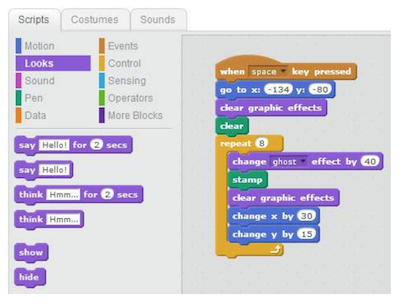
    • block based coding exampleVisual block coding is an approach to coding that represents instructions in the form of visual blocks rather than programming language syntax. This form of coding is seen to be friendlier to beginners of coding due to not having to memorize syntax due to the drag and drop feature, the “puzzle” piece aspect of the blocks that help you determine which blocks fit with one another, and a predefined list (limited choice of blocks) of functions, variables and objects you can use.
      While visual block coding might seem or feel like playing with logos, this is what coding essentially is at its highest level of abstraction. Once you understand how the functions, variables and object blocks work, you just need to apply language and syntax and that is coding! Visit Code.org or Canada Learning Code for some lesson ideas.

      • BBC Microbits make code block coding language is a visual representation of the JavaSript language. JavaScript is a function-based programming language that is used in web development. The Microbits block UI (user interface) allows you to swap or toggle between JavaScript and visual blocks to learn how the addition or subtraction of blocks affects your code in JavaScript.
        • Scratch is a block coding language developed by MIT that does not represent any other language (whereas with Microbits, the blocks represent Java). The actual code that is used is the blocks themselves. MET hosts a free cloud-based app and community where users can create stories, games, simulations, animations, and more. Scratch Jr. is a simple mobile app allowing students to drag simple block instructions to create actions on their iPad or tablet.

“Real” or Pro Coding


(The information below was provided by my programmer friend and former worklearn student, Eric):

Don’t be scared to start coding in “real” coding languages! Apply what you’ve learned in visual block coding and learn the language and the syntax and you’ll do fine! The first question one might ask themselves when they first decide to learn to code is: which language should I start with? Both Java and Python are good languages to begin learning to code. Both present high levels of abstraction in their language (code is more reminiscent of human language – visual coding is often thought to be very high levels of abstraction.) They are also both very commonly used and have plenty of resources for you to begin learning or if you have questions. Most people also find that once they learn one language, learning new languages becomes much easier.

Resources

  • Codecademy
    • Guides you through a suitable set of activities that are structured to help you understand the basics of coding. Once you first sign up, you are given a 7-day free trial to their premium program which allows you to explore all exercises. Once the trial is over, you will be relegated to practice on their free exercises; albeit, not as complete but still very helpful.
  • freeCodeCamp
    • Very similar to Codecademy, with a different set of exercises. As opposed to Codecademy, all exercises are free! However, the interface is not as easy to use as Codecademy and there is not as much guidance in completing exercises. If you progress further in freeCodeCamp, you might find it helpful to Google hints on how to do things and/or ask questions on Stack Overflow (a question and answer platform for computer programming.)
  • CodinGame
    • Directed towards more advanced coders to write and debug(fix problems) code in the form of a game. As opposed to Codecademy and freeCodeCamp, the exercises often involve multiple objectives and can take over an hour to solve. Despite its difficulty, CodinGame allows you to swap between 25 different languages. This tool is very helpful if you already know one language and you want to learn another! Don’t give up if you’re finding CodinGame hard – read the instructions very carefully and use the hints!
      YouTube videos
  • Hour of Code – Global Coding
    • Get globally connected by participating in the HOUR OF CODE. This initiative began to introduce all ages, and especially students, to the concept of coding…. in less than an hour! Hour of Code provides multiple plugged and unplugged activities so that classes around the world can begin coding. Anyone anywhere can organize an Hour of Code event – NO EXPERIENCE NECESSARY!

Robotics

There are many robots out there that can be used with specific branded apps or open coding apps like Tickle. Some that we have played with during our Sandbox Session were the following: DashSphero, and Ozobots and K-8 powered by microbits. These robots are also available to borrow from the Education Library!


Leave a Comment

Filed under AppliedDesignSkillsTechnologies, Blog Posts, Curriculum, Digital & Media Literacy, Digital Tools and Apps, Engineering, Math, Planning, Resources, Science, STEAM, Technology, The Arts