Category Archives: Inquiry

Inquiry-based learning

Inquiry is a powerful tool for teaching and learning.

Through demonstration of the core and curricular competencies, students are bound to form questions that provide teachers with insight into their thinking. Questions generated by both students and teachers are critical to encouraging a sense of wonder and curiosity among students. This dialogue can take place through many question-based approaches, including, but not limited to: Inquiry, Project-based learning, Problem-based learning, Self-assessment, Research skills & Scientific methods (from: https://curriculum.gov.bc.ca/curriculum/overview)

Engaging in inquiry can(and should) be scaffolded to support student success and can range from structured to controlled to guided to free inquiry.

with permission: https://www.trevormackenzie.com/sketchnotes success.

In ‘Teacher Inquiry’, small groups of educators connect & inquire into questions of import to solve problems by improving their pedagogical understandings and impact their practice. In the BC Curriculum, inquiry-based learning is recommended as a powerful force to support higher level thinking, deep learning and student autonomy. Examples of lesson plans provided by teachers to the BC Ministry of Education are available in the Instructional Samples of the Curriculum website. 

View:


Review:

There are several models or cycles of inquiry and it is worth looking into one that resonates with you:

Getting started with Inquiry:

  • Trevor McKenzie provides a helpful visual enabling us to see that engaging in inquiry can (and should) be scaffolded to support student success. Not all inquiry needs to be in the ‘deep end’ of the pool!

visit https://www.trevormackenzie.com/sketchnotes


  • Read Chapter 1: In this PDF, Focus on Inquiry, UBC researcher and education professor, Marlene Asselin collaborates on a more in-depth teacher’s guide to teaching and learning through inquiry including steps for implementing this approach in your classroom.

OPTIONAL Supplemental Reading

Consider & Discuss

  • Select 2 or 3 of the following:
    • How is inquiry the same or different from your school experiences?
    • What are some of the key features of inquiry that stand out to you?
    • What is the role of inquiry in learning?
    • How might you, or how do you, bring inquiry into your classroom?
      • What are some examples of inquiry-based learning from your own practice or your observations?
    • Is there a model you prefer or think you might like to try to implement?

Respond

*to learners in the Intro to BCK12 course, have a look at the Colour Symbol Image Thinking Routine and respond on the slide deck provided by email.


Leave a Comment

by | May 11, 2026 · 10:19 am

Developing, interpreting, and accessing student thinking

According to Teaching Works Team (2022, May 9), eliciting students’ thinking involves classroom practices that develop, interpret, and access student thinking, such as questioning, discussions, and assessments with the purpose of identifying students’ prior knowledge, understanding, and misconceptions. It is a pedagogical approach where…

“Teachers pose questions that create space for students to share their thinking about specific academic content. They seek to understand student thinking, including novel points of view, new ideas, ways of thinking, or alternative conceptions. Teachers draw out student thinking through carefully chosen questions and tasks and attend closely to what students do and say. They consider and check alternative interpretations of student ideas and methods. Teachers are attentive to how students might hear their questions and to how students communicate their own thinking. Teachers use what they learn about students to guide instructional decisions and to surface ideas that will benefit other students. By eliciting and interpreting student thinking, the teacher positions students as sense-makers and centers their thinking as valuable” (Teaching Works Team, 2022, May 9).

Why is eliciting student thinking essential?

There are many reasons to teachers invest classroom time to elicit students’ thinking:

  • Value students’ ideas, competencies, and ways of seeing the world, changing the focus from the teacher to the students;
  • Understand students’ connections to previous knowledge, making learning meaningful;
  • support students’ deepen understanding of essential concepts in each subject matter, generating the development of high-level skills;

How can teachers elicit student thinking?

The Teaching Works Team (2022, May 9) suggests some steps teachers can take to develop, interpret, elicit, or assess students’ thinking:

  1. “Formulating and posing questions designed to elicit and probe student thinking, with sensitivity to how students might hear or respond to the questions
  2. Listening to and interpreting student responses
  3. Developing additional questions, prompts, and tasks to probe and unpack what students say”

To help you understand the specific features in each one of the steps of this cycle, you can check in the Teaching Works Team document.

Circular Model with Children at the Center where Teachers formulate questions design to elicit and probe student thinking, pose the questions, listen and interpret responses, develop additional questions and make sense of what students know and can do.

Source: Visual representation of eliciting and interpreting student thinking (Teaching Works Team, 2022, May 9).

Designing effective questions

Making questions to students is one of the most common and powerful pedagogical strategies used by teachers during the process of teaching and learning. Read the blog post “Asking Questions that promote deep learning” to learn more about asking effective questions.

Probing as a formative assessment

Another way that teachers can interpret students’ understanding is through formative assessment probes. Tobey and Arline’s books (2014) give many examples of how teachers can build formative assessment probes to identify misconceptions or prior knowledge that conducted students to develop their current way of thinking about specific contents or concepts in a subject area.

The difference between using assessment probes to evaluate learning and to understand students’ thoughts, is that the latter wants to reveal parts of the learning process and not its final results.  In this sense, the goal is to uncover the connections students have made during their learning. Another feature is that these types of formative assessment probes are designed to show students’ understanding of specific (and in general essential) knowledge of a subject. For example, Tobey and Arline (2014c, p. 5-7) claim that teachers should design assessments that allow uncovering students’ misconceptions about “area” and “volume”.

As a consequence of better understanding students’ thinking, teachers may be able to design new learning experiences to deepen or correct students’ conception at this point. Therefore, teachers may be able to improve the process of teaching and learning and deepen students’ understanding.

What does eliciting students’ thinking look like in different content areas?

The Teaching Works Team (2022, May 9) from the teacher education program of the University of Michigan shares some specific tips and classroom resources for different subjects:

More resources:

The course, Eliciting and interpreting, offered by the University of Michigan as part of their Teaching Works Collection of free and openly accessible resources, shares many classroom videos as examples of how to elicit students’ thinking. The videos discuss classroom situations and show how teachers can use these moments to better understand students’ thinking:

References:

Keeley, P., Eberle, F., & Farrin, L. (2005). Formative Assessment Probes: Uncovering Students’ Ideas in Science. Science Scope, 28(4), 18-21. http://pal.lternet.edu/docs/outreach/educators/education_pedagogy_research/assessment_probes_uncovering_student_ideas.pdf

NSTA (2022, May 9).Using Formative Assessment Probes With Real or Virtual Field Trips. https://www.nsta.org/science-and-children/science-and-children-septemberoctober-2020/using-formative-assessment-probes.

Ok Math Teachers (2022, May 9). Formative Assessment Probes. http://okmathteachers.com/formative-assessment-probes/

Teaching Works (2022, May 9). Eliciting and interpreting. The University of Michigan. https://library.teachingworks.org/curriculum-resources/teaching-practices/eliciting-and-interpreting/

Tobey, C., & Arline, C. (2014a). Uncovering student thinking about mathematics in the common core, grades k-2. SAGE Publications, Inc.

Tobey, C., & Arline, C. (2014b). Uncovering student thinking about mathematics in the common core, grades 3-8. SAGE Publications, Inc.

Tobey, C., & Arline, C. (2014c). Uncovering student thinking about mathematics in the common core, grades 6-8. SAGE Publications, Inc.

Tobey, C., & Arline, C. (2014d). Uncovering student thinking about mathematics in the common core, high school. SAGE Publications, Ltd.


Guest post by Peer Tutor Ariane Faria dos Santos (Ph.D. EDCP), Aug. 2022.

Leave a Comment

Filed under Active Learning, Blog Posts, Inquiry, Not Subject Specific, Open Educational Resources, Planning, Resources, Teaching Strategies

A brief history… Timelines

Global logistics concept with industry icons

I came across TimeToast awhile ago and was just reminded of it this morning as a tool for creating interactive digital timelines. There are many digital tools available for timeline creation – I’ve listed several in the ‘how to get started’ section below including a few open educational resources. There are also, many ways to create timelines as ‘no or low tech’ projects in a classroom using sticky notes, cards and string.

For Timetoast, a free account allows photos to be uploaded, annotations and live links. I love the ‘timespan’ option, allowing a span of time to be highlighted and annotated. This adds some depth and interest to the typical timeline.

Public timelines can be viewed and shared ‘as is’; your own Timelines can be saved and made private or public. When public, you can share via Facebook, Twitter or by grabbing embed code. Teachers can easily upload the timeline to the class website or blog for home viewing.

As I messed about with it again, I considered a variety of uses; both personal and professional. As a teaching tool, timelines have so many possibilities. Here are a few that come to mind:

  • A classroom calendar embedded on the class blog or website – the initial timeline can house calendared events over the year and can also be added to over time either by student request due to personal milestones (lost tooth chart anyone?!) or as the class wishes to share learning events and activities with the world.
  • Social Studies units could be greatly enhanced by students creating their own timelines of historic events, life and times of… or the class can co-create a timeline as they explore a specific person, place or time.
  • Tracking growth and change in a Science experiment using both photos and text is a unique way to share.
  • A unique way to create an  ‘About Me‘ or ‘About my Family‘ or ‘History of my Community‘. A recent teacher candidate created a beaded timeline with her students to help students learn more about the Indigenous presence in her school community!
  • Create a digital story – fiction or non-fiction
  • A way of sharing Inquiry learning; a timeline might help highlight the ‘process’

Timelines can be valuable in a second language classroom such as French Immersion, Core French, etc; allowing  students to creatively engage in language learning.

What uses come to your mind? Comment to share!


There are several free timeline programs (and plenty of ways to create timelines using other programs – PPT or Padlet or a mindmap come to mind). Here are a few programs with specific timeline features:


Leave a Comment

Filed under Curriculum, Inquiry, Interactivity, Not Subject Specific, Planning, Resources, Science, Social Studies, STEAM, Technology

Asking questions that promote students’ deep learning

Why does crafting good questions matter?

Creating/designing effective questions for students is one of the most common and powerful pedagogical strategies used by teachers during the process of teaching and learning. Good questions can benefit both teachers and students.

Reinhart (2000) states that questions can…

  • For teachers:
    • support teacher decisions.
    • encourage students’ participation.
    • communicate to students that their thinking is valued.
    • show students initial knowledge.
    • reveal students’ misconceptions.
    • make them learn a new thing about their students.
    • review previous topics.
    • access understanding and curriculum goals.
    • maintain the flow of the learning within the lesson.
    • foster speculation, hypothesis, and idea/opinion forming.
    • create a sense of shared learning and avoid the feel of a ‘lecture’.
    • model higher-order thinking using examples and building on the responses of students.
  • For students:
    • help students articulate their thinking.
    • generate critical thinking and inquiring behaviors.
    • teach students to develop metacognition about a topic.
    • develop students’ ability and repertory to formulate their own questions.
    • improve high-level thinking and deep learning.
    • promote insights and connections between areas.

What makes a question a “good” one?

According to Bloom’s Taxonomy, the process of teaching and learning can develop different levels of thinking in students. In this sense, teachers can incentivize students to use lower or higher cognitive levels of thinking based on the teacher’s pedagogical goals. Therefore, it does not mean that teachers can never use the low levels since a lot of times teachers need to scaffold students’ skills. However, it is essential teachers analyze when, how, and why to use each level.

Source: Vanderbilt University Center for Teaching.

In terms of making questions, while lower levels of questioning access only students’ memory, high-level questions demand that students make connections, bring evidence, and even infer new knowledge.

If you are looking for more examples of questions in different levels or how to use them in your classroom using Bloom’s Taxonomy, there are many resources that you can use:

You can also see in the following video how teacher Melanie Agnew develops higher-level understanding through effective questioning in her High School English classes:

A Sample Guide for planning classroom questioning

Teachers know how many things can happen during a lesson and that is the reason that planning each moment or intervention is essential to promoting students’ engagement and learning. Thinking about the challenges that are to using questions in the classroom, the Center for Innovation in Teaching & Learning of the University of Illinois discusses some steps to successfully make questions in the classroom.

Cotton (1988) also gives some guidelines for classroom questioning:

  • “Incorporate questioning into classroom teaching/learning practices.
  • Ask questions that focus on the salient elements in the lesson; avoid questioning students about extraneous matters.
  • When teaching students factual material, keep up a brisk instructional pace, frequently posing lower cognitive questions.
  • With older and higher ability students, ask questions before (as well as after) material is read and studied.
  • Question younger and lower ability students only after the material have been read and studied.
  • Ask a majority of lower cognitive questions when instructing younger and lower ability students. Structure these questions so that most of them will elicit correct responses.
  • Ask a majority of higher cognitive questions when instructing older and higher ability students.
  • In settings where higher cognitive questions are appropriate, teach students strategies for drawing inferences.
  • Keep wait time to about three seconds when conducting recitations involving a majority of lower cognitive questions.
  • Increase wait time beyond three seconds when asking higher cognitive questions.
  • Be particularly careful to allow generous amounts of wait-time to students perceived as having lower ability.
  • Use redirection and probing as part of classroom questioning and keep these focused on salient elements of students’ responses.
  • Avoid vague or critical responses to student answers during recitations.
  • During recitations, use praise sparingly and make certain it is sincere, credible, and directly connected to the students’ responses” (p.8-9).

What might questioning look like in content areas?

References:

Armstrong, P. (2010). Bloom’s Taxonomy. Vanderbilt University Center for Teaching. Retrieved May 5, 2022, from https://cft.vanderbilt.edu/guides-sub-pages/blooms-taxonomy/.

Cotton, K. (1988). Classroom questioning. School improvement research series5, 1-22.

Reinhart, S. C. (2000). Never say anything a kid can say!. Mathematics teaching in the middle school5(8), 478-483.


Guest post by Peer Tutor Ariane Faria dos Santos (Ph.D. EDCP), May. 2022.

Leave a Comment

Filed under Active Learning, Assessment, Blog Posts, Curriculum, Inclusive Practices, Inquiry, Language & Lit Learning, Math, Planning, Science, Social Studies, STEAM

Concept Maps for teaching and learning

What are concept maps?

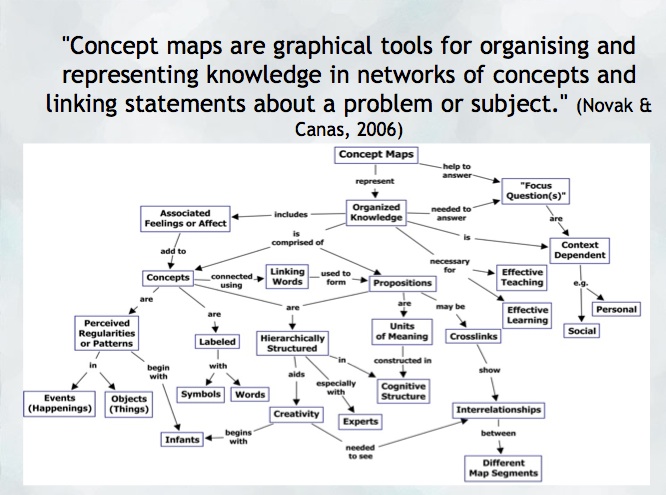
“A concept map is a type of graphic organizer used to represent knowledge of a topic, forge connections between ideas and create visual representations of one’s understandings. Concept maps begin with a main idea (or concept) and then branch out to show how that main idea can be broken down into specific topics” (Novak & Canas, 2006).  Visit the Concept Mapping resource post on this blog for a brief overview and links to resources.

Features of concept maps

There are four essential features represented differently in a concept map:

  1. Concepts: are words that try to represent a phenomenon, object, or idea. They may synthesize patterns in events or knowledge produced over time. In concept maps, these are depicted as shapes in the diagram.
  2. Linking words/phrases:  are used to connect two or more concepts and express some kind of relationship between them. They may indicate cause, consequences, conditions. In general, are written using a verb or few words.
  3. Focus concept or question: it is the main goal of a concept map.  It may be a question, an explanation, or a general idea that conducts your thought and organize all ideas around in the concept map. It is highlighted in the concept map, depending on the hierarchy chosen (top, center, etc.).
  4. Hierarchical and structure: it is how you will choose to organize the main concepts and their connections. It can be hierarchical (the main concept in the top), circle (the main concept in the middle), or other shapes appropriated to the idea you want to express.

Read more on  about the ‘concept’ of ‘concept mapping’ in this blog post on the “Inspiration” website and how teachers and their students might use concept maps, mind maps, or outlines to support writing, idea generation, and organization, planning and more. Inspiration is a software commonly found on school district devices.

You can also find a step-by-step construction of a concept map about the solar system in the Lucidchart or in the example below:

When to use concept maps in education?

Concept maps are powerful graphic organizers that can be used in many ways to illustrate and explore connections across ideas. In this sense, concept maps allow students to formulate their understanding in a non-linear way of thinking, showing their process of thinking during understanding a new idea or content.

Teachers can use concept maps to:

  1. Build new knowledge, deepen students’ understanding: designing a concept map provides students and teachers with an opportunity to construct and share their understanding of a topic, theme, concept, area of interest. This Edutopia article provides a good starting point for learning more about the power of concept maps and other strategies to support deeper thinking.
  2. Identify possible misconceptions: during the process of designing a concept map, teachers can understand better the logic used for students to build their knowledge and the origin of misconceptions. Curtis Chandler, a former Kansas teacher of the year shares how concept maps can be used to understand some students’ misconceptions or not use accurate language in a ‘middleweb’ blog post.
  3. Designing lessons: concept maps can even be used by teachers as a format for planning units or lessons of instruction, allowing teachers to visualize the logic used to connect several lessons into a unit plan or make cross-curricular connections.
  4. Assessment: concept maps can help students illustrate the connections between their ideas, concepts, or content in meaningful ways and can be used as formative and summative assessments. The University of Waterloo has some guides about what is important to consider when designing rubrics for assessing concepts maps.
  5. Create study habits: teachers can have students create concept maps summarizing the main ideas of a unit, creating the habit of continuum revision of the knowledge learned.
  6. Encourage collaboration and communication: a mind map might be collaboratively constructed in real time or asynchronously (using appropriate apps) allowing students to negotiate, think critically and communicate their ideas and understandings with others.

How to get started? mindmap

As mentioned, CMaps, concept maps can be analogue or digital. Teachers might consider providing students with a choice in developing their map using high tech or low/no-tech approaches depending on the objectives. If the objective is to widely share the map, then digital may be preferable (of course, students might also take a photo of a map ‘in process’ and one that is ‘completed’ in order to share as part of a portfolio or published work/project).

Some higher-tech options

  • Mindmaps: it is a tool that allows you to create concept maps without the need for an account. It also allows you to save your map in the cloud or download it to your computer.
  • Inspiration or Kidspiration as computer based or iPad apps Highly visual concept mapping software that allows the user to easily insert images from a large media folder. School districts commonly license these applications for use on their devices.
  • Bubbl.us is an online collaborative concept mapping software – each individual with an account can be invited to contribute to a given map being created in the cloud. With a paid educator account, a teacher can invite students using a link to either view or collaborate (students do not need to provide their information or sign up for an account). Paid app with Free trial options for Educator accounts.
  • For schools using ‘Google Classroom’   MindMup or Miro offer collaborative mindmapping (login required)
    • Teachers should always be aware of appropriate permissions in their context/school districts. These might include parental consent, student informed consent or it may not be permitted to have students sign up using gmail or other account information.

No/Low Tech Options

Collaborative or Individual drawing on chart paper or using sticky notes on a whiteboard or a table with a group of students are great options for kinesthetic or non-digital mind mapping. A primary teacher might even have students use kinesthetic, solid objects to create their mind map. Teachers might begin helping students develop their ability to connect ideas by providing a skeleton. This will help scaffold learning and introduce students to different ways to connect ideas.

Freeform Concept maps can be drawn by hand or using some of the available draw applications made for smartphones and tablets!


References:

Novak, J. and Cañas, A (2006): The Theory Underlying Concept Maps and How to Construct Them (Technical Report IHMC CMap Tools 2006-11). Florida Institute for Human and Machine Cognition.


Original post YD 2017 adapted by Peer Tutor Ariane Faria dos Santos (Ph.D. EDCP), Feb. 2022.

Leave a Comment

Filed under Active Learning, Assessment, Blog Posts, Curriculum, Digital Tools and Apps, Inclusive Practices, Inquiry, Not Subject Specific, Planning, Remote teaching & learning, Resources, STEAM

A brief history… Timelines

I came across TimeToast awhile ago and was just reminded of it this morning as a tool for creating interactive digital timelines. A free account even allows photos to be uploaded, annotations and live links. I love the ‘timespan’ option, allowing a span of time to be highlighted and annotated. This adds some depth and interest to the typical timeline.

Public timelines can be viewed and shared ‘as is’; your own Timelines can be saved and made private or public. When public, you can share via Facebook, twitter or by grabbing embed code. Teachers can easily upload the timeline to the class website or blog for home viewing.

As I messed about with it again, I considered a variety of uses; both personal and professional. As a teaching tool, timelines have so many possibilities. Here are a few that come to mind:

  • A classroom calendar embedded on the class blog or website – the initial timeline can house calendared events over the year and can also be added to over time either by student request due to personal milestones (lost tooth chart anyone?!) or as the class wishes to share learning events and activities with the world.
  • Social Studies units could be greatly enhanced by students creating their own timelines of historic events, life and times of… or the class can co-create a timeline as they explore a specific person, place or time.
  • Tracking growth and change in a Science experiment using both photos and text is a unique way to share.
  • A unique way to create an  ‘About Me‘ or ‘About my Family’ or ‘History of my Community’
  • Create a digital story – fiction or non-fiction
  • A way of sharing Inquiry learning perhaps. A timeline would help highlight the ‘process’

What uses come to your mind? Comment or Tweet to share!

Leave a Comment

Filed under Inquiry, Storytelling