My R learning notes 3: how to calculate the shortest distance to coast?

Recently, I have been working on processing data from multiple sites, which involved calculating the distance to the nearest coastline for the study sites. After exploring various methods in R and ArcGIS to compute the shortest distances, I found that many were complex and tedious. However, by integrating ideas from different sources, I’ve developed a simplest and fastest approach for calculating the shortest distance for each site by using R. This method is capable of processing multiple sites at the same time. I’d happy to share my codes below. Please feel free to let me know if you have any questions 🙂

# Load library
library(ggOceanMaps) # in order to use its function dis2land, the output are in kilometers.
library(rnaturalearth)
library(sf)

# Load coastline data
coast <- ne_coastline(scale=10, returnclass = “sf”)
Your_sites <- read.csv(“Your_sites.csv”)

# For example, I have a csv file called "Global sites", with three columns: sites_codes, Longitude (LON), and latitude (LAT):
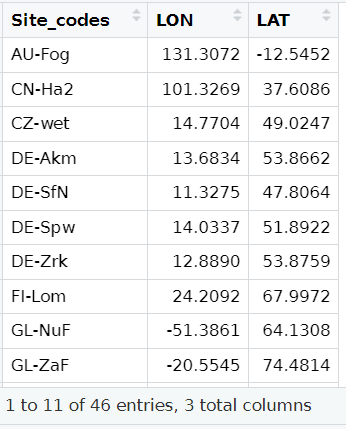
# Calculate the shortest distance
ggOceanMaps::dist2land(Your_sites,shapefile =coast)

# The results will look like:
ldist is the shortest distance (kilometers).


# Additional explanations:

The usage of ggOceanMaps library: We will use its function called “dis2land” to calculate the shortest distance. The function was originally designed for calculating the distance from a point in the ocean to the land (reference: R/dist2land.R ). But we  can replace the shapefile of the ocean by the shapefile of the coastline, so that we can calculate distance to the closest shoreline. The output is “ldist” and it is in kilometers.

The usage of rnaturalearth library: we can get the global coastline shapefile with the available finest resolution (scale =10) directly from this library.

The method presents here is inspired by Mikko’s answer at https://stackoverflow.com/questions/51837454/r-measuring-distance-from-a-coastline.

30 thoughts on “My R learning notes 3: how to calculate the shortest distance to coast?”

  1. The environment is given a snow rider 3d sense of depth by the use of soft lighting and subtle shadows, which creates the impression of a peaceful winter weather day in the mountains.

  2. This is a really elegant solution — thanks for sharing it! I especially like how you repurposed dist2land() by swapping in the coastline shapefile. That’s a clever workaround and much cleaner than building a custom st_distance() workflow with spatial joins and projections.
    Escape Road

  3. I believe that simplifying complex processes in R, like calculating the shortest distance to the coast, not only enhances efficiency but also makes data analysis more accessible for everyone, allowing us to focus on deriving meaningful insights from our research
    @bitlife unblocked

  4. Discover all the latest basketball zero codes in one place. We provide accurate and regularly updated codes that help you gain rewards, enhance performance, and enjoy a smoother gaming experience without wasting time on expired codes.

  5. This blog post offers such a deep and thoughtful reflection on the nuances of literature and personal insight. It’s fascinating to see how the second part of a story can reshape our entire perspective on the narrative. Engaging with these complex themes solo is a rewarding experience, much like the mental focus and immersion required for 1player Games. Thank you for sharing these miscellaneous thoughts; they really encourage a more mindful approach to reading!

  6. Engaging with these complex themes solo is a rewarding experience, much like the mental focus and immersion required for 1player cookie clicker . Thank you for sharing these miscellaneous thoughts; they really encourage a more mindful approach to reading!

  7. This is honestly a lifesaver! I was totally stuck trying to figure out how to calculate coastline distances without building an absurdly convoluted spatial join workflow. Swapping the ocean shapefile in the dist2land function is such a clever and elegant workaround. Tracking all my messy coordinate data used to feel as frustrating as trying to manage a complicated Fortnite Sprite Tracker, but your clean code snippet fixed everything in seconds. Definitely bookmarking this for my future GIS projects. Thanks!

  8. This is exactly the kind of efficient solution I always look for! I remember struggling with a similar task last year, spending hours manually calculating distances. If only I had this then! For anyone looking to streamline their workflow, Basketball Stars offers great tools for sharing and discovering such innovative code. I’m eager to see your code!

  9. This was super helpful! I’ve been wrestling with coastline buffers in ArcGIS for days, and your neat trick of swapping the shapefile in `ggOceanMaps::dist2land()` saved me a ton of time. Just ran it over a couple thousand site coordinates, and it handled the batch seamlessly. While working through the script, I had a stream running via the Choicer Voicer free online in the background, which kept me focused. Really appreciate you sharing such a clean workflow!

  10. The dist2land shortcut is much cleaner than the ArcGIS route I had been using, and running multiple sites in one call is the part that actually saves time. Good call flagging that the function was written for ocean points, since that assumption bites people quietly. Estimating distance by eye is hopeless, which is half the fun of Size It Up. Bookmarking this for the next batch of coastline work I have queued.

  11. What a great dive into calculating distances! I recently used R for a coastal project where accuracy was key. Your tips on spatial analysis methods are super helpful— they’ll definitely sharpen my approach. Thanks for sharing such valuable insights!

  12. Reading these R learning notes on calculating the shortest distance to the coast provides excellent spatial data analysis tips! Mastering GIS workflows in R takes practice, offering a rewarding challenge compared to relaxing with Easy Games during breaks. Thank you for sharing such clear coding tutorials—they are super helpful for learners!

  13. I also enjoy exploring how technology can shape the way we experience different forms of media and entertainment. For Mac users interested in revisiting classic PlayStation 2 titles, AetherSX2 for Mac can be a relevant option to explore alongside other modern digital experiences. It provides an interesting connection between technology, gaming, and the way older content can be experienced on newer platforms.

  14. Using ggOceanMaps with a coastline shapefile from rnaturalearth makes the workflow easy to follow, especially when processing multiple sites together. The note that ldist is in kilometers helps avoid ambiguity when interpreting the results. This gave me an idea for a mapping experiment called only one bed at the inn, comparing locations by their nearest shoreline. Would the scale=10 coastline still be detailed enough for sites close to small bays or islands?

  15. Using ggOceanMaps with a coastline shapefile makes the shortest distance to coast calculation look much more manageable for multiple sites. The note that ldist is in kilometers is particularly useful when checking results against other spatial workflows. I’m collecting practical R examples for a project called nate hand gesture, and this approach caught my attention. Would the scale =10 coastline still be suitable for sites very close to small islands?

Leave a Reply

Your email address will not be published. Required fields are marked *