Categories
LIBR559M

Users of social media aggregators

Social media aggregators are used in two different ways. The first is for private use and the second for public/social networking. On the social networking part, social media aggregators are capable of making some or all of its aggregated contents available to the public. The screenshots below show sharing settings for two social media aggregators. These settings provide affordances to learners and librarians.

Google Reader – private and public access Settings
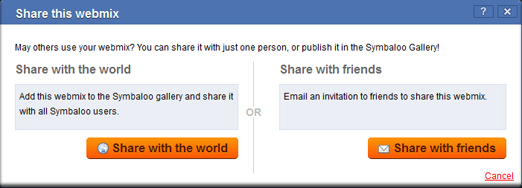
Symbaloo – private and public access Settings

From the definition of Personal Learning Environment (PLE) systems, learners are able to set goals, manage learning contents and process, and share with others in the process of learning. These are achievable with social media aggregators. So, the main users of social aggregators are learners, in which librarians (or information professionals) are included, since they are in a lifetime learning profession. In a case where learners’ progress need not be tracked and monitored, as provided in a virtual learning environment (VLE) or learning management system (LMS), social media aggregators would help such learners to manage their learning process and progress.

The social networking aspect of social media aggregators is a strong case why first, information professionals (particularly librarians) and second, learners use social media aggregators. In recent times, libraries have employed multiple social media sites to connect with their users. As libraries and librarians increase their digital footprints, the need to use social media aggregators arises. This is also the case for learners, who would like to share a collection of their social media sites with others in a “one stop shop” manner.

An example of a learner using social media aggregator (Symbaloo) is seen in the Welcome to My PLE!. BCIT library uses Netvibes for its Occupational Health & Safety resources, which I think demonstrates how social media aggregators can be used by libraries to support their patrons in social media environment.

Categories
LIBR559M

VoiceThread: Introduction to Surrey Libraries Website

I got to know about VoiceThread about three weeks ago during the first week’s class, on Affordance. I checked its About page and fell for it, after seeing the five different ways one can comment. Considering commenting by video, you don’t have to record your video comments, save it, and then upload it to the site. With a webcam attached to the computer, VoiceThread captures your video comment right into the site. Another interesting one is about audio comments, which can be made via telephone. See a demo on commenting by telephone.

The NYPL uses VoiceThread to share information about some of its digital gallery. Libraries, archives, and museums can also use VoiceThread to showcase some of their digital collections. Another way of using VoiceThread in libraries is for creating introductory videos to some of their services. Some are

  • How to use library catalogue
  • How to self checkout items
  • Introduction to the Library’s website
  • Accessing Library’s Wi-Fi network

I used VoiceThread to introduce the Surrey Libraries website homepage. With the aid of a free screen capturing tool, Jing, I captured images of the homepage of the website. After uploading these images into VoiceThread, they were converted into video clips after adding audio comments on the images. Jing also could capture video clips from the computer screen, and be uploaded into VoiceThread.

I found this experience fulfilling and would be trying other tools, like Glogster to share information in social media sites.

Categories
LIBR559M

Affordance: YouTube and VoiceThread

After reading McGrenere and Ho, I was able to differentiate between usability and affordance. I think the term usability deals with user’s experience with a system, while affordance deals with the properties of the tools that are utilized to design a system. For example, a blog might not be usable (usability) if “comment” is hidden whether by its location with the post, colour, or/and size. In the case of affordance, the designer of the blog is availed of the tools, i.e. comments, search, blogrolls, tag cloud, and many other widgets, in blogs.

The FVRL maintains a Youtube account that helps both librarians (public library especially) and the public. The videos are educative and serve as resources for librarians of public libraries, especially. Posting comments in a similar fashion as blogs is a good prove of its affordance as a social media tool. Comments in YouTube are only textual. I think this is a limitation to YouTube affordance.

Some people prefer audio/visual to textual communication. VoiceThread gives one the opportunity to comment on posted video (or multimedia file) in different formats other than typing the comments. Thanks to Dean for making reference to VoiceThread in one of the class discussion forums. Its About page is a starting point to know more about its affordance.

Spam prevention powered by Akismet