Categories
Active Learning EDUCATION Flexible Learning

Academic Writing with Grammarly: Insights from Personal and Educational Use

Academic Writing with Grammarly: Insights from Personal and Educational Use
(Nisha Malhotra, Ph.D.)

Four years ago, I started using Grammarly, which has been a time-saver, especially for editing lengthy reports and manuscripts. Reviewing Grammarly’s feedback has indeed helped enhance my writing skills. I have also encouraged my students to utilize Grammarly for editing their assignments, requiring them to submit both edited and unedited versions along with notes on the improvements made.

Grammarly’s Core Features

  1. Grammar Checking: Identifies and corrects grammatical errors.
  2. Style Improvements: Suggests ways to enhance clarity and readability.
  3. Plagiarism Detection: Checks for potential plagiarism against a vast database.
  4. Personalization: Adapts to individual writing styles and preferences.
  5. Context-Based: Ability to provide suggestions that are contextually appropriate.

Other than identifying errors- it’s numbers 4 and 5 above have kept me hooked on Grammarly despite its pricing.

Grammarly In Academia

For Students

Research has shown that students using Grammarly exhibit more linguistic variation. Studies by Dizon & Gayed (2021) and Fitria (2022) highlight Grammarly’s effectiveness in enhancing writing quality. Since, Grammarly considers context when providing corrections, helping students quickly and precisely improve their writing (Fitria, 2021).

The fact that Grammarly now also provides plagiarism reports lends itself to assessing written assignments. Students can check their work before submitting their papers, similar to a decade ago when I would have my students submit their work through “turn it in.”

As others have found – It also saved me time in grading assignments. Miranty et al.( 2021) discuss how It not only facilitates easier evaluation of students’ work but also leads to better assignment results compared to traditional teaching methods.

Decolonizing Academic Publishing

Am I in favour of using AI support to write articles in English? Of course!

In academia, top journals mostly publish exclusively in English, which can (and does) inadvertently exclude excellent research conducted by (ESL) academics, preventing valuable findings from reaching a global audience. It helps non-English writers and researchers level the playing field, at least to some extent and fosters more equitable dissemination of knowledge

Grammarly – What Next ?
Where would I like to see Grammarly go next?

I think it should create packages tailored for specific subpopulations of users, such as Education (ESL), Higher Education In Sciences, Academic Publishing, etc.

Academic Publishing: I want a platform where I can edit my manuscript, get a detailed report on what and why each edit was made, and then get support in formatting references according to the different styles. Right now, I still like to design, structure and write my own content, so other AI platforms don’t appeal to me as much – and I would not recommend them for higher education.

Grammarly’s user database can also inform pedagogy in paper-based courses and changes in publication trends across regions. It would be fantastic if they could explore the relationship between user data and graduation timelines; one could analyze the submission patterns of final papers in universities based on area codes. This study could provide insights into how students from different regions engage with AI writing tools to meet their academic requirements. Additionally, investigating the most common grammar edits across user subpopulations categorized by their mother tongue could offer valuable information on language-specific writing challenges and preferences, potentially leading to tailored writing support tools for diverse linguistic backgrounds.

_______________

Dizon, G. and Gayed, J. (2021). Examining the impact of Grammarly on the quality of mobile l2 writing. The Jalt Call Journal, 17(2), 74-92. https://doi.org/10.29140/jaltcall.v17n2.336 Fitria, T. (2022). Identifying grammatical and mechanical errors of students’ writing: using “grammarly” as an online assessment. Lingua Didaktika Jurnal Bahasa Dan Pembelajaran Bahasa, 16(2), 169. https://doi.org/10.24036/ld.v16i2.116824 Miranty, D., Widiati, U., Cahyono, B. Y., & Suzila, T. I. (2023). Automated writing evaluation tools for Indonesian undergraduate English as a foreign language students’ writing. International Journal of Evaluation and Research in Education (IJERE)12(3), 1705-1715.

How to cite: Malhotrta, N. (2024, May 19).Academic Writing with Grammarly: Insights from Personal and Educational Use. Instructional Design & Flexible Learning UBC Blog. https://blogs.ubc.ca/flexiblelearning/?p=518&preview=true

Categories
Active Learning EDUCATION Flexible Learning Flipped Classroom teaching

Screencasts: Asynchronous Video Tutorials for Economics

Recent technology and internet presence have become an essential part of education. Screencast Tutorials is one such medium – it’s an effective and powerful way to teach, present and communicate with students.

A screencast generally consists of a recording of the computer screen, along with the instructor’s commentary. Although easy to produce, it’s an excellent way to narrate presentations, explain concepts, answer students’ questions. It’s also an effective way to guide students through software and website.

Many students were eager to share their experiences and said that screencasts made economics appealing and learning fun. So, to gather further feedback I administered an online survey for my blended course; a class of 80 students taking a first-year undergraduate course in Economics were asked to provide feedback in an anonymous survey at the end of the academic semester. The survey was voluntary and administered after the final course grades were submitted for all students.

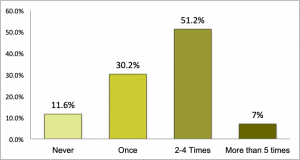
The survey responses highlighted that the ability to play and replay and at your own time were important benefits of video tutorials. The student survey asked how often the respondent replayed the screencast videos, and roughly half of them re-played the videos 2 to 4 times.

Figure 1. The number of times students replayed the video.

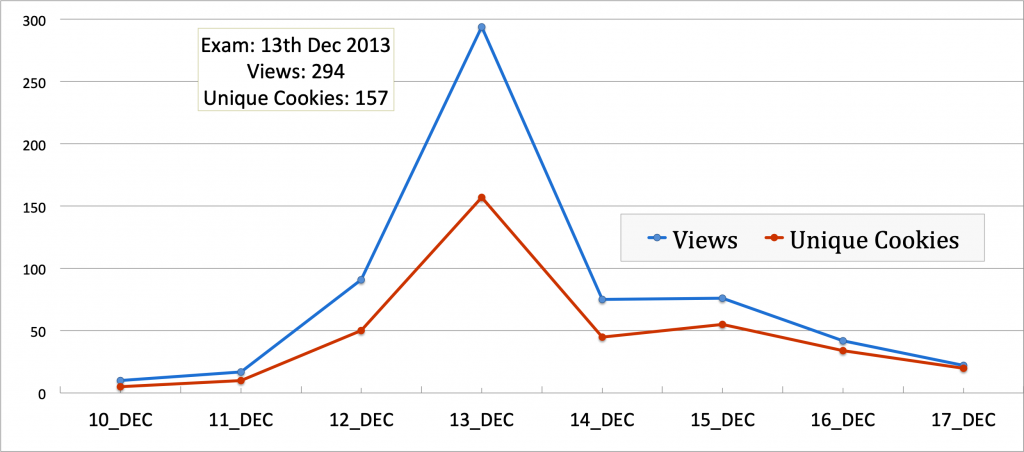
The above results are also supported by analytics from my YouTube channel where these videos are hosted. Looking at the 2013 viewership data for the YouTube channel, the biggest peak in viewership was the day before their final exam, where 157 students (as per IP addresses or cookies) watched the tutorial 294 times.

Figure 2. YouTube Analytics on Viewership

 Students rely on these videos for multiple reasons. In table 1  we have student’s responses to “For what purpose did you use the video tutorials?” Reviewing for exams was the main reason most students viewed these videos, followed by further clarification of the content.

Table 1: Student survey – Reasons students engage with the screencast video

Screencasting comes with some shortcomings too which includes that it demands time, and planning to ensure students engage with the content. One way to ensure that the student is paying attention to the video is by requiring guided notes on key points and allowing/using annotations.

A simple screencast tutorial is easy to create and takes no more than 15 minutes to learn and understand. There are many types of downloadable screen capture software like Camtasia, screencast-o-matic, screencapture- a simple google search will provide you with many software that will do the job. The annotations can be added at the time of recording or during editing. If you plan to upload it on youtube, then you can use the editing and annotation tools within youtube – that’s what I do for final touches.

So, with some pre-planning and crafty editing you can easily create a well-crafted screencast and here are a few things that I have learnt during the process:

  • Annotate- Similar to traditional lectures, organization and ‘Hooks’ are essential – organize the videos within the course and integrate new information in the video to existing knowledge by using annotated text.
  • Edit – Keep the screencast tutorials concise and short (5-7 minutes). You do not need to introduce yourself to each video unless they are stand-alone pieces.
  • Enhance with Visuals: Most recording applications offer tools to enhance videos, use these to highlight content and show connections. 
  • The tone of the video tutorial should depend on the purpose of the video and the course content that it replaces – 
    • Replaces in-class or face to face teaching – a conversational tone would work better. 
    • Replaces textbook content –  a formal tone is more suited.
  • The majority use smartphones or tablets with smaller screens to watch – so the text should be visible and easy on the eyes: use larger fonts with web-friendly colours. 

Here is  an example of a screencast tutorial – Econ101 tutorial on Income Effect and Substitution Effect using Indifference Curves

Categories
EDUCATION Flexible Learning

Where to buy cheaper textbooks?

The first day of classes, and you have your syllabi for the four courses you take this semester. At the university bookstore, you collect your package. Wait! You are expected to spend $100–200 on a textbook for a course to be used only for a semester?

No, it’s not a mistake. There are a few courses for which the cost of textbooks have skyrocketed in the past decade – I have seen this happen for economics. Yes, this is absurd. More so, as the latest, updated, expensive versions of the same textbooks might only have 2% of new content. Don’t worry—head for the exit and explore other options. There are many sources for cheaper textbooks.

Cheaper second-hand and discounted textbooks

If you don’t mind slightly worn out substitutes, acquire a second-hand textbook. There is a history in those folds, a guided hand in those marks or underlines, and a warmth in the knowledge that this book already has made the journey that you now begin.

Look for second-hand bookstores near your college or university—you might find stores dealing exclusively in second-hand textbooks. For students going to UBC, I recommend visiting Discount Textbooks—they offer a discount on new as well as second-hand textbooks.

You can also check with outgoing students and do away with the middle person- purchase second hand directly from your seniors. You might, in the process, get valuable advice and guidance from them. Use social media to connect to others who are selling used textbooks. You will find many groups on Facebook. Here are two for UBC:

  1. https://www.facebook.com/groups/ubc.textbook.4.sale/
  2. https://www.facebook.com/groups/ubcbuyandsellitems/

Online Stores like Amazon

Amazon is a great source for new and used textbooks, and offers discounts for students with “student prime” accounts. Also, it’s quite easy to trade back your used textbook. You may ask: “But isn’t there a yearly fee for Prime membership?” Amazon frequently offers a free six-month trial—check to see if it works for you. Your parents/guardians or elder siblings might have an account.  You might even find that it’s cheaper to purchase a brand-new textbook on Amazon.

Check before you purchase e-text

E-texts are an option, and if money is not a concern, then e-texts are fantastic. However, this might not always be a cheaper option. If you are deciding to purchase an e-textbook, check carefully, as some publishers only offer six-month access. In that case, you should think of this as the cost of renting a textbook for six months with no resale.

Before you purchase an e-text make sure it’s a version that can be read on your computer or tablet.

When should you sell your textbooks

If the textbook is for an introductory course that is a prerequisite for other classes, I would advise keeping the textbook for review. It makes sense to have permanent access to your textbook, or at least until you graduate. Don’t be in a rush to sell your textbooks.

Here is an insightful article by Eric Griffith in PCmag answering some of the questions on – cheap textbooks – where and how? https://www.pcmag.com/article2/0,2817,2423061,00.asp

Categories
Active Learning EDUCATION Flexible Learning Flipped Classroom teaching

Flipped Classroom

When learning happens before class. Class time can then be used to solve related problems.

Why?

Because, a) learning is not complete unless the learnt material is applied or used in an exercise; b) Class time is a limited resource, and having students learn basic concepts before class allows me to engage students in problem-solving; c) I believe guiding my students in solving a problem is more conducive to learning than a lecture that gives the answer.

Some issues that have been raised in earlier meetings (flipped classroom)

–  We have tutorials/Labs for problem-solving – that’s what TAs do in a tutorial. So, are the instructors taking up TA’s task?

  • Not all courses have tutorial sessions.
  • Why should the instructor be deprived of witnessing her student’s ‘Aha moments’ that, in general, are more frequent during problem-solving?
  • The instructor would lead the class in problem-solving, discussing the nuances and the concepts that need to be applied – while the TAs assist.

–  Would there be a need for professors- if the lecture can be replaced by a video and TAs can hold tutorials?

  • I would be surprised if a whole course can be flipped. I think there would always be material that can be better explained in a classroom.
  • One benefit of videos that I have not heard at these meetings is the ability to watch and replay and then to replay some more till the student gets the concept (see evidence of student engagement below).

Evidence of student engagement

Teaching statistical software—STATA—in my course Econ 490 (2009)

I started using video tutorials in my courses in 2009. I created videos (screen-capture)  tutorials for the seminar Econ 490 course (Gender, Population and Health) and posted them on YouTube.

These video tutorials were created to help students with their research. They review lectures on statistical software and discuss other research tools, like accessing data sources from the UBC library.

https://www.youtube.com/user/KHELKHELMAINrg

Introduction to Stata

Video tutorials are especially useful for courses where students need to practice and review software commands provided in a class, closer to the time when the data is accessed, or the software is used.

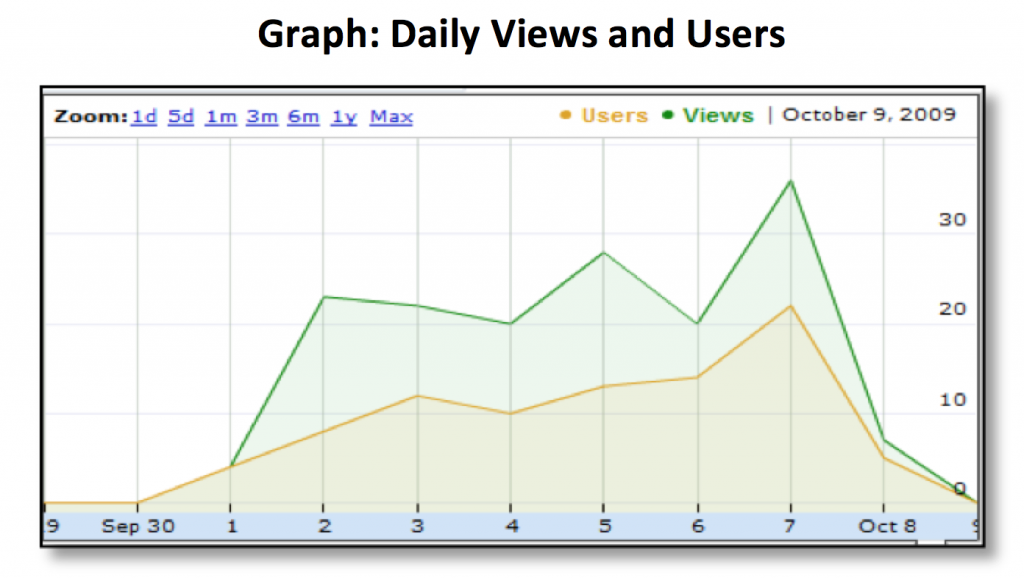
The following user statistics are for the video “Stata for Assignment 2 part 1” – it reviews the STATA commands discussed in class, and that is needed to complete Assignment 2 for this course. From the user statistics for these video tutorials, note that:

1.  Students viewed this video multiple times; a class of only 44 students viewed this video more than 100 times. (Imagine doing this in-class time)

2. Students viewed this video just before the final paper due date.

Categories
EDUCATION teaching

Teaching is like _ Sparking the Ignition System.

Teaching is Like Sparking The Ignition System.

The spark timing is extremely important – For some students we need to advance that spark but for others, those reluctant & sluggish engines, advancing the spark would only lead to detonation/knocking that might ultimately cause an engine failure.

Failure that would either reflect in school drop out rates, those failing grades or changes in their graduating majors.

Teaching can not happen without a super conductor. The teacher has to be able to connect with the students.

She has to be the conductor that can eventually deliver that spark.

And deliver that spark without self-burnouts. You see, the weaker the conduction the more effort required on the part of the teacher to convey the knowledge.

Once sparked – see those engines rev up.

REVVED UP AND READY TO GO

Spam prevention powered by Akismet