You have probably already used tagging – or have been tagged – and may not even know it. Have you ever received an email from Facebook telling you that “You’ve been tagged in a photo”? Or maybe you’re a movie geek and enjoy adding descriptive words to movies on The Internet Movie Database. These are examples of tagging in action!
What exactly is tagging?
Tagging is a common term that refers to adding labels to items (photos, books, movies, webpages, etc.) that are found online. When you’re looking for something online, often you can find it quicker and more easily if there’s a label. With the growing vastness of information available on the Internet, it’s impossible for “professionals” to label everything and computers just don’t have the human touch required to do the job right. But now that the web has gone interactive, we don’t have to rely on pros and ‘bots – anyone can tag! Everyone can collaborate through online tagging to point other web surfers in the right direction to find stuff online.
There are a couple of ways of displaying the information generated by tagging:
List View

The tag list is an index of tags that are sometimes broken into useful categories. Finding a topic is simply a matter of looking down the list to find the subject you want to search.
Tag Cloud
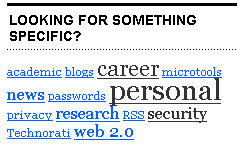
A much more visually dynamic way to display the available tags is in a tag cloud. The size of the tags let you know which are the most popular or have the most items associated with them. The tag cloud is also great for browsing as you can find which items have been tagged with a particular tag simply by clicking on the hyperlinked tag. Searching by tags can be really easy and fun!
The amount of stuff available online grows every minute and the chances of us finding our destinations on the information superhighway grow increasingly difficult every day. Tagging is a way to encourage everyone to become involved in the labelling process and make sure that there is an easy way to identify and retrieve what we want from the web.
Media Moment
There are some obvious issues created by letting just anyone with an internet connection label stuff. What if they do a lousy job? What if they mislabel information and I get a bunch of bad hits? As tagging grows in use and popularity and before it becomes the labelling method of choice for important information sites, these questions will have to be assessed and addressed. Common wisdom (and some research) suggests that “official” labelling can be greatly enhanced by tagging, as the way professionals approach material is often very different from the way we search for it. Tagging gives the people a voice – so speak up!
NetworkEducation
- Go to Flickr’s Most Popular Tags page. Click on the most popular tag today. Look through the images you find.
- Does the tag seem to fit the images?
- Checked out the related tags next to the images. Do these tags seem useful?
- Go to The Internet Movie Database. Type in the name of your favourite movie, or the last one you’ve seen. Scroll down to “Plot Keywords” and click “more”.
- How many tags does the film have? Are they ordered in any way?
- Do you think they are all/partly/not at all appropriate for this film?
- If you have an IMDB account, or want to get one, sign up and add your own tag to the film.
- Click on the tag you think is the best description of the film.
- Have you seen any of these films?
- Check out the “Related Keywords” on the left. Click on the first one that grabs your attention.
- Was it one of the most popular tags?
- Go to the University of Michigan M-Tagger page .
- Scan through the FAQs, then scroll down and look at the list of things that students at this university can tag. (FYI – “Mirlyn” is the online university library catalogue.)
- Check out the “TAG THIS PAGE” section at the bottom.
- Does the tagging process look easy? Inviting?
- Click on “MTAGGER” and then “View all tags”. Scroll through the tag cloud and look for the subject of your next paper in the list. Now look for the most popular tag on the list.
- Which was an easier search?
- Does the most popular tag surprise you?
- Click on the “DVD” tag.
- How many items are there with this tag?
- Do some items have more than one tag?
- Now find the MTAGGER search box and enter the search phrase “movie” (without the quotation marks).
- How many items are there with this tag?
- How many movies do you think the university has in its collection?
- Scroll down and check out the various suggestions.
- Do they seem helpful?
- Think about tagging as it relates to your life as a student. Would you want UBC to adopt tagging for its catalogue?
- Do you tag regularly on social network or photo sites? Why or why not?
- Post your answers in the comments below.
Check out these links!
“The Hive Mind: Folksonomies and User Based Tagging” blog post on InfoTangle
iTag – Free tagging software and a review of this application at freewaregenius
This post was originally created for the Digital Media Project, a joint project of UBC School of Library, Archival and Information Studies and the Irving K Barber Learning Centre. It has been modified from its original form.