Categories
Submitted Assignments

Synthesis Reflection

1-2 paragraph précis of your flight path (5)


When I originally set out in ETEC 565, I recognized that I had hoped to learn much about the five areas of the course, particularly about how to create an effective LMS and how to use social software so that it appeals to both my teaching style and diverse learning styles. I recognized that Bates and Poole’s (2003) SECTIONS framework as well as Chickering and Gamson’s (1987) Seven Principles…. were both relevant frameworks that when duly applied, grounded the selection and use of learning technologies in effective practice. I noted that I could see how multimedia could be used in order to “respect diverse talents and ways of learning” but that I was unclear of how exactly to achieve this (Chickering and Gamson, 1987). I also recognized that social media and newer, user friendly communication tools have made the “I” in SECTIONS (Interactivity) much more tangible in today’s learning environments.


 In looking at my flight path, I can see that I was framing LMS, multimedia, assessment tools, communication tools and social software as individual operations. I now see that really, there is much overlap and instructors should be aware of the interconnectedness of these five elements when selecting and using technology. I originally stated that my goals for this course were to learn about how to select appropriate learning technologies and how to use technology as part of communication and assessment within the classroom. In reflecting on these goals, I would say that I have certainly learned a great deal about both, particularly about how to select appropriate learning technologies.

Reflection on your eLearning toolkit experience overall (5)

            The eLearning toolkit was a helpful inclusion in this course. I admit, there were some components that I found repetitive because of my existing knowledge (wikis, web design and html authoring), but overall the toolkit was not a burden or a hard assignment. Rather, it was a helpful tool that could be accessed at any time and provided great links and examples. I enjoy self-regulated learning experiences and as such, the toolkit was something that I could navigate at my own pace and customize to my existing knowledge structures. I found the social software activity to be the most thought provoking because it had me looking at terms of service and really thinking about how that affects both my own practice and the experience of my students.


Apply SECTIONS model to self-assess your portfolio, where applicable (5)

Bates and Poole’s (2003) SECTIONS – application to my LMS


Students – My students are middle school aged (grade 7) and as such, my LMS is a balance between “kid friendly” and adolescent appropriate resources and activities. The LMS also shows as awareness that grade 7 students need to be kept engaged by appealing to their interests, hence, the Facebook style activity, podcast assignment and Google Earth assignment. All are assignments that could have been presented in a more traditional way (such as a report or illustration) but these students require something that will keep them interested in their learning and allow them to use some of the tools that they already use for personal purposes.


Ease of Use – As the instructor, I found Moodle to be relatively easy to use. My students would certainly be able to handle the technology but at the same time, very specific instructions are given so that students have clear step by step instructions regarding how to proceed. Moodle is becoming a common open source tool and I am confident that it is reliable.


Cost – As open source software, Moodle is free and no other costs were incurred in the making of this course. Tools used – Google Earth, CMap Tools, Garageband, iTunes – are all either free downloads or come with Mac computers (which students will be given access to for Garageband).


Teaching and learning – Students need to be able to learn the basics about ancient civilizations while at the same time be able to assimilate existing knowledge and have access to extensions. A constructivist learning approach is something that I (and my LMS) subscribe to and while there are direct resources I created with text, there are also links to my sources and further information. As grade 7 is a pivotal grade for easing students from an elementary to secondary style of schooling, higher thinking questions are given for discussion that require students to go beyond the resources of the LMS.


Interactivity – The LMS enables students to interact with the teacher (via chat) and other students (via entire class discussion forums as well as small group discussion forums). Additionally, students are required to complete individual assignments to be viewed by the teacher only, individual assignments to be posted for all to see and group assignments to be posted for all to see.


Organizational issues – N/A


Novelty – Neither Moodle nor any of the embedded programs are brand new. All technology being utilized is well used and constantly updated to continue improved functioning.


Speed – Materials can be changed instantly by the instructor and students that do not have required programs downloaded can download them in a matter of minutes.


Describe next steps for you, in terms of your practice in educational technology (5)

As a K-12 teacher, I have found ETEC 565 to be the most useful course of my MET program so far. I will continue to apply the SECTIONS framework when I prepare technological teaching and learning activities. I think that I will be able to better analyze educational technologies and make recommendations for my own practice and the practice of others. As a result of my learning and experience here, I will be using an LMS in my classroom. My short term goal is to be able to use Moodle for one course and long term, expand its use to other classes. I also hope to utilize social software more with my students in order to appeal to their interests and make academic connections to these programs. I am hopeful that the selection and use of educational technology will become more a natural process akin to how I would plan for teaching without technology. Already, I have SECTIONS memorized and can call upon it instinctually when thinking about educational technology so I hope that this will continue and become a natural part of my practice.


References


Bates, A.W. & Poole, G. (2003). Chapter 4: a Framework for Selecting and Using Technology. In Effective Teaching with Technology in Higher Education: Foundations for Success. (pp. 77-105). San Francisco: Jossey Bass Publishers.


Chickering, A.W. and Gamson, Z.F. (1987).  Seven Principles for Good Practice in Undergraduate Education.  American Association for Higher Education Bulletin, 39 (7), p. 3-7.
Categories
Module 5

LMS Reflection

Splash page using an object orientation (5 points)

3 units (Greece, Rome and Egypt) are clickable images that take you to appropriate modules. Additionally, the top right navigation is specific to the current unit on ancient Rome and orientates viewers to the appropriate module.

Two (or more) complete content modules (5)

Yup! 3 actually… Ancient Rome #1 (Introduction), #2 (Religion) and #3 (Government)

(At least) one module programmed for selective release (1)

So after much searching, I have concluded that Moodle will not allow one to program for selective release. I have, however, “hidden” a module (Ancient Rome – #4 – Warfare) to demonstrate to you that I know how to keep a module hidden until I wish to release it to the class. Additionally, my main quiz is programmed to open at a specific scheduled time (selective release within the LMS).

Two general discussion fora topics (2)

I have both entire class and small group forums including “Icebreaker”, “Resource Forum” and “Question Forum – Help!” under “General Forums”.

One group discussion forum for (at least) 2 groups (2)

In “Learning Forums”, I have group forums set up for “Republic vs. Empire”. Within this forum, I have selected the “separate groups” option and created 6 group forums.

A reflection upon your experience completing this assignment in your reflective practice weblog

The LMS creation experience has been the most practical experience of my MET to date. Even the moments that frustrated me felt worthwhile because they made my understanding of how to use Moodle stronger. I think of myself as an “independent learner” in many respects and I was pleased with the fact that I could explore Moodle without help and do 95% of what I wanted to do. The only things that I was not able to figure out on my own were programming a module for selective release  (which I concluded was not a possibility in Moodle anyways) and programming an object orientation (which was built in anyways). I particularly enjoy knowing that I really could use Moodle in my own classroom because of the ease of use and zero cost associated (SECTIONS!). The most challenging part of this assignment for me was actually the content creation. Since I am a new teacher, I decided not to use materials that I currently had and instead create the course that I actually hope to teach. Overall, this assignment was extremely rewarding because I was able to synthesize theory, experience and practice. My synthesis will delve further into this.

Categories
ETEC 565A Module 5 Submitted Assignments

Multimedia Inventory

I can’t paste a chart here in WordPress so for the full “effect” I have attached my Multimedia Inventory as a Word doc.

View my Multimedia Inventory

Categories
E-learning Toolkit

Toolkit – Accessibility

The issue of accessibility is very clear in my mind because of my role working with special needs students in school. I have had the opportunity to work with members of SET BC and take advantage of programs and tools that they provide for greater accessibility. In the case of my own Moodle site, there are a couple of things that I notice with respect to accessibility. The way Moodle is designed, a lot of clicking and scrolling is involved. My site requires much clicking between resources, activities and external sites, which for some, may be challenging. Also, the size of the text in Moodle is by default very small (for the activity and resource titles). I did provide alternate text for my images as prompted. When checking my site through the Markup Validation Service, four errors were returned, but I didn’t understand what they referred to.

Categories
Submitted Assignments

Digital Story

For optimal viewing, view my digital story in Google Maps

View Adventures in Europe in a larger map

Originally, I was going to select Bubbleshare to tell my digital story. After all, I have used it for that purpose many times before. However, after viewing Alan Levine’s (2007) “50 Web 2.0 Ways to Tell a Story”, I was inspired to try something new and ultimately use a tool that will be very applicable to teaching social studies. I have used Google Maps hundreds of times for the purpose of finding directions but I never thought of it as anything other than a locator tool. After seeing the options it provided for virtual storytelling, I was convinced that it was the right tool to tell my story and the right tool to introduce to my social studies students.

The story I chose to tell was about my own experience traveling. Google Maps was the right tool for several reasons. In the context of social studies and of traveling, I don’t believe that a story necessarily has to be sequential in order to understand it. Google Maps affords both a sequential or non-sequential viewing experience that can be determined by the viewer and facilitated by the ordered plots along the left side of the map (a sequential experience) or the scattered location plots on the map itself (a non-sequential experience). In reference to my story, my trip obviously took place in a certain order but to understand my thoughts on a city or to view my images one does not need to view each part in order.

I wanted to express that my travels were not linear events but rather interconnected events that were many individual experiences that also formed a collective whole. Google Maps was the tool that could best represent this due to several features.

1) The ability to colour code locations. Note that blue markers were my first trip and green markers were my second trip with London as the sole yellow marker because it was a part of both trips.
2) The ability to “symbol code” locations. The thumbtacks represented overnight stays whereas the raindrop markers represented daytrips.
3) The ability to draw routes. Google Maps allowed for me to draw my route of travel and also colour code them.
4) The ability to allow for sequential and non-sequential viewership.
5) The ability for me to situate locations on or near a map so that viewers can physically see the locations and the distances between them.

Depending on the topic, students can use Google Maps to tell a story about where they have been or use Google Maps to support a historical or cultural understanding from class. Since Google Maps is a “zoom in, zoom out” interface, students can tell their own story utilizing photos, text and map points for a trip as broad as around the world to a trip as small as Vancouver to Kelowna. This tool would be useful in my ancient civilizations unit for the same purpose, student could plot the route of a historical figure or entire culture or tell a story about a country that demonstrated knowledge of same. The simple, unrestricted set up of Google Maps allows for different styles of writing to set the tone for the story whether it is first hand experience, taking the first person perspective of a historical figure or third person factual view. Additionally, Google Maps affords the creator the opportunity to colour code map points, create routes and embed the map within another site.

A story telling approach in the social studies classroom using social media allows for students to create outside of the static Web 1.0 in the dynamic Web 2.0. In reflection, I can already see how a story telling approach in Google Maps would enhance a project that I have already done with students. Previously, I had students complete a “Lonely Planet” assignment where they used Powerpoint to create a slideshow meeting specific criteria about a country that they wanted to visit using their newly acquired information literacy skills. However, even after spending many weeks on this, most students could not situate their country on a map! Had I used Google Maps to have students write a fictional story about traveling in a country of their choosing that demonstrated knowledge about the country, students would be physically creating on top of the map.

Furthermore, Google Maps could be utilized as a much more dynamic way of having students report on summer vacation, field trips or camps. Lamb (2007) too mentions that “integrating maps with other tools” can enhance a school’s field trip.

As Google Maps provides the options for making a map public, students can view each others maps and, in the case of reporting on a field trip, compare how the experience was the same or different as their own. Lamb (2007) states that “when remixing happens in a social context on the open web, people learn from each other’s process” and that is exactly what Google Maps affords.

Outside of Google Maps, story telling is an effective tool to use in the context of the social studies classroom. In referencing Bloom’s Taxonomy, teaching social studies has formerly favored the internalizing of knowledge and then regurgitating that knowledge in the form of essays and homework question responses. However, the emergence of social media allows for a story telling approach to be taken in actually applying knowledge in a meaningful way. I certainly could have written an essay about my travels but it was more engaging, meaningful and interesting to tell my story instead through Google Maps. Alan Levine’s (2007) “50 Web 2.0 Ways to Tell a Story”, confirms that there is not just one storytelling tool, rather, there are different tools to meet the needs of each subject and story. While the map feature of Google Maps made it particularly applicable to the social studies context, there are also other tools that will, above all, engage students in creating meaningful reflections of their learning.

Reference List:

Lamb, B. (2007). Dr. Mashup; or, Why Educators Should Learn to Stop Worrying and Love the Remix. EDUCAUSE Review, vol. 42, no. 4 (July/August 2007): 12–25. Accessed online March 9 2009 http://www.educause.edu/ER/EDUCAUSEReviewMagazineVolume42/DrMashuporWhyEducatorsShouldLe/161747

Categories
Module 4

Digital story reflection

Why did you choose this particular tools?

The story I chose to tell was about my own experience traveling. Google Maps was the right tool for several reasons. In the context of social studies and of traveling, I don’t believe that a story necessarily has to be sequential in order to understand it. Google Maps affords both a sequential or non-sequential viewing experience that can be determined by the viewer and facilitated by the ordered plots along the left side of the map (a sequential experience) or the scattered location plots on the map itself (a non-sequential experience). In reference to my story, my trip obviously took place in a certain order but to understand my thoughts on a city or to view my images one does not need to view each part in order.

I wanted to express that my travels were not linear events but rather interconnected events that were many individual experiences that also formed a collective whole. Google Maps was the tool that could best represent this due to several features.

1) The ability to colour code locations. Note that blue markers were my first trip and green markers were my second trip with London as the sole yellow marker because it was a part of both trips.
2) The ability to “symbol code” locations. The thumbtacks represented overnight stays whereas the raindrop markers represented daytrips.
3) The ability to draw routes. Google Maps allowed for me to draw my route of travel and also colour code them.
4) The ability to allow for sequential and non-sequential viewership.
5) The ability for me to situate locations on or near a map so that viewers can physically see the locations and the distances between them.

How did the tool impact the manner in which you told your story (perhaps in a way that is different had you just used text or related the story using your voice)?

I certainly could have written an essay about my travels but it was more engaging, meaningful and interesting to tell my story instead through Google Maps. My story feels more personalized through Google Maps because I am able to add my own pictures and since the writing is in snippets based on the location rather than essay style, it felt most comfortable to write in an informal, blog style to make it more personal.

How might you use such tools in your own teaching to produce materials for students?

A story telling approach in the social studies classroom using social media allows for students to create outside of the static Web 1.0 in the dynamic Web 2.0. In reflection, I can already see how a story telling approach in Google Maps would enhance a project that I have already done with students. Previously, I had students complete a “Lonely Planet” assignment where they used Powerpoint to create a slideshow meeting specific criteria about a country that they wanted to visit using their newly acquired information literacy skills. However, even after spending many weeks on this, most students could not situate their country on a map! Had I used Google Maps to have students write a fictional story about traveling in a country of their choosing that demonstrated knowledge about the country, students would be physically creating on top of the map.

Furthermore, Google Maps could be utilized as a much more dynamic way of having students report on summer vacation, field trips or camps

How might students be given access to the same authoring tools?

Thankfully, Google Maps is free to use. All that is required is a Google login which can be individually created by students with only basic information or which can be generically set up by the teacher. A login is essential so that maps can be saved. I think the best way to go here would be a class account so all of the maps are easily accessible.

What kind of impact would you expect to see in your students in terms of motivation, creativity, or any other characteristics?

I would absolutely expect to see students become more motivated because of this tool. I actually really enjoyed creating my story and didn’t look at it as “an assignment that was being forced upon me “. I would expect that students would be more motivated to create in Google Maps because it allows them creativity with respect to what images they can add and how to organize their map points. The nature of the map points would also allow for an otherwise lengthy report to be broken up since students aren’t continuously writing but rather plotting, adding images, writing, coding etc. as they see fit.

Categories
Module 4

Wikis as workspaces

The wiki space experience feels much more collaborative and connected than a threaded discussion space experience. Wikis have the advantage of a less defined workspace whereby collaboration is fluid. Individuals can add, delete or modify information regardless of who originally posted it. The “discussion” tab facilitates a layer whereby dialogue can be documented regarding the content of the actual wiki page (not utilized in this activity as a two layered process but is facilitated by wiki nonetheless). What I like about wikis is that a group could initially write 500 words, for example, on their wiki page and then engage in discussion, edit their wiki page and still end up with a 500 word product. This is unlike a threaded discussion whereby content can’t be replaced rather it just keeps getting added like building blocks. The “history” tab in wiki also puts it at an advantage because collaborators can view the exact changes made by group members and can even compare versions or engage a collaborator in private discussion by clicking on their username.

In finding challenges about working in a collaborative wiki space, I reflect on my experience using solely wiki for my ETEC 510 group design project. The fluid nature of wiki and the ease in which edits can be made leaves the potential for collaborators to take edits personally as their work could be there one instant and then gone the next (although it can be restored). I also found that with all of the collaborative and communicative options (ie. User talk, individual discussion pages, actual entry pages, etc.) undertaking a group project in wiki that involves many pages requires a great deal of organization and structure as to how communication should take place (ie. Agree to leave all messages on the discussion page of the main page, each user should color code their edits etc.).

The main reason I enjoy working collaboratively in wikis is that a wiki affords a continuously changing workspace that has first draft, second draft, rough copy, final copy etc. built in. The document itself progressed to a final product – that is the nature of the collaboration. Wikis have a very open sense of communication and even after being absent from a wiki for a while, the “history” tab and discussion pages allow one to jump right back in in a more natural manner than reading through a stack of threaded discussion posts.

Categories
Submitted Assignments

assessment-tools

Reflection

My experience creating quizzes in Moodle was made much easier by the fact that it is so easy to switch between creation mode and student view mode. The ability of the creator to select from a variety of question formats makes it easy to make a well balanced test and many of those formats have automatic grading built in giving the teacher more time to focus on providing feedback for short essay questions. As I noted in my rationale, programming meaningful feedback is difficult as feedback should tell students “exactly where they have gone wrong and what they can do about it” (Gibbs and Simpson, 2004, p. 18). I spent a lot of time contemplating how much feedback should be programmed. While it initially seemed like a good idea (since the option was there) to automatically program feedback for all of the questions, I decided against doing this in the interest of provide individualized, quality feedback to students in response to the answers on their summative test.

According to Gibbs and Simpson (2004), “students need to understand criteria in order to orient themselves appropriately to the assignment task” (p.20). Upon reflecting on this, I edited the criteria for most of the assignments I created before completing the assessment tools assignments in order to provide more details. I even had grade 7 students from my school read the criteria and tell me what their impression of it was.

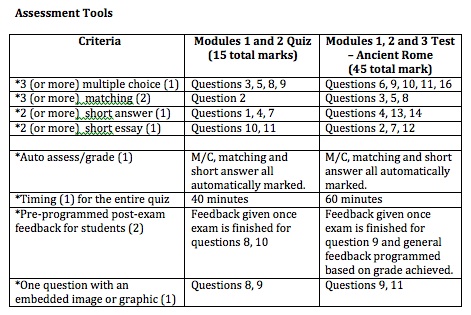
One of the strengths of my formative quiz is the ability afforded by Moodle to allow me to program feedback that guides students towards what they should include in their answer. Since the quiz will allow students to see which multiple choice, short answer and matching questions they got right immediately, I wanted to include an option that would allow for automatic feedback to be provided for short essay questions but without having to go through all of the students responses myself. For question #10 on the quiz, I programmed feedback that gives students immediate reminders about what elements should be included in their answer. This allows students to compare their work and self-monitor their own answers. Additionally, question #11 of the quiz provides students with several examples of questions that may be asked on the summative test so that they can reflect on whether or not their understanding is where it needs to be.

Overall, I focused on the quiz/test assessment options for this assignment. I have many other assessments designed and as a result of doing this assignment, I did adjust criteria in order to adhere to some of the recommendations by Gibbs and Simpson (2004).

References:

Gibbs, G. and Simpson, C. (2005).  “Conditions under which assessment supports students’ learning.” Learning and Teaching in Higher Education Accessed online June 24, 2009 http://www.open.ac.uk/fast/pdfs/Gibbs%20and%20Simpson%202004-05.pdf

Categories
Module 3

Assessment Tools – Activity and Rationale

For my grade 7 students learning about ancient civilizations, I chose to use a quiz as a formative assessment tool and a test as a summative assessment tool. “Modules 1 and 2 Quiz” is designed both to get students accustomed to taking a timed assessment within the LMS environment and to get students to test how well they have absorbed the information from the first two modules. The quiz is specifically set up such that students can take it multiple times and receive instant feedback on select questions when they submit the entire quiz. While Gibbs and Simpson find that “the quality of [student] learning has been shown to be higher in the assignment-based courses [than in exam based courses]” (p.7), I feel that students do require some exam style assessments in order to focus attention on the important aspects of the subject, give students opportunities to practice skills and consolidate learning and help students to monitor their progress (Gibbs and Simpson, 2004, p.11-12). Additionally, the last question of the quiz provides several examples of short essay questions that may be asked on the test later on in the unit.

“Modules 1, 2 and 3 Test – Ancient Rome” is the summative assessment tool for the first third of the ancient Rome unit. The test utilizes a variety of question formats and, for the short essay questions, draws upon understandings that students would have directly gained from their experience doing other assignments in the previous modules. Programming meaningful feedback is difficult as feedback should tell students “exactly where they have gone wrong and what they can do about it” (Gibbs and Simpson, 2004, p. 18). In order to ensure that feedback is reflective of instructional goals, feedback for short essay questions will be given based on individual answers. This is more time consuming than a stock answer but it will ensure that students know exactly how they are being assessed. In the formative quiz, students have some programmed feedback that gives them prompts about key understandings they need to have in order to answer the question correctly. However, in the summative test, some generalized feedback has been set up based on the total grade for the student but rather than giving qualitative (and unhelpful) feedback such as “good” or “poor”, generalized feedback such as the following has been programmed:

“50-60% – You have not demonstrated an understanding of some of the main ideas about ancient Rome. Next time, make sure you make use of the quiz provided as many of the test questions come from the quiz! The information presented on religion and government in ancient Rome will be important as we move on to the next modules. Please review the questions that you did not answer correctly and choose one of the short essay questions to re-answer and resubmit to me via email for additional marks”

While this is not a replacement for descriptive, individual feedback, it is proactive feedback that focuses on what a student needs to do next time and what they can do presently. It is my hope that feedback that focuses on “moving forward” will be helpful for students in determining what they need to do for next time.

Related to these quizzes is a formative assessment and study tool activity that I have set up in the form of a glossary (“Glossary Entry #1”).  Students are tasked with the following activity:

  1. Add an entry to the Ancient Rome Glossary (at the top of the course page underneath the image) with a term, person or structure that pertains to Module 1, 2 or 3.
    Criteria

    • entry should be a minimum of 50 words.
    • entry must not be a duplicate
    • define your entry as it relates to ancient Rome (for example, if you choose to add “immortal” make sure you say who in Rome was immortal and what significance those immortals had on religion, society etc.)
      Once finished, click “edit submission” on this page and type in the name of your entry then click “submit”.
  2. Additionally, you will need to add the emperor that you selected for your Facebook profile assignment to the Glossary. As others may have also chosen the same one, you are all responsible for contributing some information.
  3. You are required to make comments on at least 1 of the glossary entries of other students in order to improve their entry (see examples under Julius Caesar entry).
  4. You are also required to rate at least 1 of the glossary entries and explain the reasoning behind your rating in a respectful manner (ie. 5/5 – the important details of Julius Caesar’s life are clear and his important role in the end of the Republic is explained well. Ie. 1/5 – the dates that Caesar ruled are incorrect and so is the information about which triumverate Caesar was a part of. Also, Caesar is called an emperor but he wasn’t one.)


You will be authoring entries to this glossary as well as adding comments to existing entries. This glossary will serve as a study tool for quizzes and tests as well as a reference tool for assignments.

According to Gibbs and Simpson (2004), “students need to understand criteria in order to orient themselves appropriately to the assignment task” (p.20). While this seems like a given, many assignments do not come with clear criteria which can cause confusion and anxiety. The criteria given for this glossary comes with clear guideline about length, the type of term students should select, what “tasks within the task” they need to complete and examples about how to do something they would not have done before in Moodle (providing ratings/comments). Additionally, tasks are numbered to ensure that students are aware of exactly how many components they need to complete.

This activity has several purposes. First, it sets students up with a tool they can use to study and models efficient organization. Second, it allows for students to take information and present it in their own words and also apply it to other understandings from the unit. Third, it allows for students to improve upon their work and the work of others. By enabling tools that allow for students to add comments and rate entries, students are able to improve an entry by providing additional information and provide peers with formative feedback that lets them know how they can improve their entry. Students, conscious of the fact that their entries will be viewed by both their teacher and peers, may “supervise themselves and improve the quality of their own assignments prior to submitting them” (Gibbs and Simpson, 2004, p.20). This activity allows for the teacher check for understanding, insightful connections and correct information. The teacher will also make comments and add ratings to entries in order to guide students in their learning.

In keeping with the recommendation by Gibbs and Simpson (2004) that frequent assignments are more effective in distributing student effort than infrequent, intensive assignments, many assignments in my unit are provided that see students working individually and collaboratively, within the LMS and outside of the LMS, with audio, visual and text and in a timed and untimed environment.  Hopefully this approach to assessment will have students recognizing the importance of all assessment tasks and not feeling the anxiety associated with an exam-only based learning environment.

References:

Gibbs, G. and Simpson, C. (2005).  “Conditions under which assessment supports students’ learning.” Learning and Teaching in Higher Education Accessed online June 24, 2009 http://www.open.ac.uk/fast/pdfs/Gibbs%20and%20Simpson%202004-05.pdf

Categories
E-learning Toolkit

Toolkit – Wikis

When I hear the word “wiki”, I automatically think of referencing a Wikipedia article, although since starting the MET I have started to think of other options under the “wiki” umbrella. I have some experience using wikis either for reading or writing purposes – I did a collaborative design project in ETEC 510 last term entirely on Mediawiki, I used pbwiki to collaborate on a small project in ETEC 512 and I frequently use Wikipedia as a reference tool for anything from historical facts to movie trivia to sports statistics.

In reflecting on my past experience with wikis and connecting them to the teaching and learning process, I have found that they can be tremendous collaborative tools. When using pbwiki, I was working with a group that was less experienced with technology and the pbwiki interface allowed for “wysiwyg” content rather than html generated content. The final product was a good representation of working collaboratively in an environment that served as both the sandbox and the final product. My experience with Mediawiki was wonderful and a great lesson in the power of wikis. My design project group created an entire course in Mediawiki and the features of the interface allowed for us to feel like we were all in the same room throughout the process. The “recent changes” link allowed us to view the recent changes of other group members, which was very useful given the scope of our site. We were able to message each other and leave notes on the “discussion” pages as we went through. The process was very fluid – there was no need to compose formal emails to each other or list the changes we were making because Mediawiki is intuitive enough to allow for these things to happen through the natural process of using the interface. The use of html was a big tricky for me to get used to with some of the more complicated functions, but it seems that many wikis (like pbwiki) are available in “wysiwyg” mode so one won’t be scared off by html.

For the purpose of this toolkit activity, I checked out the educational wikis, which were much of what I expected. My interest was peaked by a suggestion in the toolkit assignment to look in the discussion page on Wikipedia. I thought of a nice controversial topic, the Holocaust, and decided to see if the discussion page was wrought with racist or politically motivated material or if it was truly indicative of a collaborative, scholarly discussion. I was pleasantly surprised to see that this discussion page consisted of dialogue between strangers about how to best represent information on the Holocaust and an academic discussion about references, points of contention and points of inclusion. I also looked up Adolf Hitler and found that the discussion tab had many posts about correct grammar and even members that would chime in at the mention of any words that could be seen as not neutral (ie. A member made an argument that using the word “atrocity” to describe Hitler’s action was not neutral enough). The Wikipedia guidelines are clearly posted and suggestions for what would make the article a “good article” are listed. I know that many people see Wikipedia as a “bad” resource but there are clearly a lot of check and balances in the large community that is genuinely interested in presenting factual information in an accessible manner. While not all articles are “example worthy”, I am confident that the growing Wikipedia community will soon fill in the gaps and that Wikipedia will become a credible source of information in the eyes of academics and educators.

Spam prevention powered by Akismet