Category Archives: Uncategorized

Copyright Resources

You need to understand copyright if you are planning to upload content of any kind to a website.

Visit : copyright.ubc.ca  for more information or drop in to ask specific questions. They regularly offer workshops and drop in sessions to help keep you informed.

As a rule of thumb: Use creative commons or public domain images. When you search for images online use ‘creative commons image search’ and specify your needs. If you do not need the content for ‘commercial purposes’ be sure to deselect this option as your choice of images will ‘open up’ considerably. From the CC image search browser, you can search using several popular sources such as google images, flickr, wikimedia commons and youtube.

Please note that this search will then ‘filter’ the content and attempt to show only those with a CC license – it is still up to you to ensure the content does not contain other licensing restrictions. Licensing restrictions and requirements are generally clearly stated on the image source page. If this page states this is under CC license for attribution, then you simply need to attribute the work to its author. There are often guidelines on how to do this within the page. In general, I always ‘attribute’ whether this is required or not.
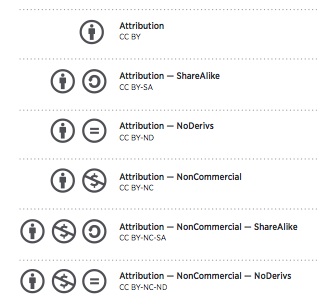
from: wiki.creativecommons.org/images/6/6d/6licenses-flat.pdf

wiki.creativecommons.org/images/6/6d/6licenses-flat.pdf

Leave a Comment

Filed under Uncategorized

Digital Storytelling

ScreenCastoMatic digital storytelling tool that is easy to use.  It is a web based screen recorder.  It allows you to create an instruction session or an artefact in minutes.  An example of a screen cast that I made and then loaded into Youtube was a Prezi I created with narration.  Please look at UBC Education Library  Instruction Report.

I have also used Comic Life  (not free but you can register for a free trial) and VoiceThread.

I also liked this ERIC Document entitled Constructing Digital Stories.

Leave a Comment

Filed under Storytelling, Uncategorized

Blogs and Social Media – Blending social & academic worlds

Social Networking, defined by Gunawardena et al (2009) as the “practice of expanding knowledge by making connections with individuals of similar interests” is a potentially powerful tool for both Post-Secondary Faculty and the K-12 classroom teacher. Through this networking, students are afforded the opportunity to co-create knowledge within a Community of Practice (Wenger et al, 2002). Further, a recent study conducted by Junco et al (2013) found that “the design of teaching strategies and practices related to virtual engagement and collaboration is instrumental to achieving positive educational outcomes (when using Twitter)” (p.285) and that instructor participation was one key to successful implementation and an increase in student engagement.

Considering Blogging or other Social Networking to enhance teaching and learning? Learn more by downloading the handout and/or visit this week’s Sandbox Session!

Sandbox_Blogs_Nov2013

Questions to consider:

  • What is the purpose for your use of social networking technologies?
  • Do you wish to moderate a discussion?
  • Do you plan to infuse it into various aspects of class?
  • Student sharing of their insights, reflections
  • Co-creation of content or ideas?
  •  Sharing of links to content, references, resources
  •  Connection with the greater community? Experts?
  • How involved do you wish to be?
  • What affordances and level of control do you need or require?
  • How public or private do you wish this space to be?
  •  Can you adjust privacy settings of your chosen digital technology?
  • Will students want or need access to this space after the course is complete?

Some places to start:

Blog: Consider setting up a classroom blog where students can reflect on discussion questions, key concepts or images. Consider providing students with their own blog space within the classroom space where they can extend their learning, upload assignments, share their own ideas, thoughts, creations.

UBC Blogs – WordPress

kidblog.org  a simple site for student blogs; teacher can set up accounts; no identifying student info or emails required!

Wiki

  • Online encyclopedia
  • Crowd-sourced information and content co-creation
  • Constant evolution/revision
  • May have ‘editors’ to verify content

UBC Wiki

Curriwiki

Wikipedia

Discussion Forum

  • Group discussion forum
  • Often ‘closed’ or invite only
  • Threaded discussion on a topic(s)

Test out the Discussion feature of your LMS –Connect

Micro-blog

  • Traditionally shorter entries than a typical blog
  • Most micro-blogging platforms have word count or character limits
  • Often sharing quick snapshot, link or image

Twitter

Leave a Comment

Filed under Uncategorized

BYOD

Bring your own device is an emerging issue in education today. Please watch this page for more information and links (coming soon)

For now, a link to a Prezi summarizing ways to leverage personal devices in the classroom for technology integration.

photo: (cc) Malte Sorenson flikr

Join the conversation on twitter #byod and see what others are saying! I follow Chris Kennedy who has made some illuminating blog posts about this and other topics relevant to education today! His Blog: http://cultureofyes.ca/


Leave a Comment

Filed under Uncategorized

Personal Learning Networks

Developing a PLN through social media can enrich your practice and broaden your connections with individuals around the globe whose interests intersect with your own. PLN’s support a diverse exchange of ideas and are great for helping to build and share your knowledge! Drop by the Scarfe Digital Sandbox in room 155 on Wednesday November 13. For now,  Visit the Educational Technology Guys blog for more info on creating your own PLN!


Leave a Comment

Filed under Uncategorized

ebooks

You have access through UBC Library to some electronic books and resources for teaching – even picture books!

BC Books Online has Kids E-Books through the e-brary collection.
http://guides.library.ubc.ca/content.php?pid=500518&sid=4118097

Story Nory is also a good site http://www.storynory.com/
Children’s Digital Library has many ‘world book’ resources

Tumble Books storybooks online
Accessible Books has adapted story creation tools for teachers and students to make their own stories – intended for special needs but usable by all.

Bookflix through Scholastic – the UBC Ed Library will get password access to these for TC’s in January! Check in with Jo-Anne Naslund or drop by a sandbox session in the new year! Some districts have subscriptions – check with your SA.

Leave a Comment

Filed under Storytelling, Uncategorized

Live Binders – resource sharing

Have you checked out some of the many resource sharing website online? Some of specific to teachers. Visit ‘Livebinders’ – scan them or create your own binder of resources that you can share with others.

http://www.livebinders.com/

Leave a Comment

Filed under Uncategorized