Category Archives: Interactivity

iPad possibilities

This week in the Scarfe Sandbox we explored some iPad apps that can support formative assessment (among other things). I frequently offer students the opportunity to share their learning using one of the ‘whiteboard’ style applications such as ‘Explain Everything’ or ‘Showme’.

These apps allow students to create content on the iPad (rather than just ‘consuming’). Students are able to draw, text, upload images and narrate. This can provide the perfect platform for teachers to have the opportunity to recognize understandings and to catch misunderstandings.

Another opportunity to help a student construct and share their understanding might be a concept map. Mind mapping, or concept mapping, can be a powerful tool where students are encouraged to illustrate the connections between their ideas, concepts or content in meaningful ways.

“A concept map is a type of graphic organizer used to help students organize and represent knowledge of a subject. Concept maps begin with a main idea (or concept) and then branch out to show how that main idea can be broken down into specific topics”.  There are some excellent tutorials on this site and information for teachers about the ‘concept’ of ‘concept mapping’
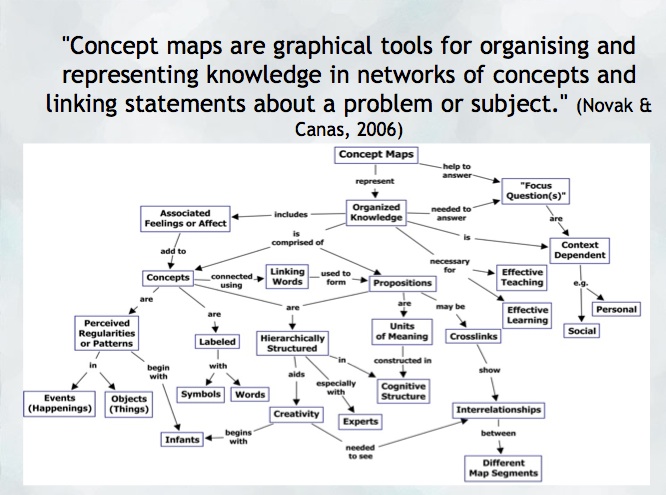
mindmap
Try: Inspiration or Kidspiration  as iPad apps

*Many schools also have licensing for this application on their computers or laptops.

Digital Storytelling is another excellent use of the iPad for content creation… try Puppet pals, Showme or imovie (among others!)
Leave a Comment

by | September 24, 2014 · 8:43 pm

Just Moodling around

I was recently asked about Moodle and how to go about using it… I’m definitely not an expert in this Learning Management System but I have enjoyed messing about with it to create a course or two during my own Masters Program.

What is Moodle?  “Moodle is a Course Management System (CMS), also known as a Learning Management System (LMS) or a Virtual Learning Environment (VLE). It is a Free web application that educators can use to create effective online learning sites.” from https://moodle.org/

I’ve never personally come across Moodle courses in an elementary school setting. It is, however, commonly used at the secondary and post-secondary level to create online course material. Other LMS’s include: Blackboard, Desire2Learn, Joomla

Visit Moodle’s website and try out their online Sandbox – you can practice building a course using the login information provided… note that login times out after about an hour and your work is not saved. You can also take a tour of their ‘demo site’ at the fictitious Mount Orange School . At this fictitious school site, you’re even able to login as a student, teacher, parent or manager to test out features. Take a ‘video tour’ of Moodle and learn more.

Finally, there are many blogs out there where you can learn Moodle tips and tricks (including, of course, the Moodle forums which I’d recommend you join!). Visit Michael Penney’s blog for some very clear and concise tutorials.

Leave a Comment

Filed under Interactivity, Uncategorized

Interactive Classrooms – iClickers for active learning

Did you know that there are two class sets of iClickers (and controllers) available on loan through the Scarfe Education Library for instructors? All you need is the clicker set (which includes a ‘base station’) and a computer hooked up to projection.  iClickers can support interaction, formative and summative assessment in any classroom – regardless of age level or size – and are relatively simple for teachers and students to use.

See the iClicker Sandbox handout for more information, research and ideas:

Sandbox  iClickerQuickStart guide

Sandbox_iClicker_Nov2013

Visit: http://elearning.ubc.ca/toolkit/clickers/ for FAQ, step by step setup and more!

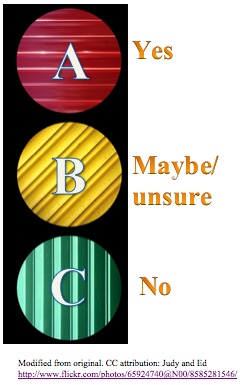
Idea – for some ‘proactive’ classroom management, hang or display signs showing the ‘choices’ related to the letters on the clickers.

Continue reading

Leave a Comment

Filed under Assessment, Interactivity, Uncategorized