STEM learning is more than different subject areas simply threaded together.
Rather, STEM learning is “a seamless experience for the students that scaffolds the use of disciplinary concepts and practices for solving inter-disciplinary problems” (Dasgupta, Magana, & Vieira, 2019, p. 123). In keeping with that amalgamated spirit, this week’s focus as Create, Make, Innovate! wraps up is Computer Aided Design (CAD). As a hands-on learning activity, CAD is a bit like an assemblage of previous Tuesday sessions this semester – more on that below!
Forty years ago, the rationale for CAD was “… to let the machine, in this case the computer, take over where the task becomes repetitious and non-creative,” freeing up designers from “sheer unadulterated dull work” (Coons, 1966, p. 7) for innovation and creativity. Further, as a matter of efficiency, designers could now “consider more options in greater detail at the earlier stages of design than any manual method would allow… [and also make] modifications… without complete restarts” (Kolesnikoff, 1984, pp. 485, 486).
“… make our lives easier and less frustrating. That is what the process of development is all about” (Axe, 1988, p. 260)
Now a long-standing and widespread approach to design, CAD can be found in fields as diverse as architecture, medicine, and manufacturing, not to mention all different types of engineering. In the classroom, some of its more compelling features include three-dimensional design and drafting (3D CADD) and 3D printing.

Photo by ZMorph Multitool 3D Printer on Unsplash
However, 3D printing means producing more by consuming more even as our focus around the world today needs to be on consuming less by repurposing more. So teachers should weigh this factor into any 3D lesson planning. Moreover, for their novelty, 3D printing and other classroom technologies might give us pause as we consider what kind of tone is desirable for CAD lessons – when it comes to technology and preparing students in the 21st century, there has been a tendency for hyperbole, sometimes euphoric and sometimes fearful of missing out or being left behind. Novelty fades, but students will always need engagement.
For all this, teachers owe their students a judicious assessment of CAD and its contributions to their learning experiences: “Deterministic programs, genetic algorithms, rule-based systems, and… other approaches are promising, but none of them approach the flexibility and thoroughness of a human architect. Computers are not yet ready to take over as chief designers, and they won’t be any time soon.… I must believe… that most architects did not enter architecture to be information managers, but rather, to design buildings” (Johnson, 2002, p. 52).
As Johnson’s remark about architects might apply to teachers, we would be wise to heed his conclusions.
“Technology only provides the backdrop for the twenty-first century. Effective instruction is what directly affects students…” (McCoog, 2007, p. 28)
Create, Make, Innovate: Getting Hands-on with Learning Design
Recap of the session Fall 2019 in the Scarfe Foyer:
As the semester draws to a close, so do our sessions each Tuesday in the foyer.
Looking back at each Create, Make, Innovate! session and the hands-on potential of interdisciplinary learning, maybe the most valuable take-away is the sheer range of topics that converge to spark our interests and kindle our inspiration. No less valuable is that interdisciplinarity encourages us to work alongside other people, and as teachers, we know how important collaboration is to meaningful learning.
At this week’s final Create, Make, Innovate! activity session, on Tuesday, November 26th, 2019, teacher candidates stopped by to learn a little more about TinkerCAD, a website that offers 3D engineering design and modelling. Having learned about VR and AR last week, this look at on-line virtual design was a good step to follow.
In fact, TinkerCAD touches upon a number of our previous Tuesday sessions:
Common Sense Education offers free lesson plans that relate to our previous sessions on Simple Machines and Stop Motion Animation.
Resources
TinkerCAD designs can be integrated with Merge Cube (five free uploads per Miniverse account) as well as CoSpaces.
During our previous session on DBL and Simple Machines, TCs learned about engineering habits of mind and the basic model for approaching design: observe, design, build, experiment, adjust. Unsurprisingly, a basic CAD cycle, with slightly more detail, is essentially the same:
- Ask / Identify / Understand
- Invesitigate / Research / Define
- Predict / Imagine / Envision
- Plan / Design
- Build / Create / Make
- Test
- Reflect / Revise
- Improve / Innovate
Seen more generally, a design process is really a learning process: designs are thoughtfully envisioned, tested, and revised. CAD itself has even been proposed as a learning methodology (Cerra et al., 2014). On the other hand, methods and processes can be constraining, even rote, whereas the value and excitement of design derives from original responses to given problems – just like an engineer or an architect! So teachers should plan carefully to give their students parameters but not necessarily limits.

Image by clausabraham from Pixabay
“Students who used CAD software and 3D printing during a STEM summer camp increased their perception of the incorporation of creativity and problem solving skills in STEM fields regardless of their gender or ethnic background.” (Bicer et al., 2017)
Thanks to 3D CADD and 3D printing, students have a chance to assume greater self-direction and spontaneity during hands-on learning activities (Ng & Chan, 2019; Popelka & Langlois, 2018).
The Cost of Hands-on Interdisciplinary Learning
One reason to consider TinkerCAD is its robust potential for helping students to render their ideas more tangibly, if still not physically. However, on that note is another more pressing concern that CAD approaches help to address.
As we now know, plastic usage and disposal have become epidemic, and we must do our best to avoid increasing the pile of little things that collect dust on our mantles, desks, and refrigerator doors. Although the effort to make 3D printing filaments more sustainable is underway, CAD provides an alternative to repeated 3D printing, at least until a physical testing stage is unavoidable. By the same token, we must be wary of our electricity usage, which taxes the environment in its own vast way.
Have a look back at October’s Recycling / Upcycling session – how can you make use of things that you already have rather than tossing them out and replacing them?
As for the proliferation of e-devices, themselves, and all their accompanying gadgetry and accessories – from their manufacturing and delivery to consumers through to their usage and salvage or disposal – all this must weigh upon our conscious decision-making or else we do not live up to our responsibility as stewards of our own environment. We have wondrous tools at our disposal, thanks to technological innovation, but at what cost are we willing to develop them, use them, shelve them, cast them aside? How indiscriminate can we afford to be before the tools of learning defeat the purpose of learning? We must not come to depend on our tools any more than we should grow so enamoured of them that tools become ends in themselves.

Image by ZMorph3D from Pixabay
Without doubt, education is the most sustainable tool we will ever have. Like any tool, it is inert until someone decides to use it, but where that decision falls again and again to each one of us, education is an enduring responsibility shouldered by every one of us.
And interdisciplinarity, more than a buzzword, more than just a singular concept, is a measurement: the degree to which all of us, all at once, act on purpose. More than just themes and theories, collaboration and interdisciplinarity are descriptions of our tangibility and the way we actually live our lives. We must respect our interconnectivity to each other and to the places where we live and that enable us to live.
We all make decisions and take action every single day, yet how coordinated are we? How much might we actually be working unwittingly at crossed purposes to each other? Since we will be making decisions and taking action anyway, we should strive to make all our cross-overs as interdisciplinary as possible. At stake is nothing less than our future itself.
Acknowledgement: post author, Scott Robertson; editor, Yvonne Dawydiak
Special thanks this week to UBC Engineering’s Geering up Team!
Interdisciplinarity, collaboration, hands-on learning – that’s the spirit of Create, Make, Innovate! We want to promote enthusiasm for sharing and learning across age groups and across subject disciplines.
Make, Create, Innovate sessions took place during the Fall 2019 in the foyer of the Neville B. Scarfe building and were hosted by Scott Robertson, a project assistant on a small TLEF grant with Dr. Lorrie Miller, Dr. Marina-Milner Bolotin and Yvonne Dawydiak, Teacher Education.
If you have an idea or an inspiration for a resource or future session, please let us know! scarfe.sandbox@ubc.ca
References
Axe, R. (1988). CAD (Computer aided design) in British industry. RSA Journal, 136(5380), 249–261.
Bicer, A., Nite, S. B., Capraro, R. M., Barroso, L. R., Capraro, M. M., & Lee, Y. (2017). Moving from STEM to STEAM: The effects of informal STEM learning on students’ creativity and problem solving skills with 3D printing. In 2017 IEEE Frontiers in Education Conference Proceedings. Retrieved from https://ieeexplore-ieee-org.ezproxy.library.ubc.ca/servlet/opac?punumber=8124740
Cerra, P., González, J., Parra, B., Ortiz, D., & Peñín, P. (2014). Can interactive web-based CAD tools improve the learning of engineering drawing? A case study. Journal of Science Education and Technology, 23(3), 398–411.
Coons, S. A. (1966). Computer-aided design. Design Quarterly, (66/67), 6–13.
Dasgupta, C., Magana, A. J., & Vieira, C. (2019). Investigating the affordances of a CAD enabled learning environment for promoting integrated STEM learning. Computers & Education, 129, 122–142.
Johnson, S. (2002). The slow and incremental “Revolution”. Journal of Architectural Education (1984-), 56(2), 49–54.
Kolesnikoff, N. (1984). Computer aided design breaks through. The Military Engineer, 76(497), 484–487.
McCoog, I. (2007). Integrated instruction: Multiple Intelligences and technology. The Clearing House, 81(1), 25–28.
Ng, O. & Chan, T. (2019). Learning as Making: Using 3D computer-aided design to enhance the learning of shape and space in STEM-integrated ways. British Journal of Educational Technology, 50(1), 294–308.
Popelka, S. R. & Langlois, J. (2018). Getting out of Flatland. The Mathematics Teacher, 111(5), 352–359.
Feature Photo Credit: Photo by Adrien Olichon from Pexels



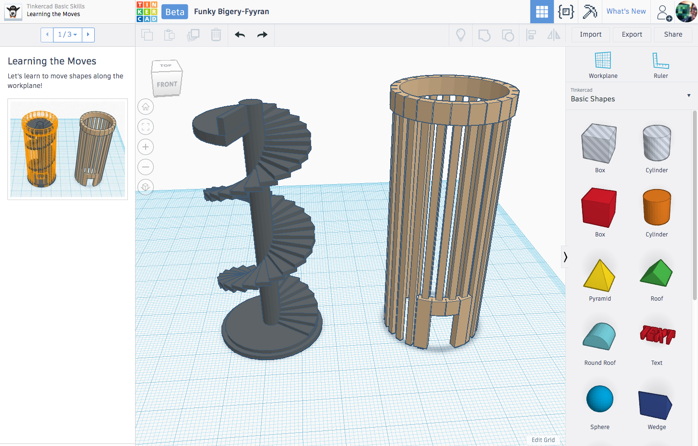


 ‘plane/paper’ and then move it up using the triangle tool at the top.
 Use the Cube in the top left corner of your screen to view Front, Back, Top, Bottom… Be sure you are building ON the plane (not below it!)