Tag Archives: STEAM

Coding in Classrooms

What is Coding?

Coding is a set of instructions given to a computer to produce different kinds of output. Learning to code involves a variety of  competencies that can be introduced or developed in K-12 classrooms across the curriculum. The Applied Design Skills and Technologies curriculum includes introducing block or visual programming languages beginning at grade 6. Many teachers incorporate activities using physical and digital ‘block code’ from a much earlier age.These activities can help build the essential competencies leading to build computational thinking (link to SD61).


Why teach coding in your classroom?

Learning Coding Remotely

Coding is included in the Applied Design Skills and Technologies Curriculum (ADST) in BC. Outside of teaching students job-marketable skills,  coding can help your students learn mathematical logic, creative exploration, how to understand systems, and a systemic procedure that exists in common computer programs (automator, video editing, animation, web design.). We might think of this as building computational thinking skills. By building these skills in collaborative and communicative hands-on ways, computational participation helps to link coding with the core competencies in the BC Curriculum and enhances student learning (and enjoyment).


How might you teach coding in your classroom?

Depending on the age, interests and abilities of your learners, (and access to equipment/materials), you can approach coding in many ways. A computer programmer friend of mine pointed out that, while learning to code using visual programming blocks as a language doesn’t necessarily translate to being able to code using Java or Python (two languages used by professionals), the computational thinking skills developed do transfer!

Consider your student interests: are there particular themes or activities you might employ to engage your students? Can you get students moving physically? Can students make something that is motivating to them? Can students work together to create and problem solve?

You might begin with some unplugged coding activities in order to apply a kinesthetic, hands-on approach to build resilience with directionality/commands, critical thinking and trial and error or you might dive right into one of the many programming applications that supports this. I’ve found older students (including me!) are motivating by coding to make something that ‘does something’ in the ‘real world’ (ex. MicroBits, Sphero or Ozobots). That said, many students will enjoy creating stories or games online (ex. Scratch, Twine).

Below are a few examples and links to resources that can support coding in your classroom across K-12.

“Unplugged” Coding

Coding and learning computational thinking can begin with unplugged activities where learners engage in problem-solving, sequencing, and design. Unplugged simply means ‘without a computer’… making this form of ‘coding’ accessible to all classrooms.

Unplugged Coding Activities:

  • Binary Braclets
    • Learn Binary by building bracelets! Students can code their initials using black and white beads which represent the language of coding.
  • Canada Learning Code
    • This Canadian content website includes a searchable database of lesson plans for unplugged and plugged coding activities including activities using popular tools and bots. Try searching by ‘unplugged’.
  • Code.org
    • houses an impressive amount of resources to learn about coding, start coding, and even use unplugged activities inside and outside of the classroom. Each idea includes a video tutorial, lesson plan, and assessment answer key.
  • Kid Bots
    • Kidbots demonstrates cross-curricular advantages of coding by involving numeracy, geometry, and literacy. Students design  a way to rescue an item from a designated location, but a classmate is the programmable “kidbot.”
  • CS Unplugged
    • They house lesson ideas of how to get learners working on core components of computational thinking!
  • Logic games like Sudoku, Mastermind, and Kanoodle can help students work on problem-solving skills that are integral to coding.
  • Lego challenges
    • Teachers can provide a task (like building their dream amusement park). This activity could also be paired with design thinking to help generate ideas or potential solutions to a problem.
    • Students can create a design (without showing their partner), then try to communicate the instructions for their partner to build the same design (without looking!). In coding, it’s important to be able to program specific instructions to get the results you want.

“Plugged” Coding

Also known as coding with a digital device! When we think about “plugged coding”, we might first look at students utilizing visual programming blocks. As a student’s computational thinking skills improve, they might begin to experiment with other programming languages including java and python. In the BC ADST curriculum, visual programming is referred to in Grades 6 through 9.

  • Visual block coding

    • block based coding exampleVisual block coding is an approach to coding that represents instructions in the form of visual blocks rather than programming language syntax. This form of coding is seen to be friendlier to beginners of coding due to not having to memorize syntax due to the drag and drop feature, the “puzzle” piece aspect of the blocks that help you determine which blocks fit with one another, and a predefined list (limited choice of blocks) of functions, variables and objects you can use.
      While visual block coding might seem or feel like playing with logos, this is what coding essentially is at its highest level of abstraction. Once you understand how the functions, variables and object blocks work, you just need to apply language and syntax and that is coding! Visit Code.org or Canada Learning Code for some lesson ideas.

      • BBC Microbits make code block coding language is a visual representation of the JavaSript language. JavaScript is a function-based programming language that is used in web development. The Microbits block UI (user interface) allows you to swap or toggle between JavaScript and visual blocks to learn how the addition or subtraction of blocks affects your code in JavaScript.
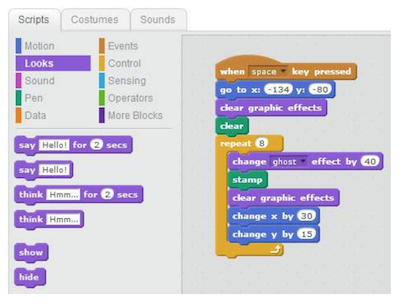
        • Scratch is a block coding language developed by MIT that does not represent any other language (whereas with Microbits, the blocks represent Java). The actual code that is used is the blocks themselves. MET hosts a free cloud-based app and community where users can create stories, games, simulations, animations, and more. Scratch Jr. is a simple mobile app allowing students to drag simple block instructions to create actions on their iPad or tablet.

“Real” or Pro Coding


(The information below was provided by my programmer friend and former worklearn student, Eric):

Don’t be scared to start coding in “real” coding languages! Apply what you’ve learned in visual block coding and learn the language and the syntax and you’ll do fine! The first question one might ask themselves when they first decide to learn to code is: which language should I start with? Both Java and Python are good languages to begin learning to code. Both present high levels of abstraction in their language (code is more reminiscent of human language – visual coding is often thought to be very high levels of abstraction.) They are also both very commonly used and have plenty of resources for you to begin learning or if you have questions. Most people also find that once they learn one language, learning new languages becomes much easier.

Resources

  • Codecademy
    • Guides you through a suitable set of activities that are structured to help you understand the basics of coding. Once you first sign up, you are given a 7-day free trial to their premium program which allows you to explore all exercises. Once the trial is over, you will be relegated to practice on their free exercises; albeit, not as complete but still very helpful.
  • freeCodeCamp
    • Very similar to Codecademy, with a different set of exercises. As opposed to Codecademy, all exercises are free! However, the interface is not as easy to use as Codecademy and there is not as much guidance in completing exercises. If you progress further in freeCodeCamp, you might find it helpful to Google hints on how to do things and/or ask questions on Stack Overflow (a question and answer platform for computer programming.)
  • CodinGame
    • Directed towards more advanced coders to write and debug(fix problems) code in the form of a game. As opposed to Codecademy and freeCodeCamp, the exercises often involve multiple objectives and can take over an hour to solve. Despite its difficulty, CodinGame allows you to swap between 25 different languages. This tool is very helpful if you already know one language and you want to learn another! Don’t give up if you’re finding CodinGame hard – read the instructions very carefully and use the hints!
      YouTube videos
  • Hour of Code – Global Coding
    • Get globally connected by participating in the HOUR OF CODE. This initiative began to introduce all ages, and especially students, to the concept of coding…. in less than an hour! Hour of Code provides multiple plugged and unplugged activities so that classes around the world can begin coding. Anyone anywhere can organize an Hour of Code event – NO EXPERIENCE NECESSARY!

Robotics

There are many robots out there that can be used with specific branded apps or open coding apps like Tickle. Some that we have played with during our Sandbox Session were the following: DashSphero, and Ozobots and K-8 powered by microbits. These robots are also available to borrow from the Education Library!


Leave a Comment

Filed under AppliedDesignSkillsTechnologies, Blog Posts, Curriculum, Digital & Media Literacy, Digital Tools and Apps, Engineering, Math, Planning, Resources, Science, STEAM, Technology, The Arts

Place-Based Learning: using your senses and digital tools as you experience nature

Hybrid Approaches to Facilitating High-Impact Experiences

Many teachers are being challenged to teach online, face-to-face or both. Shifting practices in education over the past decade or more, causes us to wonder:

How can we virtually facilitate high-impact, place-based learning experiences with our students? What practices might be most effective and which tools can support these approaches?

In an online and outdoor workshop session facilitated by: Dr. Patrick Robertson, Teresa Rowley & Yvonne Dawydiak as part of the Classroom to Communities (C2C) conference on October 23, 2020, we connected with nearby places and people around us in search of a balance of practices. We hoped you enjoyed the session and thank you for your participation in our activities and for sharing your ideas.

Below are resources from our session*.

  • PBL-in-a-Pandemic-Field-Experience-Resource-Package.docx-1
    Activities adapted from: Get Outdoors, An Educator’s Guide to Outdoor Classrooms, written & compiled by Sue Staniforth. (purchase: https://www.hctfeducation.ca/product/get-outdoors/ or View the Sample Resource: http://www.metrovancouver.org/events/school-programs/K12publications/GetOutdoors.pdf )
  • Jamboard (pdf and link posted following the session)
  • Learn about some alternative ‘digital whiteboard style‘ applications (Jamboard discontinued)
  • Our Collaborative Map: https://c2c2020.opened.ca/ was set up using a template developed as part of an open source apps community. IF you’re at all familiar with WordPress, you’ll find setting one up fairly intuitive. If not, I’m working on some instructions as a more ‘step by step’ set up and will post here when ready.
  • OpenETC Free Range Ed Tech: The FIPPA compliant interactive map we used is just one of the amazing open source technologies created by this dedicated community of volunteers made up of learning technologists, designers and educators from all levels. To access and make a copy of your own map, you will need to set up an OpenETC account and then access the ‘Clone Zone’ area of the site where you’ll find a variety of templates you can clone (including the Map – Toolset Mapping Master Template). Once there, you’ll be prompted to sign in or register for an account before cloning and setting up your own map. *Watch for some step by step instructions coming soon! A note: this is part of an open, volunteer run and under-funded project so having a plan B is valuable but also please ensure you’re respectful when asking for help or improvements.

    A few favourite apps to support outdoor experiences

  • iNaturalist: a citizen science app to support crowd sourcing ID in the field. An amazing bi-product of this application is the development of a large database of images available for research. Or try Seek by iNaturalist with your students to support ID – fairly simple interface: the Seek camera will draw from observations posted by members of the iNaturalist community to try to ID the photo. You can even scan the environment for common species of plant, birds, amphibians, insects!
  • LeafSnap is a free app created by the Canadian Wildlife Federation that allows you to learn to ID trees by their leaves, flowers and seeds.
  • Plantsnap was developed as a collaboration with several non-profits along with SnapChat that helps you ID plants by taking a photo and getting instant feedback. Their goal is to map out the world’s plants.
  • iPhone and iPad users can use the Visual Look Up feature to use Siri’s AI to identify plants, insects, landmarks, and more in pictures they have taken. You’ll need to update your device to the latest iOS. To start, open a picture on your camera, press the Visual Look Up button (‘i’ in a circle with stars on the left), then press Look Up and it will offer ideas based on a web comparison of images.
  • Using the Museum of Vancouver’s Indigenous Plant Guide, you can hear and learn the Squamish and hən̓q̓əmin̓əm̓ words for a variety of plants that are native to BC.

About the presenters:
Teresa Rowley
Teresa is an outdoor learning teacher with North Vancouver School District, and an adjunct teaching professor and faculty advisor working with teacher candidates in the Education for Sustainability cohort at UBC. Definitely not a techie, Teresa has been ruminating on simple ways educators can utilize technology to enhance place-based learning experiences.
Patrick Robertson
Patrick is a teacher educator and educational consultant working collaboratively with a wide range of partners in B.C. and Canada. He teaches in the Faculty of Education at the University of British Columbia and is a director of various community organizations focused on place, sustainability, social justice, climate and the environment. Patrick is the current Chair of the Classrooms to Communities Education Network.
Yvonne Dawydiak
Originator and Editor of this blog, Yvonne is a long time teacher passionate about taking learning outside the confines of the classroom – both ‘in place’ and ‘virtually’. As a Teacher Educator and Masters of Educational Technology graduate, Yvonne is currently the Learning Design Manager in Teacher Education at UBC helping to support faculty and teacher candidates in effectively integrating 21st Century approaches including digital technology integration for face-to-face, online and remote learning contexts.

Leave a Comment

Filed under Active Learning, Blog Posts, Curriculum, Inclusive Practices, Math, Not Subject Specific, Open Educational Resources, Planning, Remote teaching & learning, Resources, Science, STEAM, Technology

Podcast Series: interdisciplinary learning

Thinking Outside the Sandbox was created in summer 2020 as the result of a collaboration between two graduate students Belén Guillemin and Nashwa Khedr, together with Yvonne Dawydiak, Learning Design Manager, Teacher Education as part of the 2020 Scarfe Sandbox team. The inspiration for the podcast series came about as Belen and Nashwa interviewed Faculty of Education faculty members to learn more about their views on interdisciplinary learning and STEAM. During the recorded interviews, they noticed some themes emerging across the separate video interviews. In order to capture these broader themes, Belen devised a script that wove together excerpts from the interviews.

Episodes were published during the 2020-2021 school year. Each episode is accompanied by a blogpost on the Scarfe Sandbox website. Happy Listening!

Listen on Anchor (or get access to alternative streaming platforms including Spotify)

Episodes (in order):

  1. Outdoor and Interdisciplinary Learning featuring Dr. Harley Banack, Dr. Sandrine Han: Podcast Episode 1 & Sandbox Blogpost 
  2. Technology and Interdisciplinary Learning featuring Dr. Jennifer Jenson, Dr. Marina Milner-Bolotin, Dr. Sandrine Han: Podcast Episode 2 & Sandbox Blogpost
  3. The Arts and Interdisciplinary Learning featuring Dr. Shannon Leddy, Dr. Marina Milner Bolotin, Dr. Sandrine Han: Podcast Episode 3 & Sandbox Blogpost
  4. Challenges in Interdisciplinary Learning featuring Dr. Shannon Leddy, Dr. Hartley Banack, Dr. Marina Milner-Bolotin, Dr. Sandrine Han: Podcast Episode 4
  5. Learning about and through Food featuring Dr. Kerry Renwick, Dr. Susan Gerofsky, Dr. Lorrie Miller: Podcast Episode 5 & Sandbox Blogpost
  6. Textiles and Interdisciplinary Learning featuring Dr. Lorrie Miller, Dr. Kerry Renwick: Podcast Episode 6 & Sandbox Blogpost
  7. Math and Interdisciplinary Learning featuring Dr. Susan Gerofsky, Janice Novakowski, Dr. Cynthia Nichol: Podcast Episode 7, Episode 8, Episode 9 & Sandbox Blogpost

We gratefully acknowledge the funding provided by the students of UBC via a Teaching Learning Enhancement Fund grant, Weaving Together Arts and STEM. We would also like to thank the many faculty who volunteered their time to prepare for and participate in interviews leading to the podcast episodes and associated blog posts.

Leave a Comment

Filed under AppliedDesignSkillsTechnologies, Blog Posts, Curriculum, Engineering, Inclusive Practices, Math, Not Subject Specific, Planning, Podcasts, Resources, Science, STEAM, Technology, The Arts

Storytelling for STEM Subjects

Using the art of storytelling to teach STEM subjects.

“Maybe stories are just data with soul”

– from TED Talk “The Power of Vulnerability” by Brené Brown

Storytelling can be an effective method for engaging students with STEM subject areas – and this has been shown to be the case for girls especially (1, 3, 4). According to an article by Catalyst.org, Women in STEM (1), a gender gap in STEM persists across the world. This is a problem because the same systems of bias that push women and people of color out of STEM careers, also influence the products and services created by STEM organizations.

Some female students do not further pursue the STEM subjects, and enrolment in math, computer science and engineering programs can become lop-sided, as a result. This creates many issues, such as the creation of AI and other technologies that do not include women’s perspectives in the algorithms. The use of storytelling is therefore important for developing technologies such as AI products because it engages female students at a higher rate with computer science and engineering-related subjects. This way, females stay in the field and later contribute their perspectives and ideas to AI technology development. Females also tend to care about the environment, and might consider this when developing new technologies (2).

The references below explain some approaches & resources to support you in developing your own stories in the classroom. According to a blog article by Scientific American (3), stories and art can be used to help teach math and science subjects. You might also consider how Indigenous perspectives and first people’s principles of learning are supported through a storytelling approach (links to post in this blog).

Storytelling to Teach Math & Science:

  1. Math teachers can analyze the intricacies of M.C. Escher’s artwork with their students or read “Behind the Beautiful Forevers” by Katherine Boo in order to take into account different perspectives. (3)
  2. Science teachers can read aloud the poetic observations of Dr. David George Haskell, and biology teachers can share the story of the HeLa cells. In other words, they can incorporate some interesting and odd facts into their science teachings that are very memorable. (3)
  3. The National Council Teachers of Math website has some excellent resources to support storytelling in math. Use the search box at the top right to search for storytelling and to find a plethora of articles on this subject including: Trigonometry Comes Alive through Digital Storytelling and Storytelling + Origami = Storigami Mathematics. The nctm.org website also includes articles involving strategies and benefits of math discussion (refer to refs 9, 10).

Computing Science and Storytelling:


For computer science related subjects, it can be especially encouraging to hear that there have been many great female computer scientists all throughout history, who have contributed much to this subject area. This 2015 article by The Guardian (4), is mostly focused on Ada Lovelace, known by many as the first computer programmer, and presents interesting ideas to incorporate STEM (2015 article). You may wish to include some of the fun ideas below into your cross-curricular storytelling!

  1. Create a historical timeline or a collection of curious facts
  2. Demonstrate some science tricks
  3. Solve some mysteries
  4. Create a DIY model

A 2019 article by Edutopia explains how the teachers used a story about dragons to help engage their students with science content. In this case, the content was about anatomy and characteristics, such as bone structure. According to the article, “lessons like these help students make connections between what they’re learning and their prior knowledge.”

Some tools for coding for storytelling:

There are various options for students engaging in coding stories with many being accessible for even younger students due to the ‘drag and drop’ nature of some block coding languages. There are even many unplugged or more kinesthetic opportunities to practice computational thinking as they make their stories! A few tools that might help you get started:

  1. Scratch is a simple drag and drop programming language that allows even young learners to create animations, stories and games.
  2. Twine can be used to create interactive digital stories and support the development of literacies including computational thinking skills. Likely best for upper intermediate and high school.
  3. Ozobots are little robots that students can code to tell stories that can be physically ‘acted out’ or ‘enacted’ by the robot on a drawn story map or other surface in the classroom.
  4. Unplugged coding activities support a range of activities including storytelling.

For more information on why it is important to incorporate storytelling into computer science subjects, please refer to the BC curriculum. In particular, you can look to the Applied Design Skills & Technologies (ADST) and computer science curriculum.

  1. Critically analyze how competing social, ethical, and sustainability considerations impact designed solutions to meet global needs for preferred futures
  2. Evaluate impacts, including unintended negative consequences, of choices made about technology use
  3. Analyze the role technologies play in societal change
  4. Examine how cultural beliefs, values, and ethical positions affect the development and use of technologies

Storytelling: Indigenous Perspectives & First People’s Principles of Learning

Incorporating story in teaching & learning, provides students with opportunities to engage in the first people’s principles of learning (FNESC has a wonderful poster) and can support a deeper connection to place, content and varied perspectives. Inviting elders into the classroom to share story or accessing authentic voice via digital stories published online is one approach.

More recently, digital storytelling is being employed to help preserve cultural knowledge and language.

Incorporating storytelling into classroom studies is an important part of the current BC curriculum across subject areas. Within the computer science curriculum, for example, there are standards related to being culturally aware, and recognizing the impact that technology can have. Storytelling can also help create a greater awareness of other cultures, the environment, and gender-based issues.


Guest Post: Jacqueline Boivin, Project Assistant 2021; Edits, Y. Dawydiak, Learning Design Manager, TEO

References:

  1. https://www.catalyst.org/research/women-in-science-technology-engineering-and-mathematics-stem/
  2. https://www.theguardian.com/environment/2020/feb/06/eco-gender-gap-why-saving-planet-seen-womens-work
  3. https://blogs.scientificamerican.com/budding-scientist/to-attract-more-girls-to-stem-bring-storytelling-to-science/
  4. https://www.theguardian.com/teacher-network/2015/oct/05/six-creative-ways-inspire-girls-science-lessons
  5. https://www.edutopia.org/article/dragons-and-fairy-tales-science-class
  6. https://www.banffcentre.ca/indigenous-arts
  7. https://fullcircle.ca/full-circle/about-us/vision/
  8. https://curriculum.gov.bc.ca/curriculum/adst
  9. https://www.nctm.org/Research-and-Advocacy/Research-Brief-and-Clips/Strategies-for-Discussion/
  10. https://pubs.nctm.org/view/journals/tcm/14/4/article-p206.xml
  11. https://blogs.ubc.ca/scarfesandbox/drag-and-drop-programming-scratch/
  12. https://blogs.ubc.ca/scarfesandbox/computational-participation-creating-interactive-digital-stories-with-twine/
  13. Simone Hausknecht, Shannon Freeman, Jenny Martin, Carrie Nash & Kelly Skinner (2021) Sharing Indigenous Knowledge through intergenerational digital storytelling: Design of a workshop engaging Elders and youth, Educational Gerontology, 47:7, 285-296, DOI: 10.1080/03601277.2021.1927484

Leave a Comment

Filed under Blog Posts, Digital & Media Literacy, Inclusive Practices, Planning, Remote teaching & learning

Found Poems: creating poems from words around us

Found Poetry is a form of poetry created from existing texts or literature.

Words or phrases are taken out, refashioned, reordered, and presented as poems with new meanings.

Similar to a collage, poetry can be made from newspaper articles, magazines, letters, street signs, speeches, poems, or even textbooks.
Creating found poems can support interdisciplinary learning depending on the vocabulary or topic/theme being explored. We’ll look at two forms of found poetry here:  Book Spine Poetry and Blackout Poetry.

Book Spine Poetry

  1. Choose some of your interesting books, or go to the library and choose a few books of interest from a bookshelf, or choose a recommended reading list by a friend.
  2. Arrange the books into stacks (or write down the titles on pieces of paper).
  3. Read the titles on the book spine (the edge of the book)
  4. Start ordering the books in a way that creates the lines of a poem
  5. You might search for more books in your library to fit the theme you are writing on and arrange them in a suitable order to make a flow
  6. Finally, take a photo and share it with your class

There are some interesting examples of book spine poems available online!

Blackout poetry

Blackout poetry is a form of poetry where you select interesting words from an existing text, and block out the rest, creating a new meaning!

With as minimum as one page, you could create a black-out poem!

Simple Steps

poetry on paper

  1. Grab a book, newspaper, magazine or novel, or any already existing text
  2. Scan the page first, looking for interesting words.
  3. Using a marker, blackout or redact the words that you would like to eliminate, or another way of doing it, circle the words that strike you or catch your interest, and blackout the rest.
  4. You could add drawings or patterns on the blacked-out area, creating an interesting or outline, or poster.
  • Check out this website by Austin Kleon for examples of blackout poems.
  • Wanted to do it virtually without spoiling your new books? Check out this video to learn more about creating blackout poetry through google slides, by changing the background color.

Make your blackout poem come to life: Using a micro-controller like the makey makey and scratch coding, you can even make your blackout poem ‘speak’!

Virtual Platforms for sharing & creation

Nearpod is an interactive online platform for sharing multimedia content with students and collecting students’ responses.

Using Nearpod, you might create and upload your own poetry lessons. The possibilities for exploring various aspects of poetry in a way that many students find approachable and engaging are high with found poems. One might explore mood, structure, poetic devices and more.

Using a collaborative online whiteboard for Student-Paced Lessons, students can post texts and images of their book spine poems and blackout poems, in response to your prompts or questions or based on their own questions or provocations. Teachers and students can also share their feedback depending on the sharing tool selected.

Guest Post: Nashwa Khedr, EDCP graduate student, project assistant 2020

In Fall 2020, project assistant and undergrad student Maryam Begzada shared her passion for poetry with Education students. Maryam integrated poetry from her native land with the found poetry technique in a unique workshop:

Are you looking for an opportunity be heard and listen to others? We are offering a poetry workshop by Maryam on Friday, Oct 23rd, where you listen and speak with your heart. The workshop will start with a poem by Mawlana Jalaluddin Mohammad Balkhi AKA Rumi, the 13th century poet born in Balkh, Afghanistan – the country’s most celebrated literacy figure. His poems cover themes of Sufism, love and acceptance in Persian poetry read around the world. After discussing Rumi’s “Who Says Words With My Mouth?” poem, you will write your own poem (blackout poem)! This workshop will build upon an idea from a workshop we did last year called Blackout Poetry, which is a form of found poetry where you create your own poem selecting interesting words you find from an existing text, and black out the rest. A great way to repurpose old, weeded books and texts in your own library or your school library. You do not want to miss this!

Leave a Comment

Filed under Culturally Responsive Teaching, Inclusive Practices, Planning, Resources, Storytelling

Mathematics All Around Us: Podcast Resource Blogpost

“Mathematics is the language with which God has written the universe.”

Galileo Galilei

The last three episodes (episodes 7, 8, and 9) of our Thinking Outside the Sandbox podcast, are dedicated to discussing possible creative ways of teaching Math outside abstraction, in ways that embody more physicality and representation. Dr. Kerry Renwick, Dr. Susan Gerofsky, and Dr. Lorrie Miller shared beautiful diverse ideas and examples that highlighted teaching mathematics experientially through the five senses. For example, teaching the concept of patterns was demonstrated through music, observing nature, cultural activities, weaving, and storytelling.

Decolonizing space in Mathematics, integrating Indigenous Knowledge, redesigning the math classroom, teaching math for social justice were also discussed.

Begin by hearing from Dr. Susan Gerofsky, Janice Novakowsky and Dr. Cynthia Nichol in Thinking Outside the Sandbox: Math Part 1


Below are resources that might be used to support teaching Mathematics in an interdisciplinary way, that involves real-life contexts. “The Importance of Context” video by Heinemann explores how stories, posters, and real-life situations could set the stage for students to learn math through real-life contexts and problems.
the famous multi colored cube

Interactive Lessons

Interactive Lessons could be found in K-8 Mathematics station at PBS Learning Media, which includes a wide range of resources (videos, lesson plans, interactive lessons) that integrate real-world and Mathematical Problems.

Mathematics outside the Classroom

  • Mathematical concepts could be explored easily in nature. Concepts as symmetry, spheres, measurements, meteorology, and geometry are all around us. Check this Connections Academy article for activities on these concepts.
  • Age-specific outdoor activities for various concepts are available on the learning outside the classroom blog.
  • For more ideas on Math outside the classroom, check our blogpost, math outside the classroom.

On creating an inclusive, anti-oppressive Math classroom

As opposed to traditional mathematics classrooms that provide one-sided arguments, erase learners’ differences from their processes, and claim right versus wrong ways of problem-solving, Dana Bjornson, a UBC MET grad, in a blogpost suggests teachers would be aware of any oppressive practices in their classrooms.

Creating a non-oppressive, third space which draws from Indigenous wisdom:

  1. Includes collaboration with peer MKOs
    1. peer instruction: where students share responses to MCQ’s, and discuss these responses
    2. formative collaborative review: where students help other students with difficulties
    3. collaborative assessments: where students do their tests individually and mark their own work, then in groups of four complete the same test collaboratively.
  2. Honors multiple ways of knowing; where all forms of solutions are celebrated

Integrating Indigenous Knowledge

  • BC’s redesigned curriculum integrates Indigenous knowledge and perspectives throughout all areas of learning, one of which is math.

Check this BC Curriculum document for implicit and explicit references to Indigenous Knowledge and Perspectives throughout Mathematics for K -12.

Teaching Mathematics for Social Justice

Teacher teaching math on a white boardSocial Justice Issues could be easily taught through Math.

  • Radical Math provides a guide on integrating issues of economic and social justice into the Mathematics curriculum.

Mathematics Apps

  • Explore room design apps to learn mathematics principles such as geometry and arithmetic through interior design projects.
  • Photomath is a math teaching app that provides solutions to math problems elaborating the steps to these solutions
  • PHET is an online repository of interactive simulations and lessons fro Science and Math classroom.
  • More ideas the Tech Integration in your Math classroom (links to post on this blog).

Games

  • A variety of games that could help students better comprehend mathematics, on various concepts, from numbers and counting to decimals, fractions, graphs, money, and time, are included in this Mobile Math list.

Guest Post: Nashwa Khedr, EDCP graduate student, project assistant 2020

Leave a Comment

Filed under Blog Posts, Culturally Responsive Teaching, Curriculum, Digital Tools and Apps, Inclusive Practices, Math, Planning, Resources

Learning about and through Food: podcast resource post

Food is an interdisciplinary concept that intertwines through a wide range of subjects: home economics, science, math, arts, and many more.

In Episode 5 of our recently launched Thinking outside the Sandbox podcast, Dr. Kerry Renwick, Dr. Susan Gerofsky, and Dr. Lorrie Miller share their ideas and experiences with respect to food and the development of interdisciplinary learning experiences.

Below are a few resources that might be used to support each of the main points discussed in this episode:

1. Home Economics and Interdisciplinarity

Dr. Kerry Renwick shares how the concept of food could be intertwined with biology, chemistry, as well as issues of race and class.

The topic of food could be used as an entry point to discuss many topics and disciplines. Various interdisciplinary food-related activities and lesson plans are available at Teach BC:

  • Our Animal Neighbours; this unit identifies how animals were and continue to be relied upon and an important part of the lives of First Peoples; furs and skins for clothing and shelter, meat for food, bone, and antler for tools and weapons, etc.
  • Forced from home; this unit explores refugees’ experience with finding food
  • Mock Advertisement: Sustainable Community Lesson Plan; introduces marketing and advertising tactics aimed at children and youth, including those involving food and supplements.

Other resources are available at Teach BC that teach about food in relation to other cultures and geographic regions.

2. Learning from and in School Gardens

Dr. Susan Gerofsky spoke of her experience of the UBC Orchard Gardens where teachers could experiment with teaching outdoors. Check the UBC Orchard garden blog for more ideas on teaching, learning, and growing in the outdoor classroom.

  • Growing your own food helps you eat fresh fruits and vegetables, helps you choose which fertilizers and pesticides come in contact with your food, and control when to harvest your food, thus having more nutrients in your garden-grown vegetables, as highlighted in this Harvard Health Letter.
  • Engage your students with gardening their food in the school garden, or in one of the nearby community gardens.
  • Encourage your students to learn about gardening through the various activities and lesson plans provided by Kids Gardening.
  • Another interesting interdisciplinary idea in relation to gardens would be to encourage students to share their inspirations and reflections through writing poems. Explore this learning experience with the garden as a co-teacher where teacher candidates wrote their poems from the garden.

3. Food Literacy

Dr. Kerry Renwick elaborated on “food literacy” highlighting topics as food choice and responsibility when buying food, as well as seasonality and harvesting options/decisions.

Food literacy is knowledge, attitudes, and skills about food. This includes understanding the connections between food, health, and wellbeing; knowing how to select nutritious foods; and understanding what constitutes a healthy diet, as explained by Healthy Schools BC.

4. Engaging with Aboriginal Knowledge and Understanding

Dr. Kerry Renwick spoke of the importance of incorporating Aboriginal ways of learning about food specifically on sustainable ways of dealing with food.

FNESC  (First Nations Education Steering Committee) provides various resources that highlight food in relation to First Nations Knowledge.

    • Science: Traditional Aboriginal cultures used natural resources for transportation, shelter, and food gathering.
    • Social Studies: Aboriginal peoples developed distinct foods, medicines, and clothing.
  • For Grades 5-9, there is a teacher resource guide titled  “Science First Peoples”, which highlights First Peoples’ connection to the land for food. Examples include:
    • Science grade 5: How does Traditional Knowledge about body systems help First Peoples prepare and store food for the winter?
    • Science grade 6: How does Traditional Knowledge about life cycles help First Peoples harvest food in their territories?
    • Science grade 7: How did/do First Peoples use their knowledge of organisms’ survival needs- including food-to modify the environment for harvesting? (e.g. clam gardens, controlled burning, herring roe harvesting ), as well as other resources and activities.

5. Creative ways for sustainable engagement with food consumption

Dr. Lorrie Miller spoke of creative ways to make use of food scraps, one of which is food dyes.

  • More ideas on creating natural dyes from food waste could be found here.
  • Review these tips on how to compost kitchen scraps.
  • Check this teacher’s guide by the Alameda County Waste Management Authority & Source Reduction and Recycling Board, San Leandro, California, for activities on how to bring compost into the classroom as a valuable teaching tool.
  • Inspiration on ways of growing vegetables from kitchen food scraps is available in this blogpost by the UBC Orchard Garden.

Guest Post: Nashwa Khedr, EDCP graduate student, project assistant 2020

Leave a Comment

Filed under Active Learning, AppliedDesignSkillsTechnologies, Physical and Health Education, Planning, Podcasts, Resources