Tag Archives: Language Arts

A brief history… Timelines

Global logistics concept with industry icons

I came across TimeToast awhile ago and was just reminded of it this morning as a tool for creating interactive digital timelines. There are many digital tools available for timeline creation – I’ve listed several in the ‘how to get started’ section below including a few open educational resources. There are also, many ways to create timelines as ‘no or low tech’ projects in a classroom using sticky notes, cards and string.

For Timetoast, a free account allows photos to be uploaded, annotations and live links. I love the ‘timespan’ option, allowing a span of time to be highlighted and annotated. This adds some depth and interest to the typical timeline.

Public timelines can be viewed and shared ‘as is’; your own Timelines can be saved and made private or public. When public, you can share via Facebook, Twitter or by grabbing embed code. Teachers can easily upload the timeline to the class website or blog for home viewing.

As I messed about with it again, I considered a variety of uses; both personal and professional. As a teaching tool, timelines have so many possibilities. Here are a few that come to mind:

  • A classroom calendar embedded on the class blog or website – the initial timeline can house calendared events over the year and can also be added to over time either by student request due to personal milestones (lost tooth chart anyone?!) or as the class wishes to share learning events and activities with the world.
  • Social Studies units could be greatly enhanced by students creating their own timelines of historic events, life and times of… or the class can co-create a timeline as they explore a specific person, place or time.
  • Tracking growth and change in a Science experiment using both photos and text is a unique way to share.
  • A unique way to create an  ‘About Me‘ or ‘About my Family‘ or ‘History of my Community‘. A recent teacher candidate created a beaded timeline with her students to help students learn more about the Indigenous presence in her school community!
  • Create a digital story – fiction or non-fiction
  • A way of sharing Inquiry learning; a timeline might help highlight the ‘process’

Timelines can be valuable in a second language classroom such as French Immersion, Core French, etc; allowing  students to creatively engage in language learning.

What uses come to your mind? Comment to share!


There are several free timeline programs (and plenty of ways to create timelines using other programs – PPT or Padlet or a mindmap come to mind). Here are a few programs with specific timeline features:


Leave a Comment

Filed under Curriculum, Inquiry, Interactivity, Not Subject Specific, Planning, Resources, Science, Social Studies, STEAM, Technology

Digital Storytelling

Digital Storytelling: a new spin on an old tale. Creating their own stories or telling stories using digital means challenges students to move beyond being the consumer and instead become creators by adding multi-media to their narratives. That same story also becomes accessible to a broader audience by adding videos, graphics, and audio, through web-based platforms or other applications.

We can also recognize that incorporating storytelling in learning environments helps to support the First People’s Principles of Learning and has been shown to support the preservation of cultural knowledge and tradition in some cases.

A digital story is the use of technology to tell a story (Robin, 2015). It is a process of weaving together oral story, images, sound, and music to create a short film (Lambert, 2010). Within the process, traditional aspects of storytelling are integrated with multiple layers. Digital storytelling is increasingly being used for educational purposes (Robin, 2015), leaving legacy (Hausknecht et al., 2019) and as an approach to preserving cultural knowledge (Cunsolo Willox et al., 2013; Iseke & Moore, 2011).

From: Hausknecht, S. (07/2021). Sharing indigenous knowledge through intergenerational digital storytelling: Design of a workshop engaging elders and youth Taylor & Francis. doi:10.1080/03601277.2021.1927484

Digital storytelling is not limited to personal narratives and the range of topics varies from historical timelines, personal reflections on local or global events, and even exploring the community and sharing one or many perspectives. Choosing to create a digital story allows the creator to choose and expand their audience and increases accessibility and interactivity for the ‘readers’ or ‘viewers’. A story can go beyond the page as readers engage with the visual and auditory elements that a digital story provides.

an eight step cycle diagram of creating a digital story from propose an idea to research to storyboard, gather images and create.

from Transform Learning by Samantha Morra https://samanthamorra.com/2013/06/05/edudemic-article-on-digital-storytelling/

Getting started

  1. The first step is recognizing what type of story your students are expected to share. You can follow Samantha Morra’s Process Model or get inspired by her post. Remember, the options for content are virtually limitless. You can expand this topic to include recounting mathematical discoveries, retellings of famous fairytales, or provide explanations of scientific theories. Here are a few slides co-created with a colleague, Sharon, that helps to outline ‘one process’ for this… Once you have an idea of your story and how you want to share it, then you might start thinking about the medium (digital or otherwise)
  2. Choose the tool(s) you want students to use to edit and share their work (or allow students to select a tool with which they are familiar). It is helpful for students to have the opportunity to play with the tool and become more adept and familiar with the program before fusing this with their story. We’ve listed some tools below to help you get started.
  3. Plan! Make sure students have a clear goal they are researching or writing about. This could include scripts, storyboards, comic strips, sequences, or even timeframes. You may also want to scaffold students by having them create a storyboard and then a paperslide video depending on their experience.
  4. Teach about copyright so that your students know where to find and how to cite/attribute appropriate images, sounds, or videos. Access Creative Commons media or record and use your own. For professional images that don’t require attribution visit Unsplash, Pixabay , Pexels. or elementary students might find pics4learning easy to use (with copy/paste attribution). Depending on the device, students can also use Garageband or Audacity to create their own music.
  5. Create the digital story and select the appropriate audience. If it’s going public, remember to get the appropriate permission forms signed that may be district dependent. Be aware of student ages and also where the website or application is based because they will follow different privacy laws.
  6. Provide feedback through peer evaluations, self-evaluations, and even a rubric that students can use throughout the creation process. Visit this link to Kathy Schrock’s Guide to Everything for some sample rubrics and additional resources.

Watch this video to preview a variety of tools being used to create digital stories.

Video: Hans Tullman (2015). Digital Storytelling by Hans Tullman


Or this interactive Genially presentation by Tamara, Peer Mentor 2023, highlighting several different multimedia tools (with examples and hyperlinks).

Leave a Comment

Filed under Curriculum, Digital & Media Literacy, Not Subject Specific, Planning, Resources, STEAM, Storytelling, Technology, The Arts

Classroom Discussions

What are classroom discussions?

group of multi-ethnic students engaging in a discussion outdoors at school.

Remember: Discussions can occur outdoors!

Classroom discussion can be defined as an oral activity where teachers and students develop together a specific curriculum content or competency through each other ideas. “The purposes of a discussion are to build collective knowledge and capability in relation to specific instructional goals and to allow students to practice listening, speaking, and interpreting, agreeing and disagreeing” (Teaching Works, 2022, May 2). In this sense, students use the ideas, words, explanations, and interaction with their teacher and peers as a resource for their own learning.

Classroom discussions are not merely to help students answer a question but to establish a conversation. This conversation may begin with a provocation, have a beginning, a sequence of processes, and an end or closure. What happens during the process is essential to developing the content and competencies of the curriculum and achieving teaching goals. Differing opinions, moderating interaction, taking turns, etc, are essential to developing student competencies and helping students to deeply explore content. Therefore, classroom discussions are a teaching and learning process that believes that students will accomplish curriculum goals together, through the process of sharing ideas (Teaching Works, 2022, May 2). Well-designed and orchestrated class discussions can help build classroom community.classroom community (links to post in this blog).

Classroom discussions can occur in both synchronous and asynchronous contexts. When planning an asynchronous discussion, teachers should consider the ability of students to self-regulate and manage the discussion. When discussing critical issues, the teacher may need to monitor and help guide the discussion. The Bell Foundation provides some suggestions for how to improve classroom talk that can improve students’ ability to participate in synch and asynch discussions.

Why are classroom discussions important?

Classroom discussions are important because they develop both academic and non-academic skills in students. Communicating is essential to living in the current society and developing a healthy democracy. Being able to share, justify, defend, listen, and understand diverse perspectives and ideas is one of the most important competencies that human beings use in our current world. Hence, students need to learn these skills to be successful in their adult life.

Moreover, classroom discussions support student development during their school years. Through classroom discussions, students can learn to make sense of complex ideas and organize their thoughts. Students can also develop the confidence to present their views and use evidence to justify them. Finally, classroom discussions can support teachers to reveal students’ conceptions and misunderstandings about a topic, helping them to identify contents and concepts that need to be better explained in a lesson.

However, developing rich classroom discussions is a complex task that may generate several problems if teachers do not conduct the process well. Teachers should know how to value different views and pay attention to each child’s needs. Therefore, the challenge (and secret) is to be conscious of all micro details involved in classroom discussions, as we will show next.

What are elements of a rich classroom discussion?

The Teaching Works Team (2022, May 2) from the teacher education program of the University of Michigan defends that teaching practices should be unpacked in chunks or elements to support novice teachers to develop these skills. In this sense, they divide the task of developing classroom discussion into several parts and elements, detailing what teachers should pay attention to in each part. In the next sections, we will details these steps and elements as well as complement them with additional resources and orientations.

Source: (Teaching Works Team, 2022, May 2)

Preparing for a discussion

1. Selecting a task:

Teachers should choose tasks, texts, and materials that allow multiple views, discussions, and solutions for a topic/question, encouraging students to explore different possibilities and arguments. Teachers may need to adapt a task to support multiple views and disrupt inequalities.

2. Anticipating student thinking:

Teachers should think about possible questions, mistakes, or understanding that students may have about the topic. This means both activating previous knowledge but also anticipating problems that may deviate students’ attention from the curriculum goals in that classroom discussion.

3. Setting up the task:

Teachers should select the purpose of the activity and prepare the orientations to support students’ work. In this sense, teachers also should plan the moments for students to work independently, in small groups, or with the whole class as well as the resources needed to develop the discussion.

Conducting the Discussion in class

1. Launching the discussion:

2. Orchestrating the discussion:

Teachers should pay attention to a couple of elements and tasks that will create thinking routines to explore and deepen their understanding of a topic. The following elements may happen in a different order but, according to Harvard’s Project Zero, they should be part of any Thinking Routine (links to Harvard’s Project Zero) chosen by teachers:

    • Eliciting the discussion: teachers should state the multiple ideas that their students are bringing, helping them to see several points and arguments during the discussion.
    • Orienting students’ attention: teachers should ask to students pay attention to specific ideas and contributions of their peers, encouraging them to learn with each other.
    • Encouraging student participation: teachers should encourage all students to expose their ideas and control who ideas have been highlighted or ignored. It helps that classroom discussion not only become richer since diverse ideas will be developed but also supports decreasing inequity among students.
    • Probing new questions: teachers should put new questions that support students to explore and deepen the topic, move to the next learning step process, or summarize what they have discussed.
    • Making contributions: teachers should make contributions or introduce ideas/ concepts that were not brought by students but are essential to achieve the purposes of the discussion. If possible, teachers should connect these new ideas/concepts with what has already been discussed validating students’ contributions and establishing connections with previous knowledge.

3. Concluding the class discussion:

    • Supporting summary: teachers should support students to summarize and remember what has been discussed, helping to establish the most relevant points worked during the class and issues that they will develop in the next classes.
    • Acknowledge student contribution: teachers should highlight, with examples, how students’ ideas were essential to developing both content and competencies during the class.

4. Evaluating (after the discussion)

The final step is to reflect on what has happened in the classroom discussion to evaluate what works (or not) and how to improve future discussions.

Elements to consider as you plan, conduct and reflect

1. Maintaining a focus on the instructional objectives: teachers should always direct each student’s intervention to build some knowledge or example that will help to achieve content and competencies goals.

2. Monitoring students’ work: teachers should pay attention to what students are discussing in their groups and which ideas/ people are been highlighted. In this sense, teachers will be able to use students’ work to develop the content and prevent inequalities or bias in the discussion.

3. Seeing and disrupting patterns that reproduce inequalities: teachers should make interventions to stop patterns that may generate inequalities. These interventions do not need to be explicit. For example, teachers can use the work of a student who may not always be recognized as one of the more advanced or capable students in the class to exemplify a topic, helping to improve student status among his/her peers.

4. Recording the representation of content: teachers might record (on the board to the whole class or just to themself) what students are saying during the whole process because it can support the teaching and learning process. Students might also take notes as the discussion ensues. The notes can be used for formative assessment to help teachers understand students’ struggles and misconceptions, or to help with review to demonstrate student thinking or rationality and understanding of an issue. Teachers might find strategies to make student learning visible (Project Zero). Recording could take the form of a digital whiteboard (link to post in this blog) for all to see or for future reference, sorting & classifying ideas, etc.

Strategies to increase classroom engagement

There are many ways to design and lead a discussion to support more active classroom engagement. Teachers should also consider context including the age, background, needs and preferences of their students.

  • In her blog, teacher Jennifer Gonzales also provides some suggestions. You might also listen to the Cult of Pedagogy #28 Class Discussion Strategies podcast (see embed below).
  • Liberating Structures provides a menu of varied activities for discussion and group work.
  • Harvard’s Project Zero offers Thinking Routines that teachers can implement across grade levels and across the curriculum.
  • The Teaching Works Team from UMichigan, offers an open library of Curriculum Resources that include strategies to support teaching in specific aspects of the curriculum and for more interdisciplinary approaches.
  • The Bell Foundation is a charity that seeks to . The Bell Foundation website contains frameworks for discussion including video demonstrations and lesson plans for structures including ‘Information Gap’ activities such as JigSaws.

How might challenging or high-stakes topics be addressed?

Classroom discussions about challenging or complex topics need extra teachers’ attention because unexpected reactions may appear and some rules should be established to guarantee respect. The University of Michigan has prepared a specific orientation on how to conduct classroom discussions about challenging or high-stakes topics (UMich). Moreover, Edutopia discusses how classroom norms can support teachers during challenging discussions.

What can classroom discussions look like in each content area?

Teaching Works Team (2022, May 2) from the teacher education program of the University of Michigan has many specific tips and classroom resources for different subjects:

Additional Resources:


The courses below bring many classroom videos as examples of how to conduct good classroom discussions. They break down real situations and show how teachers dealt with these, conducting rich classroom discussions:

University of Pennsylvania (Coursera):

University of Michigan:

References:

Project Zero (2022, April 30). Project Zero’s Thinking Routine Toolbox. Harvard Graduation School of Education. http://www.pz.harvard.edu/

Liberating Structures (2022, April 30). Liberating Structures Menu. https://www.liberatingstructures.com/ls-menu/

Rochester Community Schools (2022, April 30). Think from the middle. Discourses Strategies. http://www.rcsthinkfromthemiddle.com/discourse-strategies.html 

Teaching Works (2022, May 2). High-Leverage Practices. Teaching Works. https://www.teachingworks.org/work-of-teaching/high-leverage-practices.


Guest post by Peer Tutor Ariane Faria dos Santos (Ph.D. EDCP), May. 2022; edited Y.Dawydiak April 2024

Leave a Comment

Filed under Active Learning, Blog Posts, Curriculum, Inclusive Practices, Not Subject Specific, Open Educational Resources, Planning

Found Poems: creating poems from words around us

Found Poetry is a form of poetry created from existing texts or literature.

Words or phrases are taken out, refashioned, reordered, and presented as poems with new meanings.

Similar to a collage, poetry can be made from newspaper articles, magazines, letters, street signs, speeches, poems, or even textbooks.
Creating found poems can support interdisciplinary learning depending on the vocabulary or topic/theme being explored. We’ll look at two forms of found poetry here:  Book Spine Poetry and Blackout Poetry.

Book Spine Poetry

  1. Choose some of your interesting books, or go to the library and choose a few books of interest from a bookshelf, or choose a recommended reading list by a friend.
  2. Arrange the books into stacks (or write down the titles on pieces of paper).
  3. Read the titles on the book spine (the edge of the book)
  4. Start ordering the books in a way that creates the lines of a poem
  5. You might search for more books in your library to fit the theme you are writing on and arrange them in a suitable order to make a flow
  6. Finally, take a photo and share it with your class

There are some interesting examples of book spine poems available online!

Blackout poetry

Blackout poetry is a form of poetry where you select interesting words from an existing text, and block out the rest, creating a new meaning!

With as minimum as one page, you could create a black-out poem!

Simple Steps

poetry on paper

  1. Grab a book, newspaper, magazine or novel, or any already existing text
  2. Scan the page first, looking for interesting words.
  3. Using a marker, blackout or redact the words that you would like to eliminate, or another way of doing it, circle the words that strike you or catch your interest, and blackout the rest.
  4. You could add drawings or patterns on the blacked-out area, creating an interesting or outline, or poster.
  • Check out this website by Austin Kleon for examples of blackout poems.
  • Wanted to do it virtually without spoiling your new books? Check out this video to learn more about creating blackout poetry through google slides, by changing the background color.

Make your blackout poem come to life: Using a micro-controller like the makey makey and scratch coding, you can even make your blackout poem ‘speak’!

Virtual Platforms for sharing & creation

Nearpod is an interactive online platform for sharing multimedia content with students and collecting students’ responses.

Using Nearpod, you might create and upload your own poetry lessons. The possibilities for exploring various aspects of poetry in a way that many students find approachable and engaging are high with found poems. One might explore mood, structure, poetic devices and more.

Using a collaborative online whiteboard for Student-Paced Lessons, students can post texts and images of their book spine poems and blackout poems, in response to your prompts or questions or based on their own questions or provocations. Teachers and students can also share their feedback depending on the sharing tool selected.

Guest Post: Nashwa Khedr, EDCP graduate student, project assistant 2020

In Fall 2020, project assistant and undergrad student Maryam Begzada shared her passion for poetry with Education students. Maryam integrated poetry from her native land with the found poetry technique in a unique workshop:

Are you looking for an opportunity be heard and listen to others? We are offering a poetry workshop by Maryam on Friday, Oct 23rd, where you listen and speak with your heart. The workshop will start with a poem by Mawlana Jalaluddin Mohammad Balkhi AKA Rumi, the 13th century poet born in Balkh, Afghanistan – the country’s most celebrated literacy figure. His poems cover themes of Sufism, love and acceptance in Persian poetry read around the world. After discussing Rumi’s “Who Says Words With My Mouth?” poem, you will write your own poem (blackout poem)! This workshop will build upon an idea from a workshop we did last year called Blackout Poetry, which is a form of found poetry where you create your own poem selecting interesting words you find from an existing text, and black out the rest. A great way to repurpose old, weeded books and texts in your own library or your school library. You do not want to miss this!

Leave a Comment

Filed under Culturally Responsive Teaching, Inclusive Practices, Planning, Resources, Storytelling

Setting Our Sights on Virtual Reality

Virtual realities (VR) are computer-created environments in which people can interact with what has been programmed or, when linked to some kind of network or on-line access, with each other.

Typically, users wear some kind of headset or goggles to facilitate their sensory experience, which is primarily visual (sometimes fully 360°) and perhaps aural and/or tactile. Environments might be fictional or non-fictional, and interaction passive or active (Moreno & Mayer, 2007).

Although we might consider any back-and-forth communication between two or more people as inter-activity, only a meaningful connection that helps one or more than one of them learn something is interactive learning (Moreno & Mayer, 2007). Moreno and Mayer (2007) are careful to clarify further that interactivity does not “cause” but rather helps “promote” learning (p. 321) although perhaps their conclusion does not fully account for the effects of the hidden curriculum.

Therefore, when planning lessons, teachers should avoid the temptation to try VR for its own sake, which can produce a more gimmicky effect. Instead, they might consider exactly how interactive learning can help enrich their students’ experiences, not only by appealing directly to students’ senses but by directly confronting their capabilities: “… students’ areas of expertise can become the ‘real’ of real-world applications, and students’ knowledge can successively alter curricular outcomes” (Schneider et al., 2014, p. 562).


Create, Make, Innovate: Getting Hands-on with Learning Design

Recap of the session held in the Scarfe Foyer Fall 2019:

At this week’s Create, Make, Innovate! activity session, on Tuesday, November 19th, 2019, teacher candidates had the chance to learn about creating VR experiences for the classroom using Google Tour Creator.

“Today’s media-savvy students compose and read texts that include alphabetic- and character-based print, still images, video, and sound. They listen to podcasts, watch animations on the Internet, film their own videos, and compose visual arguments on paper and online. These rich, multilayered texts demand multimodal literacy skills of their readers, who must navigate the different, intersecting media.” (Gardner, 2007, p. 93)

Cardboard Goggles (Image by WikimediaImages from Pixabay)

Google offers a suite of VR apps, branded as Google Cardboard on account of the homemade goggles that you can make yourself. While the goggles are novel and can be fun to try on, they are not necessary in order to use the apps, which range from the amusing to the cinematic.

The Education Library in Scarfe has several sets of goggles available for loan. However, if you do take on making some goggles, as an initial project, they can actually lend a more cozy feel to watching later on since those goggles are thanks to your own hard work!

Resources

Check out the Scarfe Digital Sandbox for other interactive VR apps, such as Discovery VR, and also Merge Cube, which is an Augmented Reality (AR) tool.

“The virtual worlds we have designed have strong visual elements that are historically and culturally related to specific literary texts…. They can incorporate sound and video files to create museum and role-play environments.” (Arver, 2007, p. 37)

Related to VR is MOO, which also functions as a multi-user on-line network but in a text-based rather than a sensory-based format. MOO systems find their origins in the role-playing adventure game, Dungeons & Dragons, in which players adopt roles and interact as protagonists during an imaginary adventure, usually while sitting together around a table. MOO systems take that experience on-line.

Typically, each MOO user is able to contribute to its programming, which affects everyone else’s experience. In the classroom, a teacher might create a VR or MOO experience that corresponds to a novel study, such as Lord of the Flies (Arver, 2007) or Brave New World (Rozema, 2003), and let students “interact as additional characters, discuss and solve problems based on the circumstances of the story, and complete classroom assignments within a virtual environment” (Arver, 2007, p. 37).

“The best way of thinking about a literary MOO, then, may be as an electronic book club that meets within the story world of the book itself and invites all to participate on equal footing.” (Rozema, 2003, p. 38)


Clarify Your Intentions, Justify Your Lessons

Author and scientist, Jaron Lanier, has been credited with creating and even coining the name “virtual reality.” While his original motivation for VR stemmed from empathy, to connect with other people and their perceptions of things, Lanier has since critiqued proponents of VR. A “machine-supremacy approach” to technology in general, he says, has “made the world of information ever more dominant” (Kahn, 2011).

However, he still credits VR for its medical and counselling applications (Adams, 2017). With that said, maybe it’s not a stretch to suggest that the concept of VR – if not the technology per se – has other origins: theatre and dramatic stage performance. After all, theatre has long been appreciated for offering a cathartic effect to its audiences.
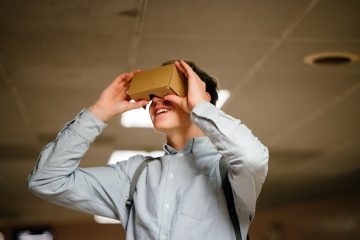
Photo by mentatdgt on Pexels

On that basis, VR could be of interest to Arts and Humanities teachers on account of its potential to emphasise literary elements such as setting (time and place) and point-of-view (1st-person, 2nd-person, or 3rd-person). In fact, these two elements of literature undergo a perplexing conflation when considered in light of VR, just as they do for people who find themselves “stuck in the middle of a tale” (Rozema, 2003, p. 33) while reading a novel, and especially for audiences of live theatre performance.

For instance, as we take in a play from our vantage in the audience, we willingly accept the make-believe conceit that the actors on stage portray characters in a drama that unfolds somewhere in or perhaps beyond our own world. What we recognise before the lights dim as a stage, a proscenium, curtains, rigging, PAR lights, and so forth, we readily accept as time-and-place unique to the story being told. VR asks no less of us and simultaneously attempts to challenge our senses more directly since we now occupy the protagonist’s first-person point-of-view. Indeed, there are many works of literature in which setting can be considered a character.

Weighed against Jaron Lanier’s critique, endorsements of classroom VR can seem somewhat rhapsodic (Adams, 2009). Nonetheless, VR makes its own worthwhile case as a way for teachers to create meaningful interactive learning.


Acknowledgement: post author, Scott Robertson; editor, Yvonne Dawydiak

Interdisciplinarity, collaboration, hands-on learning – that’s the spirit of Create, Make, Innovate! We want to promote enthusiasm for sharing and learning across age groups and across subject disciplines.

Make, Create, Innovate sessions took place during the Fall 2019 in the foyer of the Neville B. Scarfe building and were hosted by Scott Robertson, a project assistant on a small TLEF grant with Dr. Lorrie Miller, Dr. Marina-Milner Bolotin and Yvonne Dawydiak, Teacher Education.

If you have an idea or an inspiration for a resource or future session, please let us know! scarfe.sandbox@ubc.ca


References

Adams, M. G. (2009, July). Engaging 21st-century adolescents: Video games in the Reading classroom. The English Journal, 98(6), 56–59.

Adams, T. (2017, November 12). Jaron Lanier: ‘The solution is to double down on being human’. The Guardian. Retrieved from https://www.theguardian.com/technology/2017/nov/12/jaron-lanier-book-dawn-new-everything-interview-virtual-reality

Arver, C. (2007). Are You Willing to Have Your Students Join Ralph, Jack, and Piggy? The English Journal, 97(1), 37–42.

Gardner, T. (2007, July). Bold books for teenagers: Internet literature for media-savvy students. The English Journal, 96(6), 93–96.

Kahn, J. (2011, July 11, 18). The visionary: A digital pioneer questions what technology has wrought. The New Yorker. Retrieved from https://www.newyorker.com/magazine/2011/07/11/the-visionary

Moreno, R. & Mayer, R. (2007). Interactive multimodal learning environments: Special issue on interactive learning environments: Contemporary issues and trends. Educational Psychology Review, 19(3), 309–326.

Rozema, R. A. (2003, September). Falling into story: Teaching reading with the literary MOO. The English Journal, 93(1), 33–38.

Schneider, J. J., Kozdras, D., Wolkenhauer, N., & Arias, L. (2014, March). Environmental e-books and green goals: Changing places, flipping spaces, and real-izing the curriculum. Journal of Adolescent & Adult Literacy, 57(7), 549–564.


Feature Photo Credit: Stella Jacob on Unsplash

Leave a Comment

Filed under AR & VR, Engineering, Technology, The Arts

Multimodal Learning and Multimedia Technologies

Multimodal and multimedia – are they the same?

Multimodalities comprise symbols and our decisions to use them as well as our interpretations of them. For instance, the letters and words of this blog entry represent a visual mode of language that, taken together, present a text to an audience – it’s something we read!

As teachers plan for literacy instruction, we need to keep in mind the visual, textual, kinesthetic and auditory modes of communication. Literacy and the development of the communication competencies are not just about reading and writing!

Multimedia comprises the various types of presentations that we can select to exhibit our chosen symbols – instead of a blog entry or some other print media, it could be an audiobook, which is an aural mode of language, or a video, which is both visual and aural.

Jason Tham from Texas Tech offers a great explanation for differentiating multimodal from multimedia while Claire Lauer (2009) concludes that how we use each word is perhaps better understood contextually.

Just as every square is a rectangle but not every rectangle is a square, so every multimodal project is multimedia but not every multimedia project is multimodal. (Tham, 2015)

Transfer

Alongside multimodal learning is the concept of learning transfer. By relating “past knowledge” to a “current challenge,” we facilitate for ourselves a more general theory, which helps us to transpose or “transfer” something previously learned into new situations (Shepherd, 2018, p. 109). Sometimes, the transfer seems fairly obvious: we understand the words of this blog entry after learning how to read and write.

Other times, though, multimodal learning is not so taken for granted. It can become challenging if it requires more intentional reflection or speculation, such as when students are asked to remember something from last year or imagine how today’s lessons might help in the future.

Multimodal learning might even require students to connect seemingly unrelated experiences, whether literally or metaphorically. For example, Shepherd (2018) likens driving a car to driving a truck, which is fairly obvious, and then to skiing, which requires a more studious comparison. That can be challenging if students don’t readily see any relevance or similarity between these experiences. And the comparisons don’t need to be immediately scholarly. Could reading a meme, posting on Instagram, or playing Guitar Hero count as experience for coursework?

Of course, students will bring more to the classroom than video games and social media. But it’s by helping students, on their own terms, to build upon what they already know that teachers can facilitate multimodal transfer of learning. At the same time, using multimodal and multimedia tools, teachers can expand their own repertoire, maybe even in ways they didn’t know were possible (Savage & Vogel, 1996).


Create, Make, Innovate: Getting Hands-on with Learning Design

Recap of the session in the Scarfe Foyer Fall 2019:

Lights, camera… action! And action. And action. And action!

At this week’s Create, Make, Innovate! activity session, on Tuesday, October 8th, 2019, Teacher Candidates had the chance to take the Director’s chair and make some fun animated movies using a downloadable moviemaking app called Stop Motion Studio.

After just a few minutes of play and experimentation, this app readily offers users plenty of potential for conveying ideas visually to an audience. And, of course, time invested in a more meticulous approach soon demonstrates just how precise that decision-making can become. The results can be spectacular, as seen in this little mashup video put together by Eric Lee to showcase some lovely examples of stop motion video.


Resources

Check out the Scarfe Digital Sandbox for a variety of other multimodal tools, including Explain Everything, ShowMe, and ScribJab, as well as multimedia technologies such as Haiku Deck, Animoto, and Book Creator.

Each of these apps has its own focus, which can help teachers conduct specific assessments and meet particular objectives. By complementing, supplementing, and extending our approaches to teaching and learning, all of these apps can help students learn to express themselves independently in engaging, creative ways.

“To glimpse the promise of multimedia and judge the extent to which we should invest our energies in it, we need to look beyond current applications… [and consider] the potential range of its uses.” (Savage & Vogel, 1996, p. 127)


Acknowledgement: post author, Scott Robertson; editor, Yvonne Dawydiak

Interdisciplinarity, collaboration, hands-on learning – that’s the spirit of Create, Make, Innovate! We want to promote enthusiasm for sharing and learning across age groups and across subject disciplines.

Make, Create, Innovate sessions took place during the Fall 2019 in the foyer of the Neville B. Scarfe building and were hosted by Scott Robertson, a project assistant on a small TLEF grant with Dr. Lorrie Miller, Dr. Marina-Milner Bolotin and Yvonne Dawydiak, Teacher Education.

If you have an idea or an inspiration for a resource or future session, please let us know! scarfe.sandbox@ubc.ca


References

Lauer, C. (2009, December). Contending with terms: “Multimodal” and “Multimedia” in the academic and public spheres. Computers and Composition, 26(4), 225–239. https://doi.org/10.1016/j.compcom.2009.09.001

Savage, T. M. & Vogel, K. E. (1996, Fall). Multimedia: A revolution in higher education? College Teaching, 44(4), 127–131. http://www.jstor.org.ezproxy.library.ubc.ca/stable/27558793

Shepherd, R. P. (2018, June). Digital writing, multimodality, and learning transfer: Crafting connections between composition and online composing. Computers and Composition, 48, 103–114. https://doi.org/10.1016/j.compcom.2018.03.001

Feature Photo Credit: Mohamed Hassan on Stockvault

Leave a Comment

Filed under AppliedDesignSkillsTechnologies, multimedia creation, Not Subject Specific, Technology, The Arts

VR Tours & Literacy

NOTE: As of June 2021, Google Tour Creator is being discontinued (and this post and accompanying video resources will be archived/removed)

Have you considered how 360° video, images, Augmented and Virtual Reality might help spark your students’ creativity and, perhaps, engage them in the ‘place’ or setting of a novel? In the past, such technologies were out of reach for the average individual or school… today, smartphones, ipads and laptop computers afford the capacity to create!

In May 2019, I had the pleasure of collaborating, co-planning, and co-teaching with a Grade 5/6 classroom teacher in Surrey to re-imagine how information learned from novel studies could be shared using Virtual Reality. We had a common goal to push the students’ (and our!) boundaries by rethinking the traditional book report and decided to use Google Tour Creator and Google Expeditions. (For some short ‘how to videos’ and links to VR content, visit this post)

To help guide the students we selected some BIG QUESTIONS for them to consider throughout this project:

  1. How do the author’s choose settings and how does this affect the plot of a story?
  2. How can we SELECT SETTINGS and EXPLAIN how they are significant to the novel we are reading?

Here’s how we wanted students to demonstrate their learning:

    • Use Google Tour Creator to find real-world settings that are close to our imagined settings.
    • Explain the significance of the settings by describing the location we selected and why it matters to the story we/they read.
    • Add additional detail to a setting by overlaying points of interest, relevant images, appropriate sound effects or audio, and include a narration of the scene for individuals who are unable to see it (creating accessibility).

Want to try this?

To help our students get started and to help scaffold their learning process we made video tutorials, provided links to additional resources, and a launch button to always bring them back to their tours.

First, we created a website to host everything students would need for this project. It contains tutorial videos and links to creative common images, sound effects, and music to help set the scenes and make them more immersive. You are welcome to use it! NOTE: due to Tour Creator requiring google login, we set up google accounts for each group of students to use so that they were not providing their own personal information. Further, we shared with students the importance of protecting their data and privacy through ‘just in time’ lessons and information. Fore more on protecting student data privacy, visit this blog post. You may require parent consents and/or specific school admin or district permission depending on your school district’s protocols and privacy policies.

We also have shared our resources from this project so that other educators may use this process with their own students. Below are links to each resource with a brief explanation of how and why it was created.

  • Scenes from a Novel AR-VR Unit Overview
    • This overview was co-created and includes inquiry questions to guide the teachers which differ slightly from the inquiry questions for the students.
  • VR Planning Page
    • This was the planning page used by students to capture what they imagined the scenes would look like. We wanted to help students narrow their focus by selecting valuable scenes and sketching them before heading into the vast virtual world.
  • Core Competencies Predictions
    • Students used this page to predict what core competency they would use the most through this project. They then used the sheet to self-reflect at the end of the project and write comments about whether they agreed or disagreed with their prediction.
  • Single-Point-Rubric-VR Tour
    • These were co-created with the class. The teachers introduced ideas and explained the process of using the rubric so that the class could decide on what merited a “passable” project. We also discussed what moved the project into the “extending” territory.
    • We had rich discussions about considering everyone in the class and that the goal was to create an immersive project so we had to decide on objectives that were within reach of every student. Many things were decided democratically where students voted on topics. For example, we decided on what the appropriate amount of scenes should be in a tour by displaying the number on our fingers.
    • Students then used the rubric to self-assess their project a week before submission. They marked down areas that needed improvement and areas where they went beyond expectations, then used this sheet to keep track of what they needed to work on. In the end, they submitted their project with their rubric.


We presented our learning journey and that of our students’ at the Surrey Teacher Association Professional Development Day in May 2019. You can view the slides below. We also presented at UBC’s Investigating Our Practices Conference, and the BCTESOL Conference.

*parent permission and informed consent provided

*student permission granted

Leave a Comment

Filed under AR & VR, Blog Posts, Digital & Media Literacy, Planning, Resources