Category Archives: AR & VR

Embodied Learning: physical engagement and digital tech integration

“Movement, or physical activity, is thus an essential factor in intellectual growth, which depends upon the impressions received from outside. Through movement we come in contact with external reality, and it is through these contacts that we eventually acquire even abstract ideas.”

(Montessori, )

Physical movement in learning has been widely researched and written about. In the early 1930’s, Dr. Montessori understood that learning relied on how our physical bodies interacted with the environment. For her, the environment was physical. Today, we are able to consider the role of digital technologies, spaces, objects and experiences in the context of embodied learning.

Embodied, for our purposes, means that the learner has initiated a physical gesture or movement that is well-mapped or linked to the content to be learned. This might include place-based learning experiences, in-class hands-on engagement, learning labs, games and also includes the possibilities afforded through immersive technologies.

Immersive technologies, including Virtual Reality (VR) and Augmented Reality (AR), have the potential to enhance or even redefine learning (Puentedura, 2013). VR offers potentially emotionally charged, immersive experiences, where the user is ‘within’ the virtual environment, while AR overlays digital content on the real world. Research by Johnson-Glenberg MC (2018) emphasizes the levels of embodiment in education—ranging from basic gestures to full-body movement—to deepen learning experiences.

This emotional engagement, can lead to increased behavioural and, ultimately, cognitive engagement (Dubovi & Tabak, 2021). As teachers, integrating embodied learning means actively engaging students physically in the learning process. Digital and other technologies offer a spectrum of physical engagement levels for a more immersive and effective approach to teaching science. We can move from simple gesture to full body movement.

At the lower end of the embodiment spectrum would be the use of 360 video or other gesture based media (such as the Shakespeare folio we explored in our visit to UBC’s Emerging Media Lab – links to external UBC site). 360 video would be another good example. With equipment becoming less expensive and more accessible, you might try shooting your own video (or take still images using Google Streetview).

The following is an example 360 video a friend and I shot in Pacific Spirit Park. It shows my mentor, Lynn Pollard, a long-time Surrey teacher, environmental activities and naturalist educator. (Special thanks to Sharon Hu)

Now imagine the potential engagement and immersion if we could also smell the forest while learning about the carbon cycle! I actually tried this out using simple ‘scent boxes’ that students held while interacting with the video (one with moss, others with cedar, fir, leaves). While this video doesn’t allow for ‘smellivision’, it does allow a greater level of immersion than a static image or standard video. I have used this as ‘prep’ for heading outdoors with students and as a ‘replay’ to re-immerse ourselves upon return and before we do some art or writing activities related to our field experience. It could also be used as a replacement to an outdoor experience (depending on context, objectives).
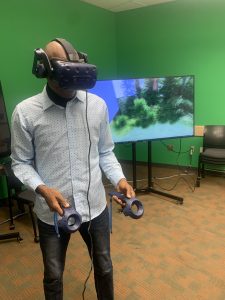
student wearing VR goggles and holding controllers in front of screen showing stanley park immersive experience

Student ‘immersed’ in VR

Levelling up a bit on the embodiment spectrum would be opportunities that allow for full body movement and gesture. This might include fully immersive VR of the kind explored on a recent visit to UBC’s Emerging Media Lab (EML).(links to external/UBC based site) Of course, while some schools have invested in this digital tech, access may not be possible in the average k12 school today. We were fortunate in our visit to the EML to try out a few different options (see table below for resource links).

Using the rather ubiquitous smartphone, we can view a variety of 3D images using a google search and engage with them as AR images in the environment.

Person gesturing towards a virtual AR image of a tiger in the classroom

Dr. Khan virtually pats a tiger!

Imagine our surprise when a tiger joined the class (or when the full circulatory system model wandered by!). In order to view these 3D images, we need to move around them physically and gesture to adjust size; allowing a somewhat ’embodied’ experience.
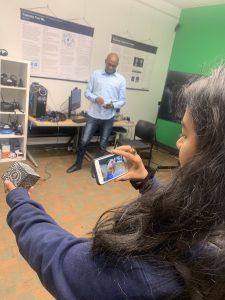
student holds merge smart phone in front of a merge cube AR block. Phone shows an AR beating heart.

Holding a beating heart in her hand!

We might also use a Merge Cube to view AR models. Again, not super high tech, but thought provoking when we think about the difference between a static model of the heart and a larger than life sized beating organ suspended in the room in front of us!


Embracing embodied learning empowers students to not just learn about science or the world around them, but to tangibly experience and internalize it. It’s about creating educational experiences that transcend the traditional confines of a classroom, fostering a deeper and, hopefully, more lasting connection between physical engagement and knowledge acquisition.

References:

Dubovi I, Tabak I. Interactions between emotional and cognitive engagement with science on YouTube. Public Underst Sci. 2021 Aug;30(6):759-776. doi: 10.1177/0963662521990848. Epub 2021 Feb 5. PMID: 33546572; PMCID: PMC8314998.

Johnson-Glenberg MC. Immersive VR and Education: Embodied Design Principles That Include Gesture and Hand Controls. Front Robot AI. 2018 Jul 24;5:81. doi: 10.3389/frobt.2018.00081. PMID: 33500960; PMCID: PMC7805662. Retrieved from https://www.ncbi.nlm.nih.gov/pmc/articles/PMC7805662/

Montessori, Maria. The Secret of Childhood. Orient Longman, 1966.

Puentedura, R. R. (2013, May 29). SAMR: Moving from enhancement to transformation [Web log post]. Retrieved from http://www.hippasus.com/rrpweblog/archives/000095.html


Resources from our Session (Oct 2023)

I recently had the opportunity to work with UBC Faculty, grad students and members of the team at the Emerging Media Lab on the Vancouver Campus on some interactive and ’embodied’ stations to allow students to experiment and consider the levels of embodiment afforded with Augmented and Virtual Reality tools. Below are some resources from our session. It is important to note that we did not offer these AR and VR options as alternatives to ‘real world embodied learning’ but as enhancements to the learning environment.

EML offers weekly drop-ins and opportunities to collaborate on projects, co-plan and co-teach! https://eml.ubc.ca/

Station/Activity Level of Embodiment  Resource notes/Links
VR immersive exploration (Stanley Park Simulation EML Project) immersive VR, interactive controllers, gesture, movement, sound https://eml.ubc.ca/projects/geography-vr/
Holo brain (using Hololens) gesture-based augmented reality https://eml.ubc.ca/projects/holobrain/
Smartphone Google Search AR gesture-based AR with some body movement Link to ios/android instructions and full list of available 3D images – Google link.
Star Walk AR gesture-based AR with some large body movement Requires smartphone, ipad, tablet. Star viewing apps allow you to view celestial objects/night sky in real time and across space and time. Link to Star Viewing Apps SS Blog post.
Merge Cube AR gesture-based AR Requires handheld/smart phone or ipad. Link to Merge Cube blog post in Scarfe Sandbox. 
Shakespeare XR Interactive gesture-based AR A table top virtual Shakespeare text, turn the pages with gesture. https://eml.ubc.ca/projects/shakespeare-xr/


Planning for ‘Tech-enhanced Embodied Learning’

I created the following ‘solution tree’ of considerations when electing to incorporate these tools (note this tree is a first draft… I’m hoping to make a more effective diagram for a future edit of this post – please comment on this post if you have feedback)

  • Is the experience you wish to offer POSSIBLE in the real world? Can you/your students visit the place or hold the object
  • if yes, then…
    • Consider incorporating the digitally enabled tools as supplement or enhancement to real world experiences and labs. For example, pre- or post- labs; allowing students to pre-play and re-play content or experiences using digital tools including 360 media can enhance their reflections on the experience, can supplement and even deepen connections to learning.
    • if yes, then:
      • Think about: your learning objectives and the ‘level of embodiment’ you’d like to offer your students as you choose the tools.
      • Ask:
        • are any students going to be excluded (due to health and safety or access issues?
        • if no, then… 
          • GO! Try to make it happen. Advocate for it!
        • if yes, then…
          • plan or consider alternative experiences. For example: if a student has vestibular or other health or safety concerns and may not be able to use a VR headset, is there an AR experience you can offer that is more comfortable for that student (Consider Universal Design for Learning (UDL) principles in your planning and you’ll see that having an alternative will likely be necessary for some and of benefit to many!)
  • Is the experience you wish to offer IMPOSSIBLE in the real world (perhaps unsafe or inaccessible to some/all of your students)
  • if yes, then…
    • consider incorporating the digitally enabled tools as the main/central experience in the lesson or unit or lab.
    • if yes, then:
      • Think about:
        • your learning objectives and the ‘level of embodiment’ you’d like to offer your students as you choose the tools.
        • how you will ensure access and engagement (if you have access to only one device, what will students do when it is not their ‘turn’? are there stations you can set up for students for more active engagement and to lessen ‘wait time’; what role do students have who are not ‘immersed’ in the activity?
        • how will students reflect upon their experience?
      • Ask: Are any of my students going to be left out of this experience?
      • if no, then… 
        • GO! Try to make it happen. Advocate for it!
      • if yes, then…
        • plan or consider alternative experiences. For example: if a student has vestibular or other health or safety concerns and may not be able to use a VR headset, is there an AR experience you can offer that is more comfortable for that student (Consider Universal Design for Learning (UDL) principles in your planning and you’ll see that having an alternative will likely be necessary for some and of benefit to many!)


Blog post by Yvonne Dawydiak, Learning Design Manager, Teacher Education Oct 2023

1 Comment

Filed under Activating Strategies, Active Learning, AR & VR, Assistive Technology, Blog Posts, Curriculum, Interactivity, Not Subject Specific, Planning, Resources

Setting Our Sights on Virtual Reality

Virtual realities (VR) are computer-created environments in which people can interact with what has been programmed or, when linked to some kind of network or on-line access, with each other.

Typically, users wear some kind of headset or goggles to facilitate their sensory experience, which is primarily visual (sometimes fully 360°) and perhaps aural and/or tactile. Environments might be fictional or non-fictional, and interaction passive or active (Moreno & Mayer, 2007).

Although we might consider any back-and-forth communication between two or more people as inter-activity, only a meaningful connection that helps one or more than one of them learn something is interactive learning (Moreno & Mayer, 2007). Moreno and Mayer (2007) are careful to clarify further that interactivity does not “cause” but rather helps “promote” learning (p. 321) although perhaps their conclusion does not fully account for the effects of the hidden curriculum.

Therefore, when planning lessons, teachers should avoid the temptation to try VR for its own sake, which can produce a more gimmicky effect. Instead, they might consider exactly how interactive learning can help enrich their students’ experiences, not only by appealing directly to students’ senses but by directly confronting their capabilities: “… students’ areas of expertise can become the ‘real’ of real-world applications, and students’ knowledge can successively alter curricular outcomes” (Schneider et al., 2014, p. 562).


Create, Make, Innovate: Getting Hands-on with Learning Design

Recap of the session held in the Scarfe Foyer Fall 2019:

At this week’s Create, Make, Innovate! activity session, on Tuesday, November 19th, 2019, teacher candidates had the chance to learn about creating VR experiences for the classroom using Google Tour Creator.

“Today’s media-savvy students compose and read texts that include alphabetic- and character-based print, still images, video, and sound. They listen to podcasts, watch animations on the Internet, film their own videos, and compose visual arguments on paper and online. These rich, multilayered texts demand multimodal literacy skills of their readers, who must navigate the different, intersecting media.” (Gardner, 2007, p. 93)

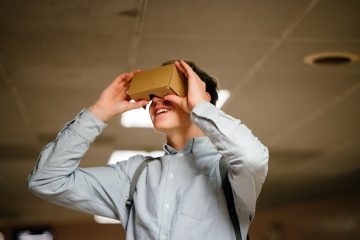
Cardboard Goggles (Image by WikimediaImages from Pixabay)

Google offers a suite of VR apps, branded as Google Cardboard on account of the homemade goggles that you can make yourself. While the goggles are novel and can be fun to try on, they are not necessary in order to use the apps, which range from the amusing to the cinematic.

The Education Library in Scarfe has several sets of goggles available for loan. However, if you do take on making some goggles, as an initial project, they can actually lend a more cozy feel to watching later on since those goggles are thanks to your own hard work!

Resources

Check out the Scarfe Digital Sandbox for other interactive VR apps, such as Discovery VR, and also Merge Cube, which is an Augmented Reality (AR) tool.

“The virtual worlds we have designed have strong visual elements that are historically and culturally related to specific literary texts…. They can incorporate sound and video files to create museum and role-play environments.” (Arver, 2007, p. 37)

Related to VR is MOO, which also functions as a multi-user on-line network but in a text-based rather than a sensory-based format. MOO systems find their origins in the role-playing adventure game, Dungeons & Dragons, in which players adopt roles and interact as protagonists during an imaginary adventure, usually while sitting together around a table. MOO systems take that experience on-line.

Typically, each MOO user is able to contribute to its programming, which affects everyone else’s experience. In the classroom, a teacher might create a VR or MOO experience that corresponds to a novel study, such as Lord of the Flies (Arver, 2007) or Brave New World (Rozema, 2003), and let students “interact as additional characters, discuss and solve problems based on the circumstances of the story, and complete classroom assignments within a virtual environment” (Arver, 2007, p. 37).

“The best way of thinking about a literary MOO, then, may be as an electronic book club that meets within the story world of the book itself and invites all to participate on equal footing.” (Rozema, 2003, p. 38)


Clarify Your Intentions, Justify Your Lessons

Author and scientist, Jaron Lanier, has been credited with creating and even coining the name “virtual reality.” While his original motivation for VR stemmed from empathy, to connect with other people and their perceptions of things, Lanier has since critiqued proponents of VR. A “machine-supremacy approach” to technology in general, he says, has “made the world of information ever more dominant” (Kahn, 2011).

However, he still credits VR for its medical and counselling applications (Adams, 2017). With that said, maybe it’s not a stretch to suggest that the concept of VR – if not the technology per se – has other origins: theatre and dramatic stage performance. After all, theatre has long been appreciated for offering a cathartic effect to its audiences.

Photo by mentatdgt on Pexels

On that basis, VR could be of interest to Arts and Humanities teachers on account of its potential to emphasise literary elements such as setting (time and place) and point-of-view (1st-person, 2nd-person, or 3rd-person). In fact, these two elements of literature undergo a perplexing conflation when considered in light of VR, just as they do for people who find themselves “stuck in the middle of a tale” (Rozema, 2003, p. 33) while reading a novel, and especially for audiences of live theatre performance.

For instance, as we take in a play from our vantage in the audience, we willingly accept the make-believe conceit that the actors on stage portray characters in a drama that unfolds somewhere in or perhaps beyond our own world. What we recognise before the lights dim as a stage, a proscenium, curtains, rigging, PAR lights, and so forth, we readily accept as time-and-place unique to the story being told. VR asks no less of us and simultaneously attempts to challenge our senses more directly since we now occupy the protagonist’s first-person point-of-view. Indeed, there are many works of literature in which setting can be considered a character.

Weighed against Jaron Lanier’s critique, endorsements of classroom VR can seem somewhat rhapsodic (Adams, 2009). Nonetheless, VR makes its own worthwhile case as a way for teachers to create meaningful interactive learning.


Acknowledgement: post author, Scott Robertson; editor, Yvonne Dawydiak

Interdisciplinarity, collaboration, hands-on learning – that’s the spirit of Create, Make, Innovate! We want to promote enthusiasm for sharing and learning across age groups and across subject disciplines.

Make, Create, Innovate sessions took place during the Fall 2019 in the foyer of the Neville B. Scarfe building and were hosted by Scott Robertson, a project assistant on a small TLEF grant with Dr. Lorrie Miller, Dr. Marina-Milner Bolotin and Yvonne Dawydiak, Teacher Education.

If you have an idea or an inspiration for a resource or future session, please let us know! scarfe.sandbox@ubc.ca


References

Adams, M. G. (2009, July). Engaging 21st-century adolescents: Video games in the Reading classroom. The English Journal, 98(6), 56–59.

Adams, T. (2017, November 12). Jaron Lanier: ‘The solution is to double down on being human’. The Guardian. Retrieved from https://www.theguardian.com/technology/2017/nov/12/jaron-lanier-book-dawn-new-everything-interview-virtual-reality

Arver, C. (2007). Are You Willing to Have Your Students Join Ralph, Jack, and Piggy? The English Journal, 97(1), 37–42.

Gardner, T. (2007, July). Bold books for teenagers: Internet literature for media-savvy students. The English Journal, 96(6), 93–96.

Kahn, J. (2011, July 11, 18). The visionary: A digital pioneer questions what technology has wrought. The New Yorker. Retrieved from https://www.newyorker.com/magazine/2011/07/11/the-visionary

Moreno, R. & Mayer, R. (2007). Interactive multimodal learning environments: Special issue on interactive learning environments: Contemporary issues and trends. Educational Psychology Review, 19(3), 309–326.

Rozema, R. A. (2003, September). Falling into story: Teaching reading with the literary MOO. The English Journal, 93(1), 33–38.

Schneider, J. J., Kozdras, D., Wolkenhauer, N., & Arias, L. (2014, March). Environmental e-books and green goals: Changing places, flipping spaces, and real-izing the curriculum. Journal of Adolescent & Adult Literacy, 57(7), 549–564.


Feature Photo Credit: Stella Jacob on Unsplash

Leave a Comment

Filed under AR & VR, Engineering, Technology, The Arts

Green Screen #wormholechallenge videos

The #wormholechallenge seems to have emerged on Twitter over the past few weeks spurred on by some improvements in iMovie that make ‘green screen’ videos highly accessible to those with the free mobile App or the full iMovie application on iOS. Using any green (or blue) background, you can create the appearance of a wormhole effect with an image gradually appearing, shifting, stretching, disappearing and distorting. Try using playdough or food colouring in water. Have a look at the Twitter hashtag (#wormholechallenge) for some amazing examples. Here’s my first try at a wormhole video!


Green screen can support photo and video creation across subject areas. Using accessible materials (without the need for a big green wall) allows your students to create unique special effects within any video project or presentation. I believe this technology encourages us to think more creatively and can support students in developing core competencies. The video above could be used in a presentation about intertidal life where students select an invertebrate to study and reveal it during their presentation. I’ve only just started to play with this but already feel like the possibilities are vast.

You can use a Green Screen app (like DoInk as shown in an earlier Scarfe Sandbox post: Green Screen for Storytelling) or use a newer feature of iMovie that allows you to import video as ‘green or blue screen’.

Here’s the video tutorial by Richard Hopkin that I viewed before making my own iMovie wormhole video:

Leave a Comment

Filed under AR & VR, Not Subject Specific, Resources, Technology, The Arts, Video & Video Tutorials

VR Tours & Literacy

NOTE: As of June 2021, Google Tour Creator is being discontinued (and this post and accompanying video resources will be archived/removed)

Have you considered how 360° video, images, Augmented and Virtual Reality might help spark your students’ creativity and, perhaps, engage them in the ‘place’ or setting of a novel? In the past, such technologies were out of reach for the average individual or school… today, smartphones, ipads and laptop computers afford the capacity to create!

In May 2019, I had the pleasure of collaborating, co-planning, and co-teaching with a Grade 5/6 classroom teacher in Surrey to re-imagine how information learned from novel studies could be shared using Virtual Reality. We had a common goal to push the students’ (and our!) boundaries by rethinking the traditional book report and decided to use Google Tour Creator and Google Expeditions. (For some short ‘how to videos’ and links to VR content, visit this post)

To help guide the students we selected some BIG QUESTIONS for them to consider throughout this project:

  1. How do the author’s choose settings and how does this affect the plot of a story?
  2. How can we SELECT SETTINGS and EXPLAIN how they are significant to the novel we are reading?

Here’s how we wanted students to demonstrate their learning:

    • Use Google Tour Creator to find real-world settings that are close to our imagined settings.
    • Explain the significance of the settings by describing the location we selected and why it matters to the story we/they read.
    • Add additional detail to a setting by overlaying points of interest, relevant images, appropriate sound effects or audio, and include a narration of the scene for individuals who are unable to see it (creating accessibility).

Want to try this?

To help our students get started and to help scaffold their learning process we made video tutorials, provided links to additional resources, and a launch button to always bring them back to their tours.

First, we created a website to host everything students would need for this project. It contains tutorial videos and links to creative common images, sound effects, and music to help set the scenes and make them more immersive. You are welcome to use it! NOTE: due to Tour Creator requiring google login, we set up google accounts for each group of students to use so that they were not providing their own personal information. Further, we shared with students the importance of protecting their data and privacy through ‘just in time’ lessons and information. Fore more on protecting student data privacy, visit this blog post. You may require parent consents and/or specific school admin or district permission depending on your school district’s protocols and privacy policies.

We also have shared our resources from this project so that other educators may use this process with their own students. Below are links to each resource with a brief explanation of how and why it was created.

  • Scenes from a Novel AR-VR Unit Overview
    • This overview was co-created and includes inquiry questions to guide the teachers which differ slightly from the inquiry questions for the students.
  • VR Planning Page
    • This was the planning page used by students to capture what they imagined the scenes would look like. We wanted to help students narrow their focus by selecting valuable scenes and sketching them before heading into the vast virtual world.
  • Core Competencies Predictions
    • Students used this page to predict what core competency they would use the most through this project. They then used the sheet to self-reflect at the end of the project and write comments about whether they agreed or disagreed with their prediction.
  • Single-Point-Rubric-VR Tour
    • These were co-created with the class. The teachers introduced ideas and explained the process of using the rubric so that the class could decide on what merited a “passable” project. We also discussed what moved the project into the “extending” territory.
    • We had rich discussions about considering everyone in the class and that the goal was to create an immersive project so we had to decide on objectives that were within reach of every student. Many things were decided democratically where students voted on topics. For example, we decided on what the appropriate amount of scenes should be in a tour by displaying the number on our fingers.
    • Students then used the rubric to self-assess their project a week before submission. They marked down areas that needed improvement and areas where they went beyond expectations, then used this sheet to keep track of what they needed to work on. In the end, they submitted their project with their rubric.


We presented our learning journey and that of our students’ at the Surrey Teacher Association Professional Development Day in May 2019. You can view the slides below. We also presented at UBC’s Investigating Our Practices Conference, and the BCTESOL Conference.

*parent permission and informed consent provided

*student permission granted

Leave a Comment

Filed under AR & VR, Blog Posts, Digital & Media Literacy, Planning, Resources

Star Viewing Apps

These are apps that provide an immersive and augmented viewing of the stars, planets, and sometimes even space stations or satellites!

They allow students to recognize and experience the locations of various stars in relation to themselves. It’s a powerful tool that promotes questioning, deeper understanding, and engagement because students can rotate their devices to view constellations and more. These apps are a way to help students recognize that the stars and planets never “disappear” and that their locations move throughout out the day and year!

You will find that once students are “viewing the stars”, they will come up with their own questions which is a perfect and natural inquiry opportunity and way to personalize your teaching for students.

Some questions we often hear are, What is a pulsating star? How can I tell the difference between a planet and star without this [app]? Who named the constellations and why are they important?

  1. Choose which app would work best with your students!
    • Skyview or SkyGuide
      • Uses the camera and overlays it with the Milky Way galaxy. Includes descriptions of star types, constellations, planets, the International Space Station, and the Hubble space telescope. Great for using outdoors and in the evenings.
    • Starwalk
      • Uses an evening themes background with the stars, constellations, and more over top. Features Real-time celestial bodies tracking, the ability to travel in time with “Time machine,” and anastronomical calendar with various celestial events.
  2. Download and open the app.
  3. Decide how you will engage students with the app.
    • Free exploration
    • Scavenger Hunt
    • Question generator – have students write as many questions as they can.
    • Galactic Explorer – write from the perspective as a 22nd Century Galatic Explorer. This could be compared to Explorers from history. They could also plot a course based on a chosen destination.
    • Storytelling – How do constellations tell a story? Be inspired by this app and then read various stories about the constellations before having students create their own (oral stories or written). You could also compare historical narratives from different cultures to build multiple perspectives of the stars.

Below is a scavenger hunt we use with Teacher Candidates but you can also borrow and personalize it for your own students. We use it to encourage engagement and exploration of the tool but leave room for TCs to create and record their own questions as they explore.


Leave a Comment

Filed under AR & VR, Not Subject Specific, Resources

Merge Cube

Merge Cube is an Augmented Reality square that applies realistic graphics and 3D models with which users can engage (available on iOS or Android) using both free and paid apps on a mobile device. Merge Cube, along with available apps, allows users to apply a different interface to their experience.
Some apps are simple viewers while others are “gamified” and/or more interactive.

You can even print and make your own paper merge cube or make a giant sized ‘class’ cube (I’d recommend using a slightly heavier card or print on paper and glue to cardstock). For full instructions, a video and printable template, visit the Merge Cube Website Support page via the link here.

Galactic Explorer

The opportunity to hold an object in your hands, rotate it, make choices about how you interact with it can lead to a a richer learning experience and deeper engagement. The merge cube allows you and your students to have a somewhat more authentic experience than holding a static model ever could! Imagine students in a biology class holding the beating human heart in your hands, moving it to see how it looks from various angles and even looking deep inside the heart to see the vessels. Students in Math can create and view geometric models. Physics students might create models of molecules or elements, Bio students might design strings of DNA!

In Merge, you can also upload your own 3D models! We know that moving from simple consumption through to creation has learning value. The trend to prototyping and 3D printing in classrooms and libraries as had me thinking a lot about the waste involved in 3D printing and prototyping. I think there is value in creating using Tinkercad or other 3D modelling software, uploading the model to Merge and carefully viewing all dimensions of your model BEFORE or even INSTEAD of Printing. That way, we’re only printing what is ‘needed’, useful or has value.

The following have some free access (for others, you’ll need a Merge EDU paid account.)

  • Object Viewer 
      • If you have students build their own 3d model, they can use this app to hold it and view them from any angle. You’ll need both a free TinkerCad account and a Merge Edu Account (free allows 5 uploads).
      • CREATE!!!
        • Create a 3D object at TinkerCad (you can also use Sketchup or CoSpaces)
        • In Tinkercad, select the “Send to” button on the top right
        • Select “MergeEdu” (you can also share to a Thingaverse account)
        • MergeEdu will open in a new tab. Follow on-screen instructions.

        1. Launch a Merge App
        2. Allow camera and photo access
        3. Enter your model code  if needed **first time only**
        4. Engage with the Merge Cube

    MERGE. Getting Started (2017).

    MERGE. Math with the Merge Cube (2018).

Leave a Comment

Filed under AR & VR, Engineering, Math, Not Subject Specific, Resources, Science, Technology, The Arts

Creating and curating VR content

What is Virtual Reality?

Virtual reality is “a technology by which computer-aided stimuli create the immersive illusion of being somewhere else” source.

How is it relevant to the classroom?

  • It can aid place-based learning by taking students on a virtual field trip.
  • It can provide powerful 3D simulations of difficult or far away concepts, experiences, and systems (such as the experience of refugees, anatomy of the human body or outer space).

What are some forms of Virtual Reality?

Forms of virtual reality include 360-degree images, 360-degree videos, and computer-simulated 360 content. Often, in school contexts, we consider 360 degree content as synonymous with VR. How we ‘consume’ this content varies from scrolling on a browser, viewing on a mobile device or using VR headsets like google cardboard.More recently, some secondary schools have started to integrate portable systems for more fully immersive VR such as the Oculus Go.

Where can I find VR content for use in the classroom?

There are many ready-made VR content that can be “consumed” in the classroom. The variety includes Virtual Reality tours, 360-degree images as well as 360-degree videos. Below are some resources.

360 Degree images 

360-degree videos

Virtual Reality Tours

What are some ways I/my students can create VR content in/for the classroom?

Some examples of creating VR content include creating Virtual Reality Tours using Google Tour Creator and creating 360 videos. Below are step-by step video tutorials for both.

Google Tour Creator 

Or watch the entire playlist below.


Creating 360 Videos 

or watch the entire playlist below.

How can I create an affordable VR headset for my students?

Check this resource for creating a Google Cardboard Viewer in your classroom.

Leave a Comment

Filed under AR & VR, Not Subject Specific, Resources