Tag Archives: Free

A brief history… Timelines

Global logistics concept with industry icons

I came across TimeToast awhile ago and was just reminded of it this morning as a tool for creating interactive digital timelines. There are many digital tools available for timeline creation – I’ve listed several in the ‘how to get started’ section below including a few open educational resources. There are also, many ways to create timelines as ‘no or low tech’ projects in a classroom using sticky notes, cards and string.

For Timetoast, a free account allows photos to be uploaded, annotations and live links. I love the ‘timespan’ option, allowing a span of time to be highlighted and annotated. This adds some depth and interest to the typical timeline.

Public timelines can be viewed and shared ‘as is’; your own Timelines can be saved and made private or public. When public, you can share via Facebook, Twitter or by grabbing embed code. Teachers can easily upload the timeline to the class website or blog for home viewing.

As I messed about with it again, I considered a variety of uses; both personal and professional. As a teaching tool, timelines have so many possibilities. Here are a few that come to mind:

  • A classroom calendar embedded on the class blog or website – the initial timeline can house calendared events over the year and can also be added to over time either by student request due to personal milestones (lost tooth chart anyone?!) or as the class wishes to share learning events and activities with the world.
  • Social Studies units could be greatly enhanced by students creating their own timelines of historic events, life and times of… or the class can co-create a timeline as they explore a specific person, place or time.
  • Tracking growth and change in a Science experiment using both photos and text is a unique way to share.
  • A unique way to create an  ‘About Me‘ or ‘About my Family‘ or ‘History of my Community‘. A recent teacher candidate created a beaded timeline with her students to help students learn more about the Indigenous presence in her school community!
  • Create a digital story – fiction or non-fiction
  • A way of sharing Inquiry learning; a timeline might help highlight the ‘process’

Timelines can be valuable in a second language classroom such as French Immersion, Core French, etc; allowing  students to creatively engage in language learning.

What uses come to your mind? Comment to share!


There are several free timeline programs (and plenty of ways to create timelines using other programs – PPT or Padlet or a mindmap come to mind). Here are a few programs with specific timeline features:


Leave a Comment

Filed under Curriculum, Inquiry, Interactivity, Not Subject Specific, Planning, Resources, Science, Social Studies, STEAM, Technology

Classroom Discussions

What are classroom discussions?

group of multi-ethnic students engaging in a discussion outdoors at school.

Remember: Discussions can occur outdoors!

Classroom discussion can be defined as an oral activity where teachers and students develop together a specific curriculum content or competency through each other ideas. “The purposes of a discussion are to build collective knowledge and capability in relation to specific instructional goals and to allow students to practice listening, speaking, and interpreting, agreeing and disagreeing” (Teaching Works, 2022, May 2). In this sense, students use the ideas, words, explanations, and interaction with their teacher and peers as a resource for their own learning.

Classroom discussions are not merely to help students answer a question but to establish a conversation. This conversation may begin with a provocation, have a beginning, a sequence of processes, and an end or closure. What happens during the process is essential to developing the content and competencies of the curriculum and achieving teaching goals. Differing opinions, moderating interaction, taking turns, etc, are essential to developing student competencies and helping students to deeply explore content. Therefore, classroom discussions are a teaching and learning process that believes that students will accomplish curriculum goals together, through the process of sharing ideas (Teaching Works, 2022, May 2). Well-designed and orchestrated class discussions can help build classroom community.classroom community (links to post in this blog).

Classroom discussions can occur in both synchronous and asynchronous contexts. When planning an asynchronous discussion, teachers should consider the ability of students to self-regulate and manage the discussion. When discussing critical issues, the teacher may need to monitor and help guide the discussion. The Bell Foundation provides some suggestions for how to improve classroom talk that can improve students’ ability to participate in synch and asynch discussions.

Why are classroom discussions important?

Classroom discussions are important because they develop both academic and non-academic skills in students. Communicating is essential to living in the current society and developing a healthy democracy. Being able to share, justify, defend, listen, and understand diverse perspectives and ideas is one of the most important competencies that human beings use in our current world. Hence, students need to learn these skills to be successful in their adult life.

Moreover, classroom discussions support student development during their school years. Through classroom discussions, students can learn to make sense of complex ideas and organize their thoughts. Students can also develop the confidence to present their views and use evidence to justify them. Finally, classroom discussions can support teachers to reveal students’ conceptions and misunderstandings about a topic, helping them to identify contents and concepts that need to be better explained in a lesson.

However, developing rich classroom discussions is a complex task that may generate several problems if teachers do not conduct the process well. Teachers should know how to value different views and pay attention to each child’s needs. Therefore, the challenge (and secret) is to be conscious of all micro details involved in classroom discussions, as we will show next.

What are elements of a rich classroom discussion?

The Teaching Works Team (2022, May 2) from the teacher education program of the University of Michigan defends that teaching practices should be unpacked in chunks or elements to support novice teachers to develop these skills. In this sense, they divide the task of developing classroom discussion into several parts and elements, detailing what teachers should pay attention to in each part. In the next sections, we will details these steps and elements as well as complement them with additional resources and orientations.

Source: (Teaching Works Team, 2022, May 2)

Preparing for a discussion

1. Selecting a task:

Teachers should choose tasks, texts, and materials that allow multiple views, discussions, and solutions for a topic/question, encouraging students to explore different possibilities and arguments. Teachers may need to adapt a task to support multiple views and disrupt inequalities.

2. Anticipating student thinking:

Teachers should think about possible questions, mistakes, or understanding that students may have about the topic. This means both activating previous knowledge but also anticipating problems that may deviate students’ attention from the curriculum goals in that classroom discussion.

3. Setting up the task:

Teachers should select the purpose of the activity and prepare the orientations to support students’ work. In this sense, teachers also should plan the moments for students to work independently, in small groups, or with the whole class as well as the resources needed to develop the discussion.

Conducting the Discussion in class

1. Launching the discussion:

2. Orchestrating the discussion:

Teachers should pay attention to a couple of elements and tasks that will create thinking routines to explore and deepen their understanding of a topic. The following elements may happen in a different order but, according to Harvard’s Project Zero, they should be part of any Thinking Routine (links to Harvard’s Project Zero) chosen by teachers:

    • Eliciting the discussion: teachers should state the multiple ideas that their students are bringing, helping them to see several points and arguments during the discussion.
    • Orienting students’ attention: teachers should ask to students pay attention to specific ideas and contributions of their peers, encouraging them to learn with each other.
    • Encouraging student participation: teachers should encourage all students to expose their ideas and control who ideas have been highlighted or ignored. It helps that classroom discussion not only become richer since diverse ideas will be developed but also supports decreasing inequity among students.
    • Probing new questions: teachers should put new questions that support students to explore and deepen the topic, move to the next learning step process, or summarize what they have discussed.
    • Making contributions: teachers should make contributions or introduce ideas/ concepts that were not brought by students but are essential to achieve the purposes of the discussion. If possible, teachers should connect these new ideas/concepts with what has already been discussed validating students’ contributions and establishing connections with previous knowledge.

3. Concluding the class discussion:

    • Supporting summary: teachers should support students to summarize and remember what has been discussed, helping to establish the most relevant points worked during the class and issues that they will develop in the next classes.
    • Acknowledge student contribution: teachers should highlight, with examples, how students’ ideas were essential to developing both content and competencies during the class.

4. Evaluating (after the discussion)

The final step is to reflect on what has happened in the classroom discussion to evaluate what works (or not) and how to improve future discussions.

Elements to consider as you plan, conduct and reflect

1. Maintaining a focus on the instructional objectives: teachers should always direct each student’s intervention to build some knowledge or example that will help to achieve content and competencies goals.

2. Monitoring students’ work: teachers should pay attention to what students are discussing in their groups and which ideas/ people are been highlighted. In this sense, teachers will be able to use students’ work to develop the content and prevent inequalities or bias in the discussion.

3. Seeing and disrupting patterns that reproduce inequalities: teachers should make interventions to stop patterns that may generate inequalities. These interventions do not need to be explicit. For example, teachers can use the work of a student who may not always be recognized as one of the more advanced or capable students in the class to exemplify a topic, helping to improve student status among his/her peers.

4. Recording the representation of content: teachers might record (on the board to the whole class or just to themself) what students are saying during the whole process because it can support the teaching and learning process. Students might also take notes as the discussion ensues. The notes can be used for formative assessment to help teachers understand students’ struggles and misconceptions, or to help with review to demonstrate student thinking or rationality and understanding of an issue. Teachers might find strategies to make student learning visible (Project Zero). Recording could take the form of a digital whiteboard (link to post in this blog) for all to see or for future reference, sorting & classifying ideas, etc.

Strategies to increase classroom engagement

There are many ways to design and lead a discussion to support more active classroom engagement. Teachers should also consider context including the age, background, needs and preferences of their students.

  • In her blog, teacher Jennifer Gonzales also provides some suggestions. You might also listen to the Cult of Pedagogy #28 Class Discussion Strategies podcast (see embed below).
  • Liberating Structures provides a menu of varied activities for discussion and group work.
  • Harvard’s Project Zero offers Thinking Routines that teachers can implement across grade levels and across the curriculum.
  • The Teaching Works Team from UMichigan, offers an open library of Curriculum Resources that include strategies to support teaching in specific aspects of the curriculum and for more interdisciplinary approaches.
  • The Bell Foundation is a charity that seeks to . The Bell Foundation website contains frameworks for discussion including video demonstrations and lesson plans for structures including ‘Information Gap’ activities such as JigSaws.

How might challenging or high-stakes topics be addressed?

Classroom discussions about challenging or complex topics need extra teachers’ attention because unexpected reactions may appear and some rules should be established to guarantee respect. The University of Michigan has prepared a specific orientation on how to conduct classroom discussions about challenging or high-stakes topics (UMich). Moreover, Edutopia discusses how classroom norms can support teachers during challenging discussions.

What can classroom discussions look like in each content area?

Teaching Works Team (2022, May 2) from the teacher education program of the University of Michigan has many specific tips and classroom resources for different subjects:

Additional Resources:


The courses below bring many classroom videos as examples of how to conduct good classroom discussions. They break down real situations and show how teachers dealt with these, conducting rich classroom discussions:

University of Pennsylvania (Coursera):

University of Michigan:

References:

Project Zero (2022, April 30). Project Zero’s Thinking Routine Toolbox. Harvard Graduation School of Education. http://www.pz.harvard.edu/

Liberating Structures (2022, April 30). Liberating Structures Menu. https://www.liberatingstructures.com/ls-menu/

Rochester Community Schools (2022, April 30). Think from the middle. Discourses Strategies. http://www.rcsthinkfromthemiddle.com/discourse-strategies.html 

Teaching Works (2022, May 2). High-Leverage Practices. Teaching Works. https://www.teachingworks.org/work-of-teaching/high-leverage-practices.


Guest post by Peer Tutor Ariane Faria dos Santos (Ph.D. EDCP), May. 2022; edited Y.Dawydiak April 2024

Leave a Comment

Filed under Active Learning, Blog Posts, Curriculum, Inclusive Practices, Not Subject Specific, Open Educational Resources, Planning

Desmos Graphing Calculator

Most secondary math classes require the use of a Ti-84 graphing calculator.  However, nowadays there are other online options to produce elegant graphing and math simulations. One of the free,  yet still powerful, options is Desmos.


  • Desmos is a free online tool that can make the affordances of a graphing calculator more accessible. It is essential to give options to students whose families may not have the resources to pay for other more expensive tools.
  • Desmos is not only a graphing calculator but also a matrix calculator and a geometry tool. Thus, teachers can use it to develop other mathematic content and competencies, such as patterns in a table, proportion, and relationships, linear equations, inequality, etc.
  • Desmos allows you to insert images to be used in theirmath tools, which support teachers when integrating hands-on activities and complex math concepts. For example, the Burnaby School District has a wonderful example of integrating First Peoples Principles of Mathematical Teaching through weaving and Desmos tools.
  • Desmos also offers a section with suggestions for activities and lessons teachers can adapt for their class/teaching needs.

Getting Started with Desmos

  1. Go to the Desmos homepage
  2. You can choose to use Desmos as a teacher or a student
  3. As a teacher, you can browse the activities available or sign up to be able to assign activities to your students through a code.
  4. Desmos has a couple of videos demonstrating how to use their several tools in different math content and competencies. If you want to learn how to use Desmos on a specific topic you can go to these links:
    1. Derivatives
    2. Integrals
    3. Functions
    4. Graphics
    5. Tables
    6. Parametric equations
    7. Regressions
    8. Statistics
    9. Trigonometry
  5. Or you can start creating your first graphic and exploring the basic functions of Desmos Graphic Calculator in the video below:


Guest post by Peer Mentor Ariane Faria dos Santos (Ph.D. EDCP), April. 2022.

Leave a Comment

Filed under AppliedDesignSkillsTechnologies, Curriculum, Digital Tools and Apps, Math, Resources, Science, STEAM, Technology, The Arts

Mind Maps App

section header - what is it?

Mindmaps is a concept mapping app that is open-source, totally free and without advertisements. Moreover, the app allows you to build your concept map in your browser and save it in several formats. This is only one tool for creating mind maps or concept maps. To learn more about high tech, low tech and no tech approaches to mind-mapping, please visit the “Concept Maps for Teaching and Learning” blog post.

section header - why is it relevant


There are many ways to build concept maps, including apps. Unlike this app, however,  many of them require an account or download of the program, or have restrictions in the free version making them less useful to educators. Concept or Mind-mapping is a powerful teaching, learning and organizational strategy that provides a visual means of understanding or representing ideas.

  1. Go to mindmaps.app
  2. Click in Central idea in the red circle and include the main idea of your concept map
  3. Move the red dot that appeared inside your central idea to create sub-ideas.
  4. Add a sub-idea to the new box that appeared.
  5. Use the Navigator on the right side to visualize the whole design of your concept map.
  6. Change the color and style of your words and arrows using the Inspector on the right of the screen.
  7. Click on an object to move it or change its dimensions.
  8. Save or export your project choosing a format (top-right corner).

Video Demonstration

This video is a demonstration of how to build a conceptual map using the features of the Mind Mapping App:


Guest post by Peer Tutor Ariane Faria dos Santos (Ph.D. EDCP), March. 2022.

Leave a Comment

Filed under Curriculum, Digital Tools and Apps, Not Subject Specific, Resources

Concept Maps for teaching and learning

What are concept maps?

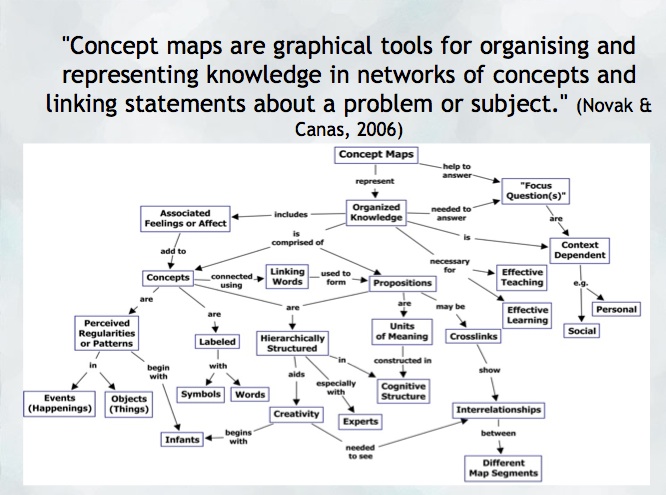
“A concept map is a type of graphic organizer used to represent knowledge of a topic, forge connections between ideas and create visual representations of one’s understandings. Concept maps begin with a main idea (or concept) and then branch out to show how that main idea can be broken down into specific topics” (Novak & Canas, 2006).  Visit the Concept Mapping resource post on this blog for a brief overview and links to resources.

Features of concept maps

There are four essential features represented differently in a concept map:

  1. Concepts: are words that try to represent a phenomenon, object, or idea. They may synthesize patterns in events or knowledge produced over time. In concept maps, these are depicted as shapes in the diagram.
  2. Linking words/phrases:  are used to connect two or more concepts and express some kind of relationship between them. They may indicate cause, consequences, conditions. In general, are written using a verb or few words.
  3. Focus concept or question: it is the main goal of a concept map.  It may be a question, an explanation, or a general idea that conducts your thought and organize all ideas around in the concept map. It is highlighted in the concept map, depending on the hierarchy chosen (top, center, etc.).
  4. Hierarchical and structure: it is how you will choose to organize the main concepts and their connections. It can be hierarchical (the main concept in the top), circle (the main concept in the middle), or other shapes appropriated to the idea you want to express.

Read more on  about the ‘concept’ of ‘concept mapping’ in this blog post on the “Inspiration” website and how teachers and their students might use concept maps, mind maps, or outlines to support writing, idea generation, and organization, planning and more. Inspiration is a software commonly found on school district devices.

You can also find a step-by-step construction of a concept map about the solar system in the Lucidchart or in the example below:

When to use concept maps in education?

Concept maps are powerful graphic organizers that can be used in many ways to illustrate and explore connections across ideas. In this sense, concept maps allow students to formulate their understanding in a non-linear way of thinking, showing their process of thinking during understanding a new idea or content.

Teachers can use concept maps to:

  1. Build new knowledge, deepen students’ understanding: designing a concept map provides students and teachers with an opportunity to construct and share their understanding of a topic, theme, concept, area of interest. This Edutopia article provides a good starting point for learning more about the power of concept maps and other strategies to support deeper thinking.
  2. Identify possible misconceptions: during the process of designing a concept map, teachers can understand better the logic used for students to build their knowledge and the origin of misconceptions. Curtis Chandler, a former Kansas teacher of the year shares how concept maps can be used to understand some students’ misconceptions or not use accurate language in a ‘middleweb’ blog post.
  3. Designing lessons: concept maps can even be used by teachers as a format for planning units or lessons of instruction, allowing teachers to visualize the logic used to connect several lessons into a unit plan or make cross-curricular connections.
  4. Assessment: concept maps can help students illustrate the connections between their ideas, concepts, or content in meaningful ways and can be used as formative and summative assessments. The University of Waterloo has some guides about what is important to consider when designing rubrics for assessing concepts maps.
  5. Create study habits: teachers can have students create concept maps summarizing the main ideas of a unit, creating the habit of continuum revision of the knowledge learned.
  6. Encourage collaboration and communication: a mind map might be collaboratively constructed in real time or asynchronously (using appropriate apps) allowing students to negotiate, think critically and communicate their ideas and understandings with others.

How to get started? mindmap

As mentioned, CMaps, concept maps can be analogue or digital. Teachers might consider providing students with a choice in developing their map using high tech or low/no-tech approaches depending on the objectives. If the objective is to widely share the map, then digital may be preferable (of course, students might also take a photo of a map ‘in process’ and one that is ‘completed’ in order to share as part of a portfolio or published work/project).

Some higher-tech options

  • Mindmaps: it is a tool that allows you to create concept maps without the need for an account. It also allows you to save your map in the cloud or download it to your computer.
  • Inspiration or Kidspiration as computer based or iPad apps Highly visual concept mapping software that allows the user to easily insert images from a large media folder. School districts commonly license these applications for use on their devices.
  • Bubbl.us is an online collaborative concept mapping software – each individual with an account can be invited to contribute to a given map being created in the cloud. With a paid educator account, a teacher can invite students using a link to either view or collaborate (students do not need to provide their information or sign up for an account). Paid app with Free trial options for Educator accounts.
  • For schools using ‘Google Classroom’   MindMup or Miro offer collaborative mindmapping (login required)
    • Teachers should always be aware of appropriate permissions in their context/school districts. These might include parental consent, student informed consent or it may not be permitted to have students sign up using gmail or other account information.

No/Low Tech Options

Collaborative or Individual drawing on chart paper or using sticky notes on a whiteboard or a table with a group of students are great options for kinesthetic or non-digital mind mapping. A primary teacher might even have students use kinesthetic, solid objects to create their mind map. Teachers might begin helping students develop their ability to connect ideas by providing a skeleton. This will help scaffold learning and introduce students to different ways to connect ideas.

Freeform Concept maps can be drawn by hand or using some of the available draw applications made for smartphones and tablets!


References:

Novak, J. and Cañas, A (2006): The Theory Underlying Concept Maps and How to Construct Them (Technical Report IHMC CMap Tools 2006-11). Florida Institute for Human and Machine Cognition.


Original post YD 2017 adapted by Peer Tutor Ariane Faria dos Santos (Ph.D. EDCP), Feb. 2022.

Leave a Comment

Filed under Active Learning, Assessment, Blog Posts, Curriculum, Digital Tools and Apps, Inclusive Practices, Inquiry, Not Subject Specific, Planning, Remote teaching & learning, Resources, STEAM

FNESC

Here is a picture of a document on the FNESC website about different literature that you can use to incorporate Indigenous perspectives into the classroom.

The First Nations Education Steering Committee, or FNESC, is an organization that promotes the incorporation of Indigenous voices into the education system. They also advocates for the well-being of Indigenous students in British Columbia. FNESC offers a variety of Indigenous education resources, including:

  • Resources for English First Peoples Courses
  • Resources for promoting Indigenous languages and cultures
  • STEM resources
  • Resources for post-secondary students and faculty
  • Lesson planning resources for teachers

In finding ways to incorporate authentic Indigenous perspectives and ways of knowing in the classroom, it is important to make sure that voices from Indigenous communities are included. For decades, FNESC has been at the forefront of promoting Indigenous education in British Columbia. The resources that they provide on their website can be valuable additions to classrooms throughout the province.

Getting started on the FNESC website is simple and there are only two major steps!:

  1. Go onto http://www.fnesc.ca/
  2. Explore the resources that FNESC offers under their menu, including resources under “Learning First Peoples” and “Post-Secondary”


Leave a Comment

Filed under Not Subject Specific, Open Educational Resources, Resources

Voices into Action

Voices into Action is a human rights, anti-racist and anti discriminatory lesson planning resource created by the human rights advocacy group Fighting Against Antisemitism Together (FAST). It is divided into six categories: Human Rights, Genocide, Understanding Prejudice and Discrimination, Immigration, Personal Action and Living Together in Today’s World. Each category is further divided into one overview and two to six chapters covering a wide array of topics, including Islamophobia, the Holocaust, Indigenous issues, Black Canadian issues and much more. The content provided by the website is compatible with Language Arts and Social Studies Curriculums across Canada and is geared towards students between Grades 9 and 12, inclusive (although it can be tailored for Grade 8 students as well). This program is intended for students from Grades 9 to 12, however, FAST also offers a similar program for late elementary/middle school students called Choose Your Voice.


Throughout the latter half of 2020, many of us have had to take a look at our society’s  relationships with marginalized communities. While, for many, the goal is for people of all races, ethnicities, sexual and gender identities and so forth to have a place at the table, this has historically not been the case and systemic discrimination against marginalized communities continue to this day. It is important that we equip the next generations with the necessary knowledge to end this vicious cycle and create a more accepting and inclusive society.

This program can be used in a variety of subjects, especially in Language Arts and Social Studies. It can also be adapted for various art courses. Each lesson has a list of courses for which it can be adapted, however in order to access this information, the teacher needs to sign up for a free account.

  1. Sign up for a free account on www.voicesintoaction.ca
  2. Fill in the required information
  3. Find the chapters under “Lessons”
  4. Click on the desired chapter and begin exploring!


Leave a Comment

Filed under Culturally Responsive Teaching, Digital Tools and Apps, Not Subject Specific, Resources