Tag Archives: active learning

Performance Assessment: connecting teaching, learning, and assessment to support student

Performance Assessment is a way to integrate not only students’ knowledge and competencies but also the teaching and assessment process. By engaging in a more ‘real-world’ and authentic approach, students will learn in a more contextualized and deep way!

What is a performance assessment?

This type of assessment evaluates students’ knowledge in a more complex way because students need to show what they know and are able to do through a practical and contextualized activity (Darling-Hammond & Adamson, 2010). In this sense, students produce something, such as an experiment, a performance, a report, research, etc that materialize what they have learned.

Moreover, performance assessment gives teachers the space to think about assessment beyond a way of measuring student learning. This type of assessment is also an opportunity for student learning since they may understand better a concept or develop a new skill during a performance assessment (Darling-Hammond & Adamson, 2014).

Differences between performance task and performance assessment

The biggest difference between performance tasks and performance assessments is that the latter is designed for students to demonstrate a group of skills and knowledge acquired during a couple of performance tasks.

Teachers might design a series of three or four performance tasks (for example, one for each week of class). Each one of these performance tasks has the purpose of developing different skills and knowledge. Consequently, the final performance assessment of this course should give the opportunity to students to demonstrate all skills and knowledge developed during the four performance tasks.

One common way in which performance tasks  might be designed is through project-based learning where students are invited to develop a topic connecting classroom knowledge with some real world, community or contemporary topic (Lenz, Wells & Kingston, 2015).

Performance assessment has the purpose of helping teachers (and students) understand what students have (or have not) learned over a period by getting them to apply and practice in a contextualized situations.

How to design a performance assessment?

The National Science Teacher Association (NSTA) has an interesting article with steps to help you design a performance assessment. Below, we summarize these five steps:

Step 1: Unpack the performance expectation: Teachers should understand their expectations or in other words what they expect students to achieve at the end of the lesson/ classroom. Thus, teachers need to evaluate if the performance assessment is really accessing what they want. In this step, teachers can use curriculum standards to better align their expectations with the performance assessment.

Step 2: Identify a rich and authentic phenomenon: the richness of performance assessment is exactly its characteristic of being contextualized. Therefore, teachers should pay attention to choosing a phenomenon that allows students to apply their knowledge and skills in an authentic way.

Step 3: Develop prompts: teachers should develop prompts and questions that guide students throughout the process without taking them the opportunity to discover and test their hypotheses and assumption because these experiences are essential to produce deep learning.

Step 4: Create scoring guides: teachers should create rubrics or order types of scoring guides for students during the process. These guides help students to understand the different kinds of activities and levels of expectations teachers expect them to complete.

Step 5: Pilot, score, and revise: before putting performance assessments in practice, it would be important to test them to analyze if they attend what you want and identify possible problems.

Performance Assessment Tools and Resources

The Performance Assessment Bank, an open educational repository, includes resources for interdisciplinary studies and in several discrete subject areas including history/social studies, english language arts, science and math. In BC, a set of performance standards was developed to support teachers in designing assessments. Below are some additional resources:

References

Darling-Hammond, L., & Adamson, F. (2014). Beyond the bubble test: How performance assessments support 21st-century learning. John Wiley & Sons.

Darling-Hammond, L. & Adamson, F. (2010). Beyond basic skills: The role of performance assessment in achieving
21st century standards of learning. Stanford, CA: Stanford University.

Lenz, B., Wells, J., & Kingston, S. (2015). Transforming schools using project-based learning, performance assessment, and common core standards. John Wiley & Sons.


Guest post by Peer Tutor Ariane Faria dos Santos (Ph.D. EDCP), Dec. 2021

Leave a Comment

Filed under Active Learning, Assessment, Blog Posts, Curriculum, Language & Lit Learning, Lesson & Unit Planning, Math, Open Educational Resources, Planning, Resources, Science, Social Studies, STEAM

Games for Language Learning

In a language learning classroom, a game “could be any activity that formalizes a technique into units that can be scored in some way” (Brown, 2001, p. 183). Additionally, a language learning game is an activity “which is entertaining and engaging”, which should be challenging in some way, and which often includes interaction and collaboration (Wright et al., 2006, p. 1). Games may or may not include competition – some students are motivated by competition and others are not. Overall, games should inspire students to participate, try their best, and practice the target language.

For more information about group work in general, visit this blog post!

Why incorporate Games?

Games can be a great way to get students communicating and increase engagement! Providing a variety of activities can help to engage diverse students (different learners enjoy different activities and learning styles). Furthermore, repetition is a key element of language learning and games can provide opportunities for repetition while keeping the material fresh. Wright et al. (2006, p.2) describe a few of the benefits of including games in language learning:

  • Games help and encourage many learners to sustain their interest and work
  • Games provide one way of helping the learners to experience language rather than merely study it
  • Many games… provide repeated occurrence and use of a particular language form
  • Games involve the emotions, and the meaning of language is thus more vividly experienced
  • Games provide the key features of a ‘drill’ with the added opportunity to sense the working of language as living communication

The Teacher’s Role

Games require that teachers become facilitators (or sometimes participants). Try not to correct grammar or mistakes unless it’s absolutely necessary – games can encourage participation and we want to make that participation positive and rewarding. Don’t forget, “errors are a ‘necessary’ manifestation of interlanguage development, and we do well not to become obsessed with their constant correction” (Brown, 2001, p. 181). Teachers can be engaged in formative assessment during games and note what may need to be reviewed or targeted later with students.

Wright et al. (2006, p. 4) suggest the following steps to introduce a new game:

  1. Explanation by the teacher to the class
  2. Demonstration of parts of the game by the teacher and one or two learners
  3. Trial by a group in front of the class
  4. Any key language and/or instructions written upon the board
  5. First ‘try out’ of the game, by groups
  6. Key language, etc., removed from the board
  7. The game continues

Icebreakers

Learning a new language can be intimidating for many students: it requires that they are open to communicate with others and take risks. Developing a sense of classroom community and shared experience can help to make students feel more comfortable and willing participate despite the potential mistakes, which could result in feelings of embarrassment and vulnerability. Teachers need to consider how they are building and developing relationships in the classroom and can check in with students by taking a class temperature.

Icebreaker games are a great way to get students “to feel comfortable with each other, confident in themselves and focused on the language lesson” (Wright et al., 2006, p. 11). Games can also help students get warmed up and ready to learn by activating prior knowledge (an activating strategy).

Here are some examples of Icebreaker games:

  • People Bingo – the teacher makes a bingo grid with questions to help students get to know each other. Students circulate asking questions to their classmates, trying to fill in their bingo cards.
  • What Makes You Unique – each student’s uniqueness benefits the class. Students (and the teacher) all come up with something they think makes them unique. As each person says their point, anyone who can say ‘me too’ raises their hand and says it. Then that person needs to think of a new unique point until every person has been able to share something where no one else can say ‘me too’ (if a student is struggling to think of something, you can return to them at the end to give them more time – I like to use a class list or seating plan and check off names as I go).
  • Two Truths & A Lie – each person secretly writes two truths about themselves and makes up one lie. Students need to circulate and see if they can guess the lie (this can be done as a class too). Note that some guidelines and trust may be needed for this game so that the truths and lies are school-appropriate.
  • Would You Rather? – teacher says or shows an image of two things and asks students which they would rather (ie. Would you rather ketchup or mustard?). Students can move to one side of the class or the other to show their picks or raise their hands. You can extend this activity be asking a few students ‘why?’ each round.
  • Temperature line or Four Corners – Similar to would you rather, the teacher (or a designated student) can pose a question and students respond by moving to one of four corners or by organizing themselves along a line based on the ‘degree’ of their response)

Examples of Games

Here are a few game ideas to get you started. Check out Wright et al.’s (2006) book, Games for Language Learning, for many more examples and suggestions.

Board Games Adapted for the Classroom

  • Scattegories – Divide the class into teams. The teacher prepares a list of 8-10 topics (ex. a verb, an animal, a food, a colour, a movie character, etc.), then randomly picks a letter of the alphabet. The teacher will set a timer and each group will work on generating word for each topic that starts with the selected letter. When the timer goes off, one at a time, groups will share what they wrote for each topic – they get a point if they wrote a word, starting with the correct letter, that no other group wrote (if another group wrote the same word, neither team gets the point). Subsequent rounds can be played with a new random letter.
  • Pictionary – In groups of four (two against two), students can use a vocabulary list and take turns selecting and drawing a word for their partner to guess. This can also be fun as a whole class game (with two teams), having students draw on a white board, projector, or document camera.
  • Concentration – teachers or students can build this game. Teachers should create a grid (so that all pieces are equal size and shape). Teachers or students create matching pieces (one piece with a word in the target language and one image/drawing). When all the pieces are complete, students flip over the pieces and mix them up. Then, students take turns selecting two pieces to turn over, if they have a match, they get to keep those two pieces. The students with the most pairs at the end wins. Card Sorts can be done digitally as well. See the ‘Whose Names are These’ blog post in the Scarfe Sandbox for an example.
  • Headbands – this game has students asking questions to guess which object or character they’ve been given. The teacher writes names or objects on small pieces of paper and while students are working at their desks on another task, the teacher can circulate and tape the papers to the backs of their students (make sure to tell students not to discuss them!) – in the boardgame version, players wear headbands for display. Students will stand up and circulate to ask yes/no questions to their classmates in order to guess who they are. For an added level of complexity, the people/objects can be designed as pairs that students then need to figure out and stand beside before the game is complete.
  • Bingo – teachers can create a blank bingo sheet (5×5 grid). Students can write or draw vocabulary words (creating the bingo sheet themselves also serves as a form of review!). The teacher calls out the words in the target language and students can use small pieces of paper as markers until a student gets 5 in a row (vertically, horizontally, or diagonally) and calls out “Bingo!”. I like to continue for a few rounds allowing more people to get a bingo before starting again. Students can easily keep these bingo sheets as a quick review later before a test or anytime throughout the year.
  • Jenga Builder – students create a design without showing their partner using Lego or coloured pieces of paper in different shapes/sizes (students should have two matching sets of whatever material they are using). Students will hide their design and verbally communicate to their partner(s) how to build the same design. This is an example of an unplugged coding activity where students practice procedural and directional language to develop their computational thinking skills (an important aspect of the Applied Design Skills and Technologies BC ADST Curriculum). Visit the Unplugged Coding blog post in the Scarfe Sandbox for more examples and resources.
  • Battleship – give students a simple grid and have them prop a binder between them so they can’t see each other’s sheets. Students hide their ships by colouring in boxes on the grid. Students communicate how they will identify the rows and columns on the gride and then take turns guessing boxes until all ships have been discovered. (This is another unplugged coding example)

Movement Games

  • Statues – one student is asked to leave the room. The students who remain in the room are all given a verb to act out (silently). The teacher yells ‘Freeze’ and the students all stop mid-motion as statues. The teacher calls back the student from the hall to guess what action the statues are frozen in.
  • Charades – students are given a prompt and must act (silently) while their teammates guess.
  • Simon Says – one person takes on the role of ‘Simon’ (or they can use their own name!). Anytime the leaders say, ‘Simon says…’ and then an action, all the students must do the action. If students do the incorrect action they sit down. If the leader doesn’t say, ‘Simon says…” before the action and students act, they sit down. Continue until you have one or two winners left standing.

Whole-Class Cooperative Games

  • Go, Go, Stop – Index cards work well for this activity. The teacher will create a set of cards (make sure that you have en

    Go Go Stop cards

    ough cards for all the students, if you have extras, some students can take two). Each card will contain an answer (to a question on another card) and a question (whose answer is on another card). The first card will have START at the top and the first question at the bottom, and the last card will have the last answer at the top and STOP at the bottom. Shuffle the deck and hand them all out randomly to students. Creating a master list for the teacher to use will make this game much easier to facilitate! The teacher starts the timer when the student with the start card begins and the goal is to get all the students to read their cards in the correct order (this requires that students listen carefully and consider what they should be listening for). The teacher stops the timer when the last student says stop. I like to discuss with the group how to improve, then reshuffle the deck, hand them all out again and try to get students to beat their time (for secondary teachers with more than one class, they can have classes compete against each other for best time). 

  • Teacher Vs. Student – you’ll need a projector or document camera for this activity. The teacher displays some images on the screen (10-12 works well), then points at an image and says the word in the target language. If the image matches the word, then the whole class must repeat the word after them. If the teacher points at an image and says the wrong word, everyone in the class must stay silent – if they do stay silent, the class gets a point, and if anyone makes a sound, the teacher gets a point. The teacher can go faster or slower depending on the level of the class. First to 10 points wins!

Competitive Games

  • Flyswatter – the class is divided into two teams. The teacher displays a screen of words and/or images (the teacher could also write words on a white board). Two students come to the front (one from each team) and using fly swatters (or yard sticks) point to the image/translated word after the teacher says a word in the target language. The first student to point at the image/word gets a point for their team.
  • The Amazing Race – the teacher divides the class in teams of 4-5 and creates a list of tasks (translating, conjugating, and drawing work well). Teams send up a representative from each team to get the first task (depending on the difficulty of the task, these could be shown to students or given as a slip of paper – make sure they can’t see the following tasks!), then take it back to their team to complete. Teams show the teacher their completed (and correct) task before getting the next task – this continues for the rest of the game. The first team through the entire list wins.
  • Design Challenges These can be a great way to promote collaboration and communication (in the target language!).

Digital Games

  • Boukili (French) is a free website offering French books to read for a variety of reading levels. As students read, they unlock levels to travel virtually to new countries where they can change the avatar’s outfits and play games.
  • Jeopardy – Factile allows users to create a digital jeopardy game which can be projected onto a screen. One of the highlights is that the program keeps track of scores!
  • Blooket – This program allows teachers to create review games for students in a variety of game formats.
  • Word Games, like Boggle, Wordle, word searches and more, can be played online.

Board Game Ideas

If your school or department is looking to spend some money on board games for language learning, here are a few that would make excellent classroom resources:

  • Spot it – learn the vocabulary and race to spot matching pairs of images
  • Lion In My Way (AKA Obstacles) – creative problem solving and story-telling game using images
  • Dix It  – players use their imaginations to interpret images
  • Taboo – players try to communicate a word to their team without using any of the listed ‘taboo’ words
  • Scrabble – the classic word game can easily be used in classrooms
  • Bananagrams – similar to scrabble, but without the board
  • Guess Who – players take turns asking questions to try to figure out their partner’s mystery person

References

Brown, H. D. (2001). Teaching by principles: An interactive approach to language pedagogy (2nd Ed.). Addison Wesley Longman.

Wright, A., Betteridge, D., & Buckby, M. (2006). Games for language learning (3rd Ed.). Cambridge University Press.


Guest post by Peer Mentor Lindsay Cunningham (Ph.D. student, EDCP), July 2024.

Leave a Comment

Filed under Activating Strategies, Active Learning, Blog Posts, Curriculum, Digital Tools and Apps, Inclusive Practices, Language & Lit Learning, Not Subject Specific, Planning, Resources

Embodied Learning: physical engagement and digital tech integration

“Movement, or physical activity, is thus an essential factor in intellectual growth, which depends upon the impressions received from outside. Through movement we come in contact with external reality, and it is through these contacts that we eventually acquire even abstract ideas.”

(Montessori, )

Physical movement in learning has been widely researched and written about. In the early 1930’s, Dr. Montessori understood that learning relied on how our physical bodies interacted with the environment. For her, the environment was physical. Today, we are able to consider the role of digital technologies, spaces, objects and experiences in the context of embodied learning.

Embodied, for our purposes, means that the learner has initiated a physical gesture or movement that is well-mapped or linked to the content to be learned. This might include place-based learning experiences, in-class hands-on engagement, learning labs, games and also includes the possibilities afforded through immersive technologies.

Immersive technologies, including Virtual Reality (VR) and Augmented Reality (AR), have the potential to enhance or even redefine learning (Puentedura, 2013). VR offers potentially emotionally charged, immersive experiences, where the user is ‘within’ the virtual environment, while AR overlays digital content on the real world. Research by Johnson-Glenberg MC (2018) emphasizes the levels of embodiment in education—ranging from basic gestures to full-body movement—to deepen learning experiences.

This emotional engagement, can lead to increased behavioural and, ultimately, cognitive engagement (Dubovi & Tabak, 2021). As teachers, integrating embodied learning means actively engaging students physically in the learning process. Digital and other technologies offer a spectrum of physical engagement levels for a more immersive and effective approach to teaching science. We can move from simple gesture to full body movement.

At the lower end of the embodiment spectrum would be the use of 360 video or other gesture based media (such as the Shakespeare folio we explored in our visit to UBC’s Emerging Media Lab – links to external UBC site). 360 video would be another good example. With equipment becoming less expensive and more accessible, you might try shooting your own video (or take still images using Google Streetview).

The following is an example 360 video a friend and I shot in Pacific Spirit Park. It shows my mentor, Lynn Pollard, a long-time Surrey teacher, environmental activities and naturalist educator. (Special thanks to Sharon Hu)

Now imagine the potential engagement and immersion if we could also smell the forest while learning about the carbon cycle! I actually tried this out using simple ‘scent boxes’ that students held while interacting with the video (one with moss, others with cedar, fir, leaves). While this video doesn’t allow for ‘smellivision’, it does allow a greater level of immersion than a static image or standard video. I have used this as ‘prep’ for heading outdoors with students and as a ‘replay’ to re-immerse ourselves upon return and before we do some art or writing activities related to our field experience. It could also be used as a replacement to an outdoor experience (depending on context, objectives).

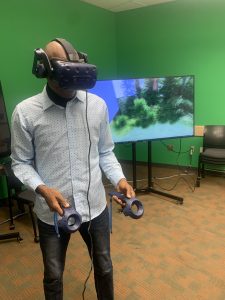
student wearing VR goggles and holding controllers in front of screen showing stanley park immersive experience

Student ‘immersed’ in VR

Levelling up a bit on the embodiment spectrum would be opportunities that allow for full body movement and gesture. This might include fully immersive VR of the kind explored on a recent visit to UBC’s Emerging Media Lab (EML).(links to external/UBC based site) Of course, while some schools have invested in this digital tech, access may not be possible in the average k12 school today. We were fortunate in our visit to the EML to try out a few different options (see table below for resource links).

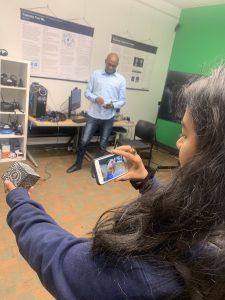
Using the rather ubiquitous smartphone, we can view a variety of 3D images using a google search and engage with them as AR images in the environment.

Person gesturing towards a virtual AR image of a tiger in the classroom

Dr. Khan virtually pats a tiger!

Imagine our surprise when a tiger joined the class (or when the full circulatory system model wandered by!). In order to view these 3D images, we need to move around them physically and gesture to adjust size; allowing a somewhat ’embodied’ experience.

student holds merge smart phone in front of a merge cube AR block. Phone shows an AR beating heart.

Holding a beating heart in her hand!

We might also use a Merge Cube to view AR models. Again, not super high tech, but thought provoking when we think about the difference between a static model of the heart and a larger than life sized beating organ suspended in the room in front of us!


Embracing embodied learning empowers students to not just learn about science or the world around them, but to tangibly experience and internalize it. It’s about creating educational experiences that transcend the traditional confines of a classroom, fostering a deeper and, hopefully, more lasting connection between physical engagement and knowledge acquisition.

References:

Dubovi I, Tabak I. Interactions between emotional and cognitive engagement with science on YouTube. Public Underst Sci. 2021 Aug;30(6):759-776. doi: 10.1177/0963662521990848. Epub 2021 Feb 5. PMID: 33546572; PMCID: PMC8314998.

Johnson-Glenberg MC. Immersive VR and Education: Embodied Design Principles That Include Gesture and Hand Controls. Front Robot AI. 2018 Jul 24;5:81. doi: 10.3389/frobt.2018.00081. PMID: 33500960; PMCID: PMC7805662. Retrieved from https://www.ncbi.nlm.nih.gov/pmc/articles/PMC7805662/

Montessori, Maria. The Secret of Childhood. Orient Longman, 1966.

Puentedura, R. R. (2013, May 29). SAMR: Moving from enhancement to transformation [Web log post]. Retrieved from http://www.hippasus.com/rrpweblog/archives/000095.html


Resources from our Session (Oct 2023)

I recently had the opportunity to work with UBC Faculty, grad students and members of the team at the Emerging Media Lab on the Vancouver Campus on some interactive and ’embodied’ stations to allow students to experiment and consider the levels of embodiment afforded with Augmented and Virtual Reality tools. Below are some resources from our session. It is important to note that we did not offer these AR and VR options as alternatives to ‘real world embodied learning’ but as enhancements to the learning environment.

EML offers weekly drop-ins and opportunities to collaborate on projects, co-plan and co-teach! https://eml.ubc.ca/

Station/Activity Level of Embodiment  Resource notes/Links
VR immersive exploration (Stanley Park Simulation EML Project) immersive VR, interactive controllers, gesture, movement, sound https://eml.ubc.ca/projects/geography-vr/
Holo brain (using Hololens) gesture-based augmented reality https://eml.ubc.ca/projects/holobrain/
Smartphone Google Search AR gesture-based AR with some body movement Link to ios/android instructions and full list of available 3D images – Google link.
Star Walk AR gesture-based AR with some large body movement Requires smartphone, ipad, tablet. Star viewing apps allow you to view celestial objects/night sky in real time and across space and time. Link to Star Viewing Apps SS Blog post.
Merge Cube AR gesture-based AR Requires handheld/smart phone or ipad. Link to Merge Cube blog post in Scarfe Sandbox. 
Shakespeare XR Interactive gesture-based AR A table top virtual Shakespeare text, turn the pages with gesture. https://eml.ubc.ca/projects/shakespeare-xr/


Planning for ‘Tech-enhanced Embodied Learning’

I created the following ‘solution tree’ of considerations when electing to incorporate these tools (note this tree is a first draft… I’m hoping to make a more effective diagram for a future edit of this post – please comment on this post if you have feedback)

  • Is the experience you wish to offer POSSIBLE in the real world? Can you/your students visit the place or hold the object
  • if yes, then…
    • Consider incorporating the digitally enabled tools as supplement or enhancement to real world experiences and labs. For example, pre- or post- labs; allowing students to pre-play and re-play content or experiences using digital tools including 360 media can enhance their reflections on the experience, can supplement and even deepen connections to learning.
    • if yes, then:
      • Think about: your learning objectives and the ‘level of embodiment’ you’d like to offer your students as you choose the tools.
      • Ask:
        • are any students going to be excluded (due to health and safety or access issues?
        • if no, then… 
          • GO! Try to make it happen. Advocate for it!
        • if yes, then…
          • plan or consider alternative experiences. For example: if a student has vestibular or other health or safety concerns and may not be able to use a VR headset, is there an AR experience you can offer that is more comfortable for that student (Consider Universal Design for Learning (UDL) principles in your planning and you’ll see that having an alternative will likely be necessary for some and of benefit to many!)
  • Is the experience you wish to offer IMPOSSIBLE in the real world (perhaps unsafe or inaccessible to some/all of your students)
  • if yes, then…
    • consider incorporating the digitally enabled tools as the main/central experience in the lesson or unit or lab.
    • if yes, then:
      • Think about:
        • your learning objectives and the ‘level of embodiment’ you’d like to offer your students as you choose the tools.
        • how you will ensure access and engagement (if you have access to only one device, what will students do when it is not their ‘turn’? are there stations you can set up for students for more active engagement and to lessen ‘wait time’; what role do students have who are not ‘immersed’ in the activity?
        • how will students reflect upon their experience?
      • Ask: Are any of my students going to be left out of this experience?
      • if no, then… 
        • GO! Try to make it happen. Advocate for it!
      • if yes, then…
        • plan or consider alternative experiences. For example: if a student has vestibular or other health or safety concerns and may not be able to use a VR headset, is there an AR experience you can offer that is more comfortable for that student (Consider Universal Design for Learning (UDL) principles in your planning and you’ll see that having an alternative will likely be necessary for some and of benefit to many!)


Blog post by Yvonne Dawydiak, Learning Design Manager, Teacher Education Oct 2023

1 Comment

Filed under Activating Strategies, Active Learning, AR & VR, Assistive Technology, Blog Posts, Curriculum, Interactivity, Not Subject Specific, Planning, Resources

Classroom Discussions

What are classroom discussions?

group of multi-ethnic students engaging in a discussion outdoors at school.

Remember: Discussions can occur outdoors!

Classroom discussion can be defined as an oral activity where teachers and students develop together a specific curriculum content or competency through each other ideas. “The purposes of a discussion are to build collective knowledge and capability in relation to specific instructional goals and to allow students to practice listening, speaking, and interpreting, agreeing and disagreeing” (Teaching Works, 2022, May 2). In this sense, students use the ideas, words, explanations, and interaction with their teacher and peers as a resource for their own learning.

Classroom discussions are not merely to help students answer a question but to establish a conversation. This conversation may begin with a provocation, have a beginning, a sequence of processes, and an end or closure. What happens during the process is essential to developing the content and competencies of the curriculum and achieving teaching goals. Differing opinions, moderating interaction, taking turns, etc, are essential to developing student competencies and helping students to deeply explore content. Therefore, classroom discussions are a teaching and learning process that believes that students will accomplish curriculum goals together, through the process of sharing ideas (Teaching Works, 2022, May 2). Well-designed and orchestrated class discussions can help build classroom community.classroom community (links to post in this blog).

Classroom discussions can occur in both synchronous and asynchronous contexts. When planning an asynchronous discussion, teachers should consider the ability of students to self-regulate and manage the discussion. When discussing critical issues, the teacher may need to monitor and help guide the discussion. The Bell Foundation provides some suggestions for how to improve classroom talk that can improve students’ ability to participate in synch and asynch discussions.

Why are classroom discussions important?

Classroom discussions are important because they develop both academic and non-academic skills in students. Communicating is essential to living in the current society and developing a healthy democracy. Being able to share, justify, defend, listen, and understand diverse perspectives and ideas is one of the most important competencies that human beings use in our current world. Hence, students need to learn these skills to be successful in their adult life.

Moreover, classroom discussions support student development during their school years. Through classroom discussions, students can learn to make sense of complex ideas and organize their thoughts. Students can also develop the confidence to present their views and use evidence to justify them. Finally, classroom discussions can support teachers to reveal students’ conceptions and misunderstandings about a topic, helping them to identify contents and concepts that need to be better explained in a lesson.

However, developing rich classroom discussions is a complex task that may generate several problems if teachers do not conduct the process well. Teachers should know how to value different views and pay attention to each child’s needs. Therefore, the challenge (and secret) is to be conscious of all micro details involved in classroom discussions, as we will show next.

What are elements of a rich classroom discussion?

The Teaching Works Team (2022, May 2) from the teacher education program of the University of Michigan defends that teaching practices should be unpacked in chunks or elements to support novice teachers to develop these skills. In this sense, they divide the task of developing classroom discussion into several parts and elements, detailing what teachers should pay attention to in each part. In the next sections, we will details these steps and elements as well as complement them with additional resources and orientations.

Source: (Teaching Works Team, 2022, May 2)

Preparing for a discussion

1. Selecting a task:

Teachers should choose tasks, texts, and materials that allow multiple views, discussions, and solutions for a topic/question, encouraging students to explore different possibilities and arguments. Teachers may need to adapt a task to support multiple views and disrupt inequalities.

2. Anticipating student thinking:

Teachers should think about possible questions, mistakes, or understanding that students may have about the topic. This means both activating previous knowledge but also anticipating problems that may deviate students’ attention from the curriculum goals in that classroom discussion.

3. Setting up the task:

Teachers should select the purpose of the activity and prepare the orientations to support students’ work. In this sense, teachers also should plan the moments for students to work independently, in small groups, or with the whole class as well as the resources needed to develop the discussion.

Conducting the Discussion in class

1. Launching the discussion:

2. Orchestrating the discussion:

Teachers should pay attention to a couple of elements and tasks that will create thinking routines to explore and deepen their understanding of a topic. The following elements may happen in a different order but, according to Harvard’s Project Zero, they should be part of any Thinking Routine (links to Harvard’s Project Zero) chosen by teachers:

    • Eliciting the discussion: teachers should state the multiple ideas that their students are bringing, helping them to see several points and arguments during the discussion.
    • Orienting students’ attention: teachers should ask to students pay attention to specific ideas and contributions of their peers, encouraging them to learn with each other.
    • Encouraging student participation: teachers should encourage all students to expose their ideas and control who ideas have been highlighted or ignored. It helps that classroom discussion not only become richer since diverse ideas will be developed but also supports decreasing inequity among students.
    • Probing new questions: teachers should put new questions that support students to explore and deepen the topic, move to the next learning step process, or summarize what they have discussed.
    • Making contributions: teachers should make contributions or introduce ideas/ concepts that were not brought by students but are essential to achieve the purposes of the discussion. If possible, teachers should connect these new ideas/concepts with what has already been discussed validating students’ contributions and establishing connections with previous knowledge.

3. Concluding the class discussion:

    • Supporting summary: teachers should support students to summarize and remember what has been discussed, helping to establish the most relevant points worked during the class and issues that they will develop in the next classes.
    • Acknowledge student contribution: teachers should highlight, with examples, how students’ ideas were essential to developing both content and competencies during the class.

4. Evaluating (after the discussion)

The final step is to reflect on what has happened in the classroom discussion to evaluate what works (or not) and how to improve future discussions.

Elements to consider as you plan, conduct and reflect

1. Maintaining a focus on the instructional objectives: teachers should always direct each student’s intervention to build some knowledge or example that will help to achieve content and competencies goals.

2. Monitoring students’ work: teachers should pay attention to what students are discussing in their groups and which ideas/ people are been highlighted. In this sense, teachers will be able to use students’ work to develop the content and prevent inequalities or bias in the discussion.

3. Seeing and disrupting patterns that reproduce inequalities: teachers should make interventions to stop patterns that may generate inequalities. These interventions do not need to be explicit. For example, teachers can use the work of a student who may not always be recognized as one of the more advanced or capable students in the class to exemplify a topic, helping to improve student status among his/her peers.

4. Recording the representation of content: teachers might record (on the board to the whole class or just to themself) what students are saying during the whole process because it can support the teaching and learning process. Students might also take notes as the discussion ensues. The notes can be used for formative assessment to help teachers understand students’ struggles and misconceptions, or to help with review to demonstrate student thinking or rationality and understanding of an issue. Teachers might find strategies to make student learning visible (Project Zero). Recording could take the form of a digital whiteboard (link to post in this blog) for all to see or for future reference, sorting & classifying ideas, etc.

Strategies to increase classroom engagement

There are many ways to design and lead a discussion to support more active classroom engagement. Teachers should also consider context including the age, background, needs and preferences of their students.

  • In her blog, teacher Jennifer Gonzales also provides some suggestions. You might also listen to the Cult of Pedagogy #28 Class Discussion Strategies podcast (see embed below).
  • Liberating Structures provides a menu of varied activities for discussion and group work.
  • Harvard’s Project Zero offers Thinking Routines that teachers can implement across grade levels and across the curriculum.
  • The Teaching Works Team from UMichigan, offers an open library of Curriculum Resources that include strategies to support teaching in specific aspects of the curriculum and for more interdisciplinary approaches.
  • The Bell Foundation is a charity that seeks to . The Bell Foundation website contains frameworks for discussion including video demonstrations and lesson plans for structures including ‘Information Gap’ activities such as JigSaws.

How might challenging or high-stakes topics be addressed?

Classroom discussions about challenging or complex topics need extra teachers’ attention because unexpected reactions may appear and some rules should be established to guarantee respect. The University of Michigan has prepared a specific orientation on how to conduct classroom discussions about challenging or high-stakes topics (UMich). Moreover, Edutopia discusses how classroom norms can support teachers during challenging discussions.

What can classroom discussions look like in each content area?

Teaching Works Team (2022, May 2) from the teacher education program of the University of Michigan has many specific tips and classroom resources for different subjects:

Additional Resources:


The courses below bring many classroom videos as examples of how to conduct good classroom discussions. They break down real situations and show how teachers dealt with these, conducting rich classroom discussions:

University of Pennsylvania (Coursera):

University of Michigan:

References:

Project Zero (2022, April 30). Project Zero’s Thinking Routine Toolbox. Harvard Graduation School of Education. http://www.pz.harvard.edu/

Liberating Structures (2022, April 30). Liberating Structures Menu. https://www.liberatingstructures.com/ls-menu/

Rochester Community Schools (2022, April 30). Think from the middle. Discourses Strategies. http://www.rcsthinkfromthemiddle.com/discourse-strategies.html 

Teaching Works (2022, May 2). High-Leverage Practices. Teaching Works. https://www.teachingworks.org/work-of-teaching/high-leverage-practices.


Guest post by Peer Tutor Ariane Faria dos Santos (Ph.D. EDCP), May. 2022; edited Y.Dawydiak April 2024

Leave a Comment

Filed under Active Learning, Blog Posts, Curriculum, Inclusive Practices, Not Subject Specific, Open Educational Resources, Planning

Asking questions that promote students’ deep learning

Why does crafting good questions matter?

Creating/designing effective questions for students is one of the most common and powerful pedagogical strategies used by teachers during the process of teaching and learning. Good questions can benefit both teachers and students.

Reinhart (2000) states that questions can…

  • For teachers:
    • support teacher decisions.
    • encourage students’ participation.
    • communicate to students that their thinking is valued.
    • show students initial knowledge.
    • reveal students’ misconceptions.
    • make them learn a new thing about their students.
    • review previous topics.
    • access understanding and curriculum goals.
    • maintain the flow of the learning within the lesson.
    • foster speculation, hypothesis, and idea/opinion forming.
    • create a sense of shared learning and avoid the feel of a ‘lecture’.
    • model higher-order thinking using examples and building on the responses of students.
  • For students:
    • help students articulate their thinking.
    • generate critical thinking and inquiring behaviors.
    • teach students to develop metacognition about a topic.
    • develop students’ ability and repertory to formulate their own questions.
    • improve high-level thinking and deep learning.
    • promote insights and connections between areas.

What makes a question a “good” one?

According to Bloom’s Taxonomy, the process of teaching and learning can develop different levels of thinking in students. In this sense, teachers can incentivize students to use lower or higher cognitive levels of thinking based on the teacher’s pedagogical goals. Therefore, it does not mean that teachers can never use the low levels since a lot of times teachers need to scaffold students’ skills. However, it is essential teachers analyze when, how, and why to use each level.

Source: Vanderbilt University Center for Teaching.

In terms of making questions, while lower levels of questioning access only students’ memory, high-level questions demand that students make connections, bring evidence, and even infer new knowledge.

If you are looking for more examples of questions in different levels or how to use them in your classroom using Bloom’s Taxonomy, there are many resources that you can use:

You can also see in the following video how teacher Melanie Agnew develops higher-level understanding through effective questioning in her High School English classes:

A Sample Guide for planning classroom questioning

Teachers know how many things can happen during a lesson and that is the reason that planning each moment or intervention is essential to promoting students’ engagement and learning. Thinking about the challenges that are to using questions in the classroom, the Center for Innovation in Teaching & Learning of the University of Illinois discusses some steps to successfully make questions in the classroom.

Cotton (1988) also gives some guidelines for classroom questioning:

  • “Incorporate questioning into classroom teaching/learning practices.
  • Ask questions that focus on the salient elements in the lesson; avoid questioning students about extraneous matters.
  • When teaching students factual material, keep up a brisk instructional pace, frequently posing lower cognitive questions.
  • With older and higher ability students, ask questions before (as well as after) material is read and studied.
  • Question younger and lower ability students only after the material have been read and studied.
  • Ask a majority of lower cognitive questions when instructing younger and lower ability students. Structure these questions so that most of them will elicit correct responses.
  • Ask a majority of higher cognitive questions when instructing older and higher ability students.
  • In settings where higher cognitive questions are appropriate, teach students strategies for drawing inferences.
  • Keep wait time to about three seconds when conducting recitations involving a majority of lower cognitive questions.
  • Increase wait time beyond three seconds when asking higher cognitive questions.
  • Be particularly careful to allow generous amounts of wait-time to students perceived as having lower ability.
  • Use redirection and probing as part of classroom questioning and keep these focused on salient elements of students’ responses.
  • Avoid vague or critical responses to student answers during recitations.
  • During recitations, use praise sparingly and make certain it is sincere, credible, and directly connected to the students’ responses” (p.8-9).

What might questioning look like in content areas?

References:

Armstrong, P. (2010). Bloom’s Taxonomy. Vanderbilt University Center for Teaching. Retrieved May 5, 2022, from https://cft.vanderbilt.edu/guides-sub-pages/blooms-taxonomy/.

Cotton, K. (1988). Classroom questioning. School improvement research series5, 1-22.

Reinhart, S. C. (2000). Never say anything a kid can say!. Mathematics teaching in the middle school5(8), 478-483.


Guest post by Peer Tutor Ariane Faria dos Santos (Ph.D. EDCP), May. 2022.

Leave a Comment

Filed under Active Learning, Assessment, Blog Posts, Curriculum, Inclusive Practices, Inquiry, Language & Lit Learning, Math, Planning, Science, Social Studies, STEAM

All Class Response – engage & assess

Educators and researchers have long considered the benefits of students actively engaging in the classroom and how this can lead to gains in student learning. One way to achieve such engagement is by effectively incorporating all-class response or a student response system (SRS) as a part of your classroom assessment (and teaching) approaches.

Be sure to keep in mind that the efficacy of any student response system depends on the quality of the questions and how you use the system. You will learn, as part of your course work, how to develop effective questions (including multiple choice). This work will be helpful in selecting an SRS and constructing a poll or quiz for formative or summative assessment. Using an effective discussion strategy will increase the value of an SRS.

All class response (vs. hands up/volunteers), including the use of a digital student response system (SRS) can lead to greater student engagement.  Martyn’s 2007 article in Educause describes how the efficacy of assessments and increases in student learning are achieved when an SRS is coupled with socio-constructivist methods. The use of these systems along with student discussion, peer teaching and pair share can also lead to greater student satisfaction and engagement. All class response is in keeping with a large body of research supporting more inclusive approaches to assessment (Nagro et al, 2016)

Providing time for your students to share their questions and understandings is key to ensuring that learning is happening in your classroom. All-Class Response is one ‘type’ of strategy that can support engaging more, or hopefully all, learners and inviting (or even requiring) participation. Some of these strategies and tools can even support anonymity which may encourage students who are more reluctant to share orally. In some cases, responses of the group can be projected so that students are able to access the responses of others as they formulate their own thoughts.

All-Class Response and Student Response Systems (SRS)

High Tech

  • Mentimeter – polling software that allows for various types of response and graphical representations (plot graphs, bar graph, word cloud, tiled short answer response)
  • Poll Everywhere – students answer poll questions using browser, mobile app or text response
  • Socrative – create a class account to track responses, students answer using browser or mobile app
  • Answer Garden – instantly generates a word cloud of responses, no account needed
  • Kahoot – gameify learning in your classroom with ‘Kahoots’
  • Flip Gridcreating and sharing videos in a Microsoft learning tools environment (NB: many coast metro school districts use FlipGrid and other MSoft tools because of their Canadian data housing). It can also be used free as a stand alone tool.

Here’s a Student Response System Comparison Chart for an at a glance view of each of the above systems.

Low Tech

    • Plickers – all you need are free printable scan cards, a teacher account and one mobile device to record and track responses.
    • iClickers – a set of iclickers for Mac and PC are available on loan in the UBC Neville Scarfe Education Library.

No Tech – a small selection of strategies

  • Thumbs up, down, sideways
  • Red card/Green card – I had a laminated set so students could flip the cards (cards can mean yes/no, stop/go, or A/B or…?
  • Letter or number cards (each student has a set)
  • Mini Individual White Boards – to record and show responses
  • Sticky Notes – have students share their idea, question, word, wonder and place on the board, around the room, on charts. Sort and classify and organize to work with the ideas.
  • Placemat Activities: Large format paper on a desk (can be separated into grids or more free form depending on your purpose) allows a group of 3 or 4 students to share ideas at the same time. These could also be concept maps/Mind maps for even more critical thinking!
  • Write around the room: students pick a spot on the whiteboard and record responses. This could be combined with a small group discussion and one or two students then go to the board to record… space dependent though I know teachers who also use their windows and put chart paper up…

It is important to note that while these no tech approaches do not provide the anonymity that digital tools can afford, they can provide authentic opportunities for formative assessment and student voice. To leverage the ‘visibility’ of responses, a teacher might have students turn and look at the responses of others, have discussion about varied responses and even change their response.

Content co-creation and brainstorming:

Allow your students to co-create their understandings, share their ideas and questions can lead to deep learning. Here are just a few suggestions:

  • Padlet – this multi-modal response digital wall is great for brainstorming, checks for understanding and formative assessment (and now includes ability to add audio and drawing in addition to text, hyperlinks, video, images)
  • Concept mapping is a powerful tool for illustrating complex links between ideas (be they images or text). Many softwares allow for hyperlinking and embedding images and video. Mindmup is a browser based application that allows co-creation of a concept map across time and space (NB: co-creation seems to now be a paid level of access – I’m trying to find another option… Schools/Districts using Google Classroom will have co-creation access).

Some Considerations when employing Digital Tech:

  • BYOD and Access – bring your own device – Are there policies in place in my jurisdiction, school, district or are there rules in my classroom to consider? What about students who do not have access to a device? When pairing or grouping students and expecting one device in a group, do you know if the student who owns that device is willing to share it OR are there devices in the school you can borrow? What impact does it have on students when they do not have the same access as others?
  • FIPPA – Freedom of Information and Privacy Protection act – Students data should not be shared on non-Canadian housed servers… Am I protecting students data privacy? Do I have necessary permissions or consent? Am I engaging my students in critical digital literacy discussion around privacy & safety in a broader sense? School Districts will have policies in place that meet the informed consent requirements of FIPPA. Be aware of local policies. (See this helpful guide from BCTF to support teachers and parents)

Additional Resources & Strategies:

Chapter 4 of Leahy and Williams’, Embedding Formative Assessment, makes a case for ‘all student response’ and limiting teacher questions to only those that propel learning. This book is a valuable addition to any teacher’s library and clearly links theory with practical strategies and relevant advice. (UBC Library has a copy)

BackChannel Chat:

By allowing students to voice their ideas or ask questions during a lecture or class work period using electronic tools such as those built into most learning management systems and widely available free online, you are providing opportunities for students to ask just-in time questions, share thoughts and connect with one another; potentially increasing student engagement and learning. These potential benefits come with ‘management’ needs and requires the development of a set of expectations in the classroom that student can follow. This can take time, usually involves some trial and error but is a risk that may be worth taking when one considers the increase in student agency that can result from the moderate risk. The notion that engaging the ‘backchannel’ during lectures and classes can add a more active component to what are sometimes more passive forms of teaching is taking hold with the growth in BYOD (bring your own device) in secondary and post-secondary classrooms.

High Tech

  • Mentimeter is one ‘tool’ example. Many other SRS’s can be used in the same way.
  • Teams and Google Classroom have their own backchannels and response systems either built in or that can be integrated depending on District permissions and access.

Low/No Tech

  • Question box – allow students to note questions on a slip of paper and pop into a question box. I’ve also had students flag a page in their notebook prior to handing in with a sticky note.

Random Selection

This isn’t strictly speaking an all-class response strategy but may encourage participation. In some instances, it may be acceptable to have an understanding in the class or in a particular lesson that you may randomly call on students to respond to questions, to share ideas or their wonders. When using this strategy, it is important to ensure you are equitable and that you are considerate of your learners… if the questions is very high level and/or will likely NOT return an appropriate or correct response, then probably best to avoid this approach. If the question is accessible and you give prior warning and you are confident all learners will have the ability to at least make good attempts, then these approaches might be employed:

High Tech:

  • Random Name Generator – there are several available online including some developed for interactive whiteboards/Smartboards. Ensure you do not include full names or other identifying info and always check out privacy policies. I’ve played with this one (developed by a Principal in the UK) https://www.transum.org/software/RandomStudents/

Low/No Tech:

  • Popsicle Stick names, Playing Cards, Bingo card, etc – Teacher draws a name at random and student responds
  • The teacher might encourage more responses by providing students with tokens and asking that they try to ‘use’ a token during each class discussion… this can also help limit the ‘over-responders’ who sometimes don’t leave space for others (i.e. they can only ‘spend’ up to X tokens each discussion…)

The value of anonymous responses…

We know that adolescent learners appreciate, or some would even say require, the opportunity to participate anonymously. Due to their sometimes heavy reliance on peer approval, students at this age can be reluctant to share their views orally. For this reason, employing an SRS can give voice to quieter learners and generate more honest responses. Of course, anonymity comes with risks so be sure to consider the following:

  • How are responses published, shared or viewed?
  • Can I moderate responses? (i.e. can I see them and approve them before they are ‘live’ to the students)
  • Can students change their responses or provide multiple responses?
  • Can I archive or track student responses in some way? (do I need to?)
  • How will I respond if a student posts an inappropriate response?
  • How can I create a class climate the promotes risk taking and accountability?
  • consider small group response vs. individual response – students discuss their ideas and, using one device for the group, record their response… this can lessen the potential for inappropriate responses especially where the teacher is actively engaged in/with the class by circulating and checking in.

Closing Notes:

Remember that creating a positive classroom climate and cultivating a place of respect and value takes intention, time and patience on the part of the teacher.
Any tool or strategy may take practice. Give yourself (and your students) the benefit of trying something more than once. If it’s a tool, try allowing time to ‘play’ with it in a low stakes way so that students can learn the affordances.

References

Low-tech classroom response systems(Clickers). (n.d.). New York Tech. Retrieved October 26, 2023, from https://www.nyit.edu/ctl/blog/low-tech_classroom_response_systems

Nagro, S. A., Hooks, S. D., Fraser, D. W., & Cornelius, K. E. (2016). Whole-group response strategies to promote student engagement in inclusive classrooms. TEACHING Exceptional Children, 48(5), 243–249. https://doi.org/10.1177/0040059916640749


Leave a Comment

Filed under Active Learning, Blog Posts, Digital Tools and Apps, Inclusive Practices, Planning, Resources

Staying active and healthy

Getting kids active may (also) help them process the new normal during this uncertain moment of their lives. Play is important to help children process their own emotional responses to adversity and stress. Outdoor physical activity can provide children with a sense of control and agency over their own actions and is important for physical-emotional skill building. Play and physical activity, at home or outdoors (while practicing physical distancing), may therefore help children process this unusual social climate we are all in. activehealthykids.org

When sending plans home or delivering them online, consider recommending that your students participate in regular brain and body breaks. Some teachers schedule these in while others provide choice boards or a selection of breaks and ask students to participate in these or other movement breaks periodically through the day. Others encourage this through synchronous ‘dance parties’ using Zoom (or other web conference tool) or asynchronous video using, for example, FlipGrid. Below are some resources teachers can use to support a healthy and active lifestyle while students learn from home:

  • Brain & Body Breaks:
    • Brain Breaks from MindUp
    • Activity Breaks shared by MET student, Erica Hargreave. Erica employs these breaks routinely in her adult learning online courses. These activities (including the ever popular chair dancing) would be appropriate for middle and secondary teachers teaching online with an LMS (learning management system), sharing via email or even printing and sending prompts as part of a resource package.
    • Megan Zeni, a favourite resource for garden and outdoor learning shared her April calendar of outdoor learning activities to support home learning. UPDATE: Megan shared this post to support return to school and Rob Fleming’s recommendation that more outdoor time be built into the school day to support student (and teacher) health and safety.

    • Physical and Health Education:
      • UBC Rec’s Play and Learn Website has live online play & learn sessions and resources intended for ages 6-8 and 9-12. The FREE live streamed activity sessions include a variety of topics: art, science, nutrition, drama, wellness, enrichment and more…

    • Cross-Curricular #homefun:
      • Scott Morrison from Elon University suggests having ‘homefun’ activities built into courses. His course on garden-based learning includes provocations:

        “Plant seeds. Are there any seeds in the food you have been eating lately? What do you know about saving seeds? Find some seeds that you can plant. Should you plant them inside or outside? What do they need to sprout? What conditions are optimum?”; Gaze at stars. There are millions of stars in the sky. Use the app Night Sky to learn more about constellations. What stories do the stars tell?”

      • How about this for some Physics #homefun? (ESPN video shared by @AllisonBryan225 on Twitter)

Leave a Comment

Filed under Blog Posts, Open Educational Resources, Physical and Health Education, Remote teaching & learning