Tag Archives: interactivity

Literature Circles: An Introduction

What are Literature Circles?

Literature Circles are small groups of students reading and discussing the same book (AKA reading groups, book groups, or book clubs). One of the main goals of lit circles is for students to enjoy reading and engaging in “open, natural conversations about books” (Daniels, 2002, p. 18). During lit circles, the learning is student-centered, taking place during reading and conversation, and the teacher becomes a facilitator and coordinator.  Teachers can support lit circles by being open to learning from and with their students, and developing an expectation of reciprocity in teaching and learning.

Lit circles are adaptable and teachers can customize them for their students’ needs, which makes them a great strategy for Universal Design for Learning (UDL). Groups of 3-5 students seem to work best. The essential elements of literature circles include student voice and choice (Daniels, 2002). In a classroom, each group may be reading a different book or the whole class may be reading the same book. For online learning, lit circles can be held via breakout rooms and the teacher can pop into different rooms to facilitate. For more information, the UBC Education Library has compiled a list of resources for teachers wanting to try lit circles.

Voice and Choice

  • Students could choose their own reading materials (teachers can start with a book talk to introduce the selections, ex. topic, genre, level of difficulty – or teachers can spread out the books over several tables and allow students some quiet time to peruse)
  • If students are all reading the same book, students could choose the motif or theme they wish to focus on and those could be used to form the groups
  • Topics for discussion should come from students and discussions are peer-led; “personal connections, digressions, and open-ended questions are welcome” (Daniels, 2002, p. 18)
  • Students will meet on a predictable schedule – it can be helpful to provide students with a calendar (older students can choose how far to read before each scheduled discussion)
  • If groups are reading different books, they could have an opportunity to share about their book to others (perhaps you’ll have students choose new books, form new groups, and continue lit circles throughout the year)

Roles

Assigned roles can be a great way to help students learn how to participate in discussions and what they need to bring to a conversation to make it rich and engaging. Younger students may choose to draw notes, as opposed to write them. Roles are particularly useful in preparing for discussions because they help students to learn what elements can prompt meaningful conversation. However, the eventual goal is to remove the scaffolds (the roles) and allow students to have free-flowing conversations, which an over-reliance on role sheets can impede (Daniels, 2002).

Examples of Roles:

Updated Roles for the 21st Century (Herrera & Kidwell, 2018) retrieved from https://files.eric.ed.gov/fulltext/EJ1181553.pdf

  • Connector: finds connections between the book and the student(s)
  • Questioner: asks questions about the section being read or the book in general
  • Illustrator: creates images as they read
  • Word Wizard: highlights a few new or meaningful words for students to learn
  • Summarizer: creates a summary of the book section
  • Researcher: digs into and discovers background information related to the book
  • Literary Luminary: locates quotations or significant passages to generate discussion 

Older students will likely be able to prepare for lit circles without having specific roles assigned. However, having students choose a ‘Discussion Director’ (who manages the flow of conversation, encourages participation, and brings some topics/questions to get started) can help to keep conversations flowing and help students to practice facilitating a small group discussion. Students can rotate through this role so each has the opportunity to be discussion director.

Dialectical journals or reading logs can help students to think through their book as they read and can help to prepare students for discussions (a dialectical journal is a double-sided journal that students write in during their reading – on the left, they write questions, drawings, interesting quotations, anything that catches their attention, and on the right, they comment and jot down their thoughts relating to what they have written on the left).

Assessment

Generally, assessments during lit circles come from “teacher observation and student self-evaluation” (Daniels, 2002, p. 18). Offering students multiple self-assessment opportunities can help students to cycle through identifying an area for improvement, setting a goal, assessing if the goal has been met, then setting a new goal, and so on. Summative assessments could also include written assignments or presentations.

Interdisciplinary Learning

Novels naturally weave disciplines together in their stories and teachers can encourage students to research background information that will contribute to their knowledge of the book. For example, students can look into historical context, geography, scientific context (particularly useful for science fiction novels), and psychology – teachers can model interdisciplinarity and encourage students to bring these elements into their discussions. Although lit circles are most commonly incorporated into English, social studies, and humanities classes, they can be used effectively in other disciplines, such as science (Straits & Nichols, 2006).

Preparation

If students have never participated in lit circles before, teachers can model roles and expectations beforehand. For example, teachers could use a short story or poem to demonstrate how lit circles work and what productive participation may look like, as well as to introduce and practice the roles and responsibilities.

During lit circles, students will need time to read (silently or in small groups) and committing time for silent reading from the start of the year can help to establish expectations and routines for that time. It can also be a great way to calmly start the class and get students focused. Teachers can demonstrate they value reading by committing time to read in a way that is visible to students and share their enjoyment (as opposed to using silent reading time for other tasks).

Teachers should read all of the book club selections before starting lit circles and choose books that they also enjoy. It’s important to display passion for reading and enthusiasm for the book choices – students can be heavily influenced by a teacher’s attitude and mindset! Teachers can also think about how book selections cover and connect to big ideas/themes for the unit or year to promote integrated learning (ex. identity, sustainability, compassion, etc.). Adrienne Gear,  MEd UBC, Vancouver teacher and well-regarded literacy specialist, has assembled some thematic book lists for grades 3-6 and for grades 6-9 to help get you started.

How to Get Started

Daniels (2002, p. 55) explains that there 5 key steps for a successful start:

  • Explain – let kids hear why this activity is important
  • Demonstrate – provide live or videotaped examples, by kids or adults
  • Practice – help kids try out a variety of approaches (a fishbowl activity can be an effective way to practice and improve group discussions!)
  • Debrief – ask kids to notice and catalog effective procedures
  • Refine – provide ongoing training through mini-lessons and coaching


References

Daniels, H. (2002). Literature circles: Voice and choice in book clubs and reading groups. Stenhouse.

Herrera, L. J. P., & Kidwell, T. (2018). Literature circles 2.0: Updating a classic strategy for the 21st century. Multicultural Education (San Francisco, Calif.), 25(2), 17-17. https://files.eric.ed.gov/fulltext/EJ1181553.pdf

Straits, W., & Nichols, S. (2006). Literature circles for science. Science and Children, 44(3), 52- 55. https://www.proquest.com/scholarly-journals/literature-circles-science/docview/236904244/se-2?accountid=14656


Guest post by Peer Mentor Lindsay Cunningham (Ph.D. student, EDCP), July 2024.


Leave a Comment

by | August 31, 2024 · 4:58 pm

Embodied Learning: physical engagement and digital tech integration

“Movement, or physical activity, is thus an essential factor in intellectual growth, which depends upon the impressions received from outside. Through movement we come in contact with external reality, and it is through these contacts that we eventually acquire even abstract ideas.”

(Montessori, )

Physical movement in learning has been widely researched and written about. In the early 1930’s, Dr. Montessori understood that learning relied on how our physical bodies interacted with the environment. For her, the environment was physical. Today, we are able to consider the role of digital technologies, spaces, objects and experiences in the context of embodied learning.

Embodied, for our purposes, means that the learner has initiated a physical gesture or movement that is well-mapped or linked to the content to be learned. This might include place-based learning experiences, in-class hands-on engagement, learning labs, games and also includes the possibilities afforded through immersive technologies.

Immersive technologies, including Virtual Reality (VR) and Augmented Reality (AR), have the potential to enhance or even redefine learning (Puentedura, 2013). VR offers potentially emotionally charged, immersive experiences, where the user is ‘within’ the virtual environment, while AR overlays digital content on the real world. Research by Johnson-Glenberg MC (2018) emphasizes the levels of embodiment in education—ranging from basic gestures to full-body movement—to deepen learning experiences.

This emotional engagement, can lead to increased behavioural and, ultimately, cognitive engagement (Dubovi & Tabak, 2021). As teachers, integrating embodied learning means actively engaging students physically in the learning process. Digital and other technologies offer a spectrum of physical engagement levels for a more immersive and effective approach to teaching science. We can move from simple gesture to full body movement.

At the lower end of the embodiment spectrum would be the use of 360 video or other gesture based media (such as the Shakespeare folio we explored in our visit to UBC’s Emerging Media Lab – links to external UBC site). 360 video would be another good example. With equipment becoming less expensive and more accessible, you might try shooting your own video (or take still images using Google Streetview).

The following is an example 360 video a friend and I shot in Pacific Spirit Park. It shows my mentor, Lynn Pollard, a long-time Surrey teacher, environmental activities and naturalist educator. (Special thanks to Sharon Hu)

Now imagine the potential engagement and immersion if we could also smell the forest while learning about the carbon cycle! I actually tried this out using simple ‘scent boxes’ that students held while interacting with the video (one with moss, others with cedar, fir, leaves). While this video doesn’t allow for ‘smellivision’, it does allow a greater level of immersion than a static image or standard video. I have used this as ‘prep’ for heading outdoors with students and as a ‘replay’ to re-immerse ourselves upon return and before we do some art or writing activities related to our field experience. It could also be used as a replacement to an outdoor experience (depending on context, objectives).

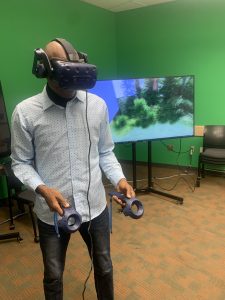
student wearing VR goggles and holding controllers in front of screen showing stanley park immersive experience

Student ‘immersed’ in VR

Levelling up a bit on the embodiment spectrum would be opportunities that allow for full body movement and gesture. This might include fully immersive VR of the kind explored on a recent visit to UBC’s Emerging Media Lab (EML).(links to external/UBC based site) Of course, while some schools have invested in this digital tech, access may not be possible in the average k12 school today. We were fortunate in our visit to the EML to try out a few different options (see table below for resource links).

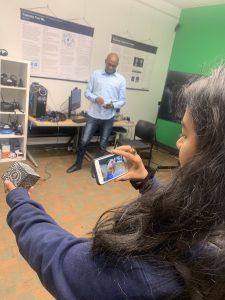
Using the rather ubiquitous smartphone, we can view a variety of 3D images using a google search and engage with them as AR images in the environment.

Person gesturing towards a virtual AR image of a tiger in the classroom

Dr. Khan virtually pats a tiger!

Imagine our surprise when a tiger joined the class (or when the full circulatory system model wandered by!). In order to view these 3D images, we need to move around them physically and gesture to adjust size; allowing a somewhat ’embodied’ experience.

student holds merge smart phone in front of a merge cube AR block. Phone shows an AR beating heart.

Holding a beating heart in her hand!

We might also use a Merge Cube to view AR models. Again, not super high tech, but thought provoking when we think about the difference between a static model of the heart and a larger than life sized beating organ suspended in the room in front of us!


Embracing embodied learning empowers students to not just learn about science or the world around them, but to tangibly experience and internalize it. It’s about creating educational experiences that transcend the traditional confines of a classroom, fostering a deeper and, hopefully, more lasting connection between physical engagement and knowledge acquisition.

References:

Dubovi I, Tabak I. Interactions between emotional and cognitive engagement with science on YouTube. Public Underst Sci. 2021 Aug;30(6):759-776. doi: 10.1177/0963662521990848. Epub 2021 Feb 5. PMID: 33546572; PMCID: PMC8314998.

Johnson-Glenberg MC. Immersive VR and Education: Embodied Design Principles That Include Gesture and Hand Controls. Front Robot AI. 2018 Jul 24;5:81. doi: 10.3389/frobt.2018.00081. PMID: 33500960; PMCID: PMC7805662. Retrieved from https://www.ncbi.nlm.nih.gov/pmc/articles/PMC7805662/

Montessori, Maria. The Secret of Childhood. Orient Longman, 1966.

Puentedura, R. R. (2013, May 29). SAMR: Moving from enhancement to transformation [Web log post]. Retrieved from http://www.hippasus.com/rrpweblog/archives/000095.html


Resources from our Session (Oct 2023)

I recently had the opportunity to work with UBC Faculty, grad students and members of the team at the Emerging Media Lab on the Vancouver Campus on some interactive and ’embodied’ stations to allow students to experiment and consider the levels of embodiment afforded with Augmented and Virtual Reality tools. Below are some resources from our session. It is important to note that we did not offer these AR and VR options as alternatives to ‘real world embodied learning’ but as enhancements to the learning environment.

EML offers weekly drop-ins and opportunities to collaborate on projects, co-plan and co-teach! https://eml.ubc.ca/

Station/Activity Level of Embodiment  Resource notes/Links
VR immersive exploration (Stanley Park Simulation EML Project) immersive VR, interactive controllers, gesture, movement, sound https://eml.ubc.ca/projects/geography-vr/
Holo brain (using Hololens) gesture-based augmented reality https://eml.ubc.ca/projects/holobrain/
Smartphone Google Search AR gesture-based AR with some body movement Link to ios/android instructions and full list of available 3D images – Google link.
Star Walk AR gesture-based AR with some large body movement Requires smartphone, ipad, tablet. Star viewing apps allow you to view celestial objects/night sky in real time and across space and time. Link to Star Viewing Apps SS Blog post.
Merge Cube AR gesture-based AR Requires handheld/smart phone or ipad. Link to Merge Cube blog post in Scarfe Sandbox. 
Shakespeare XR Interactive gesture-based AR A table top virtual Shakespeare text, turn the pages with gesture. https://eml.ubc.ca/projects/shakespeare-xr/


Planning for ‘Tech-enhanced Embodied Learning’

I created the following ‘solution tree’ of considerations when electing to incorporate these tools (note this tree is a first draft… I’m hoping to make a more effective diagram for a future edit of this post – please comment on this post if you have feedback)

  • Is the experience you wish to offer POSSIBLE in the real world? Can you/your students visit the place or hold the object
  • if yes, then…
    • Consider incorporating the digitally enabled tools as supplement or enhancement to real world experiences and labs. For example, pre- or post- labs; allowing students to pre-play and re-play content or experiences using digital tools including 360 media can enhance their reflections on the experience, can supplement and even deepen connections to learning.
    • if yes, then:
      • Think about: your learning objectives and the ‘level of embodiment’ you’d like to offer your students as you choose the tools.
      • Ask:
        • are any students going to be excluded (due to health and safety or access issues?
        • if no, then… 
          • GO! Try to make it happen. Advocate for it!
        • if yes, then…
          • plan or consider alternative experiences. For example: if a student has vestibular or other health or safety concerns and may not be able to use a VR headset, is there an AR experience you can offer that is more comfortable for that student (Consider Universal Design for Learning (UDL) principles in your planning and you’ll see that having an alternative will likely be necessary for some and of benefit to many!)
  • Is the experience you wish to offer IMPOSSIBLE in the real world (perhaps unsafe or inaccessible to some/all of your students)
  • if yes, then…
    • consider incorporating the digitally enabled tools as the main/central experience in the lesson or unit or lab.
    • if yes, then:
      • Think about:
        • your learning objectives and the ‘level of embodiment’ you’d like to offer your students as you choose the tools.
        • how you will ensure access and engagement (if you have access to only one device, what will students do when it is not their ‘turn’? are there stations you can set up for students for more active engagement and to lessen ‘wait time’; what role do students have who are not ‘immersed’ in the activity?
        • how will students reflect upon their experience?
      • Ask: Are any of my students going to be left out of this experience?
      • if no, then… 
        • GO! Try to make it happen. Advocate for it!
      • if yes, then…
        • plan or consider alternative experiences. For example: if a student has vestibular or other health or safety concerns and may not be able to use a VR headset, is there an AR experience you can offer that is more comfortable for that student (Consider Universal Design for Learning (UDL) principles in your planning and you’ll see that having an alternative will likely be necessary for some and of benefit to many!)


Blog post by Yvonne Dawydiak, Learning Design Manager, Teacher Education Oct 2023

1 Comment

Filed under Activating Strategies, Active Learning, AR & VR, Assistive Technology, Blog Posts, Curriculum, Interactivity, Not Subject Specific, Planning, Resources

Classroom Discussions

What are classroom discussions?

group of multi-ethnic students engaging in a discussion outdoors at school.

Remember: Discussions can occur outdoors!

Classroom discussion can be defined as an oral activity where teachers and students develop together a specific curriculum content or competency through each other ideas. “The purposes of a discussion are to build collective knowledge and capability in relation to specific instructional goals and to allow students to practice listening, speaking, and interpreting, agreeing and disagreeing” (Teaching Works, 2022, May 2). In this sense, students use the ideas, words, explanations, and interaction with their teacher and peers as a resource for their own learning.

Classroom discussions are not merely to help students answer a question but to establish a conversation. This conversation may begin with a provocation, have a beginning, a sequence of processes, and an end or closure. What happens during the process is essential to developing the content and competencies of the curriculum and achieving teaching goals. Differing opinions, moderating interaction, taking turns, etc, are essential to developing student competencies and helping students to deeply explore content. Therefore, classroom discussions are a teaching and learning process that believes that students will accomplish curriculum goals together, through the process of sharing ideas (Teaching Works, 2022, May 2). Well-designed and orchestrated class discussions can help build classroom community.classroom community (links to post in this blog).

Classroom discussions can occur in both synchronous and asynchronous contexts. When planning an asynchronous discussion, teachers should consider the ability of students to self-regulate and manage the discussion. When discussing critical issues, the teacher may need to monitor and help guide the discussion. The Bell Foundation provides some suggestions for how to improve classroom talk that can improve students’ ability to participate in synch and asynch discussions.

Why are classroom discussions important?

Classroom discussions are important because they develop both academic and non-academic skills in students. Communicating is essential to living in the current society and developing a healthy democracy. Being able to share, justify, defend, listen, and understand diverse perspectives and ideas is one of the most important competencies that human beings use in our current world. Hence, students need to learn these skills to be successful in their adult life.

Moreover, classroom discussions support student development during their school years. Through classroom discussions, students can learn to make sense of complex ideas and organize their thoughts. Students can also develop the confidence to present their views and use evidence to justify them. Finally, classroom discussions can support teachers to reveal students’ conceptions and misunderstandings about a topic, helping them to identify contents and concepts that need to be better explained in a lesson.

However, developing rich classroom discussions is a complex task that may generate several problems if teachers do not conduct the process well. Teachers should know how to value different views and pay attention to each child’s needs. Therefore, the challenge (and secret) is to be conscious of all micro details involved in classroom discussions, as we will show next.

What are elements of a rich classroom discussion?

The Teaching Works Team (2022, May 2) from the teacher education program of the University of Michigan defends that teaching practices should be unpacked in chunks or elements to support novice teachers to develop these skills. In this sense, they divide the task of developing classroom discussion into several parts and elements, detailing what teachers should pay attention to in each part. In the next sections, we will details these steps and elements as well as complement them with additional resources and orientations.

Source: (Teaching Works Team, 2022, May 2)

Preparing for a discussion

1. Selecting a task:

Teachers should choose tasks, texts, and materials that allow multiple views, discussions, and solutions for a topic/question, encouraging students to explore different possibilities and arguments. Teachers may need to adapt a task to support multiple views and disrupt inequalities.

2. Anticipating student thinking:

Teachers should think about possible questions, mistakes, or understanding that students may have about the topic. This means both activating previous knowledge but also anticipating problems that may deviate students’ attention from the curriculum goals in that classroom discussion.

3. Setting up the task:

Teachers should select the purpose of the activity and prepare the orientations to support students’ work. In this sense, teachers also should plan the moments for students to work independently, in small groups, or with the whole class as well as the resources needed to develop the discussion.

Conducting the Discussion in class

1. Launching the discussion:

2. Orchestrating the discussion:

Teachers should pay attention to a couple of elements and tasks that will create thinking routines to explore and deepen their understanding of a topic. The following elements may happen in a different order but, according to Harvard’s Project Zero, they should be part of any Thinking Routine (links to Harvard’s Project Zero) chosen by teachers:

    • Eliciting the discussion: teachers should state the multiple ideas that their students are bringing, helping them to see several points and arguments during the discussion.
    • Orienting students’ attention: teachers should ask to students pay attention to specific ideas and contributions of their peers, encouraging them to learn with each other.
    • Encouraging student participation: teachers should encourage all students to expose their ideas and control who ideas have been highlighted or ignored. It helps that classroom discussion not only become richer since diverse ideas will be developed but also supports decreasing inequity among students.
    • Probing new questions: teachers should put new questions that support students to explore and deepen the topic, move to the next learning step process, or summarize what they have discussed.
    • Making contributions: teachers should make contributions or introduce ideas/ concepts that were not brought by students but are essential to achieve the purposes of the discussion. If possible, teachers should connect these new ideas/concepts with what has already been discussed validating students’ contributions and establishing connections with previous knowledge.

3. Concluding the class discussion:

    • Supporting summary: teachers should support students to summarize and remember what has been discussed, helping to establish the most relevant points worked during the class and issues that they will develop in the next classes.
    • Acknowledge student contribution: teachers should highlight, with examples, how students’ ideas were essential to developing both content and competencies during the class.

4. Evaluating (after the discussion)

The final step is to reflect on what has happened in the classroom discussion to evaluate what works (or not) and how to improve future discussions.

Elements to consider as you plan, conduct and reflect

1. Maintaining a focus on the instructional objectives: teachers should always direct each student’s intervention to build some knowledge or example that will help to achieve content and competencies goals.

2. Monitoring students’ work: teachers should pay attention to what students are discussing in their groups and which ideas/ people are been highlighted. In this sense, teachers will be able to use students’ work to develop the content and prevent inequalities or bias in the discussion.

3. Seeing and disrupting patterns that reproduce inequalities: teachers should make interventions to stop patterns that may generate inequalities. These interventions do not need to be explicit. For example, teachers can use the work of a student who may not always be recognized as one of the more advanced or capable students in the class to exemplify a topic, helping to improve student status among his/her peers.

4. Recording the representation of content: teachers might record (on the board to the whole class or just to themself) what students are saying during the whole process because it can support the teaching and learning process. Students might also take notes as the discussion ensues. The notes can be used for formative assessment to help teachers understand students’ struggles and misconceptions, or to help with review to demonstrate student thinking or rationality and understanding of an issue. Teachers might find strategies to make student learning visible (Project Zero). Recording could take the form of a digital whiteboard (link to post in this blog) for all to see or for future reference, sorting & classifying ideas, etc.

Strategies to increase classroom engagement

There are many ways to design and lead a discussion to support more active classroom engagement. Teachers should also consider context including the age, background, needs and preferences of their students.

  • In her blog, teacher Jennifer Gonzales also provides some suggestions. You might also listen to the Cult of Pedagogy #28 Class Discussion Strategies podcast (see embed below).
  • Liberating Structures provides a menu of varied activities for discussion and group work.
  • Harvard’s Project Zero offers Thinking Routines that teachers can implement across grade levels and across the curriculum.
  • The Teaching Works Team from UMichigan, offers an open library of Curriculum Resources that include strategies to support teaching in specific aspects of the curriculum and for more interdisciplinary approaches.
  • The Bell Foundation is a charity that seeks to . The Bell Foundation website contains frameworks for discussion including video demonstrations and lesson plans for structures including ‘Information Gap’ activities such as JigSaws.

How might challenging or high-stakes topics be addressed?

Classroom discussions about challenging or complex topics need extra teachers’ attention because unexpected reactions may appear and some rules should be established to guarantee respect. The University of Michigan has prepared a specific orientation on how to conduct classroom discussions about challenging or high-stakes topics (UMich). Moreover, Edutopia discusses how classroom norms can support teachers during challenging discussions.

What can classroom discussions look like in each content area?

Teaching Works Team (2022, May 2) from the teacher education program of the University of Michigan has many specific tips and classroom resources for different subjects:

Additional Resources:


The courses below bring many classroom videos as examples of how to conduct good classroom discussions. They break down real situations and show how teachers dealt with these, conducting rich classroom discussions:

University of Pennsylvania (Coursera):

University of Michigan:

References:

Project Zero (2022, April 30). Project Zero’s Thinking Routine Toolbox. Harvard Graduation School of Education. http://www.pz.harvard.edu/

Liberating Structures (2022, April 30). Liberating Structures Menu. https://www.liberatingstructures.com/ls-menu/

Rochester Community Schools (2022, April 30). Think from the middle. Discourses Strategies. http://www.rcsthinkfromthemiddle.com/discourse-strategies.html 

Teaching Works (2022, May 2). High-Leverage Practices. Teaching Works. https://www.teachingworks.org/work-of-teaching/high-leverage-practices.


Guest post by Peer Tutor Ariane Faria dos Santos (Ph.D. EDCP), May. 2022; edited Y.Dawydiak April 2024

Leave a Comment

Filed under Active Learning, Blog Posts, Curriculum, Inclusive Practices, Not Subject Specific, Open Educational Resources, Planning

Science Journal

whatisit.png

Science Journal is a free app developed by Google that allows mobile devices to record and document experiment results. A phone is no longer just a pocket-size device but also a compass, accelerometer, magnetometer, and so much more. With its easy-to-use features and extensive resources for educators, Science Journal is highly accessible and can be a great tool for classroom activities and lesson plans.

Some cool features of Science Journal include:

  • Ability to accurately measure and record light, sound, movement, and many more using built-in device sensors
  • Personal customization of projects with photos and notes
  • Compatible with multiple platforms such as Android, iOS, and most Chromebooks
  • Over 70 free activities available for students and teachers, organized by levels of difficulty and specific features such as “outdoors friendly” and “do at home”
  • Ability to sync with Google Drive which encourages students to collaborate in groups and continue the learning outside the classroom

Why-is-it-relevant-360x82.png

Science Journal is a valuable resource for educators as it makes many science experiments possible without the need for specific measuring tools. All you need is a mobile device that can download the app and a curious mind! Especially at this current time when many students do not have access to a physical classroom, Science Journal fills the gap by allowing students to conduct experiments at home and share the results with teachers online. As well, Science Journal encourages outdoor learning since students can take their mobile devices outside and run a science experiment.

Furthermore, Science Journal has a specific “For Teachers” page that has over 70 experiments designed by experts including California Academy of Sciences and Playful Learning Lab. This can be of special interest for teacher candidates going on practicums. Whether you plan on choosing an experiment from this extensive list or decide to make your own, the possibilities are truly endless. You can even submit your own experiment and have it featured on the site!


how-to-get-started-360x80.png

  1. Download the Science Journal App (also available in App Store)
  2. Sign in with Google account or continue without signing in
  3. Allow Camera and Photo Access
  4. Add a new experiment (look for the + symbol at the bottom right of your screen)
  5. Start collecting data

Below is a video demonstration of how to use Science Journal to create an exoplanet light curve. This activity is a part of the Phenomenal Physics and Astronomy At Home series developed by the UBC Physics and Astronomy outreach team.

Leave a Comment

Filed under Resources

Webcams and Virtual Field trips: engagement and real-world connections!

“Incorporating webcam images into a curriculum expands the tools educators have to help explain ideas and concepts to students. Webcams can be used as a teaching tool, with images and data from the webcam sites incorporated into a teaching module, emphasizing a concept or point. Webcams can also be used in an exercise, where students find webcams from different parts of the world that fulfill a set of criteria set by the educator.”

(Sawyer, Butler & Curtis, 2010)

There has been a great deal of research on the value of connecting students to the natural world. The BCEd plan advocates experiential learning and many publications expound the impact of time spent in nature on the health and well-being of both children and adults. While taking students outdoors as often as possible is inarguably the most valuable form of field experience, webcams and Virtual Field Experiences can provide an alternative when this is not possible. Webcams can also be used to supplement an ‘actual’ field trip and support ‘real time’ data collection in the classroom prior to, following or in lieu of a field experience; to pre-play or re-play the opportunity.

For many teachers, taking students outside of the immediate local environment is difficult if not impossible. While many recognize the value in even accessing natural areas if they exist within walking distance of the school, field experiences (even a walk down the block) can pose barriers to teachers (geography, safety, scheduling, financial issues, permissions and district or school policies to name a few). Virtual experiences like webcams (or interaction with experts via web conferencing as a virtual field trip or even via social media), can eliminate these barriers and the instantaneous, multi-modal nature of the interaction helps to make the experience particularly relevant to learners today (Prensky, 2001).

Having students interact with natural environments and people via webcam allows students to see beyond the school walls even when they are confined by those walls. Real-world experiences, even those mediated by digital technologies such as web-cams, increase student motivation, engagement and learning at all grade levels (NREL, 2005). Further, while being immersed in natural environments is superior, simply viewing nature in images or video can improve mood and lessen anxiety (Louv, 2008).

While the concept of viewing nature videos or participating in virtual field trips is not new to teachers, the increase in number and quality of live streaming webcams combined with increased access to technology in schools, make the potential for this sort of observation more accessible.


There are so many potential uses for Webcams & virtual tours in the classroom. From geography to science to critical thinking, storytelling, problem solving and observation. From whole class engagement, to small group, to individual and even ‘passive’ observation where the ‘cam’ is left live on the projector for students to observe as desired or as needed. Webcams can be part of a learning center or approach along with hands-on manipulatives, magnifiers, measuring tools, books, writing and drawing materials.

See this link for a list of some of our favourite Streaming WebCams for elementary and secondary students.

Download a Sandbox_WebCams_handout

In this edutopia Article, learn how Webcams can “bring lessons to life”

http://www.educationworld.com/a_tech/tech/tech100.shtml


star-fish-242886_1920A favourite experience with my own students was a unit exploring extreme environments. We connected with Ocean Networks Canada, http://www.oceannetworks.ca/, viewed their webcams, collected data and then participated in a ship to shore Skype with an educator aboard a research vessel 100’s of KM off the coast of BC. The students were highly engaged, developed excellent questions for inquiry and did some very creative problem solving – areas each of the core competencies were easily explored in this one unit! Communication, Thinking and Personal Social.

The Vancouver Aquarium has a variety of webcams and teaching resources at vanaqua.org. They also offer Virtual Field Trips (Free in the pilot year with a fee of approx. $60 per class of any size beginning in Sept. 2019) Contact: https://www.vanaqua.org/education/school-programs/virtual-aquaclass (and let  them know you heard about these experiences via UBC’s Faculty of Education Scarfe Sandbox)


A few Tips

  • Know your objectives!
  • Pre-view and pre-test the webcam
  • Have a back up plan – what will you do if the webcam isn’t active or internet is too slow (have students engage in something related – having a ‘sketch journal’ can support effective use of downtime!)
  • Ensure your display is clear and large enough – is there sound?
  • Have students develop questions prior to watching, while they watch or after watching. Can we ‘answer’ our questions (i.e. research) by observing?

Additional Resources:


References:

Butler, D., Curtis, M., & Sawyer, C. (2010). Using webcams to show change and movement in the physical environment. Journal of Geography, 109(6), 251-263. doi:10.1080/00221341.2010.506924

Louv, R. (2008). Last child in the woods : Saving our children from nature-deficit disorder. Chapel Hill, N.C: Algonquin Books of Chapel Hill.

Northwest Regional Educational Laboratory, (2005) Focus on Effectiveness. Retrieved from http://www.netc.org/focus/challenges/student.php

Prensky, M. (2001). “Digital Natives, Digital Immigrants”. On the Horizon 9 (5). Lincoln: NCB University Press.

Leave a Comment

Filed under Blog Posts, Not Subject Specific

Word Clouds

whatisit.png

A word cloud is a cluster of words that responsively shows most used words as larger or more pronounced that lesser used words. It is a form of data visualization sometimes called ‘text’ or ‘tag’ clouds. You sometimes see a word cloud to represent the tags used for posts on a blog.


Why-is-it-relevant-360x82.png

A word cloud allows you to represent the most important or most used information in a single graphic. One might create a word cloud using a paragraph or two of text in order to visually tease out relevant information or you might use a word cloud to represent the results of a brainstorm or group discussion.

illustration of a word cloud from wordsift.org

Word cloud of text from this post using wordsift.org

Word clouds are excellent for visualizing the attributes of a character, the key points in a plot or features of a civilization. I’ve even used word clouds as a way of having students share their observations of a particular place, field trip location or image/video. Word clouds also make fun gifts… have a group of people share words to describe someone they wish to thank, then share the cloud with the recipient! Perfect for framing! Depending on your purpose, there will be a ‘tool for you’!


how-to-get-started-360x80.png

Steps:

  • Determine your purpose or objectives
  • Select a tool that meets your needs
    • Keep in mind data privacy as you make your selection – avoid tools that require personal information or login.
    • If you want multiple people/students to add to the word cloud, select an all class response tool that allows co-creation.
  • Add your text and create. In most Word Cloud applications, you can also manipulate the text to an extent using themes, colours, font, orientation, shape. Typically, you can also limit the number of words and eliminate select words.

Co-creation tools (multiple people can add words to a single cloud in real time):

    • Answer Garden – this is a student response system (no login required) where you can launch a particular question for a brainstorm, gather responses from a group and a word cloud is autogenerated.
      • A quick and visual way to share the results of a brainstorm!
      • No sign up needed (by teacher or students).
      • Teacher can set up an Admin password and make various adjustments/moderate resposnes.
      • The ‘AnswerGarden’ can be embedded in a Canvas page (find embed code in ‘share’ settings)
      • Students can access and respond from within Canvas.
      • Drawback: When using the direct link to the ‘garden’, there are large banner ads. These do not appear in the Canvas embed.
    • MentiMeter – is quite a powerful all class or student response system.
      • allows multiple question types and a variety of data visualization options (scatter plot, bar graphs, charts, text bubbles, word cloud and more).
      • Menti requires teacher sign up but no student sign up.
      • The Menti ‘live presentation’ can be embedded in Canvas.
      • Drawback: Students access and contribute via menti.com using a join code (not directly in Canvas)

Individual Tools (copy and paste a block of text to create a word cloud):

  • WordSift.org is my preferred site since it was created and is maintained by a Stanford grad student and is the result of a grant project linked to an academic institution! They even include a ‘theory’ section including references and several useful teaching tips on their website. With WordSift, users can upload/paste text, create and manipulate word clouds and capture the results in moments. It has an intuitive interface with no login required and plenty of tutorial info. There is so much potential here for the creative user or educator! Once created, select on an individual word to see a visual map thesaurus (much like ThinkMap above!), see words ‘in context’, definitions and images. Use the settings wheel to adjust number of words, orientation & more.
  • WordClouds.com allows you to paste a block of text to create a custom word cloud. The cloud can be ‘masked’ with a visible shape or ‘unmasked’ (without a border or visible shape). When you arrive at wordclouds.com, select File, New Word Cloud –> File, Paste/type text (or import from URL or file upload!)

Unique uses of WordClouds for visualization:

  • ThinkMap Visual Thesaurus: Word clouds or maps autogenerated when you enter a word into the thesaurus! (free trial only or paid subscription needed)

Leave a Comment

Filed under Active Learning, Not Subject Specific, Resources

PhET Interactive Simulations

whatisit.png

PhET Interactive Simulations are research-based interactive tools that you can use to teach and learn physics, chemistry, math, biology and other sciences. As a teacher, you can select from the current simulation collections based on your subject and, using this free, open source technology, you can design your own simulation or modify the current ones to better meet your course requirements. With these simulations, students can explore the animated and interactive environment.

  • Sims have been translated into multiple languages including French
  • free, open resources

Here are a few features that PhET has:

  1. Virtual Laboratories: students can use PhET virtual laboratories to build circuits and observe how things work together in a chemistry experiment without having to worry about making a mess or breaking things.
  2. Visualizing the invisible: students can use PhET to observe the invisible elements in an experiment, such as atoms and wave interference and thus get a better understanding of complex concepts.
  3. Embedded games and challenges: PhET also provides many games and activities that teachers can use to inspire and engage students in their classes.

Click here to check out the What is PhET article for more information.


Why-is-it-relevant-360x82.png

As a science teacher, you may find it difficult to engage your students and ensure that everyone understands the concepts you’re talking about. With PhET, you can give your students a chance to explore the real steps involved in a science experiment using PhET simulations. These simulations can provide them with a better understanding about specific concepts. Additionally, it’s intuitive, entertaining, and engaging!


how-to-get-started-360x80.png

It only takes a few steps to get started:

  1. First, choose the platform that you want to work on. Currently, PhET has a free web-based version that you can use on your computers, a mobile version from the apple store and an Android version.
  2. Register as a teacher here.
  3. Conduct a search on the website, or use the filters to find what you are looking for.
  4. Once you have selected what you wish to explore, you can read the descriptions and download the teacher tips. You can also download the simulation or choose to embed it in your own blog or website. All the simulations available on the website are open educational resources that allow free reuse and remix, without redistribution or use for commercial purposes.

videopng-360x61.png

Leave a Comment

Filed under Open Educational Resources, Resources