Tag Archives: references

Avoir accès aux ressources de références

What is it  

Dans une classe de langue il faut toujours avoirs accès aux ressources de références.  C’est-à-dire : des dictionnaires, des thésaurus, des livres de conjugaison, etc. Par contre avoir toute  ces ressources peut coûter cher. Aujourd’hui on peut avoir accès gratuitement à toutes les ressources qu’on veut grâce à l’internet.  

Pour commencer, les trois ressources suivantes peuvent être utilisés non seulement dans la classe mais aussi à la maison

  • Les synonymes : pour aider à enrichir son vocabulaire et pour améliorer son expression .
  • La conjugaison : verb2verbe donne une introduction sur la grammaire et toutes les façons de conjuguer un verbe.  Quant à la conjugaison d’un verbe il y a l’option pour voir la traduction en anglais.
  • Le dictionnaire : Le dictionnaire Larousse est non seulement un dictionnaire français mais on a aussi accès au dictionnaire bilingue, une encyclopédie, des forums, des jeux, et le “conjugateur”.  Le Larousse peut être téléchargé sur tablette et téléphone mais il faut acheter l’application (moins de 30.00 dollars)

Why is it relevant

C’est très important que les enseignant.e.s et les élèves aient tous les outils nécessaires pour aider avec l’apprentissage d’une langue secondaire.  Aujourd’hui il n’y a plus d’excuse de ne pas avoir accès à ces ressources. Certaines de celles qui se trouvent en ligne sont gratuites avec l’option de télécharger une application.  


A l’école on peut utiliser les ordinateurs dans la classe et à la bibliothèque.  On peut montrer aux élèves comment utiliser et partager leur tablette ou téléphone pour des raisons éducatives pendant les heures de cours.  Pour les élèves qui n’ont pas de moyen d’accès à la maison, il faut rappeler qu’à la bibliothèque municipale on peut accéder à toutes ces ressources en version numérique et imprimer gratuitement.


How to get started

On suggère d’aller explorer les sites,  mais aussi d’aller voir notre blogue sur Les ateliers de grammaire.  Au mois d’octobre les sessions de Cyber Café ont donné une présentation sur les ressources qui sont disponibles pour la grammaire mais aussi sur d’autres ressources d’orthographe.


Leave a Comment

Filed under Blog Posts, en francais, Not Subject Specific, Resources

L’encyclopédie canadienne

What is it  
À propos du site : “Fondée il y a maintenant 28 ans, lEncyclopédie canadienne débute aujourd’hui un nouveau chapitre de son histoire. À l’occasion du lancement de notre nouveau site internet interactif aux multiples facettes, nous invitons les Canadiens à contribuer aux articles et à nous faire part de leurs idées de sujets touchant aussi bien l’histoire et la politique que l’art et la science ainsi que bien d’autres domaines. Nous sommes à la recherche d’auteurs et de chercheurs à la fine pointe de leurs domaines respectifs, et ce, afin de présenter aux Canadiens les histoires, les peuples et les idées les plus significatifs. Si vous êtes un spécialiste de l’histoire, de la société ou de la culture du Canada, nous vous invitons à nous proposer de nouveaux articles pertinents pour les Canadiens aujourd’hui. Avec son nouveau design et son contenu révisé, la nouvelle Encyclopédie canadienne évolue en permanence afin d’intéresser la nouvelle génération de lecteurs. Par cette invitation, nous espérons rejoindre des contributeurs avisés et passionnés par la création d’un patrimoine culturel et historique durable pour tous les Canadiens.” (L’encyclopedie Canadienne, 2018)


Why is it relevant

Dans les écoles d’immersion française ou dans les cours de français de base, l’encyclopédie canadienne est une ressource très utile.  Dans la partie éducation on peut trouver des guides et des ressources interactives. Ces guides peuvent être parcourus selon des sujets spécifiques.


On peut explorer l’encyclopédie en mode chronologie. Par exemple la chronologie des peuples autochtones se concentre sur leur histoire.  La première marque chronologique est le 2 juin 1537. Pour voir l’exemple il faut cliquer sur le lien : https://www.thecanadianencyclopedia.ca/fr/chronologie/first-nations    

Les collections sont organisées par catégorie : lieux , Personnes, et choses.


How to get started

Le site est gratuit et facile à naviguer.  Il y a aussi l’application (Canada2017)qui peut être téléchargé (gratuitement) sur d’autres technologies.  Comme c’est expliqué au début que l’encyclopédie est interactive, on suggère de suivre l’encyclopédie canadienne sur ses réseaux sociaux.  


Twitter : Canadian Encyclopedia

Facebook : The Canadian Encyclopedia

YouTube : canadianencyclopedia


Leave a Comment

Filed under Blog Posts, en francais, Not Subject Specific, Resources

Citing Research in your Blog

“The term reference is used in many spheres of human knowledge, adopting shades of meaning particular to the contexts in which it is used.”

When citing other sources in your blog or website, it is very important to give ‘credit’ where credit is due (and it is always due!). For online sources, you can simply create a link to the original source and remember to always use quotation marks when directly quoting. You can highlight and link to the entire quote as I have done above.

When sharing information you gleaned from another online space or publication (that is not a direct quote), such as a blog or website, you should link out to the site as I have done below. For academic sources, I would suggest using Chicago in text citations (which footnotes your reference) as they are ‘cleaner’ looking with numbers rather than bracketed names and dates, but you can use any style with which you are comfortable. Again, though, I would recommend citing on each page or post of your blog rather than a reference list as a separate page. Unfortunately, I am unaware of a specific style guide to advise on this. You can create the footnotes in Word and just copy and paste the paragraph into your blog. The footnotes automatically become links and the citations from your document will appear on the bottom of the page.

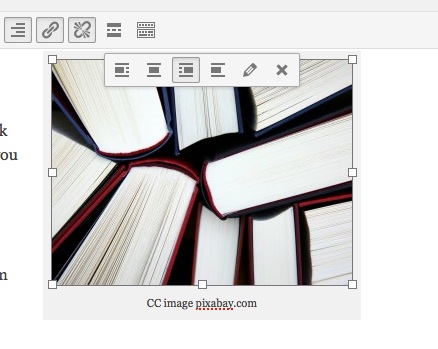
books-462579_1280

CC image pixabay.com

With images, it’s also important to reference (and use creative commons images citing appropriately where needed). I often use a caption with a link to the image source but always ensure you check individual copyright needs. NB: Pixabay has creative commons images with not attribution needed (although link-backs as I’ve done here are always appreciated!)

NB: to add the caption below the image, click on the image you’ve inserted into the page or post, select the ‘pencil’ edit tool and type the caption. You can also set alignment here so that your images has text ‘wrapping’ or not. (I used text wrapping above but not in the image below)

imageedit

Below the following paragraphs, I’ve added a horizontal line (from the visual editor menu bar) for a more organized appearance:

Interactive WhiteBoards, like the SmartBoard, have become commonplace in many schools over the past decade. IWB’s afford access to a variety of learning styles and can support inclusion according to Universal Design for Learning theory.[1] They promise the ability to increase student engagement by providing a focal point for instruction, interactivity, gaming and animations. This increased focus and engagement can improve student learning.[2]

Still, barriers to this potentially valuable technology include the price tag (a system must include a dedicated computer, projector and the IWB), and time. Teachers report that initial planning and preparation time are increased when using IWB’s. Further, time spent on troubleshooting, including ‘orienting’ the board, is seen as a disadvantage to implementation.[3]


[1] Pellerin, M. (2013). E-inclusion in early french immersion classrooms: using digital technologies to support inclusive practices that meet the needs of all learners. Canadian Journal of Education, 36(1), 44+. Retrieved from http://go.galegroup.com.ezproxy.library.ubc.ca/ps/i.do?id=GALE%7CA323659495&v=2.1&u=ubcolumbia&it=r&p=CPI&sw=w

[2] Troff, B. & Tirotta, R. (2009). Interactive whiteboards produce small gains in elementary students’ self-reported motivation in mathematics. Computers & Education ,54, 379-383.

[3] Krug, D, (2004). Leadership and Research: Reimagining electronic technologies for supporting learning through visual arts. Studies in Art Education: A Journal of Issues and Research. 46(1), 3-5.

CC images courtesy of Pixabay.com

Leave a Comment

by | January 14, 2015 · 3:50 pm

Zotero: a valuable research tool

From their website:

Zotero [zoh-TAIR-oh] is a free, easy-to-use tool to help you collect, organize, cite, and share your research sources.

Zotero is particularly useful if you will be using a wide variety of sources to write research papers. It is a Firefox plugin and standalone program that is used alongside Microsoft Word.

Reasons why you should use Zotero:

  • Zotero works as a cloud service, so you can access your bookmarks on multiple computers. As well, Zotero can work offline, meaning you don’t need Internet access to create your citations.
  • You can create your citations in a number of different formats- APA, MLA, Chicago, etc. If you want to change your citations from one style to another, you can do so with the click of a few buttons.
  • You avoid the hassles of formatting. If you struggle with creating hanging indents or don’t know when to use italics in APA, Zotero will take care of all that for you.
  • Zotero will save a copy of the journal article, PDF document, webpage, etc. for you when you add it to your folder. If you lose an existing copy of an article, rest assured that Zotero will always save a backup copy.

To use Zotero:

  • Download the Firefox plugin or the standalone program that is compatible with other browsers. I recommend using Firefox because Zotero is integrated right into the browser.
  • Download the Microsoft Word plugin.
  • Download the PDF plugin right from Zotero. Right click on a PDF  in your library to “Retrieve Metadata For PDF”, and the plugin will install in a matter of seconds.  You can also download the plugins from the Search pane of the Zotero preferences.

For some really helpful tutorials, Zotero has a number of easy to follow screencasts on their website.

Leave a Comment

by | November 20, 2014 · 10:46 am