

Technology use for technology’s sake is not what we are striving for in education today. Transforming learning by providing opportunities that would not otherwise be afforded is a goal that, with emerging technologies and increased access, may be achievable. This transformation can be as simple as allowing for as-needed differentiation, as is the case when providing a student with the option to audio record, video record or ‘screen capture’ record his/her ideas or can include such opportunities as sharing their ideas and creations with a larger audience online.
Explore some ways to connect with students and provide for interactivity – my top 5 apps for student engagement and expression (including some that are cross platform!). Download the Handout for more information (links to research and practice)
Sandbox_iPad Possibilities_Oct 2015
Always explore with a critical eye and ask yourself key questions such as:
• Is it intuitive?
• Is it interactive? Does it support content creation and collaboration?
• Can you edit once you’ve started?
• Can work be easily exported?
‘Whiteboard style’ applications are terrific for formative assessment, project work and digital storytelling (among other things). I like to offer students the opportunity to share their learning using ‘Explain Everything’ or ‘Showme’. Providing multimodal opportunities for expression and representation of learning supports Universal Design for Learning – remember to consider offering choice!
These apps allow students to create content on the iPad (rather than just ‘consuming’). Students are able to draw, text, upload images and narrate. This can provide the perfect platform for teachers to have the opportunity to recognize understandings and to catch misunderstandings. Using devices to support students creating (or co-creating) stories, presentations & projects moves the learning up the SAMR ladder!
Another opportunity to help a student construct and share their understanding might be a concept map. Mind mapping, or concept mapping, can be a powerful tool where students are encouraged to illustrate the connections between their ideas, concepts or content in meaningful ways.
“A concept map is a type of graphic organizer used to help students organize and represent knowledge of a subject. Concept maps begin with a main idea (or concept) and then branch out to show how that main idea can be broken down into specific topics”. There are some excellent tutorials on this site and information for teachers about the ‘concept’ of ‘concept mapping’
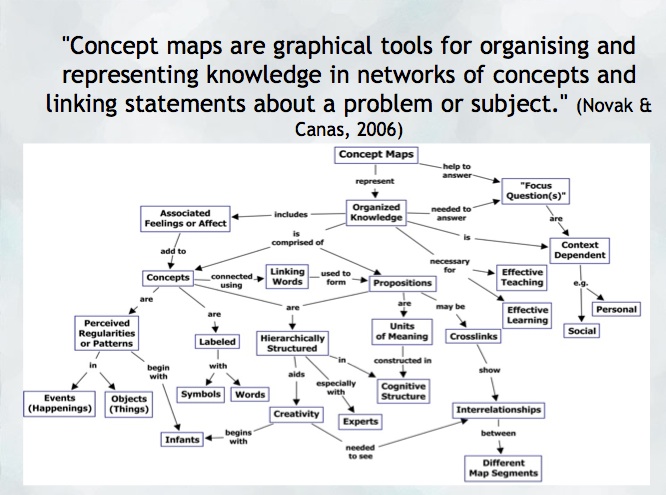
Try: Inspiration or Kidspiration as iPad apps
*Many schools also have licensing for this application on their computers or laptops.
Digital Storytelling is another excellent use of the iPad for content creation… try Puppet pals, Showme or imovie (among others!)
Sketchnoting and Digital Storytelling offer many opportunities mobile content creation… try Puppet pals, Showme or imovie (among others!)
Feeling ambitious?? Consider this ‘App Smash’ sequence:
- Storyboard your ideas using Kidspiration (or, better yet, markers and paper!).
- Create a talking avatar (or narrator) using either Chatterpix (making an avatar with an image of your own) or Telegami (talking, moving avatars) and save the video to your camera roll. *Save a screen shot of the character if you want to embed it into your story at some point!
- Draw a background using ‘Paper53’ and save it to your camera roll.
- Now, create a story using either ‘PuppetPals’ or ‘Explain Everything’ (import your background and character into this app)
- Finally, you can merge it all together using ‘iMovie’! You now have a personally constructed digital story!