Tag Archives: block coding

Blocky-Games: Programmer en jouent

blocky-games

What is it

Blocky-Games est une série de jeux éducatifs pour enseigner le codage.  C’est fait pour les enfants qui n’ont jamais eu d’expérience en informatique.  A la suite de ces jeux, les joueurs pourront utiliser la base de texte pour programmer.

Blocky-Games est conçu pour des élèves plus jeunes dans l’école primaire (de la maternelle à la 3ème année).  Ce site est gratuit. On peut changer la langue facilement en haut de la page.

C’est un site auquel les élèves peuvent accéder pendant les cours quand ils/elles ont fini leur travail, ou le site peut faire partie des centres pédagogique pendant les petit groupes.


Why is it relevant

Blocky-Games, comme Coding.org, est unique car des élèves partout dans le monde peuvent apprendre comment coder.  Dans la classe des élèves de l’immersion française, ou français de base, peuvent utiliser ce réseau dans la langue enseignée.  A la maison, les élèves peuvent continuer dans la langue française ou ils.elles peuvent changer vers la langue maternelle. Cela peut devenir un lien entre la classe et la maison.


How to get started

On suggère d’aller explorer Blocky-Games.  Le site est gratuit et facile à naviguer.  Il n’y a pas besoin de s’enregistrer pour les exercices.


Les activités sont simples.  On place des blocs comme un puzzle pour créer des codes d’information.  A la fin, on nous explique à quoi cela correspond en langue de programmation – JavaScript


Leave a Comment

Filed under Blog Posts, en francais, Resources, STEAM, Technology

Code.org (FR)

What is it

Code․org est une organisation non lucrative qui veut que toutes les écoles aient accès à l’informatique de la même manière que pour les maths et les sciences.  La formation des cours suit les pédagogies les plus communes au primaire et au secondaire. Un cours de Code Studio dure environ 20 hrs et des personnes de tous les âges peuvent y participer.  S’il n’y a pas de temps pour un cours complet de Code Studio il y a des tutoriels d’une heure qui sont disponibles.

Le site offre plusieurs langues pour faire les activités de codage.  Il faut simplement aller en bas de la page pour changer la langue.

Coding.org est gratuit et fait partie des ressources éducatives libres (REL).


Why is it relevant

Ce site est gratuit et en ligne.  Il n’y a pas besoin de télécharger une application sur des tablettes ou le téléphone.  Tout le monde a accès sous condition d’avoir l’Internet.

Coding.org est unique car les élèves partout dans le monde peuvent apprendre à coder.  A l’école, dans la classe des élèves de l’immersion française, ou français de base, peuvent utiliser ce réseau dans la langue enseignée.  A la maison les élèves peuvent continuer dans la langue française ou changer vers la langue maternelle. Cela peut devenir un lien entre la classe et la maison.


How to get started

On suggère d’aller explorer Coding.org.  Pour participer aux cours il faut créer un compte.  Pour les tutoriels on a accès direct.


Quand ils commencent à jouer, les débutants voient le code en bloc et aussi en JavaScript.


Video demonstration

Leave a Comment

Filed under Blog Posts, en francais, Resources, Technology

BBC micro:bit

micro:bit logo


whatisit.png

A micro:bit is a micro-controller designed by BBC for the use of computer education. It’s basically a mini-computer! The micro:bit can be programmed and makes use of multiple sensors including an accelerometer, a magnetometer, Bluetooth, a 25 LED display and two mechanical push-buttons (the V2 MBit also has a microphone, speaker and touch sensor). The function of the micro:bit is in the open hands of the user’s creativity which can include: games, tools, toys, science experiments, etc.

The micro:bit can be programmed using the ‘official’ code editor which supports block coding (by Microsoft MakeCode), Python and JavaScript. The Micro:bit can also be programmed using a Scratch block coding plugin. 


Why-is-it-relevant-360x82.png

Coding has become a very valuable skill and is recognized as part of the ADST (applied design skills and technologies) curriculum. Outside of teaching your students job-marketable skills, the act of coding helps to teach your students mathematical logic, creative exploration, how to understand systems, and a systemic procedure that exists in common computer programs (automator, video editing, animation, web design.)

By coding a micro:controller, you are also providing students with a more kinesthetic experience. They are coding to ‘make something do something’!

The micro:bit can be used as an entry point for beginners but can also level up to allow more intermediate users (including secondary students and beyond) to code and make.  One of the biggest barriers to teaching coding to a new audience is how complicated and detailed text-based programming languages can seem off first glance. The official micro:bit block code editor attempts to circumvent this barrier by representing functional code bits in terms of visual blocks. This makes coding seem more like joining puzzle pieces together rather than typing out complex functions. To further allow the ‘levelling up’, you can toggle in the make code editor between the visual programming blocks and the javascript editor!


how-to-get-started-360x80.png

  1. Go to microbit.org
  2. Click Let’s Code
  3. Select between the JavaScript Visual Blocks Editor (more guidance, comes with the block editor, tutorials, and projects) or the Python Editor (less guidance) and click Let’s Code under your respective choice. You can also select Micro:bit Classroom to share and manage coding sessions for your classroom.
  4. Start building your code!
  5. Once you are finished building your code, download your code into the form of a .hex file, connect your micro:bit to your computer and upload the .hex file into the micro:bit’s drive
  6. Test it out, revise your code, and have fun!

micro:bit extras
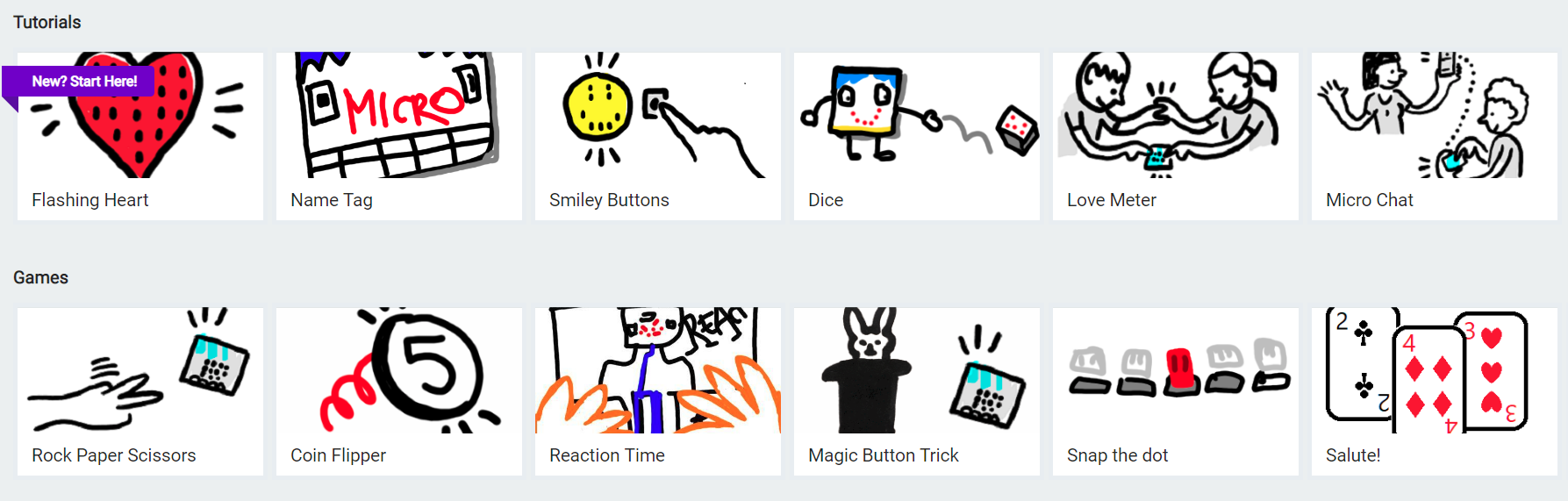
Click above to view a sample of micro:bits’ tutorials and games section.

micro:bit step-by-step tutorials and games

If you are new to coding, and you would like a smooth introduction into how to use your micro:bit, I would suggest starting with micro:bit’s tutorials and sample games. In the official micro:bit MakeCode code editor, you can find micro:bit’s tutorials as well as pre-made sample games in the MakeCode dashboard. The sample games and tutorials will guide you through building a project step-by-step with an explanation of how the code is working.

Block coding to text coding

While block coding is a very effective way to expose students to coding, block coding is not typically used outside of educational contexts. We might see block coding as providing some foundational skills, including computational thinking, as a stepping stone towards learning text coding such as Java, JavaScript, Python etc.

The official micro:bit MakeCode block editor provides a button that allows you to swap between JavaScript and block code. In conjunction with building a program with blocks, a student can flip back and forth between JavaScript and block code to see how the two translate into one another. Furthermore, once a student feels comfortable building with block code, introducing text coding to a student would seem much less daunting. The structural component of block coding remains in text code; the student would only need to learn the syntax of a text coding language to get a fair grasp of the language.

More resources


Check out our blog post about coding in classrooms!
BBC Microbits has a Lesson bank for Micro:bit that is searchable by theme and subject area.

Canada Learning Code MicroBit Challenge connected to UN Global goals.

Pinnguaq is a Canadian NGO working with and within northern, Indigenous and other communities on STEAM, ADST and digital tech competencies and has developed many resources related to MBits and more.

videopng-360x61.png

*post updated July, 2023

Leave a Comment

Filed under AppliedDesignSkillsTechnologies, Resources

Dash & Dot Robots

Dash and Dot are programmable robots that interact with each other and use various sensors to detect obstacles and motions.

Students will get a chance to plan their code, test it, evaluate if it works and problem-solve if it doesn’t! This is the next step beyond block coding online because there is an interactive component by the robot immediately responding to code.


[column size=6]

  1. Locate or purchase a Dash Robot & have access to a Bluetooth-enabled device.
  2. Choose which app will work best for your students (available on Apple, Google Play, & Amazon Appstore)
    • Tickle – This app is for advanced learners who understand block coding already. It can control multiple robots, not just Dash or Dot. Only available on iOS devices.
    • Swift Playgrounds – Created by Apple and used by IOS to create popular apps. This App can now power Dash.
    • Wonder – Houses a controller, free-play, and Quests which are similar to self-guided tutorials. It is also used for the Wonder League – a Global Competition.
    • Go – Allows users to control the direction of Dash with basic controls. This app is also a portal to online content and more activities.
    • Path – Control Dash’s direction by drawing where it should travel.
    • Blockly – Program Dash or Dot by using visual block coding
    • Xylo – Create your own music using. Requires the Xylophone component.
  3. Determine if additional components would be useful (for an extra cost)
    • lego blocks, launcher, sketch, xylophone
  4. Get inspired!
    • Browse what other students and teachers have done


**Note: Wonder has released another robot, “Cuebot” which can also be coded using javascript

[/column]
[column size=6]

[/column]

Video: Wonder Workshop (2015). Getting Started with Dash & Dot for Teachers

Leave a Comment

Filed under AppliedDesignSkillsTechnologies, Not Subject Specific, Resources

