Warsaw

As I wandered through the Castle in Warsaw's Stare Miasto (Old Town) I thought to myself "a culture must value itself that goes to such great efforts to ensure its legacy is maintained.

And then I remember 95% of what I'm experiencing was recreated after WW II. Almost entirely financed by the Polish people themselves, despite the privations of communism.  That's pride folks.

panoramic view of main plaza in Stare Miasto in Warsaw

The Castle itself was razed by the Nazis as punishment for the Warsaw Uprising. This is a remarkable recreation then, a monument as much to collected memory as to the history embodied here. Tenacious seems an understatement. 

I'm not exactly a photographer, so I tend to snap a lot and often at random things.  Here's some randocity, inspired by texture, colour and light:

After the Castle I meandered down through Nowy Miasto (also rebuilt after the war) and visiting the Marie Curie Museum. Which is in the apartment where her parents lived when she was born. Curie was the 5th child and youngest of 4 daughters born to two educated parents. Curie was the first person to win Nobel prizes in TWO disciplines (physics and chemistry) and the only to do so in two science disciplines. She was also the first woman professor at the Sorbonne, having taken over the lab run by her husband after his death (about 2 years after they jointly won her first Nobel).

The second woman to win a Nobel in Science was her daughter and her husband. Curie and her daughter shared another aspect of life: both died from radiation exposure (Curie from anaemia, her daughter from leukaemia). Remarkable family; charming wee museum (no photos; I just grooved on the nerdy feminist vibes).

Jet lagged and disoriented, I decided to try and find the Warsaw Uprising Museum–and failed. But I did find the Memorial. Which fairly took my breath away:


And then I went back to my hotel and not sleeped.  Full set of photos to be found here

Posted in Uncategorized | Comments Off

miscellania

Been playing catch-up on a number of fronts as of late. Mostly because I loathe not being on top of things; partially because I’m in the office 4 days this week, then on holidays for 11 days (w00t!). Consider this something of a drive-by post.

Interesting reading:

Ever heard of unschooling? Curious? This month’s University Affairs has a pretty good article on the subject. I’m was of mixed feelings: now I’m solidly in the opposed camp. Your 11 year old just learned to tie their shoelaces? Fail….

Student Evaluation of Teaching (SEoT) is an important aspect of ensuring the quality of both course/curriculum development and teaching in higher education. But what about evaluations halfway through a term? Some schools have formalized such processes, as indicated in an excellent article in the Chronicle. I’m not convinced–while I believe students need to have prominent voice in educational development I’m a big believer in learning-centred, rather than learner-centred pedagogy. Or andragogy, si vous preferiez…

Last week’s U21 Teaching and Learning Network meeting seemed to go rather well. In particular, CTLT’s Events team really outdid themselves. It helps when we work in a great unit in a great university.  Anything involving the Liu Institute and Museum of Anthropology can’t be bad either.

Edits for the January 2012 offering of ETEC565A are largely finished. Largely.

Ich habe kein Nachrichten mehr.  Except I’m not failing German…though I’m not sure I’m learning German either!


Posted in Uncategorized | 2 Comments

Recommended iPad app: 2Screens

I had a meeting with a faculty member a couple of weeks ago about “tablet teaching”. For many folks tablet=iPad; given he’s a scientist I suspected he might be using a Wintel tablet–a PC with a touch screen.  Turns out both were right: he was using a Wintel tablet, but was interested in possibly moving to an iPad.

So I asked him to show me what he did. And what he did blew me away:

  • Pushing PowerPoint out and annotating on the slides
  • Zooming in and out of the screen
  • Sending the annotated slides to his students after class
  • Other kewl stuff my 47.5 year old brain cannot recall.

I was mightily impressed. And shortly thereafter was determined: is there an app for it? In fact, the number of productivity apps for presenting in a more interactive way was a surprise. After testing a few, one standouts. More about the app in a minute…

Using an iPad to teach/present/lecture/natter

If you want to use your iPad to teach, you need to get yourself properly kitted out. For sure you’ll need:

  • An iPad ;)
  • An iPad case that works in landscape position
  • Either a VGA or HDMI iPad out adapter (depending on your projection source; I’ve got both)
  • A stylus or digital pen that won’t scratch your iPad but will allow you to write and click.

If you want to use a presentation slide deck upon which you can easily annotate–and one your students can print post-class if they wish–a white background works best (and uses less ink). You’ll also need to accept that no slide animations (on a slide or between slides) will work. Which, contrary to many people’s assumptions is not the end of the world.

Finally, most apps that allow you to annotate on PowerPoint will convert your presentation to either a PDF or JPG: maintain control over this by creating your own PDF of the full slides (not handouts).  Now we’re ready to roll!

2Screens – recommended app

 2Screens couldn’t replicate everything my colleague did: it didn’t allow zooming in as deeply. But on balance that’s a minor limitation–this app rocks.  Here’s a quick overview.

John likes that  2Screens:

  • Supports Dropbox
  • Annotation tool is flexible
  • Built-in pointer can be an arrow, a laser dot, a highlight bar (among other options)
  • Display photos from your Photo Albums
  • Multiple tabs to switch from presentation to other collateral
  • Can save each slide/screen/tab with annotations to share with students afterwards
  • Built-in webbrowser for annotated webbrowsing, including bookmarks
  • Ability to taken notes that only you can see: they’re not broadcast on the external display
  • Incredibly good value: $4.99Supports Airplay, so you can send presentation wirelessly via AppleTV

This last point is easy to underestimate: by using Airplay via AppleTV, I can move around with my iPad in the classroom. Range is estimated at 10m, which is enough to wiggle around a fair bit of even many megalecture halls.

Under the hood

The interface isn’t entirely intuitive: the fact that the manual is for an earlier release of the app (with significant differences) entirely unhelpful. But it didn’t take long to get the gist of things.

Here’s the main interface whilst pushing a PowerPoint presentation:
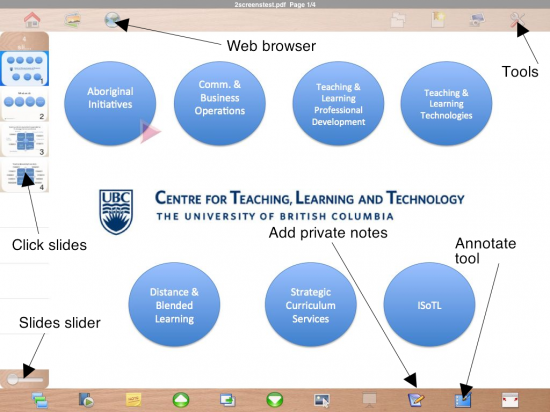
As you can see there’s a few ways to move through slides (click or slide slider; there’s a couple of other ways too), the enhancement tools for adding private notes and annotate the slides are on the bottom. The web browser and tools are accessed via the top toolbar. Tapping any of these–ideally with your stylus–enables them.

With respect to the annotation tool options you can select to draw shapes, lines, or freehand. You can also pick the colour of the annotations–very useful, but do your audience a favour and avoid using white text on a dark background (owsie on the eyes).
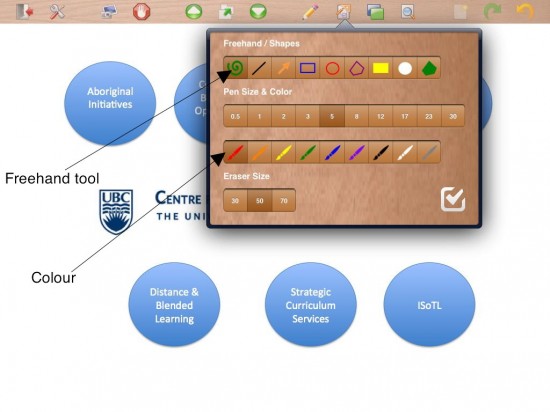
You can also pick the point size of the pen (in pixels) as well as the eraser size. How do you enable the erase? Tap the pen in the top toolbar so the erase is point down!

Not perfect

It’s a great app–but it’s not perfect:

  • If the annotations would be appended to an entire PDF (rather than each slide as a JPG), circulating things would be much easier. I’d prefer to be able to  annotate using my keyboard (on the screen or my Bluetooth one).
  • I’d like really like to be able to resize the speaker notes and private notes windows via the iOS “pinch/flick” interface.
  • The pointer doesn’t seem to work when using Airplay to my Apple TV

Overall, though, this is a great start. Already I can’t wait to use this at a conference–I presented using my iPad at a conference in June and it worked well. Being able to annotate would’ve rocked it.

Posted in Uncategorized | Comments Off

MET Moodle now version 2!

The awesome folks in the Faculty of Education’s Computing and Media Services unit have moved our MET Moodle server to a new box AND upgraded us to version 2 (2.1 I believe).

If you’ve built a course under 1.9.8 it should work fine–but go test it before you actually need to use the site. I’ve tested most of the core functionality and found no problems. But it was a cheap and cheerful test.

Unfortunately I cannot provide tech support if you do have challenges…there’s a surfeit of resources online to help though, including videos, wikis and webpages.  But if you have any feedback, comment below!

Posted in Uncategorized | Comments Off

2 – 4 – 6 – 8 can you say e-val-u-ate?

Apparently many of you can. Just reviewed my evaluations for the summer offerings of 565A.  Overall folks are pleased with the course and the work Robert and I did (thanks again Rob, if you’re reading this). I, of course, zoom into the negative parts and think “am I that bad?”

No, I’m not. But there’s room for improvement in the course–and in my practice. Though some folks’ feedback makes it difficult to see the point through the snark. Or veiled homophobia, as it were. What. Ever.

In terms of the former I’ll be looking at the following as possible changes for the January offering:

  • A downloadable course syllabus
  • Harmonizing the Course Intro section with the learning modules
  • Updating the assessment rubrics
  • Recalculating the overall course workload
  • Developing new cases for the small group task
  • Mmmmmaybe developing new cases for some of the weekly discussions. Especially Raj (resource issue)
  • Maybe dropping one of the cases near the end of the course, since there are two assignments due
  • Revisiting (again) how participation is assessed

As for me the lessons learned are more straightforward: 4 sections is insane, even with a TA. I think I did a good job this summer: I prefer to do an excellent one. Folks don’t seem to believe me when I say I’m harder on myself than anyone else…

Posted in Uncategorized | 2 Comments

Initial thoughts: Blackboard Collaborate

I know I’m not alone in grieving the impending death of Wimba Classroom. I like it’s sleek interface, it’s friendly, low-key interface (not too corporate) and its robustness. I’ve used it lots and pushed it hard and it’s rarely let me down. However Wimba and Elluminate were acquired by Blackboard (BB) and BB is paring down the virtual classroom product to Blackboard Collaborate.

I’ve used Elluminate a bit as well and my first impression is that Collaborateis Elluminate, tweaked a bit. Elluminate Collaborate still has the somewhat scary one minute Java download messaging. I’m accessing this at work, so I’ve got bandwidth to spare; would this take a lot longer at home, over my wifi network? Must try to remember to try this from home too…

  • The interface is leaner and more streamlined.
  • Video setup is right in the main window, which makes more sense than Wimba’s floating window. I’m all alone in here so I can’t judge what happens when others launch their video: Wimba used to toggle between feeds when the speaker changed.
  • Audio setup is a bit buried (right above the Video feed). Gives the options for selecting and testing input and output. Nice!

Content

Loading content is done by….clicking the Load Content button. Unlike Wimba Collaborate shows a “Powerpoint is generating images” message. And yup, my computer’s PP app has been launched. I find this troubling and creepy–why not just load the presentation itself? After just under a minute my 15 slides are loaded as .jpgs and a navigation window has opened to allow me to click through.

Resizing the classroom window shows a nicely vectorized graphic. Closing this window embeds the navigation into the top right of the classroom window–much nicer.

Loading a Quicktime movie (100MB or less–can we change that to 2GB???) is very slow…5 minutes to load.  Quality is good and the interface is clean.

Loading a Word document–now this is kewl. It says “<doc> file type is not supported for loading. Would you like to distribute this file to ALL participants using File Transfer instead?” That’s a neat option!

App Sharing hides the classroom window and adds a yellow border to the app window being shared. Nice! Clearing the classroom is done by clicking New page. There’s the standard white board stuff, plus a screen capture option. And clip art–yeah, me too–why clipart? There are some maps and math notations and other symbols. Again, very nice.

Overall I like Collaborate–but I’m reserving final judgement until I deliver a live session to at least 10 concurrent users with video and audio–which Wimba Classroom handled easily.

Posted in Uncategorized | 2 Comments

Moodle 2.0

Since the UBC MET Moodle server needs to be moved to a new box (i.e. server), we’re going to take the opportunity presented and upgrade to Moodle 2.0. On 17 October 2011.

I’ll be posting a message on the MET Moodle server landing page as well, but I suggest folks backup and download a copy of their course sites. Your courses should work fine on 2.0, but if there is a problem you can still load your course on another Moodle 1.9.x installation.

Welcome to the world of educational technology and the accompanying magic carpet ride!

Speaking of Moodle, there’s some Moodle Moots (conferences) coming up in the next few months, including:

More info here. Feel free to fly me to the one in Brazil. I’m always willing to support the open source/open access community. ;)

Posted in Uncategorized | 1 Comment

sometimes educational research’s bad rep is (somewhat) earned

A feed through a feed led me to this interesting blog posting. It caught my attention because: 1.) lecturecapture is a hot topic these days (UBC included), and 2.) it makes some pretty strong claims, including:

6. Improves pass rate
7. Recording lectures improves bad lectures!

BTW I don’t disagree/contest these (or the other) findings in the report. But what I do find problematic is that the presentation in question (available here on SlideShare) doesn’t include the sort of critical research data that tells us how credible the claims are. Sample size? Prospective (or at least) retrospective power calculation? Statistical measures for claims (more specifically the claim that “They would prefer for all courses to be recorded”.

I suspect that some–probably all–these questions can be answered and in a manner that confirms the reliability of the findings. Which is why they should’ve been included in the original presentation. But already someone else has fed the results through their own filter–and the “they” is now generalized to “all students” rather the students at one particular institution–a technical one, which may account for “no major technical problems.”

This example is a rather benign one…but what about similar reports that make specious claims?  We can and should do better.  Our work is of a high enough standard to stand scrutiny. Or at least it should be…

Posted in Uncategorized | Comments Off

Education at a Glance 2011 (OECD Indicators annual report)

Parking my concerns with their statement that “in an increasingly global economy, in which the benchmark for educational success is no longer improvement by national standards alone, but the best performing education systems internationally, the role of the OECD has become central, providing indicators of educational performance that not only evaluate but also help shape public policy,” which is certainly overstepping both the OECD’s role and concomitant analyses, these sorts of reports do give us some indication of education on a global scale.

My pre-occupations are: 1.) Canada, 2.) girls and women, and 3.) strong public education. I’ll focus on these in my analysis, though I encourage you to download the report and read it yourself.

Canada

Currently 79 per cent of Canadian adults have a high school diploma (or dogwood as it’s called here in BC); in 1933 only 59 per cent did. Impressed? Don’t be too much: Canada is considered a country with “historically medium” attainment, in terms of secondary education. Only the Czech Republic, Germany, Norway and the US are considered “historically high” though–meaning in 1933 theirs were between 65 and 79 per cent. Today Canada is ahead of Norway, though Australia and Austria are at 91 per cent. And Korea (“South”) leapt from 21 to 98 per cent secondary attainment.

In terms of tertiary (post-secondary; usually university or college) attainment Canada ranks second overall, behind Korea! In Canada the “generation gap” between 25-34 and 55-64 year olds is relatively small: around 17 per cent. In Korea it’s much wider: almost 60 per cent. This shows how quickly Korea has transformed itself educationally–and how Canada, though still performing strongly, still has room to improve.

Canada is in the high attainment group with New Zealand and the US. Our rate has improved from25 to 58 per cent, with New Zealand (48%) and the US (41%) a fair bit back. I find this surprising, given the surfeit of post-secondary institutions in the US (parking the idea of quality). Even back in 1982 in my (suburban New York City) high school we were told “college is the new high school diploma.” In other words, everyone needs one in the new economy. From what I can tell about 2/3 of my class of ’82 peers have a four year degree. From other attainment groups Japan (medium; 58%) and Korea (low; 62%) are most notable.

The numbers for “vocational” (i.e. trades) education are quite different. Canada is 31st of 35 OECD members in terms of vocational educational attainment: less than 10 per cent of adults 25-34 have completed vocational education, which is a drop. I suspect there’s a number of dynamics in play, but certainly the emphasis on “the new grade 12″ being a university degree plays a part in this trend.

One interesting stat about secondary attainment au Canada: of the 78 per cent of adults 25-64 with grade 12 or higher, only about 5 per cent completed their grade 12 after they turned 25. In many European countries higher proportions of adults complete their high school education through non-traditional channels: around 30per cent in Portugal (for a total of 95%!), nearly20 per cent in Iceland (total 89%), 12 per cent in New Zealand (total 90%) and Norway (total 91%). If Canadian adult education funding hadn’t been eviscerated in the last few years, how much higher could our secondary attainment rate be?

Girls and Women

In Canada women are slightly ahead of men, in terms of secondary educational attainment: among 25-64 year-olds 89 per cent of women and 86 per cent of men have completed high school. The gap widens with tertiary education: 28 per cent of women (versus 20 per cent of men) have completed a tertiary-level qualification in Canada.

More bad news for men and boys: we’re more likely to drop out of high school than girls and women: a difference of about 8 per cent. But we’re not alone: only Finland, Slovak Republic and Sweden have a differential of 5 or less percentage points, whereas in Israel and Norway the gap is more than 15 per cent.

Strong Public Education

Infused throughout the report is messaging about the value of strong public education–there’s no evidence to contradict or confirm this. That’s one assumption I’m happy to perpetuate myself, with strong being a key word.The reports does cite evidence that the enjoyment of reading the reading of fiction correlate with level of reading proficiency.

In terms of “socio-economic status” (i.e. being marginalized because of economics, social status, or membership in a cultural minority group), Canada has the 12th best (of 39 jurisdictions) administering the PISA reading test in 2009. The gender gap icitte is pronounced though: only 60 per cent of Canadian boys read for pleasure, compared to 81 per cent of Canadian girls.

In terms of overall school performance Canada is one of a handful of jurisdictions where there is a “below-average impact of socio-economic status on students’ reading performance”. In other words, our system does a better job of mitigating the impact of marginalization on educational attainment. Better doesn’t necessarily mean great, by the way…

There’s a lot more in the report…still reading it.


Posted in Uncategorized | Comments Off

Irene

Don’t believe everything you see on the internet: Hurricane Irene was not a non-event in New York City. This is my old neighbourhood: Rockaway Beach (specifically Belle Harbor) Queens last Sunday morning:

This is B (as in Beach) 131st Street; our home was on B 127th. This is the worst flooding in 50 years. The surge was “only” 4 feet–had it been 5 or more feet these houses would’ve all beeen full of sand and filthy seawater (storm surges are full of shells, fish, crabs and any garbage floating around). As it was many homeowners got a few feet of water in their basements thanks to Irene.

Would I have evacuated as ordered? Nope: even with a big surge, the places I’d be staying in would be concrete or brick and large. I’d've totally been there with my camcorder! But if I had kids? Different story.

Posted in Uncategorized | Comments Off

recommended iPad app: PDF Expert

My job requires me to read a lot of articles, mostly from academic journals almost entirely in Portable Document File (pdf) format. And until recently my way of managing this reading load has been surprisingly…analogue. This process—aggregating, mass printing, reading, and binning or archiving articles—pleases no one less than it does me. It kills a lot of trees. And it requires me to handwrite annotations—which is doubly painful, since handwriting’s always been very challenging for me and I often can’t read my own handwriting a day or more after taking notes.

I have tried managing things more digital with my various computers. To date none of the apps I’ve tried on my Macs (Photoshop, Acrobat Pro, Preview, Graphic Converter) has allowed me to seamless mark up my pdf files. Ditto my iPad. Until now.

A few months ago a colleague and I were discussing apps we use on our iPads. She mentioned how awesome PDF Expert was. It sounded pretty good, but I was buried, work-wise at the time. So I filed the info away and added to my “revisit when bandwidth allows or practicality necessitates.” As it happened, both converged a couple of days ago.

This week I found some bandwidth. Also this week I took a good look at the reading requirements for this program, which I’ll be starting in September. In fact, I went and downloaded all the readings. Gulp!

Why it rocks

My analogue workflow for reading articles is rather straightforward: print ‘em, highlight bits, scribble comments in the margins (often with a smug sense of superiority; thanks for that, uh, perspective, Mom.), dog ear any pages that merit revisiting, and then transcribe any bits that might be useful for papers or presentations. And then bin the original article. Lots of dead trees.

Here’s the key functionality I’m already leveraging in PDF Expert:

  1. Highlighting text
  2. Adding text annotations
  3. Strike-out text (to flag a point of contention)
  4. Circle bits of a page (using the draw function)
  5. Bookmark pages to revisit
  6. Adding post-its
  7. Completing fill-in pdf forms
  8. Add my digital signature to forms
  9. “Flatten” an annotated pdf to a manageable size for emailing

Of these, 1, 2, 3, 4 and 5 fully replicate my analogue workflow. When I have a lot of annotations to make I whip out my Bluetooth keyboard. These features alone make PDF Expert a gawdsend.

Kewl 2.0

PDF Expert is a Readdle product. Readdle offers cloud storage; unsurprisingly, readdle.com is fully integrated into PDF Expert. I’ve not used readdle.com before—or yet, to be honest—but I did sign up for the free user account offered.

Besides, PDF Expert also integrates with iDisk, Dropbox and Googledocs—or a WebDAV server. And you can transfer files between your iPad and another computer on the some wireless hub (password protected or not), since the iTunes sync option (Note to Apple: you’ve got to have a less clunky way of managing files coming with the next version of iOS, right? Right?). The cloud integration is a clever aspect. And for us old skool geeks, when you open an email with a pdf attachment, the Open As… dialogue will allow you to open a pdf in PDF Expert rather than directly in iOS Mail. Sweet as, bro.

PDF Expert is the most useful app I’ve bought since Angry Birds.  Easily the best $10 I’ve spent this week.

Posted in Uncategorized | 1 Comment

un bon jack

39th PARLIAMENT, 2nd SESSION EDITED HANSARD:Vol 142 (110), House of Commons Debates:

Last, but certainly not least, I do want to thank my colleague, the leader of the New Democratic Party. For the past year and a half, he has spoken to me with regularity and great conviction on the need for this apology. His advice, given across party lines and in confidence, has been persuasive and has been greatly appreciated.


Right Honorable Stephen Harper, Prime Minister of Canada, 11 June 2008


Rest in peace Jack. We’re sad you’re not with us any longer; we promise to follow your example.


Posted in Uncategorized | Comments Off

the sage on the side

After a summer of teaching–ably assisted, I must add–it’s time to submit grades, clean up desktops (both my work and home computers’ are littered with pdfs of assignments with deficiencies that need to be documented), and try to stop logging onto WebCTVista even 32 minutes to check for email and forum postings. After an online course ends it takes me a few days to catch up on marking marking marking; after I’m caught up on marking it takes a few days to frickin’ let go.

And as a drag kween™ once said to me years ago “honey, everything I’ve ever let go of has claw marks in it.” 4 realz.

I’m often wistful and reflective as a term ends; this summer is no different. Power and its manifestations in teaching relatonships is, again, a pre-occupation. Not in a self-flaggelating way though: I’m confident that while I’m not perfect I am a thoughtful, reflective and passionate practitioner.

Front and centre or behind the red curtain

There is, in both education and mentorship literature a popular binary: an educator or mentor as either the guide on the side or the sage on the stage. It’s a great,ostensibly tidy way to introduce discussions (or reflections) about one’s orientation to power and influence in a teaching relationship. Who among us–particularly those of us steadily rolling further down into our decrepitude–hasn’t experienced both? For example: in a FB community for folks who grew up in the same suburb of NYC, there’s been a thread about great teachers. I could name 2 great ones easily: one a sage, the other a guide. Both, as it were, were English teachers. I have visceral memories of sages that weren’t–their approach to the teaching relationship didn’t align with what they actually had on offer. Can’t name names if I wanted to though; I see to have redacted them from my memory. ;)

But I think this binary is more accurately something of a unitary: you’d be hard pressed to find (m)any educators today who would describes themselves as sage/on/stage–even if their inside voice says “hell yeah!” perhaps because it sounds so…presumptuous? Folks seem to clamour towards guide/on/side. So very humble, si vrai canadien. I find this very troubling: am I the only one?

(I) Mind the gap

Right now our world isn’t exactly in a great place–even if Canada’s doing better than most places, in relative terms. The world economy’s in trouble, there’s more than enough strife and violence and oppression to go around, and globalization seems to be entrenching balkanization, nationalism and division–when arguably finding a broader commonness of purpose would be bettter all-around. There’s also something of leadership vacuum–everywhere–with no one seemingly inspired by their leaders. Or the direction of society. It’s a wonderful time for misanthropes though–and those who see division by difference as an opportunity for themselves. I prefer my tea orange pekoe thanks; not tea party: too bitter.

The stakes in governance are always high–and always highest for the most vulnerable in society; education isn’t any different.Educational outcomes can include transformation, the status quo, orintensification of marginality. For some folks only the latter is problematic–those who are usually doing OK and for whom the status quo is ostensibly neutral. But for a lot of us–and I include myself, when I look at my overall life trajectory–the status quo is a trap. If a bear or a mouse can’t get out of a trap set by someone, why do we expect people to have that ability? Traps are traps: they’re not potholes: they’re sinkholes. They swallow things whole. It often difficult to rescue something from a sinkhole once it gets wide and deep enough.

Long arms

We need inspiriing leadership–so long as the rhetoric can be cashed in for results. The same is true for teaching: regardless of how eloquent one’s articulation is of their ethos, if it’s not reflected in their teaching practice it’s not worth much.

Is guide/on/side always what’s best,  or even a good thing–in the pursuit of transforming society? Are things like being “learner centred” always in a learner’s best interests? In particular, can we rely on–or expect–someone who’s been inculcated into a certain sense of themselves and society to be oriented towards transformation–of self and society? Or is that sometimes unrealistic–and unfair?

For myself, as an educator I have to be mindful of power relations. That includes my personal power, that of my students, and the power given to me by my roles as an educator. And the responsibility that infuses it all. Sometimes this means creating spaces where power is acknowledged, surfaced, and distributed transparently.

I am not a sage/on/stage; not guide/on/side either. I’m not neither: I’m both. My commitment to setting high standards of achievement sometimes requires me to say “try it this way.” And others “do it this way.” Initially at least. Which can very much be something of a stretch…

In the fore (rather than the side)

In the course that’s just wrapping up, students do some web design work as part of an overall e-portfolio: there are a couple of specific assignments where creating web resources are required. When I first taught this course a couple of years ago, “fully meets requirement” meant ticking all the (technical and pedagogical) boxes: the quality of the design work was not assessed. Rather quickly I realized some of students might be going into their workplaces–or potential workplaces–booting up their work from this course and using it as examples of their work–without any feedback about the calibre of the design work.

I’m not referring to horrible work–pages or artifacts that are risible–but on the spectrum of what an educational technologist would be expected to produce, these were OK. Fine. Consumable.

Some students are OK with producing OK web artifacts (for example: those who have access to web designers and multimedia profesionals to build things for them to spec)–so long as whomever created the resource is aware of its deficiencies with respect to esthetics. Which is why the overall quality of web design work became an integral aspect of the assessment criteria, including the quality of digital artifacts like audio, video and still images. An effort was acknowledged and to a certain extent rewards–but differentiating based on design quality. Folks whose work met all functional and pedagogical requirements, by the way, still earn a a good mark–just not an awesome one!

There is sometimes some unhappiness about my feedback–but I prefer students to be pissed off at me now for being hardcore, than being pissed off at me later for sending them out into the world without any sense of the calibre of their design work.

As I tell folks frequently: when you design online learning spaces you are your splash page. It’s your calling card, your ironed shirt and shined shoes and fresh breath. Having a nicely designed site in your portfolio might not get you that job…but having a so-so or not great one will quite possibly lose it for you.

For the most part, folks this summer produced materials of which they can be very proud–often exceedingly proud. And no one who made a concerted effort will leave my course with poor skills. I’m pleased with this…not because of how it reflects upon me, but how it reflects upon the hard work of others. Because the other part of this for me is to get out of folks’ way when they’re raring to go. On the side, as it were…at least until assessment time.

Onward

As the days of summer also wane, I’m gearing up–slowly–for a fall (non-teaching) term. Yet again this year I let teaching become a barrier to my own professional development: there’s no conferences to submit to this fall now. My bad. Not that there’s a shortage of things I have to get done, mind you…   ;)

Posted in Uncategorized | 4 Comments

Thanks Ronna!

I’ve got a Voki!

Posted in Uncategorized | 1 Comment

something inspiring

After several days of painful, heart-wrenching news, how about something inspiriing?

Like a man who’s dedicated his life to getting brilliant poor Indian kids into India’s most presitigous post-secondary insitutions?

And let’s stop circulating the text and multimedia of a cruelly insane meglomaniac, OK? Stop feeding the beast; don’t inspire others.

Posted in Uncategorized | 3 Comments

a digital story: Heimaey

Recently I got to fulfill a childhood dream–how often does that happen?  And I wanted to create a digital story that a friend who teached grade three could use in her class. For this age group, linking a story (or two: the island’s story and my journey to the island) to science (volcanos) should  allow students to associate a distant phenomenon by establishing empathy.

Here’s Heimaey, which looks better on the Prezi site in fullscreen mode.


Prezi is kewl…but perplexing at times. I lost some content somewhere; the lack of a “find” function meant recreating it. Not a big deal, but a pain.

Posted in Uncategorized | 6 Comments

from 565A to 545

Dear Colleagues:

We are holding an open consultation meeting for the following course proposal in the Master of Educational Technology (MET) program.

ETEC 545 (3) – Learning Technologies: Selection, Design and Application

Date:  Thursday, July 28, 2011
Time:  10:00-11:30am
Location:   Room 310

This proposal has already been reviewed by departments in the Faculty of Education, but we wanted to provide an opportunity for anyone interested who has not yet seen the course proposal to offer comments and suggestions.

Dr. John Egan, who co-designed the course and has taught it several times on a pilot basis as ETEC 565A, will be present to answer questions.

You can review the course outline at http://met.ubc.ca/etec545prop.pdf

If you would like to provide your input in person, please join us.

If you are unable to attend the meeting, we will be happy to receive your written comments but please send them no later than Friday, August 12, 2011.  Please forward comments to:  heather.mcgregor att  ubc  dott ca.

Thomas J. Sork, PhD
Senior Associate Dean, International and Administration
and Professor, Adult Education
Faculty of Education
University of British Columbia
Room 2616 – 2125 Main Mall
Vancouver, BC  V6T 1Z4 Canada

Posted in Uncategorized | 1 Comment

Google+; gamechanger?

Like a lot of folks the announcement that Google was beta testing its latest kick at the social media can had my attention. And thanks to friends on the innerweb I landed an invite (eventually) and set myself up on Google+. It was a couple of days, however, until I could give it any sort of attention and ascertain to any extent: what it is, what it does, whether it’s useful to me.

I’m still not confident that I’ve got a handle on it…but I’ve got a handle on enough of it to be rather excited about it. Not iPad excited…but excited!  Here’s what I’ve gleaned so far:

  • Allows you to share somethings with anyone who wishes to follow you, or certain groups or communities (circles ou «flux» en français) – sort of the best of Twitter and Facebook.
  • Integrates other Google tools (unsurprisingly) very well, including Picasa, Youtube, Calendar, Gmail and Chat…though the Hangout trumps Chat (see below).
  • The Hangout («bulle» en français) is a stand-by video conferencing tool that supports up to 10 participants–WOW!!!!
  • Allows you to trend concepts or interests via the Sparks (déclics) function

All of which hinges upon having a Google account. Which presents the first dilemma: what about those of us who have independent online personal and professional personae? Answer seems to be multiple Google+ accounts to go along with our multiple gmail accounts. But would’ve been cool to have this addressed too!

I came across this video (via G+ of course) that gives a more eloquent review of Google+:

Colleagues can add me via john dott patrick dott egan att gmail. dott com if they so wish!

Posted in Uncategorized | 10 Comments

Yes we CAAN

I’ve just returned from Ottawa (yup, I had to fly back to Ottawa 2 days after flying Zagreb-Calgary-Vancouver–on the red-eye to boot) for the ultimate meeting of a community-based research team for which I’m a co-investigator. The project isn’t over–we’ll be publishing results probably for years to come–but this is the last time the entire research team will meet face-to-face. Bittersweet to say the least. A great couple of days with a great team of people (Aboriginal and not) producing things that may well change policy in Canada. Not at all a bad way to pass a couple of days in our nation’s capital.

How was Ottawa? Well the airport, hotel and Mexican resto 2 blocks from the hotel were all AWESOME. Between meetings and jet lag (and humidity! oy the humidity!) I didn’t really go outside. No walk to Parliament, no malingering around the Supreme Court of Canada, no pilgrimage to the CBC/Radio Canada shop. Sadly.

Being back in the same time region as most of my students is great too. Even though my access while in Europe wasn’t a barrier, somehow I feel a bit more connected being at home. I’m gonna ruminate on that for a while.

I’ve also received an invite to join Google+. So my goal this weekend is to figure the #@*& thing out. So far I’m clueless…

Posted in Uncategorized | Comments Off

Dubrovnik

I am convinced that Dubrovnik is Croatian for “gouge”. I found and drink roughly twice the prices elsewhere in Croatia. Ditto taxis. And I didn’t feel the Dubrovnik card to be very good value, in hindsight.

Don’t misconstrue what I’m saying. Dubrovnik itself is the stunning jewel of a fortified city you’ve probably heard it to be. Massive walls, high turrets, humungous gates. Dubrovnik is, as they used to say, all that. Everyone should visit–once.

Unlike earthy Split, there’s a bit of a Disney vibe to the place. It’s all nearly perfect. It doesn’t feel very lived in (though, in fact, a surprising number of folks live within the fortified city). And the locals, like their Splitani cousins up the coast, are cheerfully capitalistic. But they’re also solidly over the line between attentive and aggressive. Be prepared for touts: have lunch here, have a coffee here, buy this here. Dunno about you, but tout me and you’ll never get my kuna $€£¥. Be ready to answer my questions and you often will.

You’ll notice there’s not a lot of fat locals too. That’s because of the climbing: Dubrovnik is wedged against 1200m steeply graded hills. My guesthouse was 106 steps above the Ploçe Gate. Were I not able to strap my bag to my back for the climb, I’d've died dragging a suitecase up, step by step. Anyone with a mobility impairment–or vertigo–would’ve been hooped. Having said that, by the end of day one I was sort of used to them. Sort of.

One of my days I spent on Lokrum island, a 15 minute ferry ride away. You should too: there’s lovely water, a salt lake (no Mormons), lots of chatty peacocks, and some nice footpaths. There’s one tiny sand beach; the rest are actually quasi-flat rocks upon which one can (sort of) stretch out. There’s a reason clever folks bring a beach cushion with them. Like I did.

After checking out of my hotel, I had 7 hours before my flight to Zagreb. So I hit the old town hard and took the funicular up to 1200m above the city–worth the $16 for the views (and much cooler air). It was a nice last tourist thing to do; it ensured the last taste Dubrovnik left in my mouth was a sweet one.

I went back to my hotel, waddled down 103 steps with back loaded up like a Sherpa, took a local bus to the depot (again, like boarding the last helicopter out of Saigon), and got the bus to the airport. As I entered the terminal I heard “wood mester Jun Agun come to counter 5 please?”. Nothing exciting like an upgrade: the had been a equipment change and my seat hcad changed. Rather quickly I was in Zagreb, where it was a brisk 20C when we landed.

Posted in Uncategorized | Comments Off