Tag Archives: OER

Sharing is caring: Open Ed Resources benefit the profession

While the title of this post may sound a bit cheesy, I am quite serious in saying that, as educators, we are in a sharing and caring profession and one way we show this care is by freely and openly sharing teaching resources we have created or curated.

Did you know that contributing to the profession is one of the nine standards for becoming an educator in British Columbia? Today, more than ever, educators are assisting each other by freely sharing resources, ideas and inspiration through a variety of networks including social media. The Ministry of Education will also be launching a repository of resources developed by and for BC Teachers (ShareEdBC) in the next short while. Stay tuned for information on how you can access this resource (to share with and/or to borrow from)

As teacher candidates developing resources for practicum and your community field experience, this is an unprecedented opportunity to contribute to the profession even beyond your practicum school. Below are some suggestions as to how you might do so:

1. Share your resource by uploading to Teachbc.bctf.ca and tag it with #ubcbed. This open educational repository was developed by the BCTF for BC Teachers to support the development and free sharing of resources for our current curriculum.
Post (en français)
Post (in english)
2. Share a link to resources, images, video via Instagram or Twitter (#bcedchat or any of the PSAs – Provincial Specialists Association hashtags)
3. Create and use your own blog as a platform for sharing your resources – share the URL with colleagues or even via social media. For more on the blogging and social media for educators visit this post.
4. Request access and participate in one of the private Facebook groups (BC Teachers Covid-19 Support Group or Beyond Report Cards are two with many local teachers)

When sharing resources publicly online, it is important to ensure you have only utilized copyright appropriate media and that you have cited or acknowledged sources.

Leave a Comment

Filed under Blog Posts, Open Educational Resources, Remote teaching & learning

Scrumblr – OpenEd App


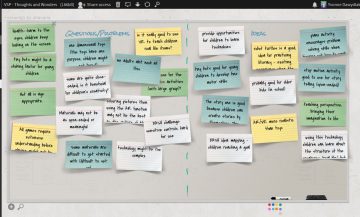
A Scrumblr wall from the Vancouver Summer Program 2019

Scrumblr is a visual note board. It is one of a suite of browser based apps available through the Open Ed Project. All apps in this project are open source. The instance of the app we use is within ‘Sandcats’ a Canadian housed server that is part of the Open Ed Project.


All class response via an app like Scrumblr is a great way to share information and collaboratively create content. Consider a classroom brainstorm that often entails students raising their hands and sharing, one at a time, while the teacher or another student records on the board… now think about the possibilities if groups of students or pairs of students have a shared wall open and are all adding and sharing ideas and resources in real time! Once the brainstorming has taken place, the teacher can follow up with a group discussion that might involve evaluating, sorting and classifying responses… something that can be difficult to make time for when the act of brainstorming and recording is lengthy.

  • Visit: https://oet.sandcats.io/
  • Sign up for a free account using your email (You may then be prompted to enter a login code you will receive via email)
  • Go to the ‘Apps’ Market and select the app you want to use (i.e. Scrumblr)
  • Give your Scrumblr board a title. (note: this board now appears in your list of ‘Grains’)
  • You can share the wall with your students via link or by inviting them to the board.
  • Students can add their ideas without having an account.
  • Should you wish to have accounts for students, they may request these… remember, the server is Canadian housed so the use is FIPPA compliant. Whenever having students share online, please ensure they are mindful of protecting their data privacy.

1 Comment

Filed under Not Subject Specific, Open Educational Resources, Resources

Fostering Understandings of Culture in French Teacher Education through Technology

On May 4, 2019, I had the pleasure of presenting at Investigating our Practices 2019 conference with my colleague, Nick Bartlett. We presented on some findings tied to our small TLEF project, Building Digital Citizenship and Critical Digital Literacies in French Program Teacher Candidates through Open Educational Repositories. That touched upon a subject near and dear to my heart and research interests – culture in the language classroom.

We began by addressing the importance of technology in the language classroom and the various ways in which it can facilitate language learning and student growth. Furthermore, we argued that technology can provide a window to the outside world exposing students to the various cultures of the target language. Kramsch (2013) argues that:

The digital culture of the computer has become our students’ way of learning, thinking, and communicating. Slowly but surely it has transformed what it means to learn a foreign language, what we mean when we talk of ‘communicating’, ‘negotiating meaning’, and, ultimately, ‘understanding the other’ (p. xii)

This digital opportunity therefore provides learners with an outlook into different ways of life, language and meaning. As such, it helps our learners build a more comprehensive perspective of the diverse world in which we live.

From our data, we found that French teacher candidates (TCs) value culture and find it to be an important element in the language classroom. Furthermore, French TCs agreed that authentic materials (materials created for native speakers such as magazine articles, songs, interviews and videos)  are important resources to be used and that technology allows for easy access.

To conclude our presentation, Nick and I recommended a few approaches that purposefully integrate technology to address different cultures. For example, we suggested language teachers take a learner-centered approach by opening the discussion in the classroom so that learners can reflect upon their experiences and perspectives and be exposed to others. We also encouraged language teachers to use authentic materials and to engage with native speakers of the target language as well as learners of the target language through online exchanges such as Skype in the Classroom and PenPal Schools.

Slides from our session: IOP: Fostering Understandings of Culture in French Teacher Education through Technology

References: Kramsch, C. (2013). Foreward. In R. J. Blake (Ed.), Brave new digital classroom: Technology and foreign language learning (Second ed., pp. xi-xiii). Washington, DC: Georgetown University Press.

Liza Navarro
PhD Student
Department of Language & Literacy Education
University of British Columbia
Twitter| LLED


Leave a Comment

Filed under Blog Posts, en francais

Indigenous Storybooks

What is it?

This is a repository of free open licensed online stories written by indigenous peoples in Canada. Inspired by, and utilizing, the open-licensed stories from Little Cree Books, this project aims to make the text, images, and audio of stories available in Indigenous languages as well as English, French, and the most widely spoken immigrant and refugee languages of Canada.


Why is it Relevant?

The stories have permission to be shared and translated so that they are available to readers. They allow Indigenous students to read in their home language and translanguage with English or French and they also allow others to read and listen to these languages in story format. These stories are not co-opted from Indigenous cultures. They have been written and developed specifically for sharing by Indigenous authors.

When choosing to use Indigenous materials in classrooms it’s important to find resources that are created by authentic authors, have been granted permission to be shared, and are accessible to many readers. The stories on this website have been created as  Open Educational Resources and shared under a creative commons license 4.0 which means they can be downloaded, shared, adapted, and modified for classroom use with attribution.


How to get started

  • Visit the Indigenous Stories website.
    • You can choose to take a tour and it will walk you through the website (great for sharing with parents & students)
  • Select the language you wish to listen to the narrator in.
  • Organize stories by level.
  • Choose a book to read.
  • Toggle between languages.

We recommend visiting the FAQ page which helps unpack using credible Indigenous materials authentically


Additional Stories & Materials

Under the Indigenous Storybooks Resources, more stories can be found that have been sorted.


Information was modified from The Indigenous Story Website.

Leave a Comment

Filed under Open Educational Resources, Resources

Storybooks Canada

What is it?

Storybooks Canada is a collection of free Digital Books that are available in multiple languages and accessible through any web browser. The text and recorded narrations can be accessed in English, French, and other languages. As an  Open Education Resource shared under a Creative Commons 4.0 International License, visitors are free to access, download, adapt and modify the content including audio recordings with attribution. The website, created by a team in the Language and Literacy Department of UBC’s Faculty of Education is an Open Source project which means that even the site code is ‘open’!


Why is it relevant?

Students must continue to read in their first language while learning to read in a second target language so that they can maintain their home language and cultural identity while building translanguaging skills (code-switching between two languages). Books are leveled and available in numerous languages so that students can have access to improve their literacy. Students who are language learners require reading resources and these books are available for free and online which also enables them to read at home with their families.

This is the first digital resource that toggles the language to French so it’s highly useful if students want to maintain their first language and they are in a French Immersion class or in a French Speaking location.


How to get started?

Reading a Story

  • Click on a story to read it.
  • Click on Change language to read the story in a different language.
  • Click on en and fr icons to switch quickly between English and French, respectively.
    • Please note that this only changes the language of the text. Click on Change language to change the language of the audio as well.

Listening to Stories

  • Click on the audio icon beside any text on the page to hear the text read aloud.
    • To pause or restart the audio at any point, click on the pause icon.
  • To hear the entire story read aloud, click on the audio controls at the top of the page. (Please note that not all stories have audio versions.)


Note: If you do not see any audio controls, or if the audio controls are greyed out, it means that there is no audio available for that language at this time.


Global Storybooks Project

Canada Storybooks is part of a global initiative to translate a select number of African Stories into numerous languages. Visit the Global Storybooks Portal for access to participating countries and organizations (including indigenous language story and stories translated by speech and hearing specialists)

Make or Translate

If you don’t see a language offered and you know someone, including yourself, who can help with the translation there is an easy way to do so.

With Support

  • Contact globalafricanstorybook@gmail.com

Without Support (by yourself online)

  • Visit the African Storybook Make Page and create an account.
  • Confirm your email address.
  • Read
    • Filter by language and/or by reading level
    • **There are more available in this online portal than on the storybooks website**
  • Make
    • Select Make
    • On the Second menu bar, select Create and then New Storybook
    • Use the existing images from the other stories to either create a new story OR follow the sequence of the original story to translate it.

You can also download the African Storybook app for iOS or Google Play which features many of the books translated.


  • Image Gallery

Leave a Comment

Filed under Open Educational Resources, Resources

TeachBC

whatisit.png

TeachBC is a repository of Open Educational Resources (OERs) including teaching resources, lesson plans, and unit plans relevant to the K-12 BC Curriculum. Resources are provided by teachers and typically non-profit organizations uploading their materials or providing links so that anyone can browse and download them to then freely use, adapt, or modify for their classroom.

Why-is-it-relevant-360x82.png

All of the materials are provided by either BC Teachers or Organizations that are using the BC curriculum and there are recent uploads. It is becoming a ‘go to place’ for BC teachers! On TeachBC, you can also upload and share your own resources (or creative commons resources you have adapted) thus contributing in a valuable way to the profession. You might share links to useful websites, slides, images or videos you’ve created, a lesson plan or unit plan. Users can then search through resources by subject, grade level, resource type, title, description, language, and more.

how-to-get-started-360x80.png

Visit TeachBC and select whether you want to Browse or Share your own resource.

If you choose to Share please keep in mind that you will need to:

  • Create an account.
  • Follow the Copyright Laws for any content you upload. Tips here: Ready for Open Sharing Assess Your Lesson Plan
  • Be aware that to change or remove your resource you need to contact them (through a handy link!)
  • UBC BEd students are invited to tag their resource with #ubctc if they wish to ‘identify’ as a UBC pre-service teacher.

videopng-360x61.png

Video from TeachBC’s help page.

Leave a Comment

Filed under Not Subject Specific, Open Educational Resources, Resources

OEC: Open Educational Courses


whatisit.png

Open Educational Courses (OEC) are one type of Open Educational Resource (OER). OER’s, according to UNESCO, are “teaching, learning and research materials in any medium – digital or otherwise – that reside in the public domain or have been released under an open license that permits no-cost access, use, adaptation and redistribution by others with no or limited restrictions.”

Read more on Open Education Resources (which go beyond courses)

Why-is-it-relevant-360x82.png

Open Courses provide global and legal access to education, which is a United Nations basic human right (Article 26). For a teacher, OECs provide access to those who wish to further their own Professional Development or who want resources that they can then legally modify and adapt to then use in their own classrooms.

OECs are also important for developing countries and rural communities, where many students may not be able to afford textbooks, where access to classrooms may be limited, and where teacher-training programs may be lacking. UBC has developed MOOCs (Massive Open Online Courses) which are available to anyone with internet access so that individuals are able to learn about salient topics like:


how-to-get-started-360x80.png

Decide what you want to pursue based on either your own interests or by looking through some available online courses. You may choose to focus on courses or materials to use in your classroom but you might also want to explore a topic for your personal growth.

Here are some popular OECs that may benefit your teaching pedagogical practice:

videopng-360x61.png

Blink Tower (2012) OER (Open Educational Resources) Introduction


More Available OERs – beyond open courses


  • SOL*R (BCcampus)

Digital resources, lesson plans, and unit plans created by BC Teachers for BC Teachers. Access is open to everyone and Teachers can upload their own resources too.

Licensing

This guide’s content was adapted from work done by University of CalgaryBC CampusSimon Fraser UniversityGeorge Washington University and more.

Leave a Comment

Filed under Open Educational Resources, Resources