Category Archives: Resources

Mind Maps App

section header - what is it?

Mindmaps is a concept mapping app that is open-source, totally free and without advertisements. Moreover, the app allows you to build your concept map in your browser and save it in several formats. This is only one tool for creating mind maps or concept maps. To learn more about high tech, low tech and no tech approaches to mind-mapping, please visit the “Concept Maps for Teaching and Learning” blog post.

section header - why is it relevant


There are many ways to build concept maps, including apps. Unlike this app, however,  many of them require an account or download of the program, or have restrictions in the free version making them less useful to educators. Concept or Mind-mapping is a powerful teaching, learning and organizational strategy that provides a visual means of understanding or representing ideas.

  1. Go to mindmaps.app
  2. Click in Central idea in the red circle and include the main idea of your concept map
  3. Move the red dot that appeared inside your central idea to create sub-ideas.
  4. Add a sub-idea to the new box that appeared.
  5. Use the Navigator on the right side to visualize the whole design of your concept map.
  6. Change the color and style of your words and arrows using the Inspector on the right of the screen.
  7. Click on an object to move it or change its dimensions.
  8. Save or export your project choosing a format (top-right corner).

Video Demonstration

This video is a demonstration of how to build a conceptual map using the features of the Mind Mapping App:


Guest post by Peer Tutor Ariane Faria dos Santos (Ph.D. EDCP), March. 2022.

Leave a Comment

Filed under Curriculum, Digital Tools and Apps, Not Subject Specific, Resources

Concept Maps for teaching and learning

What are concept maps?

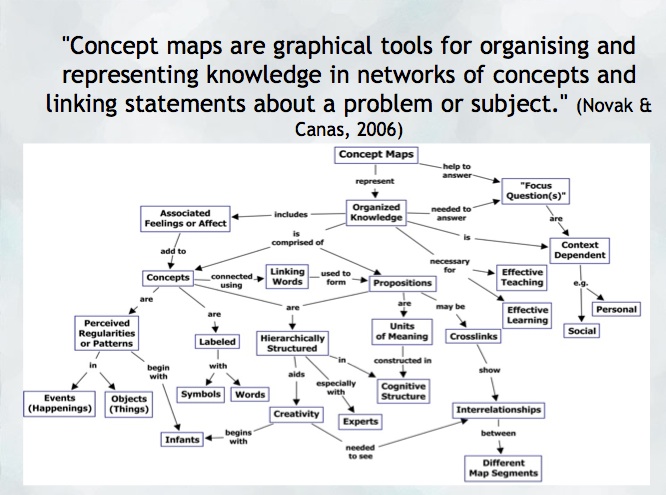
“A concept map is a type of graphic organizer used to represent knowledge of a topic, forge connections between ideas and create visual representations of one’s understandings. Concept maps begin with a main idea (or concept) and then branch out to show how that main idea can be broken down into specific topics” (Novak & Canas, 2006).  Visit the Concept Mapping resource post on this blog for a brief overview and links to resources.

Features of concept maps

There are four essential features represented differently in a concept map:

  1. Concepts: are words that try to represent a phenomenon, object, or idea. They may synthesize patterns in events or knowledge produced over time. In concept maps, these are depicted as shapes in the diagram.
  2. Linking words/phrases:  are used to connect two or more concepts and express some kind of relationship between them. They may indicate cause, consequences, conditions. In general, are written using a verb or few words.
  3. Focus concept or question: it is the main goal of a concept map.  It may be a question, an explanation, or a general idea that conducts your thought and organize all ideas around in the concept map. It is highlighted in the concept map, depending on the hierarchy chosen (top, center, etc.).
  4. Hierarchical and structure: it is how you will choose to organize the main concepts and their connections. It can be hierarchical (the main concept in the top), circle (the main concept in the middle), or other shapes appropriated to the idea you want to express.

Read more on  about the ‘concept’ of ‘concept mapping’ in this blog post on the “Inspiration” website and how teachers and their students might use concept maps, mind maps, or outlines to support writing, idea generation, and organization, planning and more. Inspiration is a software commonly found on school district devices.

You can also find a step-by-step construction of a concept map about the solar system in the Lucidchart or in the example below:

When to use concept maps in education?

Concept maps are powerful graphic organizers that can be used in many ways to illustrate and explore connections across ideas. In this sense, concept maps allow students to formulate their understanding in a non-linear way of thinking, showing their process of thinking during understanding a new idea or content.

Teachers can use concept maps to:

  1. Build new knowledge, deepen students’ understanding: designing a concept map provides students and teachers with an opportunity to construct and share their understanding of a topic, theme, concept, area of interest. This Edutopia article provides a good starting point for learning more about the power of concept maps and other strategies to support deeper thinking.
  2. Identify possible misconceptions: during the process of designing a concept map, teachers can understand better the logic used for students to build their knowledge and the origin of misconceptions. Curtis Chandler, a former Kansas teacher of the year shares how concept maps can be used to understand some students’ misconceptions or not use accurate language in a ‘middleweb’ blog post.
  3. Designing lessons: concept maps can even be used by teachers as a format for planning units or lessons of instruction, allowing teachers to visualize the logic used to connect several lessons into a unit plan or make cross-curricular connections.
  4. Assessment: concept maps can help students illustrate the connections between their ideas, concepts, or content in meaningful ways and can be used as formative and summative assessments. The University of Waterloo has some guides about what is important to consider when designing rubrics for assessing concepts maps.
  5. Create study habits: teachers can have students create concept maps summarizing the main ideas of a unit, creating the habit of continuum revision of the knowledge learned.
  6. Encourage collaboration and communication: a mind map might be collaboratively constructed in real time or asynchronously (using appropriate apps) allowing students to negotiate, think critically and communicate their ideas and understandings with others.

How to get started? mindmap

As mentioned, CMaps, concept maps can be analogue or digital. Teachers might consider providing students with a choice in developing their map using high tech or low/no-tech approaches depending on the objectives. If the objective is to widely share the map, then digital may be preferable (of course, students might also take a photo of a map ‘in process’ and one that is ‘completed’ in order to share as part of a portfolio or published work/project).

Some higher-tech options

  • Mindmaps: it is a tool that allows you to create concept maps without the need for an account. It also allows you to save your map in the cloud or download it to your computer.
  • Inspiration or Kidspiration as computer based or iPad apps Highly visual concept mapping software that allows the user to easily insert images from a large media folder. School districts commonly license these applications for use on their devices.
  • Bubbl.us is an online collaborative concept mapping software – each individual with an account can be invited to contribute to a given map being created in the cloud. With a paid educator account, a teacher can invite students using a link to either view or collaborate (students do not need to provide their information or sign up for an account). Paid app with Free trial options for Educator accounts.
  • For schools using ‘Google Classroom’   MindMup or Miro offer collaborative mindmapping (login required)
    • Teachers should always be aware of appropriate permissions in their context/school districts. These might include parental consent, student informed consent or it may not be permitted to have students sign up using gmail or other account information.

No/Low Tech Options

Collaborative or Individual drawing on chart paper or using sticky notes on a whiteboard or a table with a group of students are great options for kinesthetic or non-digital mind mapping. A primary teacher might even have students use kinesthetic, solid objects to create their mind map. Teachers might begin helping students develop their ability to connect ideas by providing a skeleton. This will help scaffold learning and introduce students to different ways to connect ideas.

Freeform Concept maps can be drawn by hand or using some of the available draw applications made for smartphones and tablets!


References:

Novak, J. and Cañas, A (2006): The Theory Underlying Concept Maps and How to Construct Them (Technical Report IHMC CMap Tools 2006-11). Florida Institute for Human and Machine Cognition.


Original post YD 2017 adapted by Peer Tutor Ariane Faria dos Santos (Ph.D. EDCP), Feb. 2022.

Leave a Comment

Filed under Active Learning, Assessment, Blog Posts, Curriculum, Digital Tools and Apps, Inclusive Practices, Inquiry, Not Subject Specific, Planning, Remote teaching & learning, Resources, STEAM

All Class Response – engage & assess

Educators and researchers have long considered the benefits of students actively engaging in the classroom and how this can lead to gains in student learning. One way to achieve such engagement is by effectively incorporating all-class response or a student response system (SRS) as a part of your classroom assessment (and teaching) approaches.

Be sure to keep in mind that the efficacy of any student response system depends on the quality of the questions and how you use the system. You will learn, as part of your course work, how to develop effective questions (including multiple choice). This work will be helpful in selecting an SRS and constructing a poll or quiz for formative or summative assessment. Using an effective discussion strategy will increase the value of an SRS.

All class response (vs. hands up/volunteers), including the use of a digital student response system (SRS) can lead to greater student engagement.  Martyn’s 2007 article in Educause describes how the efficacy of assessments and increases in student learning are achieved when an SRS is coupled with socio-constructivist methods. The use of these systems along with student discussion, peer teaching and pair share can also lead to greater student satisfaction and engagement. All class response is in keeping with a large body of research supporting more inclusive approaches to assessment (Nagro et al, 2016)

Providing time for your students to share their questions and understandings is key to ensuring that learning is happening in your classroom. All-Class Response is one ‘type’ of strategy that can support engaging more, or hopefully all, learners and inviting (or even requiring) participation. Some of these strategies and tools can even support anonymity which may encourage students who are more reluctant to share orally. In some cases, responses of the group can be projected so that students are able to access the responses of others as they formulate their own thoughts.

All-Class Response and Student Response Systems (SRS)

High Tech

  • Mentimeter – polling software that allows for various types of response and graphical representations (plot graphs, bar graph, word cloud, tiled short answer response)
  • Poll Everywhere – students answer poll questions using browser, mobile app or text response
  • Socrative – create a class account to track responses, students answer using browser or mobile app
  • Answer Garden – instantly generates a word cloud of responses, no account needed
  • Kahoot – gameify learning in your classroom with ‘Kahoots’
  • Flip Gridcreating and sharing videos in a Microsoft learning tools environment (NB: many coast metro school districts use FlipGrid and other MSoft tools because of their Canadian data housing). It can also be used free as a stand alone tool.

Here’s a Student Response System Comparison Chart for an at a glance view of each of the above systems.

Low Tech

    • Plickers – all you need are free printable scan cards, a teacher account and one mobile device to record and track responses.
    • iClickers – a set of iclickers for Mac and PC are available on loan in the UBC Neville Scarfe Education Library.

No Tech – a small selection of strategies

  • Thumbs up, down, sideways
  • Red card/Green card – I had a laminated set so students could flip the cards (cards can mean yes/no, stop/go, or A/B or…?
  • Letter or number cards (each student has a set)
  • Mini Individual White Boards – to record and show responses
  • Sticky Notes – have students share their idea, question, word, wonder and place on the board, around the room, on charts. Sort and classify and organize to work with the ideas.
  • Placemat Activities: Large format paper on a desk (can be separated into grids or more free form depending on your purpose) allows a group of 3 or 4 students to share ideas at the same time. These could also be concept maps/Mind maps for even more critical thinking!
  • Write around the room: students pick a spot on the whiteboard and record responses. This could be combined with a small group discussion and one or two students then go to the board to record… space dependent though I know teachers who also use their windows and put chart paper up…

It is important to note that while these no tech approaches do not provide the anonymity that digital tools can afford, they can provide authentic opportunities for formative assessment and student voice. To leverage the ‘visibility’ of responses, a teacher might have students turn and look at the responses of others, have discussion about varied responses and even change their response.

Content co-creation and brainstorming:

Allow your students to co-create their understandings, share their ideas and questions can lead to deep learning. Here are just a few suggestions:

  • Padlet – this multi-modal response digital wall is great for brainstorming, checks for understanding and formative assessment (and now includes ability to add audio and drawing in addition to text, hyperlinks, video, images)
  • Concept mapping is a powerful tool for illustrating complex links between ideas (be they images or text). Many softwares allow for hyperlinking and embedding images and video. Mindmup is a browser based application that allows co-creation of a concept map across time and space (NB: co-creation seems to now be a paid level of access – I’m trying to find another option… Schools/Districts using Google Classroom will have co-creation access).

Some Considerations when employing Digital Tech:

  • BYOD and Access – bring your own device – Are there policies in place in my jurisdiction, school, district or are there rules in my classroom to consider? What about students who do not have access to a device? When pairing or grouping students and expecting one device in a group, do you know if the student who owns that device is willing to share it OR are there devices in the school you can borrow? What impact does it have on students when they do not have the same access as others?
  • FIPPA – Freedom of Information and Privacy Protection act – Students data should not be shared on non-Canadian housed servers… Am I protecting students data privacy? Do I have necessary permissions or consent? Am I engaging my students in critical digital literacy discussion around privacy & safety in a broader sense? School Districts will have policies in place that meet the informed consent requirements of FIPPA. Be aware of local policies. (See this helpful guide from BCTF to support teachers and parents)

Additional Resources & Strategies:

Chapter 4 of Leahy and Williams’, Embedding Formative Assessment, makes a case for ‘all student response’ and limiting teacher questions to only those that propel learning. This book is a valuable addition to any teacher’s library and clearly links theory with practical strategies and relevant advice. (UBC Library has a copy)

BackChannel Chat:

By allowing students to voice their ideas or ask questions during a lecture or class work period using electronic tools such as those built into most learning management systems and widely available free online, you are providing opportunities for students to ask just-in time questions, share thoughts and connect with one another; potentially increasing student engagement and learning. These potential benefits come with ‘management’ needs and requires the development of a set of expectations in the classroom that student can follow. This can take time, usually involves some trial and error but is a risk that may be worth taking when one considers the increase in student agency that can result from the moderate risk. The notion that engaging the ‘backchannel’ during lectures and classes can add a more active component to what are sometimes more passive forms of teaching is taking hold with the growth in BYOD (bring your own device) in secondary and post-secondary classrooms.

High Tech

  • Mentimeter is one ‘tool’ example. Many other SRS’s can be used in the same way.
  • Teams and Google Classroom have their own backchannels and response systems either built in or that can be integrated depending on District permissions and access.

Low/No Tech

  • Question box – allow students to note questions on a slip of paper and pop into a question box. I’ve also had students flag a page in their notebook prior to handing in with a sticky note.

Random Selection

This isn’t strictly speaking an all-class response strategy but may encourage participation. In some instances, it may be acceptable to have an understanding in the class or in a particular lesson that you may randomly call on students to respond to questions, to share ideas or their wonders. When using this strategy, it is important to ensure you are equitable and that you are considerate of your learners… if the questions is very high level and/or will likely NOT return an appropriate or correct response, then probably best to avoid this approach. If the question is accessible and you give prior warning and you are confident all learners will have the ability to at least make good attempts, then these approaches might be employed:

High Tech:

  • Random Name Generator – there are several available online including some developed for interactive whiteboards/Smartboards. Ensure you do not include full names or other identifying info and always check out privacy policies. I’ve played with this one (developed by a Principal in the UK) https://www.transum.org/software/RandomStudents/

Low/No Tech:

  • Popsicle Stick names, Playing Cards, Bingo card, etc – Teacher draws a name at random and student responds
  • The teacher might encourage more responses by providing students with tokens and asking that they try to ‘use’ a token during each class discussion… this can also help limit the ‘over-responders’ who sometimes don’t leave space for others (i.e. they can only ‘spend’ up to X tokens each discussion…)

The value of anonymous responses…

We know that adolescent learners appreciate, or some would even say require, the opportunity to participate anonymously. Due to their sometimes heavy reliance on peer approval, students at this age can be reluctant to share their views orally. For this reason, employing an SRS can give voice to quieter learners and generate more honest responses. Of course, anonymity comes with risks so be sure to consider the following:

  • How are responses published, shared or viewed?
  • Can I moderate responses? (i.e. can I see them and approve them before they are ‘live’ to the students)
  • Can students change their responses or provide multiple responses?
  • Can I archive or track student responses in some way? (do I need to?)
  • How will I respond if a student posts an inappropriate response?
  • How can I create a class climate the promotes risk taking and accountability?
  • consider small group response vs. individual response – students discuss their ideas and, using one device for the group, record their response… this can lessen the potential for inappropriate responses especially where the teacher is actively engaged in/with the class by circulating and checking in.

Closing Notes:

Remember that creating a positive classroom climate and cultivating a place of respect and value takes intention, time and patience on the part of the teacher.
Any tool or strategy may take practice. Give yourself (and your students) the benefit of trying something more than once. If it’s a tool, try allowing time to ‘play’ with it in a low stakes way so that students can learn the affordances.

References

Low-tech classroom response systems(Clickers). (n.d.). New York Tech. Retrieved October 26, 2023, from https://www.nyit.edu/ctl/blog/low-tech_classroom_response_systems

Nagro, S. A., Hooks, S. D., Fraser, D. W., & Cornelius, K. E. (2016). Whole-group response strategies to promote student engagement in inclusive classrooms. TEACHING Exceptional Children, 48(5), 243–249. https://doi.org/10.1177/0040059916640749


Leave a Comment

Filed under Active Learning, Blog Posts, Digital Tools and Apps, Inclusive Practices, Planning, Resources

Podcast Series: interdisciplinary learning

Thinking Outside the Sandbox was created in summer 2020 as the result of a collaboration between two graduate students Belén Guillemin and Nashwa Khedr, together with Yvonne Dawydiak, Learning Design Manager, Teacher Education as part of the 2020 Scarfe Sandbox team. The inspiration for the podcast series came about as Belen and Nashwa interviewed Faculty of Education faculty members to learn more about their views on interdisciplinary learning and STEAM. During the recorded interviews, they noticed some themes emerging across the separate video interviews. In order to capture these broader themes, Belen devised a script that wove together excerpts from the interviews.

Episodes were published during the 2020-2021 school year. Each episode is accompanied by a blogpost on the Scarfe Sandbox website. Happy Listening!

Listen on Anchor (or get access to alternative streaming platforms including Spotify)

Episodes (in order):

  1. Outdoor and Interdisciplinary Learning featuring Dr. Harley Banack, Dr. Sandrine Han: Podcast Episode 1 & Sandbox Blogpost 
  2. Technology and Interdisciplinary Learning featuring Dr. Jennifer Jenson, Dr. Marina Milner-Bolotin, Dr. Sandrine Han: Podcast Episode 2 & Sandbox Blogpost
  3. The Arts and Interdisciplinary Learning featuring Dr. Shannon Leddy, Dr. Marina Milner Bolotin, Dr. Sandrine Han: Podcast Episode 3 & Sandbox Blogpost
  4. Challenges in Interdisciplinary Learning featuring Dr. Shannon Leddy, Dr. Hartley Banack, Dr. Marina Milner-Bolotin, Dr. Sandrine Han: Podcast Episode 4
  5. Learning about and through Food featuring Dr. Kerry Renwick, Dr. Susan Gerofsky, Dr. Lorrie Miller: Podcast Episode 5 & Sandbox Blogpost
  6. Textiles and Interdisciplinary Learning featuring Dr. Lorrie Miller, Dr. Kerry Renwick: Podcast Episode 6 & Sandbox Blogpost
  7. Math and Interdisciplinary Learning featuring Dr. Susan Gerofsky, Janice Novakowski, Dr. Cynthia Nichol: Podcast Episode 7, Episode 8, Episode 9 & Sandbox Blogpost

We gratefully acknowledge the funding provided by the students of UBC via a Teaching Learning Enhancement Fund grant, Weaving Together Arts and STEM. We would also like to thank the many faculty who volunteered their time to prepare for and participate in interviews leading to the podcast episodes and associated blog posts.

Leave a Comment

Filed under AppliedDesignSkillsTechnologies, Blog Posts, Curriculum, Engineering, Inclusive Practices, Math, Not Subject Specific, Planning, Podcasts, Resources, Science, STEAM, Technology, The Arts

Resources for Indigenizing and Decolonizing Education

The Truth and Reconciliation Commission Calls to action and the BC curriculum requires teachers to consider and incorporate Indigenous voice, issues, resources and perspectives in their teaching. Teachers in BC are also reminded that the 9th Professional Standard (link to BCTC Resource with full text) requires educators to authentically engage in decolonizing their practices. The video, Professional Standard 9 – Truth and Reconciliation, Moving Forward Together offers a moving call to action.

Educators respect and value the history of First Nations, Inuit and Métis in Canada and the impact of the past on the present and the future. Educators contribute towards truth, reconciliation and healing. Educators foster a deeper understanding of ways of knowing and being, histories and cultures of First Nations, Inuit and Métis.

The aftermath of the Summer 2020 anti-racism protests sparked an international conversation on the urgency of racial justice for Black, Indigenous and People of Colour, a conversation that continues today. As we reflect on how to be anti-racist and how to decolonize our societies, we must discuss the importance of education in achieving this. I believe that highlighting the histories and cultures of marginalized groups in the education system is essential to creating a truly anti-racist society. Finding resources to begin incorporating these ideas into classrooms can be daunting for many.

This post attempts to highlight a handful of Indigenous education-related resources that can help guide teachers in creating anti-racist lessons and activities that highlight the importance of reconciliation with Indigenous peoples. It is important to seek authentic, local resources and avoid ‘pan-Indigenous’ perspectives.

Resource Collections:

Curriculum Bundles have been assembled by Indigenous educators from around British Columbia, most of whom are students and graduates of the NITEP program.  Each bundle focuses on a particular skill, resource, or place, and connects with BC curriculum.

The UBC based website, https://indigenizinglearning.educ.ubc.ca/  includes well-curated resource links and information about ‘welcomes’ and ‘land acknowledgements’.

Indigenous educators are creating and openly sharing their resource collections:

Subject Specific Resources

At a glance documents representing implicit and explicit connections to each grade level and subject area are part of the Indigenous Education Resources shared by the BC Ministry of Education.  On their main page, you’ll also find videos and a Resource Inventory to help teachers incorporate First Peoples Knowledge and Perspectives.

English First Peoples

  • The FNESC Planning for Instruction, Grades 10-12 document (2018) is meant for English teachers (specifically for the course English First Peoples, but with some great ideas for any English teacher)

Physical Health Education

  • The BC Ministry of Ed has created a document to support incorporating FPPL in planning for PHE k-12. This document makes it quite clear that incorporating Indigenous knowledge and perspectives is implicit in the PHE curriculum across all grade levels (while also being explicit in PHE Outdoor Ed at the senior secondary level)

Cultural Maps:

Native Land is a website that maps out the ancestral lands of Indigenous peoples from

Here is a screen capture of a map of the territories of Indigenous groups in North America.

around the world. The main feature of the website is an interactive map that can filter the lands by linguistic groups, territories, and treaties. Another local BC website, The First People’s Map of BC, shares Indigenous language, art and heritage in an interactive format perfect for students seeking to learn more about local language and culture or connect with artists. You can even hear audio clips of native language speakers.

The Indigenous Ed team in SD61, Victoria shares a variety of maps in their Social Studies Resource area for Secondary teachers.

FNESC:

The First Nations Education Steering Committee, or FNESC, is an organization that advocates for the inclusion of Indigenous history and cultures into the curriculum as well as the well-being of Indigenous students in British Columbia. They offer a plethora of resources for teachers to make use of in classrooms, including lesson-planning documents across subject areas.

UBC Booklists:

The UBC Education Library booklists are available for educators and teacher candidates, offering an abundance of resources ranging from picture books to use in the classroom to lesson-planning guides. The library offers multiple booklists regarding Indigenous culture and history. These booklists cover topics such as residential schools, storytelling resources and literature written by Indigenous authors.

Puppets at Xwi7xwa:

In addition to their vast textual resources, the Xwi7xwa Library at UBC has a collection of puppets created by Indigenous artists to help engage students using storytelling. There are a variety of collections that can be borrowed from the library, including the “Grace the Eagle“, “Splash the Orca” and “Streamer the Salmon” collections.

Digital Stories:

Indigenous Storybooks (post en francais – Storybooks Autochtons) is a repository of free openly licensed online stories written by Indigenous peoples in Canada. Inspired by, and utilizing, the open-licensed stories from Little Cree Books, this project aims to make the text, images, and audio of stories available in Indigenous languages as well as English, French, and some of the most widely spoken immigrant and refugee languages of Canada.

Witness Blanket is a unique and striking digital collection. This large-scale work of art carries items and stories, accompanied by the voices of residential school survivors. The site also houses a Teacher’s guide that helps teachers build empathy with their students and develop a human rights culture in their classroom.

Strong Nations:

Strong Nations

Strong Nations is an online store and publishing house that sells authentic Indigenous-created art and literature. They are a BC-based organization, however they offer resources from Indigenous groups from all over Canada. One interesting resource that I found on Strong Nations is the “This Land is our Storybook” series, which is a series written from the perspective of Indigenous children living in the Northwest Territories.

As we navigate conversations surrounding anti-racism and reconciliation, we must continue this discussion in teacher education and in the education system more broadly. You may wish to visit SFU’s “Think before you Appropriate”  resource as you explore and learn. I hope you will explore the resources in this post so that you can begin this work in your own classroom.


Guest post by Naomi Hudson, Scarfe Sandbox Project Assistant and Virtual Peer Mentor, Winter 2020; edited by Yvonne Dawydiak, Winter 2022, Fall 2023.

Leave a Comment

Filed under Blog Posts, Inclusive Practices, Not Subject Specific, Planning, Remote teaching & learning, Resources, Storytelling

FNESC

Here is a picture of a document on the FNESC website about different literature that you can use to incorporate Indigenous perspectives into the classroom.

The First Nations Education Steering Committee, or FNESC, is an organization that promotes the incorporation of Indigenous voices into the education system. They also advocates for the well-being of Indigenous students in British Columbia. FNESC offers a variety of Indigenous education resources, including:

  • Resources for English First Peoples Courses
  • Resources for promoting Indigenous languages and cultures
  • STEM resources
  • Resources for post-secondary students and faculty
  • Lesson planning resources for teachers

In finding ways to incorporate authentic Indigenous perspectives and ways of knowing in the classroom, it is important to make sure that voices from Indigenous communities are included. For decades, FNESC has been at the forefront of promoting Indigenous education in British Columbia. The resources that they provide on their website can be valuable additions to classrooms throughout the province.

Getting started on the FNESC website is simple and there are only two major steps!:

  1. Go onto http://www.fnesc.ca/
  2. Explore the resources that FNESC offers under their menu, including resources under “Learning First Peoples” and “Post-Secondary”


Leave a Comment

Filed under Not Subject Specific, Open Educational Resources, Resources

Native Land

Native Land is an online, interactive map that maps out the ancestral lands of Indigenous peoples all over the world, specifically in the Americas, Northern Europe and Austronesia. Its “About” page states that it was created in 2015 by a non-Indigenous man named from the Okanagan named Victor Temprano. Right now, Native Land is run by a team of Indigenous and non-Indigenous people from around Canada and around the world.

There is incredible diversity amongst Indigenous populations which is sometimes overlooked and can lead to a pan-Indigenous view…  Native Land is a valuable resource that can help expose students to the heterogeneity of Indigenous populations, both nationally and internationally. Teachers might use Native land to recognize the territories on which their own school resides, or when learning about other places in the world so that they incorporate more local voices and resources in their teaching.

  1. Go to native-land.ca
  2. Use the interactive map to view the locations of the ancestral lands of various Indigenous groups from around the world.
    1. There are now two ways to view and search: Classic Map and Constellations.

      Constellations view: search by address and get help from Kōrero

      Native Land also includes an ‘acknowledgement helper’ they call ‘Kōrero’.

    2. Search the lands by address, Territories, Languages and/or Treaties

Leave a Comment

Filed under Digital Tools and Apps, Inclusive Practices, Not Subject Specific, Open Educational Resources, Planning, Resources