Category Archives: Active Learning

Concept Maps for teaching and learning

What are concept maps?

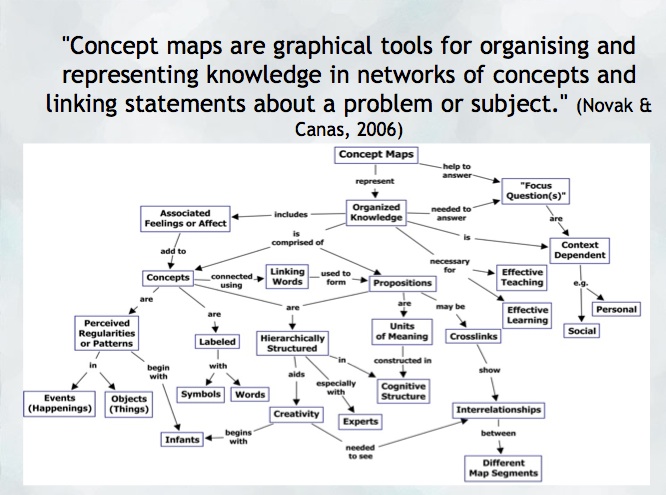
“A concept map is a type of graphic organizer used to represent knowledge of a topic, forge connections between ideas and create visual representations of one’s understandings. Concept maps begin with a main idea (or concept) and then branch out to show how that main idea can be broken down into specific topics” (Novak & Canas, 2006).  Visit the Concept Mapping resource post on this blog for a brief overview and links to resources.

Features of concept maps

There are four essential features represented differently in a concept map:

  1. Concepts: are words that try to represent a phenomenon, object, or idea. They may synthesize patterns in events or knowledge produced over time. In concept maps, these are depicted as shapes in the diagram.
  2. Linking words/phrases:  are used to connect two or more concepts and express some kind of relationship between them. They may indicate cause, consequences, conditions. In general, are written using a verb or few words.
  3. Focus concept or question: it is the main goal of a concept map.  It may be a question, an explanation, or a general idea that conducts your thought and organize all ideas around in the concept map. It is highlighted in the concept map, depending on the hierarchy chosen (top, center, etc.).
  4. Hierarchical and structure: it is how you will choose to organize the main concepts and their connections. It can be hierarchical (the main concept in the top), circle (the main concept in the middle), or other shapes appropriated to the idea you want to express.

Read more on  about the ‘concept’ of ‘concept mapping’ in this blog post on the “Inspiration” website and how teachers and their students might use concept maps, mind maps, or outlines to support writing, idea generation, and organization, planning and more. Inspiration is a software commonly found on school district devices.

You can also find a step-by-step construction of a concept map about the solar system in the Lucidchart or in the example below:

When to use concept maps in education?

Concept maps are powerful graphic organizers that can be used in many ways to illustrate and explore connections across ideas. In this sense, concept maps allow students to formulate their understanding in a non-linear way of thinking, showing their process of thinking during understanding a new idea or content.

Teachers can use concept maps to:

  1. Build new knowledge, deepen students’ understanding: designing a concept map provides students and teachers with an opportunity to construct and share their understanding of a topic, theme, concept, area of interest. This Edutopia article provides a good starting point for learning more about the power of concept maps and other strategies to support deeper thinking.
  2. Identify possible misconceptions: during the process of designing a concept map, teachers can understand better the logic used for students to build their knowledge and the origin of misconceptions. Curtis Chandler, a former Kansas teacher of the year shares how concept maps can be used to understand some students’ misconceptions or not use accurate language in a ‘middleweb’ blog post.
  3. Designing lessons: concept maps can even be used by teachers as a format for planning units or lessons of instruction, allowing teachers to visualize the logic used to connect several lessons into a unit plan or make cross-curricular connections.
  4. Assessment: concept maps can help students illustrate the connections between their ideas, concepts, or content in meaningful ways and can be used as formative and summative assessments. The University of Waterloo has some guides about what is important to consider when designing rubrics for assessing concepts maps.
  5. Create study habits: teachers can have students create concept maps summarizing the main ideas of a unit, creating the habit of continuum revision of the knowledge learned.
  6. Encourage collaboration and communication: a mind map might be collaboratively constructed in real time or asynchronously (using appropriate apps) allowing students to negotiate, think critically and communicate their ideas and understandings with others.

How to get started? mindmap
As mentioned, CMaps, concept maps can be analogue or digital. Teachers might consider providing students with a choice in developing their map using high tech or low/no-tech approaches depending on the objectives. If the objective is to widely share the map, then digital may be preferable (of course, students might also take a photo of a map ‘in process’ and one that is ‘completed’ in order to share as part of a portfolio or published work/project).

Some higher-tech options

  • Mindmaps: it is a tool that allows you to create concept maps without the need for an account. It also allows you to save your map in the cloud or download it to your computer.
  • Inspiration or Kidspiration as computer based or iPad apps Highly visual concept mapping software that allows the user to easily insert images from a large media folder. School districts commonly license these applications for use on their devices.
  • Bubbl.us is an online collaborative concept mapping software – each individual with an account can be invited to contribute to a given map being created in the cloud. With a paid educator account, a teacher can invite students using a link to either view or collaborate (students do not need to provide their information or sign up for an account). Paid app with Free trial options for Educator accounts.
  • For schools using ‘Google Classroom’   MindMup or Miro offer collaborative mindmapping (login required)
    • Teachers should always be aware of appropriate permissions in their context/school districts. These might include parental consent, student informed consent or it may not be permitted to have students sign up using gmail or other account information.

No/Low Tech Options

Collaborative or Individual drawing on chart paper or using sticky notes on a whiteboard or a table with a group of students are great options for kinesthetic or non-digital mind mapping. A primary teacher might even have students use kinesthetic, solid objects to create their mind map. Teachers might begin helping students develop their ability to connect ideas by providing a skeleton. This will help scaffold learning and introduce students to different ways to connect ideas.

Freeform Concept maps can be drawn by hand or using some of the available draw applications made for smartphones and tablets!


References:

Novak, J. and Cañas, A (2006): The Theory Underlying Concept Maps and How to Construct Them (Technical Report IHMC CMap Tools 2006-11). Florida Institute for Human and Machine Cognition.


Original post YD 2017 adapted by Peer Tutor Ariane Faria dos Santos (Ph.D. EDCP), Feb. 2022.

Leave a Comment

Filed under Active Learning, Assessment, Blog Posts, Curriculum, Digital Tools and Apps, Inclusive Practices, Inquiry, Not Subject Specific, Planning, Remote teaching & learning, Resources, STEAM

Group Work Strategies for All Classrooms

Teachers can feel overwhelmed trying to support the different needs of their students. A group work activity can be a perfect strategy to encourage students to work together, develop their collaboration skills, build classroom community, and support each other.

What is group work?

Cohen & Lotan (2014) define group work as “students working together in a group small enough so that everyone can participate on a clearly assigned learning task” which should be carried out “without direct and immediate supervision of the teacher” (p. 1). These two characteristics are essential because they allow students not only to develop academic knowledge and competencies but also to learn social skills, such as collaboration and responsibility.

However, designing group work is not easy even in a homogeneous classroom and it becomes a big challenge in a heterogeneous classroom, where students have different cultural and language backgrounds, levels of knowledge, and many other distinct characteristics.

Thinking about the possible challenges of group work, Cohen & Lotan (2014) suggest that the group and the tasks should have some features that may help to minimize inequalities in educational settings.

The status problem

Cohen & Lotan (2014) highlight a serious problem in educational places: a student has a different status in the classroom based on both external or internal factors. For example, students who have a facility for mathematics tend to be granted a high status by their peers and teachers. As another example, students for whom English is their second language tend to have a lower status in school. The idea is that schools tend to value some knowledge and skills more than others and, therefore, students from some groups will not be considered “good students” because their competencies and knowledge are not considered “high status” in school settings.

With these considerations in mind, the authors suggest that group work can help change students’ status and, consequently, improve their learning. However, group work should follow some guidelines related to group composition and the nature of the task:

Tasks

To show that all students have equal importance during the group activity, tasks should be designed to include a variety of competencies and knowledge. Students should not be able to complete the task without the collaboration of all members. In this sense, Cohen & Lotan (2014, p. 85) suggest that a task should:

  • be open-ended, productively uncertain, and require complex problem solving;
  • provide opportunities for students to use multiple intellectual abilities to access the task and to demonstrate intellectual competence;
  • address discipline-based, intellectually important content;
  • require positive interdependence and individual accountability;
  • include clear criteria for the evaluation of the group’s product and of the individual report.


Group composition

Cohen & Lotan (2014) argue that three points should be considered when a teacher plans the composition of a group:

1) Size of groups: groups should not be so small that they do not allow a complex interaction between members, but also not so big that they prevent all members from having meaningful participation.

2) Composing groups: the ideal composition is one that balances different skills, knowledge, and status. The authors recommend randomizing students to avoid any bias in group composition. However, teachers may want to think about specific intentions and try to diminish inequalities in their classroom.

3) Hold individuals and groups accountable: even though students are working in a group, it is important to think of both individual and group assessments. It may help to understand individual progression while also considering the value of group work.

Individual roles

Cohen & Lotan (2014) suggest that each individual in the group should have a different role; roles can help to balance power since all members will be essential to complete the task. In addition, teachers can rotate the roles between students, giving more voice to students who usually do not participate or prompting some students to develop specific skills.

The roles can change, but these are some ideas:

  • Facilitator: Ensures that everyone gets the help he or she needs to do the task. They can be responsible for seeking answers to questions within the group – the teacher is only queried if no one in the group can help.
  • Time Manager: Makes sure that the group is progressing and will conclude the task on time.
  • Materials Manager: Is responsible for getting materials and resources and putting them away properly.
  • Participation Manager: Is responsible for making sure that all members have space to express their ideas.
  • Reporter: Is responsible for organizing a group report and presenting to the class.
    • How to implement group work in the classroom?
    • This post from the University of Waterloo discusses essential steps to consider when teachers design and implement group work in their classrooms.
    • Group work can include drawings, playdough, games, or design challenges to get students thinking, discussing, and working together.
  • Groups At Work: Strategies and Structures for Professional Learning, by Laura Lipton and Bruce Wellman is full of group work strategies and activities. Although these strategies are marketed for professional learning, most of them are perfect for classroom use! The strategies are broken into several categories that makes it easy to select an effective activity for your scenario:
    • Strategies for Activating (consider using these for community & relationship building – links to post in this blog)
    • Strategies for Assessing, Goal Setting & Planning (consider using these for self or peer assessment)
    • Strategies for Dialogue & Discussion (consider using these to get students talking and verbally processing concepts)
    • Strategies for Generating Ideas (consider using these for design thinking and ideation. – links to post in this blog)
    • Strategies for Summarizing & Synthesizing (consider using these to help students clarify their understandings and integrate concepts or information)
    • Strategies for Text & Information Processing (consider using these when students are interacting with texts or new information)


Guest post by Peer Tutor Ariane Faria dos Santos (Ph.D. EDCP), 2021; Updated June, 2024 by Peer Mentor Lindsay Cunningham (Ph.D. student, EDCP)


References:

Cohen, E. G., & Lotan, R. A. (2014). Designing groupwork: strategies for the heterogeneous classroom third edition. Teachers College Press.

Lipton, L., & Wellman, B. (2011). Groups at work: Strategies and structures for professional learning. MiraVia.


Leave a Comment

Filed under Active Learning, Blog Posts, Planning, Teaching Strategies

All Class Response – engage & assess

Educators and researchers have long considered the benefits of students actively engaging in the classroom and how this can lead to gains in student learning. One way to achieve such engagement is by effectively incorporating all-class response or a student response system (SRS) as a part of your classroom assessment (and teaching) approaches.

Be sure to keep in mind that the efficacy of any student response system depends on the quality of the questions and how you use the system. You will learn, as part of your course work, how to develop effective questions (including multiple choice). This work will be helpful in selecting an SRS and constructing a poll or quiz for formative or summative assessment. Using an effective discussion strategy will increase the value of an SRS.

All class response (vs. hands up/volunteers), including the use of a digital student response system (SRS) can lead to greater student engagement.  Martyn’s 2007 article in Educause describes how the efficacy of assessments and increases in student learning are achieved when an SRS is coupled with socio-constructivist methods. The use of these systems along with student discussion, peer teaching and pair share can also lead to greater student satisfaction and engagement. All class response is in keeping with a large body of research supporting more inclusive approaches to assessment (Nagro et al, 2016)

Providing time for your students to share their questions and understandings is key to ensuring that learning is happening in your classroom. All-Class Response is one ‘type’ of strategy that can support engaging more, or hopefully all, learners and inviting (or even requiring) participation. Some of these strategies and tools can even support anonymity which may encourage students who are more reluctant to share orally. In some cases, responses of the group can be projected so that students are able to access the responses of others as they formulate their own thoughts.

All-Class Response and Student Response Systems (SRS)

High Tech

  • Mentimeter – polling software that allows for various types of response and graphical representations (plot graphs, bar graph, word cloud, tiled short answer response)
  • Poll Everywhere – students answer poll questions using browser, mobile app or text response
  • Socrative – create a class account to track responses, students answer using browser or mobile app
  • Answer Garden – instantly generates a word cloud of responses, no account needed
  • Kahoot – gameify learning in your classroom with ‘Kahoots’
  • Flip Gridcreating and sharing videos in a Microsoft learning tools environment (NB: many coast metro school districts use FlipGrid and other MSoft tools because of their Canadian data housing). It can also be used free as a stand alone tool.

Here’s a Student Response System Comparison Chart for an at a glance view of each of the above systems.

Low Tech

    • Plickers – all you need are free printable scan cards, a teacher account and one mobile device to record and track responses.
    • iClickers – a set of iclickers for Mac and PC are available on loan in the UBC Neville Scarfe Education Library.

No Tech – a small selection of strategies

  • Thumbs up, down, sideways
  • Red card/Green card – I had a laminated set so students could flip the cards (cards can mean yes/no, stop/go, or A/B or…?
  • Letter or number cards (each student has a set)
  • Mini Individual White Boards – to record and show responses
  • Sticky Notes – have students share their idea, question, word, wonder and place on the board, around the room, on charts. Sort and classify and organize to work with the ideas.
  • Placemat Activities: Large format paper on a desk (can be separated into grids or more free form depending on your purpose) allows a group of 3 or 4 students to share ideas at the same time. These could also be concept maps/Mind maps for even more critical thinking!
  • Write around the room: students pick a spot on the whiteboard and record responses. This could be combined with a small group discussion and one or two students then go to the board to record… space dependent though I know teachers who also use their windows and put chart paper up…

It is important to note that while these no tech approaches do not provide the anonymity that digital tools can afford, they can provide authentic opportunities for formative assessment and student voice. To leverage the ‘visibility’ of responses, a teacher might have students turn and look at the responses of others, have discussion about varied responses and even change their response.

Content co-creation and brainstorming:

Allow your students to co-create their understandings, share their ideas and questions can lead to deep learning. Here are just a few suggestions:

  • Padlet – this multi-modal response digital wall is great for brainstorming, checks for understanding and formative assessment (and now includes ability to add audio and drawing in addition to text, hyperlinks, video, images)
  • Concept mapping is a powerful tool for illustrating complex links between ideas (be they images or text). Many softwares allow for hyperlinking and embedding images and video. Mindmup is a browser based application that allows co-creation of a concept map across time and space (NB: co-creation seems to now be a paid level of access – I’m trying to find another option… Schools/Districts using Google Classroom will have co-creation access).

Some Considerations when employing Digital Tech:

  • BYOD and Access – bring your own device – Are there policies in place in my jurisdiction, school, district or are there rules in my classroom to consider? What about students who do not have access to a device? When pairing or grouping students and expecting one device in a group, do you know if the student who owns that device is willing to share it OR are there devices in the school you can borrow? What impact does it have on students when they do not have the same access as others?
  • FIPPA – Freedom of Information and Privacy Protection act – Students data should not be shared on non-Canadian housed servers… Am I protecting students data privacy? Do I have necessary permissions or consent? Am I engaging my students in critical digital literacy discussion around privacy & safety in a broader sense? School Districts will have policies in place that meet the informed consent requirements of FIPPA. Be aware of local policies. (See this helpful guide from BCTF to support teachers and parents)

Additional Resources & Strategies:

Chapter 4 of Leahy and Williams’, Embedding Formative Assessment, makes a case for ‘all student response’ and limiting teacher questions to only those that propel learning. This book is a valuable addition to any teacher’s library and clearly links theory with practical strategies and relevant advice. (UBC Library has a copy)

BackChannel Chat:

By allowing students to voice their ideas or ask questions during a lecture or class work period using electronic tools such as those built into most learning management systems and widely available free online, you are providing opportunities for students to ask just-in time questions, share thoughts and connect with one another; potentially increasing student engagement and learning. These potential benefits come with ‘management’ needs and requires the development of a set of expectations in the classroom that student can follow. This can take time, usually involves some trial and error but is a risk that may be worth taking when one considers the increase in student agency that can result from the moderate risk. The notion that engaging the ‘backchannel’ during lectures and classes can add a more active component to what are sometimes more passive forms of teaching is taking hold with the growth in BYOD (bring your own device) in secondary and post-secondary classrooms.

High Tech

  • Mentimeter is one ‘tool’ example. Many other SRS’s can be used in the same way.
  • Teams and Google Classroom have their own backchannels and response systems either built in or that can be integrated depending on District permissions and access.

Low/No Tech

  • Question box – allow students to note questions on a slip of paper and pop into a question box. I’ve also had students flag a page in their notebook prior to handing in with a sticky note.

Random Selection

This isn’t strictly speaking an all-class response strategy but may encourage participation. In some instances, it may be acceptable to have an understanding in the class or in a particular lesson that you may randomly call on students to respond to questions, to share ideas or their wonders. When using this strategy, it is important to ensure you are equitable and that you are considerate of your learners… if the questions is very high level and/or will likely NOT return an appropriate or correct response, then probably best to avoid this approach. If the question is accessible and you give prior warning and you are confident all learners will have the ability to at least make good attempts, then these approaches might be employed:

High Tech:

  • Random Name Generator – there are several available online including some developed for interactive whiteboards/Smartboards. Ensure you do not include full names or other identifying info and always check out privacy policies. I’ve played with this one (developed by a Principal in the UK) https://www.transum.org/software/RandomStudents/

Low/No Tech:

  • Popsicle Stick names, Playing Cards, Bingo card, etc – Teacher draws a name at random and student responds
  • The teacher might encourage more responses by providing students with tokens and asking that they try to ‘use’ a token during each class discussion… this can also help limit the ‘over-responders’ who sometimes don’t leave space for others (i.e. they can only ‘spend’ up to X tokens each discussion…)

The value of anonymous responses…

We know that adolescent learners appreciate, or some would even say require, the opportunity to participate anonymously. Due to their sometimes heavy reliance on peer approval, students at this age can be reluctant to share their views orally. For this reason, employing an SRS can give voice to quieter learners and generate more honest responses. Of course, anonymity comes with risks so be sure to consider the following:

  • How are responses published, shared or viewed?
  • Can I moderate responses? (i.e. can I see them and approve them before they are ‘live’ to the students)
  • Can students change their responses or provide multiple responses?
  • Can I archive or track student responses in some way? (do I need to?)
  • How will I respond if a student posts an inappropriate response?
  • How can I create a class climate the promotes risk taking and accountability?
  • consider small group response vs. individual response – students discuss their ideas and, using one device for the group, record their response… this can lessen the potential for inappropriate responses especially where the teacher is actively engaged in/with the class by circulating and checking in.

Closing Notes:

Remember that creating a positive classroom climate and cultivating a place of respect and value takes intention, time and patience on the part of the teacher.
Any tool or strategy may take practice. Give yourself (and your students) the benefit of trying something more than once. If it’s a tool, try allowing time to ‘play’ with it in a low stakes way so that students can learn the affordances.

References

Low-tech classroom response systems(Clickers). (n.d.). New York Tech. Retrieved October 26, 2023, from https://www.nyit.edu/ctl/blog/low-tech_classroom_response_systems

Nagro, S. A., Hooks, S. D., Fraser, D. W., & Cornelius, K. E. (2016). Whole-group response strategies to promote student engagement in inclusive classrooms. TEACHING Exceptional Children, 48(5), 243–249. https://doi.org/10.1177/0040059916640749


Leave a Comment

Filed under Active Learning, Blog Posts, Digital Tools and Apps, Inclusive Practices, Planning, Resources

Learning about and through Food: podcast resource post

Food is an interdisciplinary concept that intertwines through a wide range of subjects: home economics, science, math, arts, and many more.

In Episode 5 of our recently launched Thinking outside the Sandbox podcast, Dr. Kerry Renwick, Dr. Susan Gerofsky, and Dr. Lorrie Miller share their ideas and experiences with respect to food and the development of interdisciplinary learning experiences.

Below are a few resources that might be used to support each of the main points discussed in this episode:

1. Home Economics and Interdisciplinarity

Dr. Kerry Renwick shares how the concept of food could be intertwined with biology, chemistry, as well as issues of race and class.

The topic of food could be used as an entry point to discuss many topics and disciplines. Various interdisciplinary food-related activities and lesson plans are available at Teach BC:

  • Our Animal Neighbours; this unit identifies how animals were and continue to be relied upon and an important part of the lives of First Peoples; furs and skins for clothing and shelter, meat for food, bone, and antler for tools and weapons, etc.
  • Forced from home; this unit explores refugees’ experience with finding food
  • Mock Advertisement: Sustainable Community Lesson Plan; introduces marketing and advertising tactics aimed at children and youth, including those involving food and supplements.

Other resources are available at Teach BC that teach about food in relation to other cultures and geographic regions.

2. Learning from and in School Gardens

Dr. Susan Gerofsky spoke of her experience of the UBC Orchard Gardens where teachers could experiment with teaching outdoors. Check the UBC Orchard garden blog for more ideas on teaching, learning, and growing in the outdoor classroom.

  • Growing your own food helps you eat fresh fruits and vegetables, helps you choose which fertilizers and pesticides come in contact with your food, and control when to harvest your food, thus having more nutrients in your garden-grown vegetables, as highlighted in this Harvard Health Letter.
  • Engage your students with gardening their food in the school garden, or in one of the nearby community gardens.
  • Encourage your students to learn about gardening through the various activities and lesson plans provided by Kids Gardening.
  • Another interesting interdisciplinary idea in relation to gardens would be to encourage students to share their inspirations and reflections through writing poems. Explore this learning experience with the garden as a co-teacher where teacher candidates wrote their poems from the garden.

3. Food Literacy

Dr. Kerry Renwick elaborated on “food literacy” highlighting topics as food choice and responsibility when buying food, as well as seasonality and harvesting options/decisions.

Food literacy is knowledge, attitudes, and skills about food. This includes understanding the connections between food, health, and wellbeing; knowing how to select nutritious foods; and understanding what constitutes a healthy diet, as explained by Healthy Schools BC.

4. Engaging with Aboriginal Knowledge and Understanding

Dr. Kerry Renwick spoke of the importance of incorporating Aboriginal ways of learning about food specifically on sustainable ways of dealing with food.

FNESC  (First Nations Education Steering Committee) provides various resources that highlight food in relation to First Nations Knowledge.

    • Science: Traditional Aboriginal cultures used natural resources for transportation, shelter, and food gathering.
    • Social Studies: Aboriginal peoples developed distinct foods, medicines, and clothing.
  • For Grades 5-9, there is a teacher resource guide titled  “Science First Peoples”, which highlights First Peoples’ connection to the land for food. Examples include:
    • Science grade 5: How does Traditional Knowledge about body systems help First Peoples prepare and store food for the winter?
    • Science grade 6: How does Traditional Knowledge about life cycles help First Peoples harvest food in their territories?
    • Science grade 7: How did/do First Peoples use their knowledge of organisms’ survival needs- including food-to modify the environment for harvesting? (e.g. clam gardens, controlled burning, herring roe harvesting ), as well as other resources and activities.

5. Creative ways for sustainable engagement with food consumption

Dr. Lorrie Miller spoke of creative ways to make use of food scraps, one of which is food dyes.

  • More ideas on creating natural dyes from food waste could be found here.
  • Review these tips on how to compost kitchen scraps.
  • Check this teacher’s guide by the Alameda County Waste Management Authority & Source Reduction and Recycling Board, San Leandro, California, for activities on how to bring compost into the classroom as a valuable teaching tool.
  • Inspiration on ways of growing vegetables from kitchen food scraps is available in this blogpost by the UBC Orchard Garden.

Guest Post: Nashwa Khedr, EDCP graduate student, project assistant 2020

Leave a Comment

Filed under Active Learning, AppliedDesignSkillsTechnologies, Physical and Health Education, Planning, Podcasts, Resources

Tailoring Your Lessons For Passionate Learning


“The goals of passion-driven education is to preserve and perpetuate the senses of awe and excitement all young children inherently have, fuelling a lifelong love of learning.”

Connor Boyack in his book Passion-Driven Education (p. 128)


Children are naturally curious! Alternatively, the world is full of learning opportunities and puzzles to be solved (Griffith, 1998). This means that children usually have personal interests that they are exploring and questions that they are inquiring about.

Children might lose their curiosity as they grow if they are not provided with stimulating opportunities to explore their passions and interests. While some known figures (Bill Gates, Steven Jobs, Oprah Winfrey, Mark Zuckerberg) have pursued their passion in their personal time, others (Walt Disney and Henry Ford) left the modern education systems to focus on their passions (Boyack, 2016). Albert Einstein says “It is a miracle that curiosity survives formal education.”


Does one’s passion need to be pursued beyond school time?


Pursuing one’s passion does not need to be separate from the school learning program. A child’s interest is not a useless distraction, as explained by Boyack (2016). In fact, Boyack explains that “a successful method of education must incorporate a child’s interests” (2016, p. 124).

The BC curriculum allows for a large extent of flexibility when it comes to planning a lesson or a unit. Based on the big ideas, content and curricular competencies, teachers could creatively craft their lessons based on the students’ interests allowing for a more personalised learning experience.

Additionally, with more time spent at home amidst remote learning, students have more time to experiment and explore topics of their own interest in their personal space and time.

Also, more age-mixing occurs at home with people of a broader age spectrum (siblings, parents, relatives and acquaintances) thus learning within the zone of proximal development occurs as students interact with individuals that have knowledge and skills beyond themselves.

Connor Boyack explains in his book Passion Driven Education: How to Use Your Child Interests to Ignite a Life Long Love of Learning how he managed to foster his son’s passion for Angry Birds by relating different subject areas to it.

He also provides several examples in his book of how a child’s interest could be tackled through various subjects, allowing the student to learn about it interdisciplinarily. Two examples are described below:

1. Animals
A passion for animals could be stimulated through:

  • History: list of extinct species and the cause of their demise, study the predator/prey relationship to discuss the dominance of weak nations by powerful nations
  • Languages: write a journal of family pet (behaviors, habits, physical activities), volunteer at the zoo and write a blog, write a story of world dominated by animals
  • Science: explore binomial nomenclature, dissect a frog, explore how animals adapt to the environment
  • Math: calculate statistics of population of animals in different countries, estimate counting animals in a video or real life
  • Art & Creativity: create animal sock puppets, woodwork to build a birdhouse, design obstacles for a family pet

2.Cooking:
A passion for cooking could be stimulated through:

  • History: explore how diets have changed over time, how people harvested & preserved food in the past, and how pilgrims cooked while on the move, review wars by studying diets of soldiers
  • Languages: read and write; recipe cards, blogs, shopping list, food journals with daily intakes
  • Math: utilize units of measure, calculate the cost of meal, cut food into various shapes (geometry), plan for a week’s food and calculate the money
  • Science: study the effect of temperature and humidity on food, study chemical reactions that affect food, study recent inventions used to increase shelf life of food, introduce kingdoms of life
  • Art/creativity: possible activities include best dessert decoration, most colourful salad, fancy meal invitation, painting using juices.


What might teachers do in the classroom?


Class activities and projects could be based on students’ interests (e.g., horses, cooking, animals, car, cartoon characters) or a contextually- relevant social problem.

Let’s imagine a student or a group of Grade 4 students interested in ‘gardening’. How could we possibly integrate their interest in several subjects allowing them to pursue their passions in depth within the realm of school curriculum?

First, explore the curriculum for that grade. Use this interesting search tool to view the big ideas, content and core competencies for subjects of interest in the BC curriculum.

Looking at the subjects (social studies, math and science) with ‘gardening’ in mind, several opportunities for fostering this passion emerge!

Social studies: in relation to the history of the local community and of local First Peoples communities, students could explore how farming and gardening have changed over time and how food and medicine gardening continues to be a culturally relevant practice.

Mathematics: students could explore their backyard garden or visit a nearby garden, and count different species of trees, compare fractions, and hypothesise the number of a certain species in the larger park (maybe through counting species in a smaller group then estimating that figure through multiplying and dividing, exploring the perimeter of regular and irregular shapes, exploring polygons, exploring increasing and decreasing  patterns pf flowers or trees.

Science: students could explore how plants respond to light, touch, water and gravity; or local changes caused by Earth’s axis, rotation and orbit, specifically how plants respond to the seasons (e.g., dropping leaves).


Similarly, if another student is interested in ‘cooking’, possible suggestions for these subjects include:

Social Studies: students could explore the history and changes in meal preps in local communities and local First Peoples communities, and to what extent the change in meals has been impacted by colonisation of First Peoples societies.

Mathematics: students could calculate recipes for hypothetical large dinner preparations, could design patterns in meals, calculate the probability of a certain pizza ingredient/vegetable not being present in a slice, or explore perimeter of irregular shapes such as bagels or pretzels.

Science: students could explore the forms of energy involved throughout cooking (thermal, chemical…), energy transformation that occurs through cooking, effects of temperature on particle movement, the importance of senses and responses in the kitchen, phases of matter included in the kitchen, and the effect of temperature on particle movement

An example of how an interdisciplinary unit for secondary school students could be prepared is available here.

Guest Post: Nashwa Khedr, EDCP graduate student, project assistant 2020


References

Boyack , Connor. (2016) Passion Driven Education: How to Use Your Child Interests to Ignite a Life Long Love of Learning. Libertas Press.

Griffith, M. (1998). The Unschooling Handbook: How to use the whole world as your child’s classroom. Crown Publishing Group.

Rosen, M. (2014). Good Ideas: How to be Your Child’s (and Your Own) Best Teacher. John Murray (Publishers).


Leave a Comment

Filed under Active Learning, Blog Posts, Planning, Remote teaching & learning

Asking and Promoting Effective Questions

“Questioning is one of the thinking processing skills which is structurally embedded in the thinking operation of critical thinking, creative thinking, and problem-solving”
(Cuccio‐Schirripa & Steiner, 2000, p. 210).


Young children as natural inquirers

Young children ask an estimated 10,000 questions per year before they begin formal schooling (Harris, 2012). Preschoolers increasingly use questions to seek information. These questioning skills develop rapidly during infancy and the elementary school years. Elementary school students develop the ability to ask precise questions to receive accurate information (Ronfard, et al., 2017).


Who asks the most questions in the classroom?

Despite young children’s natural inclination to ask questions, previous research shows that children rarely ask questions at school compared to teachers who usually ask predominantly rote memory questions, at rates of 1–3 questions per minute (Gall, 1971; Susskind, 1969; Susskind,1979; Ronfard, et al., 2017).


Why might some students refrain from questioning?

Research shows that questioning drops in school and classroom environments compared to home when teachers take an authoritarian stance, or when students’ questions are regarded as ‘stupid’, as providing an ‘impolite challenge’ or as adding to current stress (Ronfard, et al. 2017).

It is important for teachers to develop students’ curiosity not only by asking questions but also by encouraging students to develop their own questions, thus owning their learning process.

Students’ ability to ask good questions has multifold benefits according to Chin & Osborne (2008).

For students:

  • Allows them to direct their own learning
  • Fosters discussion
  • Helps with self-evaluation
  • Arouses their curiosity thus increasing motivation and interest in a topic

For teachers:

  • Helps them diagnose students’ understanding, thus acting as formative assessment
  • Evaluates higher-order thinking skills
  • Allows for further inquiry into the topic
  • Invites critical reflection on classroom practices


Recommendations:

Below are several recommendations for asking effective questions in various subjects, as well as encouraging your students to come up with their own questions!


Create A ‘Cognitive Disequilibrium’

To stimulate students’ question-asking and spark students’ curiosity, teachers might set up some kind of ‘cognitive disequilibrium’ in the classroom, through confronting students with gaps of knowledge, obstacles to goals, unusual events, projecting contrasts, and decisions that require choosing between alternatives (Chin & Osborne, 2008).

Stimulate Curiosity Through Observation

Providing stimulating prompts for observation is an effective way to stimulate curiosity. One example is provided by Tammy, an upper elementary school teacher, is encouraging students to observe, then investigate observations through writing questions, and classifying them to searchable and investigative questions. Teachers can then build lessons based on students’ interests.

In Social Studies

The Critical Thinking Skills Cheatsheet (provided by the Global Digital Citizen Foundation) offers questions to promote critical thinking on any given topic, especially when students are to explore or discuss new information.

In Novels

Questions could be used to promote critical thinking and deeper understanding when reading novels. Through suggesting choices about different possible scenarios as well as using close-ended and open-ended questions, students are encouraged to think, allowing the advance of cognitive and emotional processing. Elaboration using the story of “Goldilocks and the Three Bears” could be found here.

In Mathematics

Questions could be used not only as a prompt to start exploration but also throughout the work to stimulate thinking, encourage students to reflect on their work, make connections, and help them share their representations.

Consider the following prompts provided by the Ontario Ministry of Education in their  special edition (#21) of the  Capacity Building Series on asking effective questions, which help students:

  • Share their presentations

(How have you shown your thinking- e.g., picture, model, number, sentence? )

  • Reflect on their work

(What questions arose as you worked?)

  • Make connections

(When do you see this math at home?)

  • Share feelings, attitudes and beliefs about mathematics

(How do you feel about mathematics?)

  • Retell

(How did you solve the problem? What did you learn today? What were the steps involved?)

  • Predict, invent or problem solve

(How are adding and multiplying the same? What would happen if ..?)

More examples of questions could be found in the previously mentioned document.

In Science

In attempt to make individuals critical consumers of scientific knowledge, the ability to ask good thinking questions is an important component of scientific literacy (Chin & Osborne, 2008).

In science education, strategies to enhance students’ question-asking as recommended by Chin & Osborne (2008) are:

Teacher modelling and use of appropriate stimuli, questions prompts, and taxonomies

  • Teach student categories of question types that differ in the nature of higher-order thinking skills
  • Provide sample self-questions that focus on specific cognitive processes (e.g., comparing, analysing, predicting, hypothesising, explaining)

Structuring tasks through use of physical support, time and targeted activities

  • Encourage students to record their questions in a learning journal, allowing them to think about gaps in their knowledge and allowing the instructor to modify instruction to address students’ needs.
  • Establish a problem corner where students can supply problems of the week (Jelly, 1985)
  • Allow shy students to take the time to craft their questions through email or discussion forums
  • Encourage students to write questions to be used in the evaluation (Eisner, 1965; Zoller, 1994)

 Providing social support

  • Provide a warm classroom climate with low criticism
  • Provide praise to those who invent questions, avoid repression
  • Encourage students to ask questions that help them find relationship and coherence in search of understanding


How to encourage students to come up with their own questions?

According to The Right Question Institute, the skill of Question Formulation has several benefits:

  • providing learners the cognitive skills to solve real-world problems
  • shifting the view of ignorance from a weakness to an opportunity
  • aiding in arriving at better questions
  • increasing engagement
  • adding joy in learning and researching

 Dan Rothstein and Luz Santana of the Right Question Institute developed 6 steps in the Question Formulation Technique (QFT) for educators to help students formulate their own questions.

Step 1: Present with a question focus (QFocus) that is not in the form of a question (a prompt which could be an image, primary source, etc.)

Step 2: Encourage students to pose questions about question focus while following the four rules

  1. Ask as many questions as you can.
  2. Do not stop to judge, discuss, or answer questions.
  3. Write down every question exactly as stated.
  4. Change any statement into a question.

Step 3: Identify different types of questions (open-ended or closed-ended), transform questions to the other type, and add to the list.

Step 4: Students prioritise questions

Step 5: Educator and students discuss next steps

Step 6: Students reflect on the process of asking questions, and move into next steps

For more elaboration, you could read this article on QFT by Dan Rothstein and Luz Santana.

Always remember that children are young inquirers and their ability to develop precise questioning skills strengthens with age, given the supportive environment- so let’s create that!

Guest Post: Nashwa Khedr, EDCP graduate student, project assistant 2020

References:

Chin, C & Osborne, J (2008). Students’ questions: a potential resource for teaching and learning science, Studies in Science Education, 44(1), pp. 1-39, DOI: 10.1080/03057260701828101

Cuccio-Schirripa, S., & Steiner, H.E. (2000). Enhancement and analysis of science question level for middle school students. Journal of Research in Science Teaching, 37, 210–224.

Gall, M. (1971.) The use of questions in teaching. Review of Educational Research, 40, pp. 707-721.

Harris, P. L. (2012). Trusting What You’re Told: How Children Learn from Others. Cambridge, Mass.: The Belknap Press of Harvard University Press.

Minigan, A. P., Westbrook, S. Rothstein, D, and Santana, L. (2017). Stimulating and Sustaining Inquiry with Students’ Questions. Social Education 81(5), National Council for the Social Studies. pp. 268-272

Ronfard, S., Zambrana, I. M., Hermansen, T. K. & Kelemen, D. (2017). Question-asking in childhood: A review of the literature and a framework for understanding its development. Developmental Review, https://doi.org/10.1016/j.dr.2018.05.002

Susskind, E. (1969). Questioning and curiosity in the elementary school classroom. Unpublished doctoral dissertation. Yale University.

Susskind, E. (1979). Encouraging teachers to encourage children’s curiosity a pivotal competence. Journal of Clinical Child Psychology, 8(2).

Ontario Ministry of Education (July 2011). Asking Effective Questions. Capacity Building Series. Special Edition no. 21 Retrieved from http://www.edu.gov.on.ca/eng/literacynumeracy/inspire/research/cbs_askingeffectivequestions.pdf


Leave a Comment

Filed under Active Learning, Blog Posts, Not Subject Specific, Remote teaching & learning

Word Clouds

whatisit.png

A word cloud is a cluster of words that responsively shows most used words as larger or more pronounced that lesser used words. It is a form of data visualization sometimes called ‘text’ or ‘tag’ clouds. You sometimes see a word cloud to represent the tags used for posts on a blog.


Why-is-it-relevant-360x82.png

A word cloud allows you to represent the most important or most used information in a single graphic. One might create a word cloud using a paragraph or two of text in order to visually tease out relevant information or you might use a word cloud to represent the results of a brainstorm or group discussion.

illustration of a word cloud from wordsift.org

Word cloud of text from this post using wordsift.org

Word clouds are excellent for visualizing the attributes of a character, the key points in a plot or features of a civilization. I’ve even used word clouds as a way of having students share their observations of a particular place, field trip location or image/video. Word clouds also make fun gifts… have a group of people share words to describe someone they wish to thank, then share the cloud with the recipient! Perfect for framing! Depending on your purpose, there will be a ‘tool for you’!


how-to-get-started-360x80.png

Steps:

  • Determine your purpose or objectives
  • Select a tool that meets your needs
    • Keep in mind data privacy as you make your selection – avoid tools that require personal information or login.
    • If you want multiple people/students to add to the word cloud, select an all class response tool that allows co-creation.
  • Add your text and create. In most Word Cloud applications, you can also manipulate the text to an extent using themes, colours, font, orientation, shape. Typically, you can also limit the number of words and eliminate select words.

Co-creation tools (multiple people can add words to a single cloud in real time):

    • Answer Garden – this is a student response system (no login required) where you can launch a particular question for a brainstorm, gather responses from a group and a word cloud is autogenerated.
      • A quick and visual way to share the results of a brainstorm!
      • No sign up needed (by teacher or students).
      • Teacher can set up an Admin password and make various adjustments/moderate resposnes.
      • The ‘AnswerGarden’ can be embedded in a Canvas page (find embed code in ‘share’ settings)
      • Students can access and respond from within Canvas.
      • Drawback: When using the direct link to the ‘garden’, there are large banner ads. These do not appear in the Canvas embed.
    • MentiMeter – is quite a powerful all class or student response system.
      • allows multiple question types and a variety of data visualization options (scatter plot, bar graphs, charts, text bubbles, word cloud and more).
      • Menti requires teacher sign up but no student sign up.
      • The Menti ‘live presentation’ can be embedded in Canvas.
      • Drawback: Students access and contribute via menti.com using a join code (not directly in Canvas)

Individual Tools (copy and paste a block of text to create a word cloud):

  • WordSift.org is my preferred site since it was created and is maintained by a Stanford grad student and is the result of a grant project linked to an academic institution! They even include a ‘theory’ section including references and several useful teaching tips on their website. With WordSift, users can upload/paste text, create and manipulate word clouds and capture the results in moments. It has an intuitive interface with no login required and plenty of tutorial info. There is so much potential here for the creative user or educator! Once created, select on an individual word to see a visual map thesaurus (much like ThinkMap above!), see words ‘in context’, definitions and images. Use the settings wheel to adjust number of words, orientation & more.
  • WordClouds.com allows you to paste a block of text to create a custom word cloud. The cloud can be ‘masked’ with a visible shape or ‘unmasked’ (without a border or visible shape). When you arrive at wordclouds.com, select File, New Word Cloud –> File, Paste/type text (or import from URL or file upload!)

Unique uses of WordClouds for visualization:

  • ThinkMap Visual Thesaurus: Word clouds or maps autogenerated when you enter a word into the thesaurus! (free trial only or paid subscription needed)

Leave a Comment

Filed under Active Learning, Not Subject Specific, Resources