Tag Archives: math

Squishy Circuits


TELL 3C TCs at ‘play’

whatisit.png

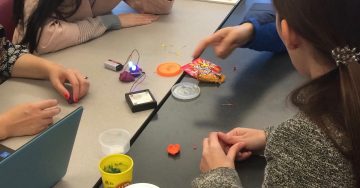
Squishy Circuits is a hands-on way for students to explore electrical circuitry using simple, readily available materials including dough (conductive and non-conductive playdough), LED lights and batteries. Students can construct their understanding of electric circuits and even design and create their own inventions. Through a play based approach students can discover simple, parallel and series circuits and important concepts including conductivity, short circuits, voltage.


Why-is-it-relevant-360x82.png

Hands-on, minds-on exploration of concepts, like electricity and circuitry, support a more inquiry-based approach to teaching and learning and are in keeping with BC Curriculum. Science content and curricular competencies can be supported through activities like Squishy Circuits. When students work together to co-construct their knowledge, they are naturally developing various core competencies including communication and critical thinking. Squishy Circuits can be used at many different grade levels depending on the curricular/learning purpose the teacher has in mind and the prompts provided for students to get started!

When provided with simple materials and perhaps a prompt or challenge, students can design, plan and carry out their own science investigations in keeping with an integrated ADST (applied design skills and technologies) approach. See this article in the National Science Teachers Association for further information about an investigative approach to science learning.

I have found that students can learn a great deal when provided with time and materials without ‘over prompting’. The teacher, as guide and facilitator, can provide “just in time” support to help students extend their learning. These prompts might include providing key vocabulary to help develop literacy within the subject/content area, they might also be to help propel or advance learning by helping students avoid ‘hitting a wall’.

For more resources, please visit:

Squishy Circuits Guide – University of St. Thomas


how-to-get-started-360x80.png

There are many ways for a teacher to get started with Squishy Circuits depending on your subject area and lesson objectives.

There is a Squishy Circuits kit available for borrowing from the UBC Education Library. Kits and materials can also be purchased through the Squishy Circuits website (they also have tutorials, quick start guides and dough recipes) or you can find electronics materials in bulk through electronics supply stores including RP Electronics in Burnaby or Lee’s Electronics in East Vancouver

You can make your own dough or purchase playdough (naturally conductive due to water/salt content) and plastecine or modeling clay (non-conductive) at toy stores or dollar stores.

Once you have your materials, it’s time to plan for the learning!

A sample lesson plan…

Or, be a little more inquiry-oriented in your exploration. See Lynda’s blog for some ideas!

You and your students will likely start thinking about and looking for extensions once you’ve had a chance to play:

See also MIT’s Soft Circuits Guide for information about FABRIC circuits!!

Paper Circuits (make-and-take circuits using conductive copper tape – tape also available at local electronics stores or online)

videopng-360x61.png

Leave a Comment

Filed under AppliedDesignSkillsTechnologies, Resources

AR Flashcards: A new way to engage your students


AR Flashcard – Animal Alphabet

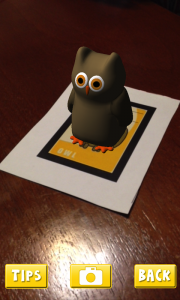
AR Flashcards are a series of Augmented Reality apps used to teach your students words and concepts based on different categories such as animals, shapes, colors and planets. By using 3D animation, AR Flashcards bring print outs of animals and planets to life.

Some main features include:

  • colorful renditions of animals, dinosaurs and the solar system
  • sound effects
  • screenshot button which allows you to save your pictures

Click here for more information…


AR Flashcards are great tools for early childhood educators and English as an additional language (EAL) instructors. AR Flashcards create an entertaining way to introduce different vocabulary words to young children. According to testimonials, students have engaged with the app and have enjoyed the learning process:

“It’s definitely unique and a very clever way to get children involved in learning the alphabet and animal names.”

“Love how the animals pop up! My son gets a huge smile on his face when the animals appear. The new graphics are great and being able to take pics is cool.” (Augmented Reality Flashcards).


  1. Download and print out the cards from here . (Tip: print out flashcards in color and use cardstock paper)
  2. Download and install AR Flashcards to your mobile devices (the Alphabet and color have free versions where as the rest are paid apps) .
  3. Double tap the screen to bring up the focus button onto the flashcard so that you can adjust your device’s camera to bring the cards to life.

videopng-360x61.png

Leave a Comment

Filed under AR & VR, Math, Not Subject Specific, Resources

Plickers – Student Response System

whatisit.png

 ‘Plickers’ is a free Student Response or All-Class Response System (SRS), useful for those without access to one-to-one devices in the classroom. All you need are some downloadable and printable class cards, the Plickers app, and one handheld device. The students hold their cards up based on their answer (A, B, C, D), the teacher scans the cards from anywhere in the classroom using a smartphone, tablet or iPad, and the responses are automatically entered.

You and the class can view a graph of responses if you connect your computer to a projector (without your students seeing who provided which individual response). Teachers can ask multiple choice questions or yes/no questions and can save the results of each quiz or poll in their teacher account.

NEW: Plickers now has hybrid and online mode for using plickers face to face, online (or in both modes at once!). The Plickers question editor allows you to include advanced mathematical and scientific equations. In addition, the ability to include images, Gifs, sound and other multimodal features might add a more gameified feel!


Why-is-it-relevant-360x82.png

Regular check-ins with your students during instruction aids formative assessment and future planning. Teachers often use thumbs up/down or hands up or fingers to try to gauge understanding or interest but these ‘systems’ can be difficult if not impossible to track. Plickers allows you to save the individual student responses (and you don’t need to ‘give away’ any of your students’ information to do so).

Plickers can even be used in the gym or outdoors (be sure to download the large sized cards if using in large spaces). This youtube video shares how one teacher uses a ‘magnet version of Plickers’ called ‘Plagnets’ in a PHE class.

Many teachers lack access to individual devices needed to use other student response systems (iClickers, Socrative, Menti, Kahoot and others). With Plickers, all you need is an app, one device and printable cards for your students. Some excellent features include (excerpts below from Plickers.com):

1. Scoresheet: “review your students’ results over multiple questions. Use it to spot learning trends with students, identify questions to review from a unit, or even get grading done faster.”

2. Individual Student Reports: On the left panel of Scoresheet, you can print individual student reports or save them as a PDF. The first sheet provides an overall class average and lists the 3 most commonly missed questions for you to save for your records, while the remaining pages contain individual student reports including the question and answer choice selected.
This resource can be used in a second language classroom such as French Immersion, Core French, etc.

More information about features is available   on the Zendesk on the Plickers website.


how-to-get-started-360x80.png

Go to Plickers.com and set up a free teacher account. When you select ‘classes’, you will be prompted to enter student names or aliases which will automatically be assigned to a plicker card number. If you teach multiple classes, you can simply create a new class and add the new students and there’s no need to have a separate set of plickers cards since the app easily lets you toggle between your classes.
Now all you need to do is think of some excellent questions – remember, the questions you ask can make or break an assessment opportunity. Think carefully about your questions. I’d also suggest having a few ‘generic’ questions (i.e. temperature checks, checks for understanding) that you can use at any time regardless of subject or content.
Plickers Quick Start Instructions


videopng-360x61.png

Leave a Comment

Filed under Not Subject Specific, Physical and Health Education, Resources

Frontiers for Young Minds

whatisit.png

Frontiers is a community-based open access academic publisher whose vision is to build an open science platform accessible to all. Frontiers for Young Minds enables young kids to work directly with scientists to create articles that are both accurate and exciting. All the articles are written by scientific experts and reviewed by children to make sure they are clear and understandable.

It only takes a few steps to create an article on Frontiers for young minds:

  1. The editorial board identifies recent discoveries that might be interesting and exciting to young readers.
  2. The scientists behind the original research write an article that translates the discovery into comprehensible terms for young readers.
  3. The associate editor assigns the manuscript to a young mind/science mentor pair, who produces a review report in which feedback is provided.
  4. After the review process is complete, the associate editor validates the article and publishes it on the platform.

Why-is-it-relevant-360x82.png

For Young Minds:

On Frontiers for Young Minds, young readers can stay on track with the latest cutting edge discoveries or explore key ideas that are fundamental to understanding different science concepts. Subjects include:

  • Astronomy
  • Space science
  • Biodiversity
  • Health
  • Mathematics
  • Neuroscience
  • Earth and Resources

In addition, kids can apply to become a reviewer and work with their friends or classmates to provide feedback to scientists about how to make their articles accessible for kids at their own age. This partnership gives children the opportunity to communicate and interact with scientific experts on their topics of interest!

For teachers:

Based on the website, instructors have many possibilities for class activities:

  • Start a debate
  • Use an article as context to introduce a new type of graph or figure
  • Have a mini-conference
  • Design a follow-up experiment after the class reading an article.

You can also visit their website for more detailed information.


how-to-get-started-360x80.png

First, go to the homepage of Frontiers for Young Minds.

Then select one of the subject areas to view relevant articles. You can also view the most recent articles to become familiar with new technologies and discoveries.

If you know a class or group of kids who would like to work as Young Reviews and would like more information about how to find a science mentor, contact kids@frontiersin.org via email.


videopng-360x61.png

Leave a Comment

Filed under AppliedDesignSkillsTechnologies, Open Educational Resources, Resources

Simulations for Science and Math

mathematics-757566_1280


pixabay.com

PHET, from the University of Colorado, Boulder, is an online repository of interactive simulations and lessons for the Science and Math classroom. Teachers can create a free account and begin to use PHET after confirming their account via email.

  • free, open resources
  • teacher account required
  • requires download to play sims
  • widely used in educational institutions
  • Sims have been translated into multiple languages including French

PHET Interactive app for iPad (new in Fall 2016) is perfect for offline use and allows mobile users to view sims.

  • Compatible with iPad iOS 9.1 or later.
  • Cost: 99 cents (the developers note that this cost helps fund more HTML5 Sims)

Many science and math concepts can be explored through a variety of hands-on and virtual learning opportunities and can be scaffolded to support learners at varying levels of understanding. Many schools will have boxes and bins of various science equipment for teachers to use with their classes. Teachers can also purchase the needed equipment in bulk to keep per student costs reasonable. Free on-line Simulations can provide excellent vehicles for students to further explore and develop their understanding.

‘Physics Classroom’ is another free site – it has simulations and lesson plans with no download required to your computer.

  • frees
  • no account needed
  • no download required to play sims

Providing opportunities for students to use simulations affords them as needed access at home and at school to continue their learning without the need for equipment other than a computer, tablet or ipad. Simulations allow for a more kinesthetic approach to learning than pencil and paper exercises and can help students visualize complex problems and concepts. Some simulations allow students to engage in ‘work’ that might not otherwise be possible in a typical classroom setting by allowing students to experiment with potentially hazardous inquiries. The use of simulations can provide students with the opportunity to engage in independent inquiry and experiential learning. Teachers can utilize simulations in a number of ways from visual aids during a lecture to conceptual tests, homework and pre-lab activities. Many of the lesson plans available on PHET are inquiry-based and support student independent exploration so are in keeping with BC Ed Curriculum which emphasizes inquiry and personalized learning.

Be sure to try to engage your students in some hands-on exploration of the topic or concept (ex. Exploring electrical circuits) using activities such as ‘Squishy Circuits‘, ‘Makey Makey’ or ‘Paper Circuits’.

Read this article about the value of simulations in the science classroom and to find some interesting ways to integrate simulations into your teaching (including additional online sims).


Visit PHET to sign up for a student or teacher account. Activate your account using the email provided and then just get started exploring the simulations. Most sims require download to your computer so you may need to adjust your security settings in order to ‘play’.

‘Physics Classroom’ is another free site – it has simulations and lesson plans with no download required to your computer.

For both sites, lesson plans accompany each simulation. With PHET, teachers can even become authors by sharing the resources they create.

Take a PHET tutorial, webinar or download workshop information (or just launch a sim and play!).


videopng-360x61.png


Leave a Comment

Filed under Resources, Science

Personal Learning Networks

Developing a PLN through social media can enrich your practice and broaden your connections with individuals around the globe whose interests intersect with your own. PLN’s support a diverse exchange of ideas and are great for helping to build and share your knowledge! Drop by the Scarfe Digital Sandbox in room 155 on Wednesday November 13. For now,  Visit the Educational Technology Guys blog for more info on creating your own PLN!


Leave a Comment

Filed under AppliedDesignSkillsTechnologies, Blog Posts, Not Subject Specific, Physical and Health Education

Tech integration in your Math classroom

Moving beyond the worksheet-like practice of facts using one of the many popular apps is of value in today’s elementary math classroom! If we are seeking to develop deeper understanding of math concepts with our students, we must look to more authentic ways to integrate technology. Below are some links that might support this in your classroom:

Graphing stories is a collaboration between Dan Meyer (an excellent speaker and someone I follow on Twitter) and BuzzMath. Real life situations are presented on video and students are challenged to graph what they see.  http://www.graphingstories.com/

Visit the MathMunch Blog (a Weekly Digest of the Mathematical Internet) for some tremendous ideas, videos and links to help you explore various math concepts with your class. One post looks at Math Art Tools (or, as I like to call it with my elementary students Math + Art = MArt)

We know that looking at mistakes can help us to develop an understanding of concepts. Teachers could use Math Mistakes as an activating strategy at the beginning of a lesson or unit. Students and teachers can work through a variety of problems to determine where the ‘solver’ went wrong.

Supports for learning to teach math available online (not ‘tech integrated’ but some decent resources and suggestions for teaching can be found on MathWire. Visit  Math lab for video segments and descriptions of effective math lessons facilitated by master teachers.

Whatever you do, try to engage students through hands on learning and exploration. Consider Inquiry in your math class. Provide an essential question and facilitate as students explore & discover the key vocabulary and the concepts.


Leave a Comment

Filed under Math, Resources, Technology